Raw device mapping (RDM) volumes are a VMWare feature that allows LUNs from a SAN array to attach directly to a virtual machine (VM). The ESXi host connects and manages LUNs, when configured as Raw Device Mapping (RDM) devices. Then these devices are presented to virtual machines through a minimal virtualization layer. A mapping file stores the information on how to connect to the LUN stored on a DataStore. However, the reality is that Red Hat OpenShift Virtualization can provide an RDM-like experience. This article describes how to achieve an RDM-like experience in OpenShift Virtualization.
Requirements of applications using RDMs
In VMware deployments, we typically use RDM volumes to satisfy these requirements:
- On-the-wire disk I/O performance
- SCSI command propagation via Scatter-Read/Gather-Write Input/Output (SG_IO) and SCSI3 persistent reservation (SCSI3 PR) commands
- In some cases, RDM disks were used to overcome the limitation of 2TB size for VMDK disks existing in some old versions of VMware.
Because LUNs are attached directly to the VMs, RDM volumes tend to perform better than VMDK disks.
Certain types of cluster software use SCSI3 PR commands to coordinate between the cluster instances that share a volume. Typically, this coordination is essential for electing a leader and implementing fencing to prevent other cluster members from writing to the disk.
Other common requirements for VM volumes that are not unique to RDM devices:
- Shared disks for clustered systems
- Ability to live migrate a VM
- Support for snapshots
An RDM-like experience with OpenShift Virtualization
Assuming a SAN array is available for OpenShift to use, it’s possible to create volumes that behave in a similar manner to RDMs. The primary requirement here is to use the CSI drivers of the SAN array vendor. Within this architectural approach, all the VM disks are actually dedicated LUNs with theoretically on-the-wire I/O performance.
To enable SGIO command propagation, mount these volumes in the VM as LUNs similar to the following:
devices:
 disks:
 - name: rdm-like
   lun:
     reservation: true
Note that if you need persistent reservations, set the relative flag to true as in the previous snippet.
Figure 1 shows the resulting architecture.
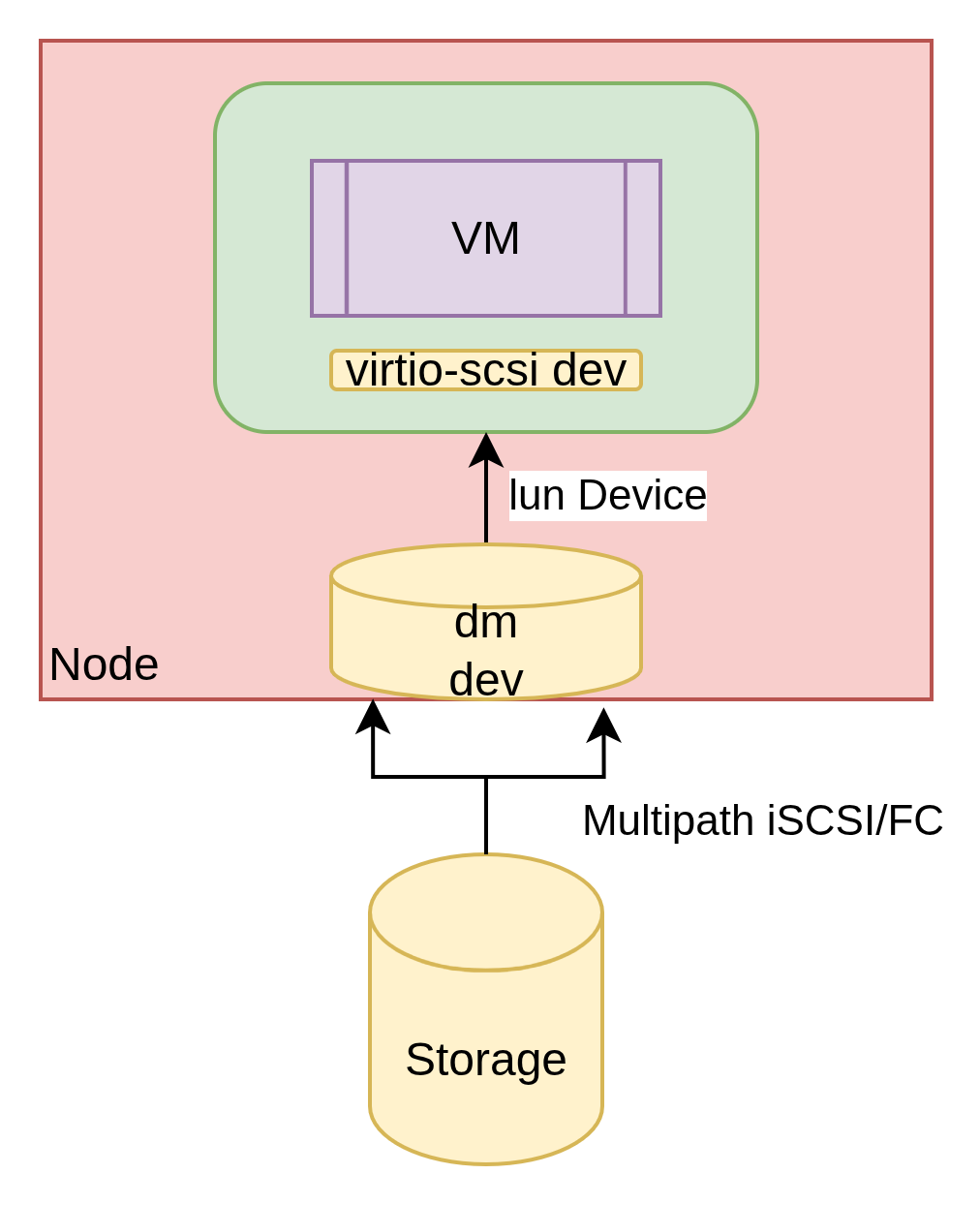
The following summarizes the characteristics and features of RDM-like devices in OpenShift Virtualization:
- LUN dedicated to VM disk: SAN array vendor CSI drivers will create a LUN per VM disk.
- On-the-wire performance: The virtio-scsi overhead is minimal and similar for the NPIV overhead.
- SGIO commands propagation (including persistent reservations): Available with the volume configured as a LUN and enabled PR flag.
- Support for shared volumes: Available
- Support for snapshots are available: Snapshots are actually not supported for physical RDMs (the most commonly used type) in VMware.
- Support for VM live-migration is generally available. Will be available soon when SCSI3 PR is enabled (see this Jira).
Using the SAN array vendor CSI drivers, it is not necessary to manually configure the RDM LUNs to be presented to all of the nodes. Capabilities provided by the CSI driver will facilitate this process.
Migration strategies for VMs using RDM devices
In general, there are three strategies for migrating VMs that are configured to use RDM devices.
The first strategy is MTV with Storage offload. Because we use direct CSI drivers, we can typically optimize the migrations via storage offload. Also you can only migrate RDM devices when using this feature. If the you migrate virtual machines from a clustered application, the Migration Toolkit for Virtualization (MTV) requires two migration waves. In the first wave, migrate a VM with the shared RDM disks. The second wave migrates the remaining VMs, and sets a flag in the migration plan to ignore the shared disks, so they are not copied multiple times. This migration approach requires some post migration activities to configure the migrated RDM disks as LUN (see the limitation described here) and to reattach the shared RDM disk to the VMs in the second wave. A future iteration of MTV will allow migrating the clustered VMs using a single wave (see the issue described here).
The second strategy is static provisioning. By using static provisioning, you can reference an existing LUN representing RDM as a persistent volume (PV) from OpenShift. Most CSI drivers have documentation on how to use static provisioning. If the documentation is not available, you can use static provisioning. However, you'll need some reverse engineering to create the PVs. After creating all the PVs representing RDM’s, you can migrate VMs via MTV (ignoring the RDM devices). As a post migration step, you can reattach the PV to the migrated VMs.
The third strategy is growing and shrinking the cluster. Because most of the applications that need RDM disks are clustered applications, another approach is to have the cluster grow on the OpenShift Virtualization side by provisioning new VMs. You will attach these VMs to the RDM volumes via statically provisioned PVs. After the successful growth of the cluster, you can safely delete the VMs running on the VMware side.
Wrap up
In this article, we discussed how OpenShift Virtualization can provide an RDM-like experience as long as a few conditions are met. The RDM-like volumes are not provisioned with the same technology as RDM volumes, but perform essentially the same way, fitting the majority of the common use cases. This article also described three migration strategies for applications using RDM devices.
Last updated: April 1, 2026
