The evolution of programming efficient GPU kernels has led to a continuous push towards higher levels of abstraction, moving developer focus from hardware management to computational logic. CUDA provides maximum control, with developers manually managing every detail like thread blocks, memory access, synchronization, and index calculations. It's a powerful process, but also complex. Triton emerged as a new GPU language, simplifying the task by introducing block-based programming, allowing developers to manage teams of threads rather than individuals. However, Triton still demands manual effort, like defining block sizes and calculating program IDs. The latest language is Helion, a Python embedded domain-specific language that abstracts all low-level parallelism detail to allow developers to write GPU operations using simple, intuitive syntax using PyTorch.
What if writing a GPU kernel felt like writing PyTorch?
Helion automates almost every part of GPU kernel development. Instead of forcing you to manage low-level details of GPU execution, Helion lets you write code that describes the computation you want. A matrix multiplication (matmul) kernel might take over 200 lines in CUDA or around 80 lines in Triton due to manual indexing, masking, and stride handling. That's reduced to about 15 lines of PyTorch-like code in Helion.
You write a simple loop like for tile_m, tile_n in hl.tile([m, n]): and use operations like torch.addmm(), while Helion handles indexing, tiling, masks, grid sizing, memory layouts, and all the hardware-level configuration. Helion searches through hundreds and thousands of possible implementations to select the fastest one for the specific hardware and problem size, giving developers performance without complexity.
import torch, helion, helion.language as hl

@helion.kernel()
def matmul(x: torch.Tensor, y: torch. Tensor) -> torch. Tensor:
m, k = x.size()
k2, n = y.size()
out = torch.empty([m, n], dtype=x.dtype, device=x.device)
for tile_m, tile_n in hl.tile([m, n]):
acc = hl.zeros([tile_m, tile_n], dtype=torch.float32)
for tile_k in hl.tile(k):
acc torch.addmm (acc, x[tile_m, tile_k], y[tile_k, tile_n])
out[tile_m, tile_n] = acc
return out
One kernel, 1000 variants, zero manual tuning
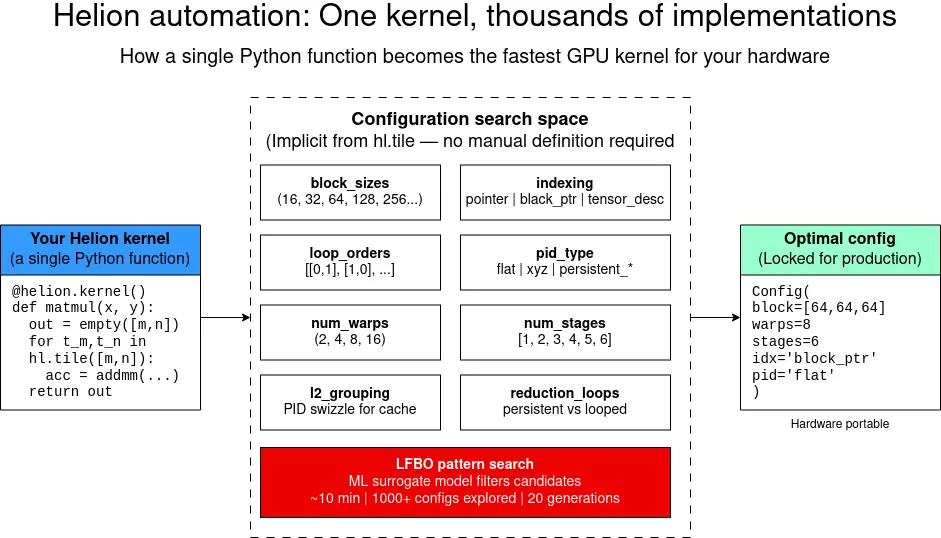
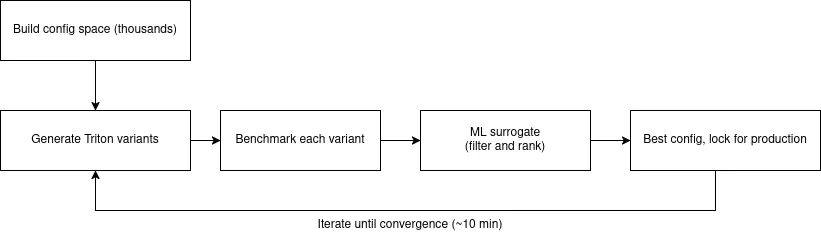
Helion's real advantage comes from its autotuning system. Instead of writing and tweaking GPU kernels manually, you create a single Helion kernel and the compiler automatically generates hundreds or even thousands of Triton variants, each with different choices, including block sizes, loop orders, indexing methods, program ID mappings, wrap counts, pipeline depths, unrolling strategies, and cache optimizations. It uses an LFBO-based pattern search for autotuning, while also supporting evolutionary algorithms for completeness. Typical kernels tune within minutes, while more complex kernels may take longer.
After the optimal configuration is found, you can lock it in production so that there's no tuning cost at runtime. The result is performance portability. The same kernel adapts automatically to different GPU generations (Ampere, Hopper, Blackwell) without manual changes. This process is illustrated in Figure 1.
How Helion works
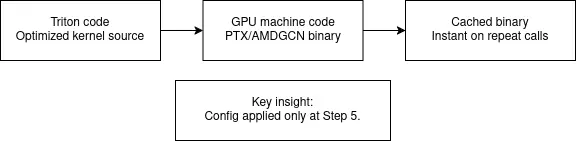
When the Helion kernel is called for the first time, it parses your Python function into an abstract syntax tree (AST) and runs type propagation to determine tensor shapes, data types, and how different values depend on each other. It then separates what should run on the host (tensor allocations, shape calculations) and what should run on the GPU, which is identified through hl.tile loops. The GPU portion is captured through PyTorch's FX system and lowered through TorchInductor, which translates operators such as torch.addmm, torch.sum, torch.exp into Triton form. The many steps, most of which you don't manually perform, are shown in Figure 2.
The compiler builds the full configuration space, and for each option converts the internal representation into Triton code for right indexing, masking, and memory access logic. Triton compiles into GPU machine code, which is cached so that repeated calls with the same tensor signature run instantly.

Real-world impact: Less code, faster kernels
Helion provides boost to both performance and productivity for machine learning (ML) engineers requiring custom GPU kernels. The examples in the Helion Git repository show how flexible it is. Simple functions take only 5 to 10 lines, while fused kernels like GEGLU are implemented in 30 lines instead of hundreds. Even complex components like attention mechanisms and layer norms remain concise and easy to maintain.
Debugging is also straightforward. You can print the generated Triton code with HELION_PRINT_OUTPUT_CODE=1, run kernels in an eager, Python-like mode with HELION_INTERPRET=1, or generate full repro scripts when filing bug reports. Although autotuning takes 10 to 15 mins for each kernel for each shape, the savings in time spent coding is huge. It's easier to understand and maintain, and the resulting performance often matches or exceeds hand-written and hand-optimized kernels, while automatically adapting across GPU generations.
Future of GPU programming
Helion is changing the way we think about writing GPU kernels. Just as high-level languages freed programmers from writing assembly, and frameworks like PyTorch removed the burden of hand-written back-propagation, Helion removes the need to manually manage low-level GPU details while still delivering top performance.
The evolution from CUDA (hundreds of lines and fully manual tuning) to Triton (dozens of lines with block level abstractions) to Helion (10 to 30 lines of PyTorch-like code with hundreds of automatically tuned variants) shows that the direction of GPU programming is moving towards high-level tools that make expert-level results broadly accessible. And because Helion can explore optimization spaces far beyond what a human can test, developers can spend more time innovating and less time with thread layouts and memory management. Here are common workflows for a Helion developer, from idea to production.
Phase 1: Write
The code you write is often no more than 15 lines of code.
- Define kernel functions:
@helion.kernel()decorator - Write host code (CPU): Allocate tensors, compute shapes
- Write device code (GPU):
hl.tileloops and PyTorch ops - Debug in eager Python mode: Test with
HELION_INTERPRET=1
Phase 2: Tune
This usually takes 10 minutes for each kernel, for each shape.
- First call triggers autotune: Automatic, no code changes
- LFBO explores configs: 1000+ Triton variants tested
- Best config printed: Copy into
@helion.kernel(configs…) - Inspect with
PRINT_OUTPUT: See generated Triton code
Phase 3: Deploy
Your project is deployed with no runtime tuning overhead.
- Lock config in decorator: Zero tuning cost at runtime
- Deterministic compilation: Single optimized Triton kernel
- Binary cached: Instant on repeat calls
- Re-tune for new hardware: The same code is re-tuned to run on a different GPU
See it in action: 3 kernels in 30 lines of code
Here's a vector addition function in 7 lines of code:
@helion.kernel()
def add_kernel(x: torch.Tensor, y: torch.Tensor) -> torch.Tensor:
    size = x.size(0)
    out=torch.empty_like(x)
    for tile in hl.tile(size):
        out[tile] = x[tile] + y[tile]
    return out
Softmax in 10 lines:
@helion.kernel()
def softmax kernel(x: torch.Tensor) -> torch.Tensor:
n, _m = x.size()
out = torch.empty_like(x)
for tile_n in hl.tile(n):
values = x[tile_n, :]
amax = torch.amax(values, dim=1, keepdim=True)
exp torch.exp(values - amax)
sum exp = torch.sum(exp, dim=1, keepdim=True)
out[tile_n, :] = exp / sum_exp
return out
Debug like it's Python
You can use the same techniques you use in Python to debug your code. To see the generated Triton code:
HELION_PRINT_OUTPUT_CODE=1 python my_kernel.pyTo debug without GPU compilation:
HELION_INTERPRET=1 python my_kernel.pyLocking the config for production use
Once autotuning completes, you can lock the optimal config for zero-overhead production use. For example:
@helion.kernel(config=helion.Config(
block_sizes=[64, 64, 64],
loop_orders=[[0, 1]],
num_warps=8,
num_stages=6,
indexing='block_ptr',
pid_type='flat'
))
def matmul(x: torch.Tensor, y: torch.Tensor) -> torch.Tensor:
...
Getting started
With Helion, you write minimal code, and you get automated block sizes, program IDs, grid dims, tensor indexing, masking, strides, and autotuning config lists. It's open source, and ready for use.
To start using Helion for GPU kernel, the setup is just 4 commands:
$ python3.12 -m venv helion_env && \
source helion_env/bin/activate
$ pip install "torch>=2.9" --index-url \ https://download.pytorch.org/whl/cu128
$ pip install helion packaging
$ python -c "import helion; import torch; print('CUDA:', torch.cuda.is_available())"
Our example code is in a Git repository, so feel free to clone and iterate!
Last updated: April 27, 2026
