Every dependency your application uses is in its last consequence also a trust decision. Red Hat Dependency Analytics (RHDA) helps developers make that decision in the one place they already spend most of their time in - the IDE. But what if your organization doesn't want to send dependency data to the public internet? What if developers can't have direct internet access from their workstations? This post shows you how to connect the RHDA plugin to your own private instance of Red Hat Trusted Profile Analyzer (RHTPA) running on OpenShift.
What is Red Hat Dependency Analytics?
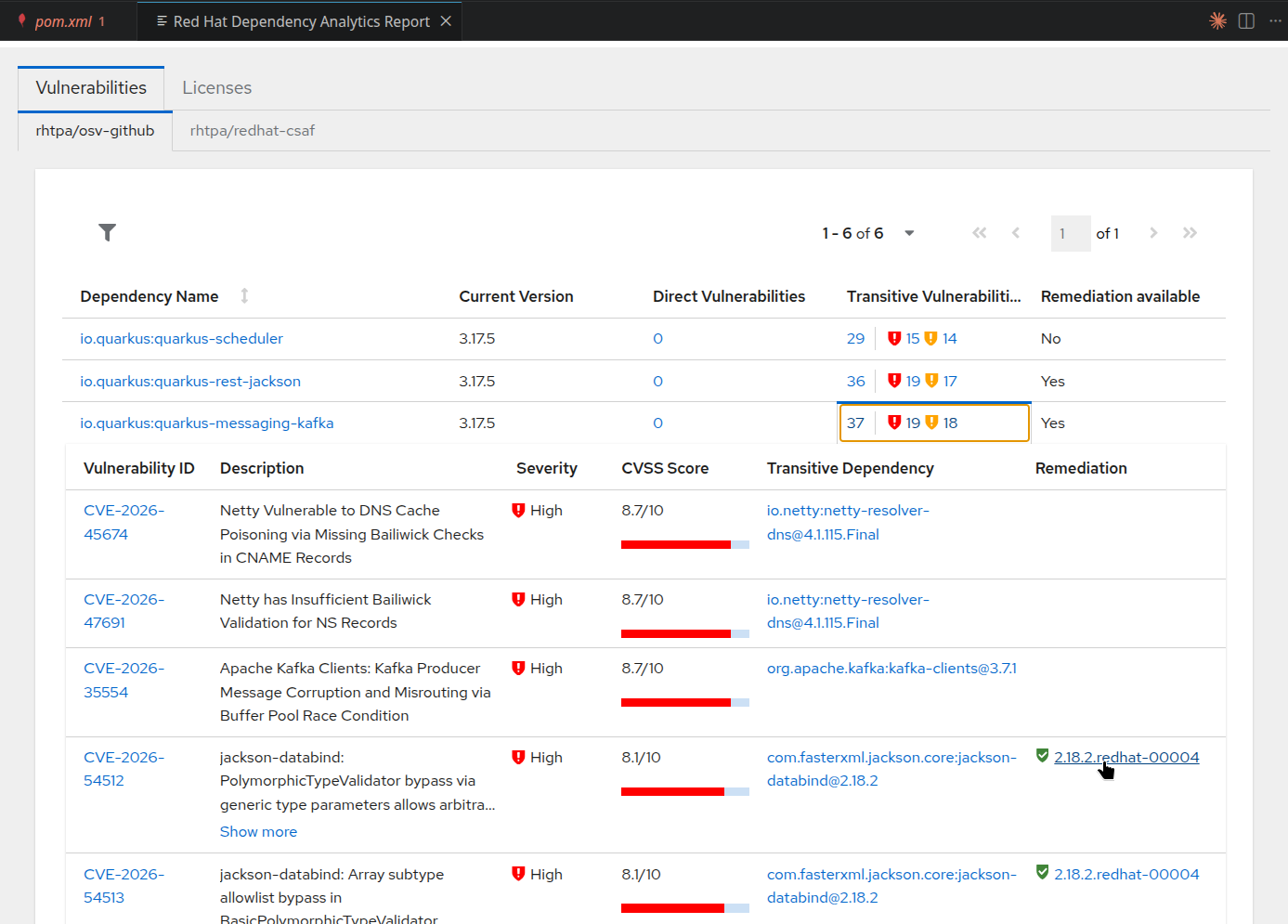
Red Hat Dependency Analytics (RHDA) is a free IDE extension for VS Code and JetBrains IDEs that performs software composition analysis (SCA) on your project dependencies. Open a pom.xml, package.json, go.mod, requirements.txt, or any other supported manifest file, and RHDA automatically scans your dependency tree for known vulnerabilities and license compatibility issues.
No account, no configuration, no separate step. It sits in the editor as a passive guardrail — always on, always scanning.
With the 1.0 release in July 2026, Dependency Analytics added CycloneDX SBOM generation, Dockerfile scanning, and tighter integration with AI-assisted coding workflows. As the article puts it: 42% of all code is now AI-generated or AI-assisted. RHDA catches the vulnerabilities that AI tools introduce before they ever reach production.
What is Red Hat Trusted Profile Analyzer?
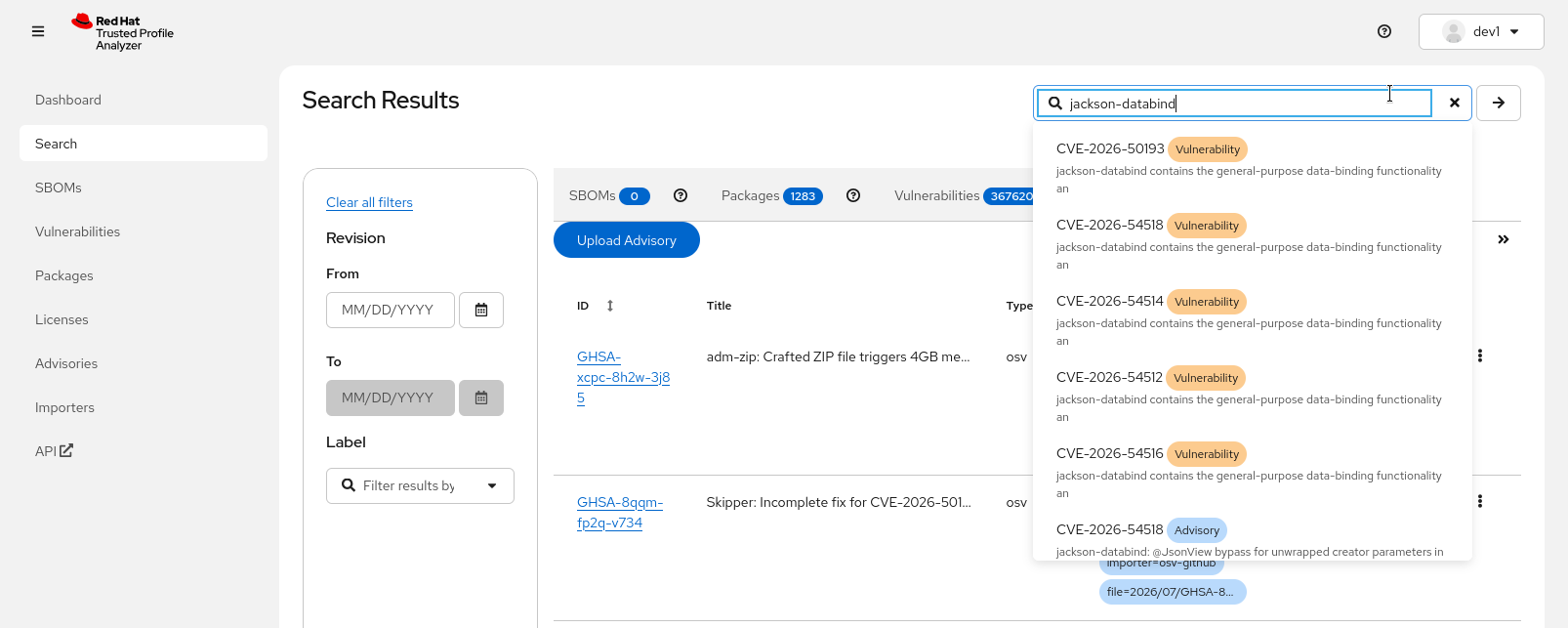
Red Hat Trusted Profile Analyzer (RHTPA) is a platform for managing and analyzing software supply chain security data. It goes well beyond simple SBOM storage — RHTPA is a contextual vulnerability intelligence system that brings together multiple data sources in one place:
SBOMs — ingest and query Software Bill of Materials in CycloneDX (1.3–1.6) and SPDX (2.2–2.3) formats
CVE data — known Common Vulnerabilities and Exposures with severity scores (CVSS v2, v3, v4)
OSV advisories — Open Source Vulnerability advisories from multiple upstream sources
CSAF documents — Common Security Advisory Framework advisories, including Red Hat's own security advisories
VEX statements — Vulnerability Exploitability eXchange documents that capture whether a vulnerability actually affects a specific product, along with justifications (e.g., "vulnerable code not present", "not affected")
RHTPA runs on OpenShift (deployed via the RHTPA Operator or Helm) as well as Red Hat Enterprise Linux (deployment via Ansible) and exposes a REST API that other tools — including the RHDA backend described in this post — can query for vulnerability analysis and remediation recommendations. It is part of the Red Hat Trusted Software Supply Chain family of products.
Where to find RHDA and RHTPA
Red Hat Dependency Analytics:
Red Hat Trusted Profile Analyzer:
- RHTPA on Red Hat Developer
- RHTPA Documentation (latest)
- RHTPA Quick Start Guide
- RHTPA on Red Hat Customer Portal
Further reading
- Dependency Analytics 1.0: AI coding with supply chain security
- What's new in Red Hat Dependency Analytics
- Vulnerability analysis for Golang applications
- Red Hat Trusted Profile Analyzer overview
- RHTPA Deployment Guide
How RHDA works with the public backend
Out of the box, the RHDA plugin sends your project's dependency information to a free, Red Hat-hosted backend at https://rhda.rhcloud.com, connected to a public good instance of Red Hat Trusted Profile Analyzer. The backend performs the vulnerability analysis and returns the results to your IDE. No setup is required — install the extension, open a manifest file, and you're scanning.
This public instance is a great way to get started. It's free, always available, and requires zero configuration. For many developers and teams, it's all they need.
Why connect to a private RHTPA (Red Hat Trusted Profile Analyzer) instance?
For organizations with stricter security requirements, the public backend may not be an option. Here's why deploying a private RHDA backend connected to your own Red Hat Trusted Profile Analyzer instance makes sense:
No internet connectivity required. As outlined above, the RHDA plugin communicates with the Red Hat hosted instance of the RHDA backend service and RHTPA. This might not be possible in all environments.
No dependency data leaves your network. When developers use the public backend, dependency information (package names, versions, PURLs) is sent to an external service. With a private backend on your OpenShift cluster, all analysis stays within your corporate network. No internet connection is required for developers to perform vulnerability scans.
Custom vulnerability data. RHTPA allows you to ingest your own OSV advisories, CSAF documents, and VEX statements. If your security team maintains custom vulnerability feeds, consumes OSV data from e.g. the Lightwell Network or internal advisories that aren't part of any public database, a private backend lets RHDA surface those findings directly in the developer's IDE.
Private VEX statements. Your organization may have VEX (Vulnerability Exploitability eXchange) data that documents which vulnerabilities actually affect your software and which don't. With a private RHTPA instance, these VEX statements are available through the RHDA plugin, giving developers accurate exploitability context — not just a raw CVE list.
Air-gapped and restricted environments. In disconnected or regulated environments where external network access is prohibited, a private backend is the only way to provide developers with dependency analysis tooling.
Architecture overview
The private setup introduces a middleware component called trustify-dependency-analytics (the RHDA backend) that sits between the IDE plugin and your RHTPA instance (the same RHDA backend is also serving the public endpoints at https://rhda.rhcloud.com ) :
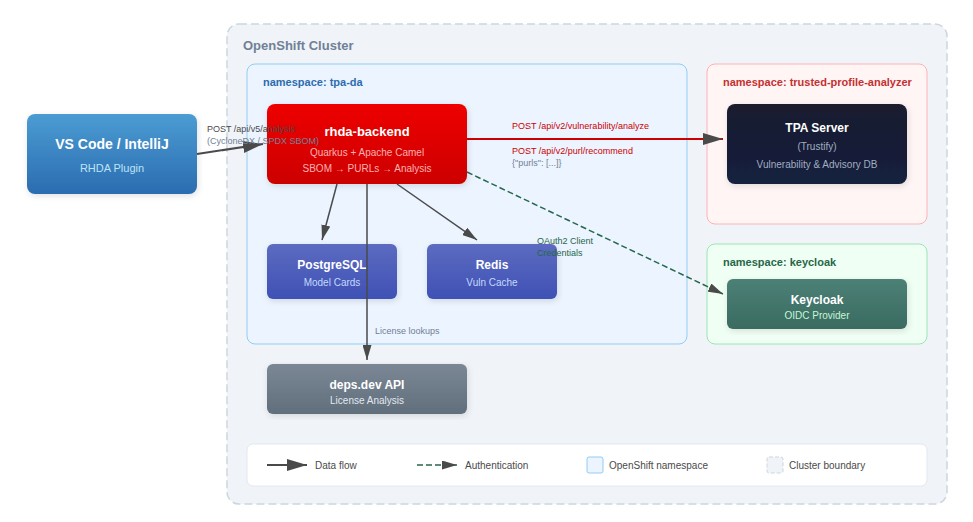
When the IDE plugin triggers an analysis:
1.) The plugin sends a full SBOM (CycloneDX or SPDX format), generated from your dependencies manifest to the RHDA backend's POST /api/v5/analysis endpoint.
2.) The backend parses the SBOM into a dependency tree, extracting Package URLs (PURLs) for each component. The full SBOM is not forwarded to RHTPA — only the list of PURLs.
3.) Vulnerability analysis runs in parallel with license checks. The backend sends PURLs (in batches of 128) to RHTPA's POST /api/v2/vulnerability/analyze endpoint, and simultaneously queries deps.dev for license data. Results are cached in Redis with a configurable TTL (default: 1 day).
4.) RHTPA returns vulnerability details — CVE identifiers, CVSS scores, severity ratings, and advisory sources — along with remediation recommendations (typically Red Hat-rebuilt package versions with VEX status).
5.) The backend assembles the final report, merging vulnerability data, recommendations, and license information into a single response returned to the IDE plugin as JSON, HTML, or both.
Quick install with the automated script
To support this blog post, we have built an interactive installation script that handles the entire deployment. It prompts for configuration values (with sensible defaults), deploys all components, and verifies the installation.
Prerequisites
An OpenShift cluster with RHTPA and Keycloak (as OIDC authentication source for RHTPA) already installed
The oc CLI, logged in to the cluster
git (only if building from source)
Running the script
git clone https://github.com/redhat-tssc-tmm/rhda-tpa.git
cd rhda-tpa/deploy/
./install.sh
What the script does
The script walks you through these steps:
1. Prerequisites check. Verifies that oc is installed and that you're logged in to an OpenShift cluster. Shows the cluster URL and asks for confirmation.
2. Image selection. Choose between using a pre-built container image (default: quay.io/tssc_demos/trustify-dependency-analytics:v2.0.0) or building from source. If building from source, the script clones the trustify-dependency-analytics repository, creates an OpenShift BuildConfig, and builds the image on-cluster — no local container runtime needed.
3. Configuration. The script prompts for:
| Setting | Default |
|---|---|
| Target namespace | tpa-da |
| TPA namespace | trusted-profile-analyzer |
| Keycloak namespace | keycloak |
| Keycloak realm | backstage |
| OIDC client ID | tpa-cli |
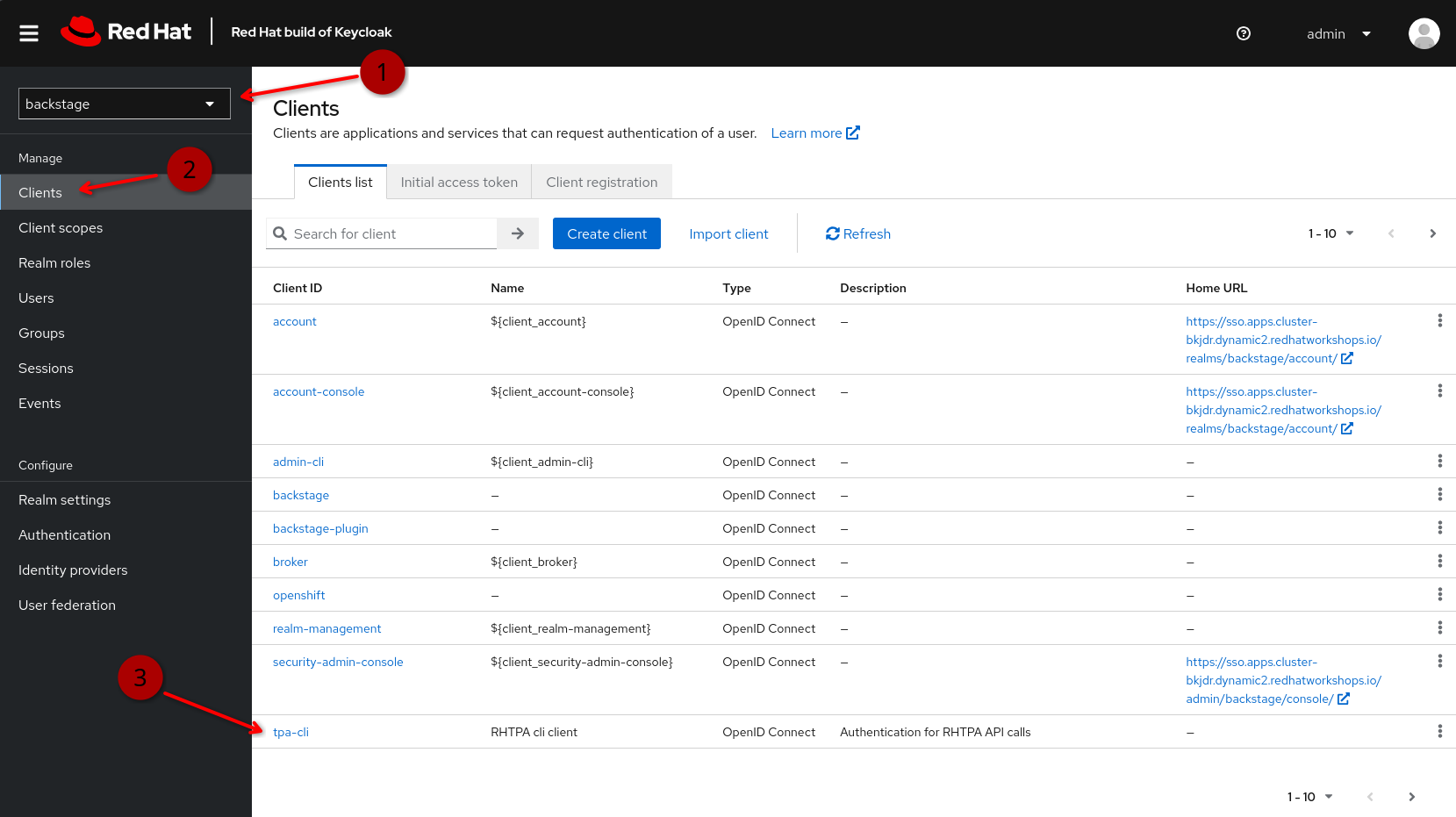
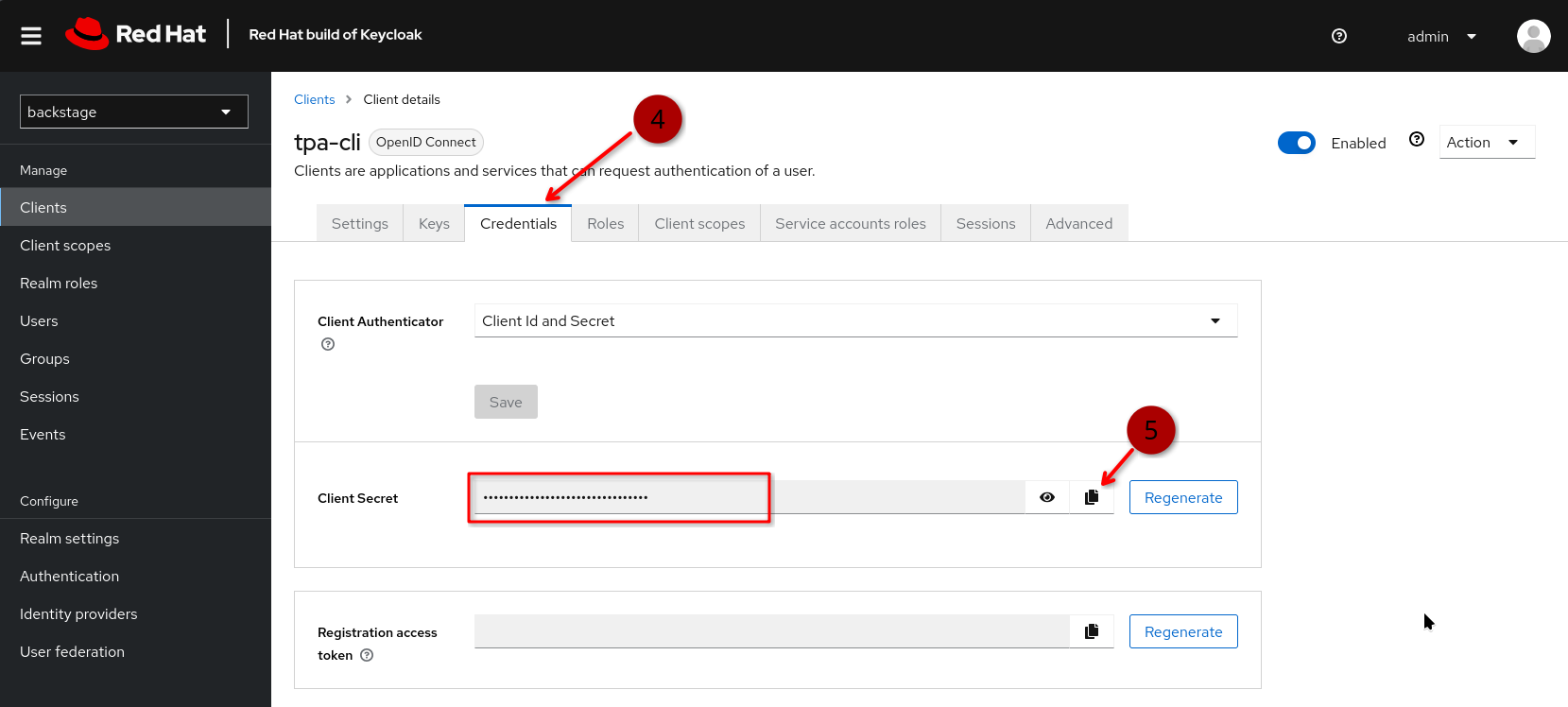
It auto-discovers the Keycloak route URL and computes the OIDC issuer URL. For the OIDC client secret, you can either reuse an existing Kubernetes secret (default: oidc-tpa-cli in the TPA namespace) or enter one manually. You can obtain the client secret from Keycloak by logging in to the Keycloak management console and then
1.) select your realm (backstage in our example)
2.) select "Clients" from the navigation
3.) find the OIDC client used for authenticating RHTPA API requests (tpa-cli in our example)
4.) open the "credentials" tab, where you can view and
5.) copy the client credentials
4. Deployment. The script deploys all components in order: namespace, service CA bundle, PostgreSQL (PVC-backed), Redis (PVC-backed), OIDC secret, and the RHDA backend application. It waits for each component to become ready before proceeding.
5. Verification. Sends a test SBOM to the deployed backend and checks that the TPA provider responds successfully.
6. Result. Prints the RHDA Backend URL and VS Code configuration instructions:
=== Installation Complete ===

  RHDA Backend URL:  https://rhda-backend-tpa-da.apps.<your-cluster>

  To configure the VS Code RHDA plugin:
    Settings > Red Hat Dependency Analytics: Backend URL
    Set to: https://rhda-backend-tpa-da.apps.<your-cluster>
Configuring the VS Code plugin
After the script completes, configure the RHDA plugin to use your private backend:
1.) Open VS Code Settings (File > Preferences > Settings)
2.) Search for "Red Hat Dependency Analytics"
3.) Set Backend URL to the URL printed by the install script
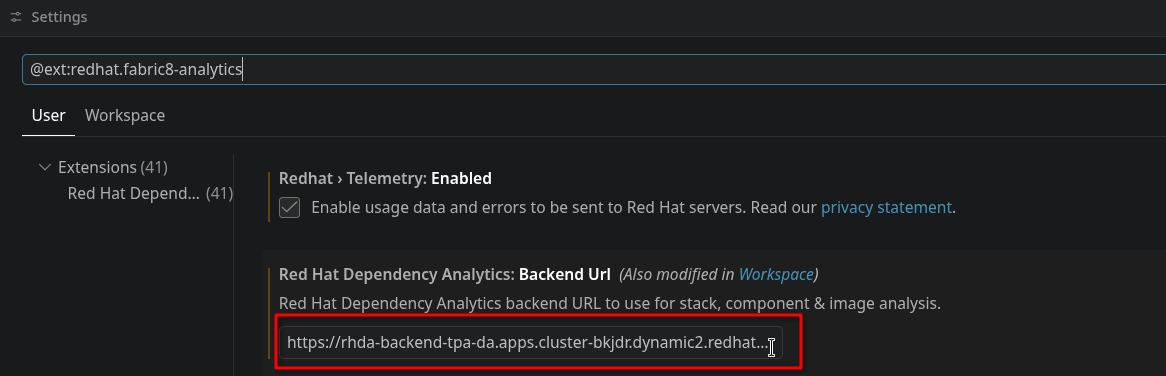
Or add it directly to your user settings.json:
{
  "redhat.dependency.analytics.exhort.backendUrl": "https://rhda-backend-tpa-da.apps.<your-cluster>"
}
Configuring it for your entire team via the repository
Rather than asking every developer to configure the backend URL manually, you can commit it as a workspace setting in your repository. Add a .vscode/settings.json to your project:
{
  "redhat.dependency.analytics.exhort.backendUrl": "https://rhda-backend-tpa-da.apps.<your-cluster>"
}
VS Code merges settings with the precedence Default < User < Workspace, so the workspace setting overrides the default public backend URL automatically. Developers who clone the repo get the private backend without any manual configuration, and the setting only applies to that project — it doesn't affect their other workspaces.
If you already have a .vscode/extensions.json that recommends the RHDA extension, this pairs nicely: developers get both the extension prompt and the correct backend URL on first open.
// .vscode/extensions.json
{
  "recommendations": [
    "redhat.fabric8-analytics"
  ]
}
Technical deep dive
This section covers the internals for anyone who wants to understand what gets deployed, how the components interact, and the configuration details.
Components deployed
The installation creates the following resources in the target namespace:
| Component | Purpose | Image |
|---|---|---|
| rhda-backend | The middleware service (Quarkus 3.31.3 + Apache Camel) | quay.io/tssc_demos/trustify-dependency-analytics:v2.0.0 or via source build |
| rhda-backend-postgresql | Flyway-managed database for model cards and guardrails | registry.redhat.io/rhel9/postgresql-16 |
| rhda-backend-redis | Cache for vulnerability and license analysis results | redis:8-alpine |
| rhda-backend-secret | OIDC client credentials for TPA authentication | (Kubernetes Secret) |
| service-ca-bundle | OpenShift service-serving CA for internal TLS | (ConfigMap with auto-injection) |
Internal TLS trust
The RHDA backend connects to the TPA server using its internal service URL (server.<tpa-namespace>.svc:443), which uses an OpenShift service-serving certificate. To establish TLS trust:
1.) A ConfigMap with the annotation service.beta.openshift.io/inject-cabundle: "true" is created. OpenShift automatically populates it with the cluster's service CA certificate.
2.) An init container in the rhda-backend pod copies the default JVM truststore (cacerts), imports the service CA using keytool, and shares the result with the main container via an emptyDir volume.
3.) The JAVA_TOOL_OPTIONS environment variable points the JVM at this custom truststore. (Note: JAVA_OPTS_APPEND does not work with the UBI9 OpenJDK runtime image's run-java.sh entrypoint — JAVA_TOOL_OPTIONS is a JVM-standard mechanism that is always honored.)
Authentication flow
The RHDA backend authenticates with RHTPA using the OAuth2 Client Credentials grant:
1.) At startup, it creates an OIDC client using the configured Keycloak issuer URL, client ID, and client secret.
2.) Before each request to TPA, it obtains (or reuses a cached) bearer token from Keycloak.
3.) The token is included in the Authorization header on all TPA API calls.
The RHDA backend itself does not require callers (IDE plugins) to authenticate. It acts as a trusted intermediary.
Environment variable mapping
The Quarkus SmallRye config mapping uses the provider key name as part of the environment variable prefix. We use rhtpa as the provider key, so the env vars use the PROVIDER_RHTPA_ prefix. The provider key name also determines how vulnerability sources appear in the HTML report (e.g., rhtpa/osv-github).
| Quarkus Property | Environment Variable |
|---|---|
provider.rhtpa.host | PROVIDER_RHTPA_HOST |
provider.rhtpa.auth.client-id | PROVIDER_RHTPA_AUTH_CLIENT_ID |
provider.rhtpa.auth.client-secret | PROVIDER_RHTPA_AUTH_CLIENT_SECRET |
provider.rhtpa.auth.server-url | PROVIDER_RHTPA_AUTH_SERVER_URL |
Important: The provider host must be the root URL (e.g., https://server.trusted-profile-analyzer.svc:443) without /api/v2/. The source code constants already include the full API paths (/api/v2/vulnerability/analyze, /api/v2/purl/recommend). Including /api/v2/ in the host causes the health check to fail because it hits /api/v2/.well-known/trustify instead of /.well-known/trustify.
Customization variables
Beyond the core provider configuration, the RHDA backend supports several variables for customizing the report appearance, caching behavior, and provider naming.
Branding
The HTML vulnerability report rendered by the RHDA backend can be branded to match your organization. Branding is gated on BRANDING_DISPLAY_NAME — if it's not set, the report falls back to the default Trustify community branding.
| Environment Variable | Default | Purpose |
|---|---|---|
BRANDING_DISPLAY_NAME | (none — falls back to "Trustify") | Brand name used in report headings (e.g., "Red Hat Trusted Profile Analyzer overview of security issues") |
BRANDING_EXPLORE_URL | https://guac.sh/trustify/ | URL for the "Take me there" button on the explore card |
BRANDING_EXPLORE_TITLE | "Learn more about Trustify" | Heading of the explore card |
BRANDING_EXPLORE_DESCRIPTION | (Trustify project description) | Body text of the explore card |
BRANDING_IMAGE_RECOMMENDATION | (empty) | Text for container image recommendations (Docker/container reports only) |
BRANDING_IMAGE_REMEDIATION_LINK | (empty) | Base URL for the container catalog link |
Our install script sets these automatically, pointing the explore card at your RHTPA instance's search UI:
- name: BRANDING_DISPLAY_NAME
  value: "Red Hat Trusted Profile Analyzer"
- name: BRANDING_EXPLORE_URL
  value: "https://server-trusted-profile-analyzer.apps.<your-cluster>/search"
- name: BRANDING_EXPLORE_TITLE
  value: "Open your Red Hat Trusted Profile Analyzer"
- name: BRANDING_EXPLORE_DESCRIPTION
  value: "Red Hat Trusted Profile Analyzer helps organizations manage SBOMs, vulnerability advisories, and VEX data."
Provider key naming
The provider key — the segment between PROVIDER_ and _HOST in the environment variable name — controls how vulnerability sources are labeled in the report. With PROVIDER_RHTPA_HOST, sources appear as rhtpa/osv-github and rhtpa/redhat-csaf. If you used PROVIDER_TRUSTIFY_HOST instead, they would show as trustify/osv-github. Choose a key that makes sense for your organization.
Cache TTL
| Environment Variable | Default | Purpose |
|---|---|---|
ITEMS_CACHE_TTL | 1d | How long vulnerability analysis results are cached in Redis before being re-fetched from RHTPA |
LICENSES_CACHE_TTL | 1d | How long license lookup results are cached in Redis |
Lower values mean fresher data but more load on RHTPA; higher values reduce API calls at the cost of serving stale results. For most deployments, the 1-day default is a good balance.
API timeouts
| Environment Variable | Default | Purpose |
|---|---|---|
API_TRUSTIFY_TIMEOUT | 60s | Circuit-breaker timeout for RHTPA API calls (vulnerability analysis and recommendations) |
API_LICENSES_DEPSDEV_TIMEOUT | 60s | Circuit-breaker timeout for deps.dev license lookups |
If your RHTPA instance is under heavy load or has a large advisory database, you may need to increase API_TRUSTIFY_TIMEOUT.
TPA API contract
The RHDA backend communicates with two TPA endpoints:
POST /api/v2/vulnerability/analyze — receives a JSON payload of PURLs and returns vulnerability details per package:
// Request
{ "purls": ["pkg:maven/org.apache.logging.log4j/log4j-core@2.14.1", ...] }

// Response (per PURL)
{
  "details": [{
    "identifier": "CVE-2021-44228",
    "title": "Log4Shell",
    "status": {
      "affected": [{
        "identifier": "GHSA-jfh8-c2jp-5v3q",
        "scores": [{ "type": "3.1", "value": 10.0, "severity": "critical" }]
      }]
    }
  }]
}
POST /api/v2/purl/recommend — receives the same PURL list and returns remediation recommendations with VEX status:
// Response
{
  "recommendations": {
    "pkg:maven/log4j/log4j-core@2.14.1": [{
      "package": "pkg:maven/log4j/log4j-core@2.17.1.redhat-00001?repository_url=https://maven.repository.redhat.com/ga/",
      "vulnerabilities": [
        { "id": "CVE-2021-44228", "status": "NotAffected", "justification": "VulnerableCodeNotPresent" }
      ]
    }]
  }
}
Verifying the end-to-end flow
After deploying, you can verify that requests flow through both services by checking the TPA server logs:
# Get the rhda-backend pod IP
RHDA_IP=$(oc get pod -n tpa-da -l app=rhda-backend -o jsonpath='{.items[0].status.podIP}')

# Check TPA logs for analysis requests from rhda-backend
oc logs deployment/server -n trusted-profile-analyzer --since=5m \
  | grep "$RHDA_IP" \
  | grep -E 'analyze|recommend'
You should see POST /api/v2/vulnerability/analyze and POST /api/v2/purl/recommend requests with HTTP 200 responses, confirming that RHTPA is serving vulnerability data to the RHDA backend:
::ffff:10.234.0.70 "POST /api/v2/purl/recommend HTTP/1.1" 200 635 "-" "node-fetch" 0.146
::ffff:10.234.0.70 "POST /api/v2/vulnerability/analyze HTTP/1.1" 200 8334 "-" "node-fetch" 2.450
Wrapping up
By deploying the RHDA backend on your OpenShift cluster, connecting it to your private RHTPA instance and pointing the Dependency Analytics plugin at it, your developers get the same vulnerability scanning experience they know from the public instance — but powered entirely by your private RHTPA data, within your network boundary, enriched by private data streams (if applicable, e.g. from the Lightwell Network)
The install script handles the full deployment in a few minutes. The deployment manifests are also available individually inside the git repository if you prefer to customize the setup or integrate it into your GitOps workflow.
Sources:

