Redhat Developers  Logo
  • AI

    Get started with AI

    • Red Hat AI
      Accelerate the development and deployment of enterprise AI solutions.
    • AI learning hub
      Explore learning materials and tools, organized by task.
    • AI interactive demos
      Click through scenarios with Red Hat AI, including training LLMs and more.
    • AI/ML learning paths
      Expand your OpenShift AI knowledge using these learning resources.
    • AI quickstarts
      Focused AI use cases designed for fast deployment on Red Hat AI platforms.
    • No-cost AI training
      Foundational Red Hat AI training.

    Featured resources

    • OpenShift AI learning
    • Open source AI for developers
    • AI product application development
    • Open source-powered AI/ML for hybrid cloud
    • AI and Node.js cheat sheet

    Red Hat AI Factory with NVIDIA

    • Red Hat AI Factory with NVIDIA is a co-engineered, enterprise-grade AI solution for building, deploying, and managing AI at scale across hybrid cloud environments.
    • Explore the solution
  • Learn

    Self-guided

    • Documentation
      Find answers, get step-by-step guidance, and learn how to use Red Hat products.
    • Learning paths
      Explore curated walkthroughs for common development tasks.
    • Guided learning
      Receive custom learning paths powered by our AI assistant.
    • See all learning

    Hands-on

    • Developer Sandbox
      Spin up Red Hat's products and technologies without setup or configuration.
    • Interactive labs
      Learn by doing in these hands-on, browser-based experiences.
    • Interactive demos
      Click through product features in these guided tours.

    Browse by topic

    • AI/ML
    • Automation
    • Java
    • Kubernetes
    • Linux
    • See all topics

    Training & certifications

    • Courses and exams
    • Certifications
    • Skills assessments
    • Red Hat Academy
    • Learning subscription
    • Explore training
  • Build

    Get started

    • Red Hat build of Podman Desktop
      A downloadable, local development hub to experiment with our products and builds.
    • Developer Sandbox
      Spin up Red Hat's products and technologies without setup or configuration.

    Download products

    • Access product downloads to start building and testing right away.
    • Red Hat Enterprise Linux
    • Red Hat AI
    • Red Hat OpenShift
    • Red Hat Ansible Automation Platform
    • See all products

    Featured

    • Red Hat build of OpenJDK
    • Red Hat JBoss Enterprise Application Platform
    • Red Hat OpenShift Dev Spaces
    • Red Hat Developer Toolset

    References

    • E-books
    • Documentation
    • Cheat sheets
    • Architecture center
  • Community

    Get involved

    • Events
    • Live AI events
    • Red Hat Summit
    • Red Hat Accelerators
    • Community discussions

    Follow along

    • Articles & blogs
    • Developer newsletter
    • Videos
    • Github

    Get help

    • Customer service
    • Customer support
    • Regional contacts
    • Find a partner

    Join the Red Hat Developer program

    • Download Red Hat products and project builds, access support documentation, learning content, and more.
    • Explore the benefits

Eclipse Che, Kubernetes-native IDE, version 7 now available

September 17, 2019
Stevan Le Meur
Related topics:
Developer toolsIDEsOpen source
Related products:
Developer Toolset

    Today, the Eclipse Foundation announced the release of Eclipse Che 7, the Kubernetes-native IDE, enabling developer teams to code, build, test, and run cloud-native applications. We are excited by this announcement and the new capabilities that this version offers the community and developers building containerized applications.
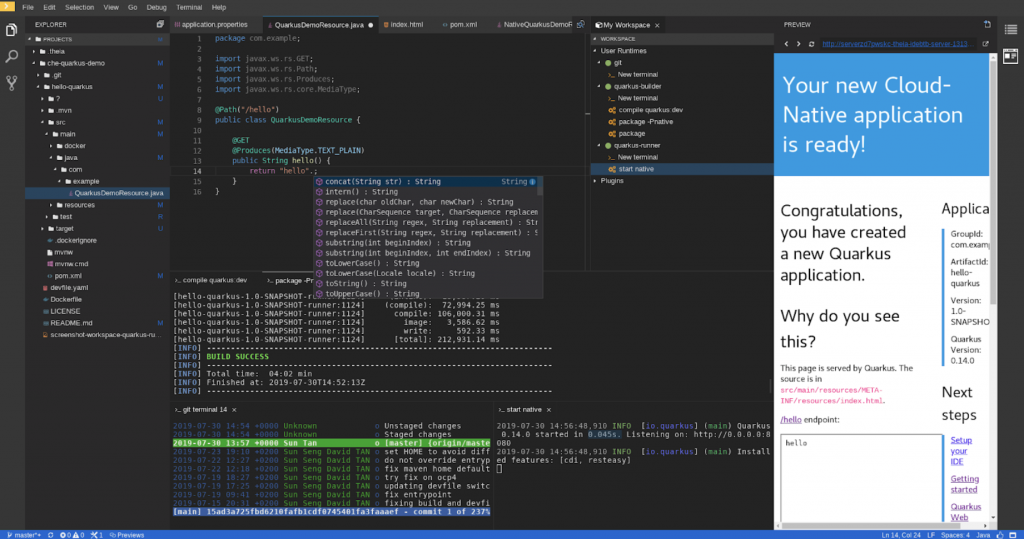
    Eclipse Che 7

    Eclipse Che 7 used to build a Quarkus cloud-native application.

    This release introduces:

    • Kubernetes-based developer workspaces: Fully containerized developer workspaces allowing to bring your application runtime back easily in your dev environment.
    • New Editor: Based on Eclipse Theia, the new default web-based editor provides a VSCode-like experience in the browser.
    • Devfile—developer environments as code: Configure a devfile for your project and get reproducible and disposable portable developer environments.
    • New plugins and extensibility model: Get the plugins you need for your project with VSCode extension compatibility. Swap IDEs with custom ones such as Jupyter, Eclipse Dirigible, or others.
    • Kubernetes and Red Hat OpenShift support: Deploy on any public cloud or on-premise Kubernetes.
    • Easy to monitor and administrate: Prometheus and Grafana dashboards to easily control your Eclipse Che deployment.
    • Chectl: New command-line tool to manage Eclipse Che.

    You can learn more about Eclipse Che 7 release on the following release note blog post.

    Try Eclipse Che 7, on Hosted Che at che.openshift.io and browse the samples already available.

    Kube-app from 0 to hero

    Eclipse Che 7 makes Kubernetes development accessible for developer teams, providing one-click developer workspaces and eliminating local environment configuration for your entire team. Che brings your Kubernetes application into your development environment, allowing you to code, build, test and run applications exactly as they run on production, providing developers with an improved inner-loop development workflow.

    Centrally hosted Kubernetes workspaces for teams

    Eclipse Che can be deployed on public K8S clusters or installed on-premise, behind your firewall.

    Che allows managers to establish the configuration of their team’s development environments, define technology stacks and IDE tooling, and provide their team with resources that surpass the limits of a laptop, all while securing access to source code.

    Eclipse Che Operator

    Eclipse Che 7 provides an Operator that is available to manage Eclipse Che on any K8S cluster with the OLM installed. It is available today on OperatorHub.IO. If you are already using Red Hat OpenShift 4.x, the installation can smoothly proceed directly from the OpenShift Console.

    To learn more on installation Eclipse Che on Red Hat OpenShift:

    • Installation guide for OpenShift 3.11
    • Installation guide for OpenShift 4.x

    Natively integrated with Red Hat OpenShift

    Running on Red Hat OpenShift, Eclipse Che allows developers to code on their applications exactly the way as they are running on production. Eclipse Che 7 is compatible with OpenShift starting at version 3.11.

    The integration in the future is going to become more and more seamless, allowing developers to benefit from on-demand developer environments for their applications directly from the OpenShift Developer Console (coming with OpenShift 4.2).
    Eclipse Che 7 and Red Hat CodeReady Workspaces 2.0

    Red Hat CodeReady Workspaces, is the supported version of Eclipse Che for OpenShift. Version 7 of Eclipse Che will be integrated into CodeReady Workspaces 2.0, providing the latest open source Kubernetes-native IDE to build cloud-native applications on OpenShift for OpenShift.

    Learn more

    • Eclipse Che: https://www.eclipse.org/che
    • Red Hat CodeReady Workspaces: https://developers.redhat.com/products/codeready-workspaces/overview
    • Che hosted by Red Hat Developer: https://che.openshift.io

    Last updated: November 8, 2023

    Recent Posts

    • Trusted software factory: Building trust in the agentic AI era

    • Build a zero trust AI pipeline with OpenShift and RHEL CVMs

    • Red Hat Hardened Images: Top 5 benefits for software developers

    • How EvalHub manages two-layer Kubernetes control planes

    • Tekton joins the CNCF as an incubating project

    Red Hat Developers logo LinkedIn YouTube Twitter Facebook

    Platforms

    • Red Hat AI
    • Red Hat Enterprise Linux
    • Red Hat OpenShift
    • Red Hat Ansible Automation Platform
    • See all products

    Build

    • Developer Sandbox
    • Developer tools
    • Interactive tutorials
    • API catalog

    Quicklinks

    • Learning resources
    • E-books
    • Cheat sheets
    • Blog
    • Events
    • Newsletter

    Communicate

    • About us
    • Contact sales
    • Find a partner
    • Report a website issue
    • Site status dashboard
    • Report a security problem

    RED HAT DEVELOPER

    Build here. Go anywhere.

    We serve the builders. The problem solvers who create careers with code.

    Join us if you’re a developer, software engineer, web designer, front-end designer, UX designer, computer scientist, architect, tester, product manager, project manager or team lead.

    Sign me up

    Red Hat legal and privacy links

    • About Red Hat
    • Jobs
    • Events
    • Locations
    • Contact Red Hat
    • Red Hat Blog
    • Inclusion at Red Hat
    • Cool Stuff Store
    • Red Hat Summit
    © 2026 Red Hat

    Red Hat legal and privacy links

    • Privacy statement
    • Terms of use
    • All policies and guidelines
    • Digital accessibility

    Chat Support

    Please log in with your Red Hat account to access chat support.