Introduction
In order to maximize performance of the Open vSwitch DPDK datapath, it pre-allocates hugepage memory. As a user you are responsible for telling Open vSwitch how much hugepage memory to pre-allocate. The question of exactly what value to use often arises. The answer is, it depends.
There is no simple answer as it depends on things like the MTU size of the ports, the MTU differences between ports, and whether those ports are on the same NUMA node. Just to complicate things a bit more, there are multiple overheads, and alignment and rounding need to be accounted for at various places in OVS-DPDK. Everything clear? OK, you can stop reading then!
However, if not, read on.
This blog will help you decide how much hugepage memory to pre-allocate with OVS-DPDK. It's not useful to fill the blog with the many lines of nested C code macros to show the exact calculation for every scenario. Instead we will give some guidelines and examples. This blog is relevant for OVS versions 2.6, 2.7, 2.8, and 2.9.
What is the Memory Used For?
The memory we are discussing is primarily used for buffers that represent packets in OVS-DPDK. One or more groups of these buffers are pre-allocated, and any time a new packet arrives on an OVS-DPDK port, one of the buffers is used. An OVS-DPDK port may be the type dpdk for physical NICs, or dpdkvhostuser, or dpdkvhostuserclient for virtual NICs. They will only use buffers that are on the same NUMA node as that which the port is associated with.
Mempool Sharing
A group of same size buffers are stored in a ring structure and referred to as a mempool. A mempool can be used for a single port, or it can be shared among multiple ports, on the condition that after some rounding, the ports have matching buffer sizes and are associated with the same NUMA node.
For example, a physical dpdk port on NUMA 0 with an MTU of 1500 bytes can share a mempool with:
A virtual vhost port on NUMA 0 with an MTU of 1500 Bytes
A physical dpdk port on NUMA 0 with an MTU of 1800 Bytes
However it cannot share a mempool with:
A virtual vhost port on NUMA 0 with an MTU of 9000 Bytes
A physical dpdk port on NUMA 1 with an MTU of 1500 Bytes
Buffer Sizes
From a user perspective, you just requested an MTU for a port, but that's where the calculations start in OVS-DPDK. Metadata integration with other OVS packet types and alignment rounding all need to be factored in, and are calculated in the code. It will vary according to the MTU and rounding, but it's safe to assume that the overhead will be somewhere between 1000 bytes and 2000 bytes per buffer.
Let's look at some common examples.
In a case where you set the MTU of a port to be 1500 bytes:
Total size per buffer = 3008 BytesIn another example where you set the MTU to 9000 bytes:
Total size per buffer = 10176 BytesThat's the size of each individual buffer. The question then is, how many buffers are there in a mempool?
Mempool Sizes
We mentioned earlier that mempools can be shared between multiple ports that have similar MTUs and the same NUMA association, and this is not uncommon. To cater for multiple ports using a mempool, initially OVS-DPDK requests 256K buffers in each mempool. It seems like a lot, but we have to consider that for any of these ports the buffers may be in-flight processing, or they could be in-use associated with multiple physical NIC queues. In OVS 2.9 they can also be in software TX queues.
If 256K buffers are not available, the requested amount is halved up until 16K. If at 16K the mempool can still not be created, an error is reported. Depending on the context of setting the MTU, this either means that the port cannot be correctly created, or that an MTU change failed.
Let's combine the information about how many buffers are requested for the mempool with the total size of each buffer (from the 1500 Byte and 9000 Byte examples above).
For an MTU of 1500 bytes:
Size of requested mempool = 3008 Bytes * 256K
Size of requested mempool = 788 MBytes
For an MTU of 9000 bytes:
Size of requested mempool = 10176 Bytes * 256K
Size of requested mempool = 2668 MBytes
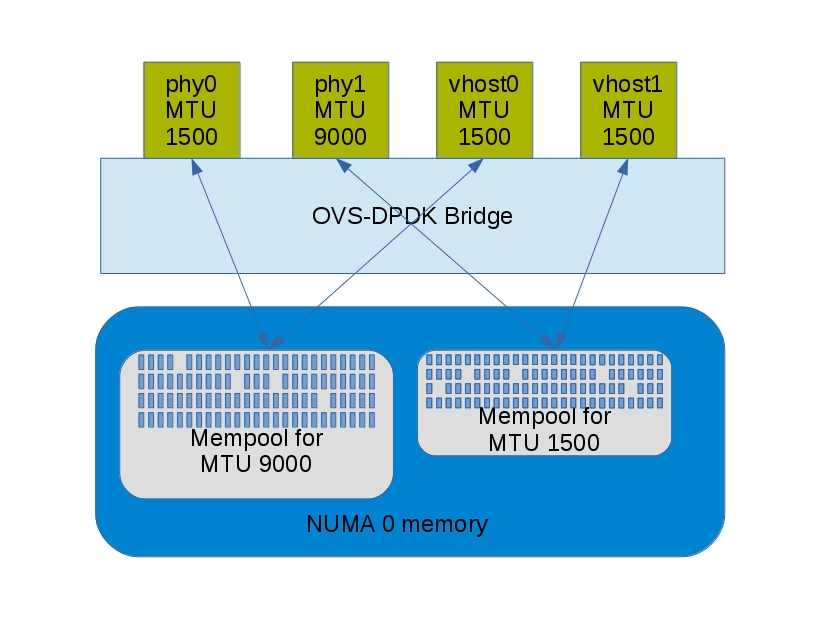
Now let's consider a case where the ports with MTUs of 1500 bytes and 9000 bytes co-exist on NUMA node 0. The MTUs are too different to allow sharing of a mempool, so there will be a mempool for each.
Initially the OVS-DPDK will request:
Size of mempools = 788 MBytes + 2668 MBytes
Size of mempools = 3456 MBytes
The image illustrates the association where there are two physical ports and two virtual ports sharing these MTUs:
Setting Hugepage Memory
From the example above, we know we would like to have 3456 MB available on NUMA node 0 to allow for having ports with MTUs of 1500 bytes and 9000 bytes. Let's set it!
Typically it is set in chunks of 1024 MB, so pre-allocate 4096 MB on NUMA node 0. Strictly speaking, that satisfies the requirement for this example. However, as noted above, ports will only use mempools from the same NUMA node as which they are associated with, so it's good practice to also pre-allocate on other NUMA nodes.
# ovs-vsctl --no-wait set Open_vSwitch . other_config:dpdk-socket-mem=4096,4096You can find more information about OVS-DPDK parameters (including dpdk-socket-mem and NUMA) in this blog post.
Conclusion
It's difficult to give you a simple calculation for the memory required in order to be pre-allocated for OVS-DPDK. Port MTUs and rounding tend to make this variable. As a guideline, using the examples above should enable a calculation that provides a good approximation. Oh, and the good news is that if you get it wrong, OVS-DPDK will retry using lower amounts of memory.
So there's a bit of flexibility built in!

