Redhat Developers  Logo
  • AI

    Get started with AI

    • Red Hat AI
      Accelerate the development and deployment of enterprise AI solutions.
    • AI learning hub
      Explore learning materials and tools, organized by task.
    • AI interactive demos
      Click through scenarios with Red Hat AI, including training LLMs and more.
    • AI/ML learning paths
      Expand your OpenShift AI knowledge using these learning resources.
    • AI quickstarts
      Focused AI use cases designed for fast deployment on Red Hat AI platforms.
    • No-cost AI training
      Foundational Red Hat AI training.

    Featured resources

    • OpenShift AI learning
    • Open source AI for developers
    • AI product application development
    • Open source-powered AI/ML for hybrid cloud
    • AI and Node.js cheat sheet

    Red Hat AI Factory with NVIDIA

    • Red Hat AI Factory with NVIDIA is a co-engineered, enterprise-grade AI solution for building, deploying, and managing AI at scale across hybrid cloud environments.
    • Explore the solution
  • Learn

    Self-guided

    • Documentation
      Find answers, get step-by-step guidance, and learn how to use Red Hat products.
    • Learning paths
      Explore curated walkthroughs for common development tasks.
    • Guided learning
      Receive custom learning paths powered by our AI assistant.
    • See all learning

    Hands-on

    • Developer Sandbox
      Spin up Red Hat's products and technologies without setup or configuration.
    • Interactive labs
      Learn by doing in these hands-on, browser-based experiences.
    • Interactive demos
      Click through product features in these guided tours.

    Browse by topic

    • AI/ML
    • Automation
    • Java
    • Kubernetes
    • Linux
    • See all topics

    Training & certifications

    • Courses and exams
    • Certifications
    • Skills assessments
    • Red Hat Academy
    • Learning subscription
    • Explore training
  • Build

    Get started

    • Red Hat build of Podman Desktop
      A downloadable, local development hub to experiment with our products and builds.
    • Developer Sandbox
      Spin up Red Hat's products and technologies without setup or configuration.

    Download products

    • Access product downloads to start building and testing right away.
    • Red Hat Enterprise Linux
    • Red Hat AI
    • Red Hat OpenShift
    • Red Hat Ansible Automation Platform
    • See all products

    Featured

    • Red Hat build of OpenJDK
    • Red Hat JBoss Enterprise Application Platform
    • Red Hat OpenShift Dev Spaces
    • Red Hat Developer Toolset

    References

    • E-books
    • Documentation
    • Cheat sheets
    • Architecture center
  • Community

    Get involved

    • Events
    • Live AI events
    • Red Hat Summit
    • Red Hat Accelerators
    • Community discussions

    Follow along

    • Articles & blogs
    • Developer newsletter
    • Videos
    • Github

    Get help

    • Customer service
    • Customer support
    • Regional contacts
    • Find a partner

    Join the Red Hat Developer program

    • Download Red Hat products and project builds, access support documentation, learning content, and more.
    • Explore the benefits

Optimized support for Open NVIDIA Nemotron 3.5 Super VL

October 15, 2026
Eldar Kurtić Helen Zhao Charles Hernandez Dipika Sikka
Related topics:
AI inference
Related products:
Red Hat AI InferenceRed Hat AI

    Red Hat AI is releasing optimized FP8 and DSpark speculative decoding checkpoints for Nemotron 3.5 Super VL, a 120B multimodal mixture-of-experts (MoE) model built for long-running agents. These checkpoints are designed to double inference throughput on NVIDIA Hopper GPUs without compromising output accuracy.

    These optimizations combine FP8 quantization using LLM Compressor with a DSpark speculative decoding model trained using Speculators, delivering substantial inference performance gains while preserving model quality.

    FP8 quantization

    To accelerate inference for Nemotron 3.5 Super VL, we are releasing an optimized FP8-quantized checkpoint. FP8 quantization reduces the precision of model weights and activations from BF16 to 8-bit floating point, cutting model weight memory and storage requirements in half while preserving model quality.

    FP8 quantization is particularly effective on NVIDIA Hopper GPUs, which feature native FP8 Tensor Core support and deliver approximately 2× higher theoretical matrix multiplication throughput compared to BF16. Combined with reduced memory bandwidth requirements, this enables higher inference throughput and improved GPU efficiency, especially for large-scale models.

    We generated the quantized checkpoints using the LLM Compressor library and its model-free post-training quantization (PTQ) workflow, leveraging the calibration-free nature of FP8 Dynamic quantization.

    After evaluating several quantization configurations, we settled on quantizing the attention, expert, and Mamba projection layers of the main model, while keeping the shared experts, routers, normalization layers, and lm_head in their original precision. For the multi-token prediction (MTP) layers, we quantized the attention, expert, and shared expert layers, while leaving the normalization layers and eh_proj unquantized.

    The quantization process is fully reproducible using the creation script provided in the model card.

    To assess the impact of quantization on model accuracy, particularly in reasoning-intensive tasks and agentic workflows, we evaluate both the BF16 and FP8 models across a broad suite of representative benchmarks. To ensure a fair and consistent comparison, both models are evaluated under identical conditions: non-greedy sampling, four NVIDIA H200 GPUs, vLLM 0.31.0, and the Inspect AI and Harbor evaluation frameworks. The evaluation results are presented in Figure 1. The FP8 checkpoint consistently preserves model accuracy across all evaluated benchmarks.
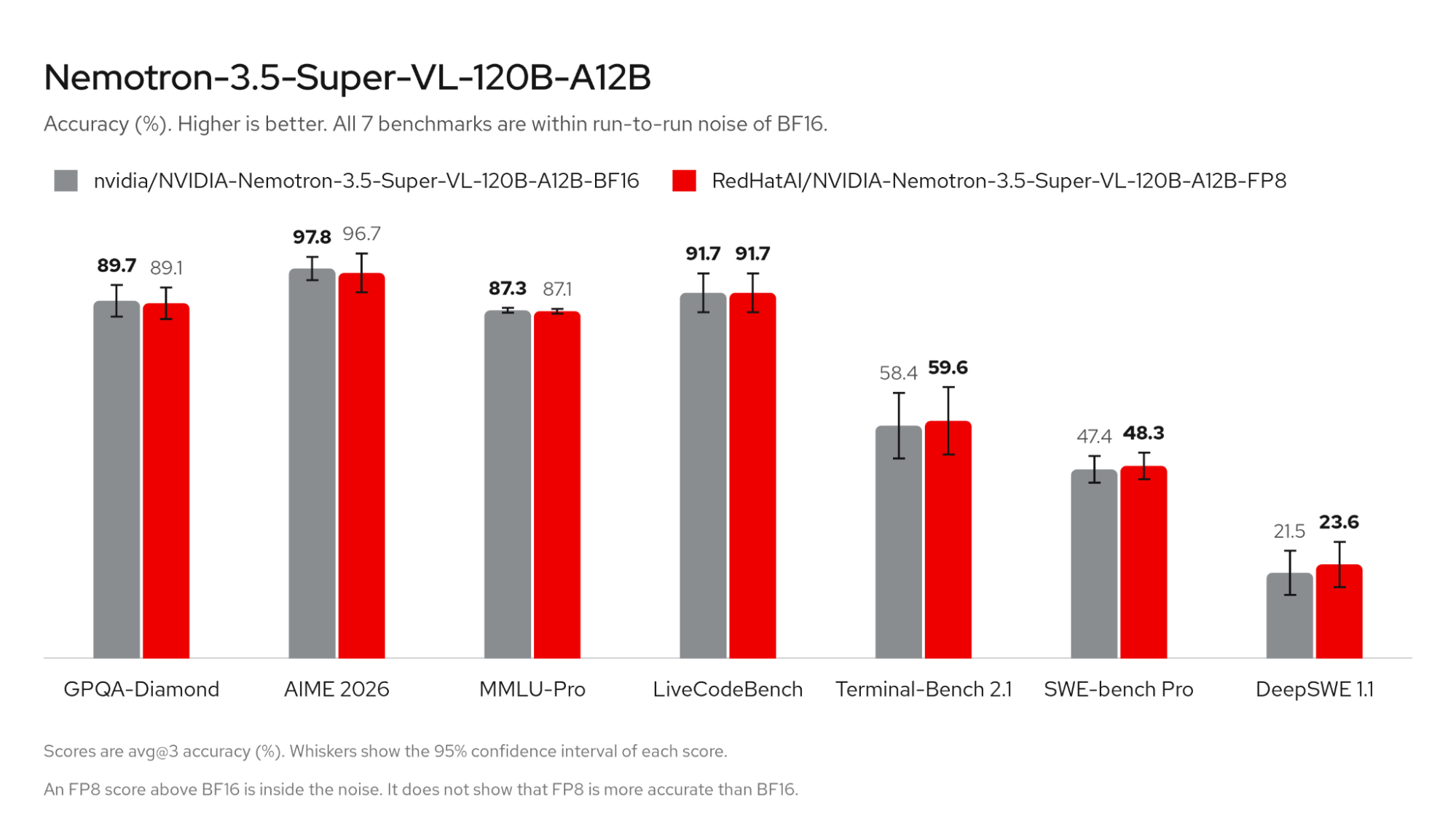
    Comparison of BF16 and FP8 accuracy scores across 7 benchmarks, including GPQA-Diamond, AIME 2026, and SWE-bench Pro.
    Figure 1: Evaluation results for the FP8-quantized Nemotron model, demonstrating full accuracy recovery across a diverse range of reasoning-intensive and agentic workloads.

    DSpark speculator

    The performance gains from quantized checkpoints can be further extended by enabling speculative decoding with parallel drafting DSpark models. Speculative decoding accelerates inference by using a smaller, faster draft model to propose multiple tokens ahead of time, which the LLM then verifies in parallel.

    While the target LLM natively includes MTP layers for multi-token prediction, DSpark takes a different approach. DSpark’s speedup mainly benefits from a parallel-drafting technique. Instead of drafting tokens autoregressively, it proposes 8-16 tokens in a single forward pass.

    This gain is not completely free: parallel drafting means we now lose the causality between tokens. DSpark resolves this issue by extending the parallel drafting with a lightweight Markov head to introduce dependencies between speculated tokens, allowing each token in the draft sequence to build on previous predictions rather than generating all tokens independently. As shown in Figure 2, this architecture helps DSpark to produce higher-quality candidate sequences and increase overall inference throughput.
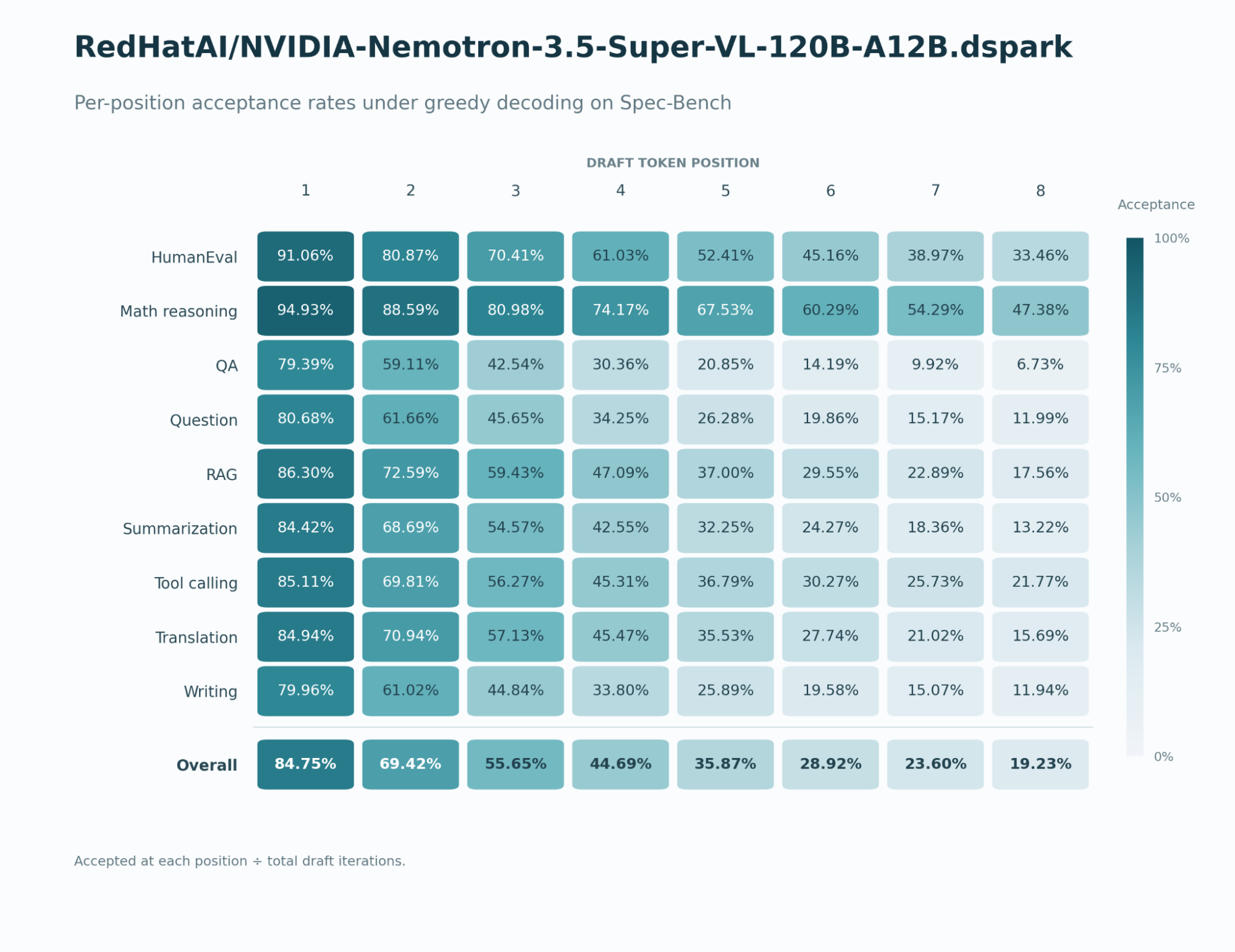
    Heatmap of draft token acceptance rates from positions 1 to 8 across 9 tasks, with overall rates from 84.75% to 19.23%.
    Figure 2: Evaluation results of the DSpark speculator model on the Spec-Bench benchmark.

    Performance benchmarking

    Quantization and speculative decoding are complementary, orthogonal inference acceleration techniques that can be combined to achieve compounded performance gains. To demonstrate their individual and combined impact, we conducted a series of benchmarks using vLLM, highlighting the performance improvements enabled by each optimization and the additional benefits of combining them.

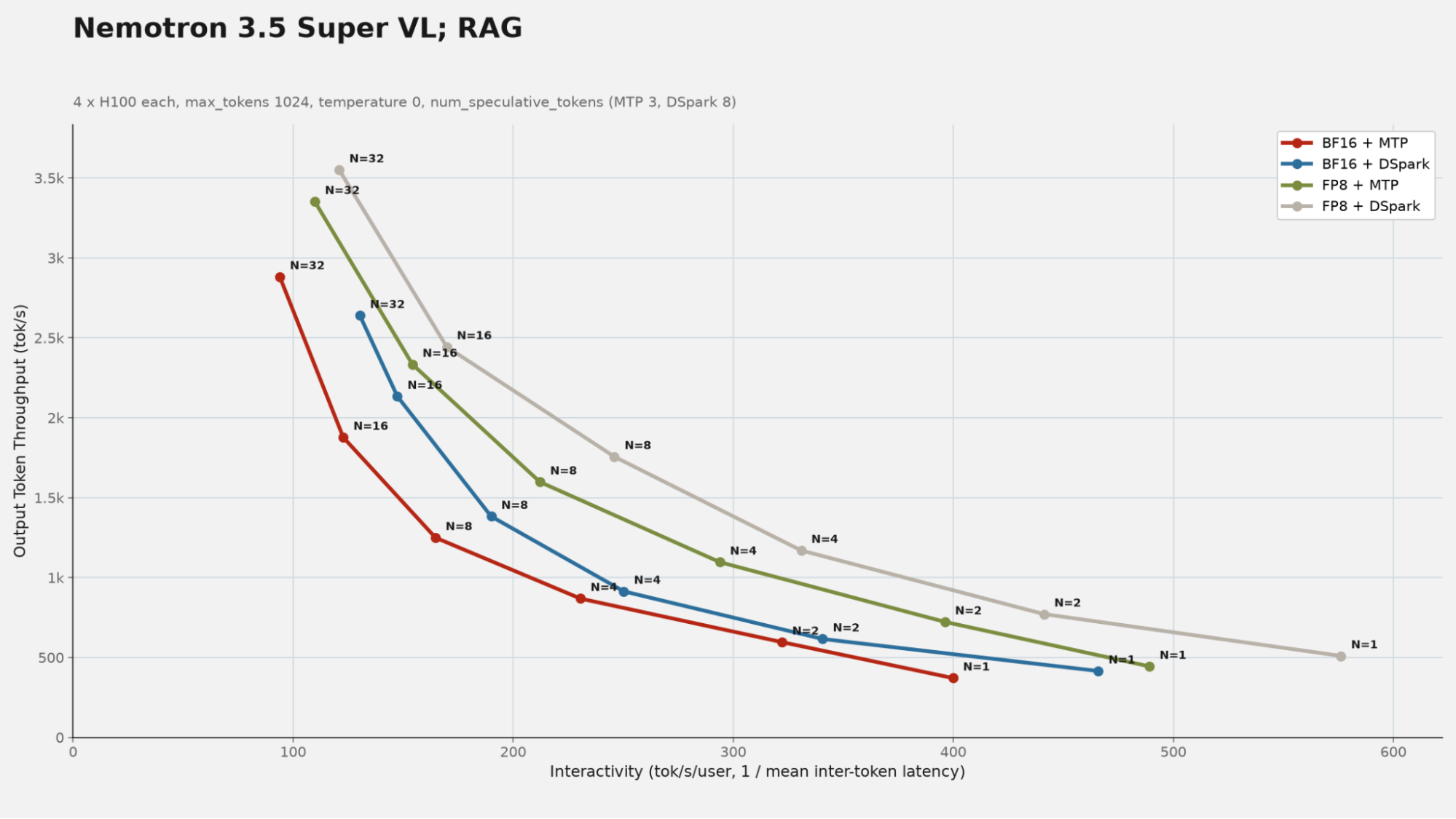
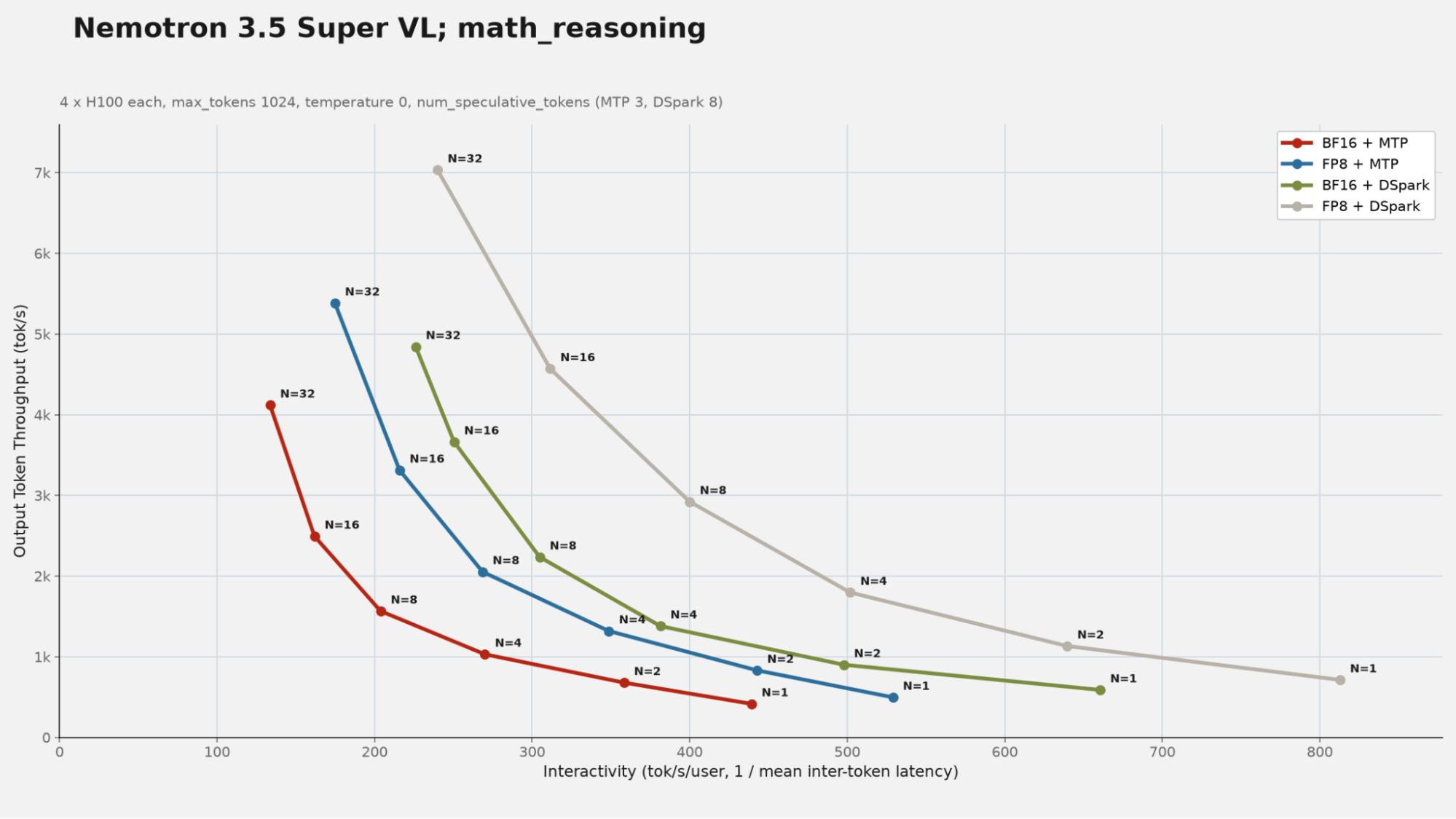
    The following plots (Figure 3, Figure 4, and Figure 5) demonstrate performance benchmarking, comparing the performance gains achieved through swapping MTP speculative decoding with our trained DSpark speculator as well as swapping the BF16 checkpoint for our FP8 quantized checkpoint. All benchmarks were performed on four H100s across workloads with prompts from various datasets. Each chart shows per-user streaming speed (interactivity) on the x-axis versus total output throughput (tok/s) on the y-axis, with each point representing a different concurrency level N. The HumanEval prompts come from OpenAI's HumanEval coding benchmark, while the math_reasoning and RAG prompts come from Spec-Bench, the ACL 2024 speculative decoding benchmark suite.

    Each upgrade delivers meaningful gains on its own, and they compose cleanly. Swapping MTP for our trained DSpark speculator at BF16 primarily boosts single-user streaming speed, while swapping the BF16 checkpoint for FP8 primarily boosts aggregate throughput under load, where its reduced compute and memory footprint matters most. Combining them outperforms either intermediate configuration at every concurrency level on both workloads.
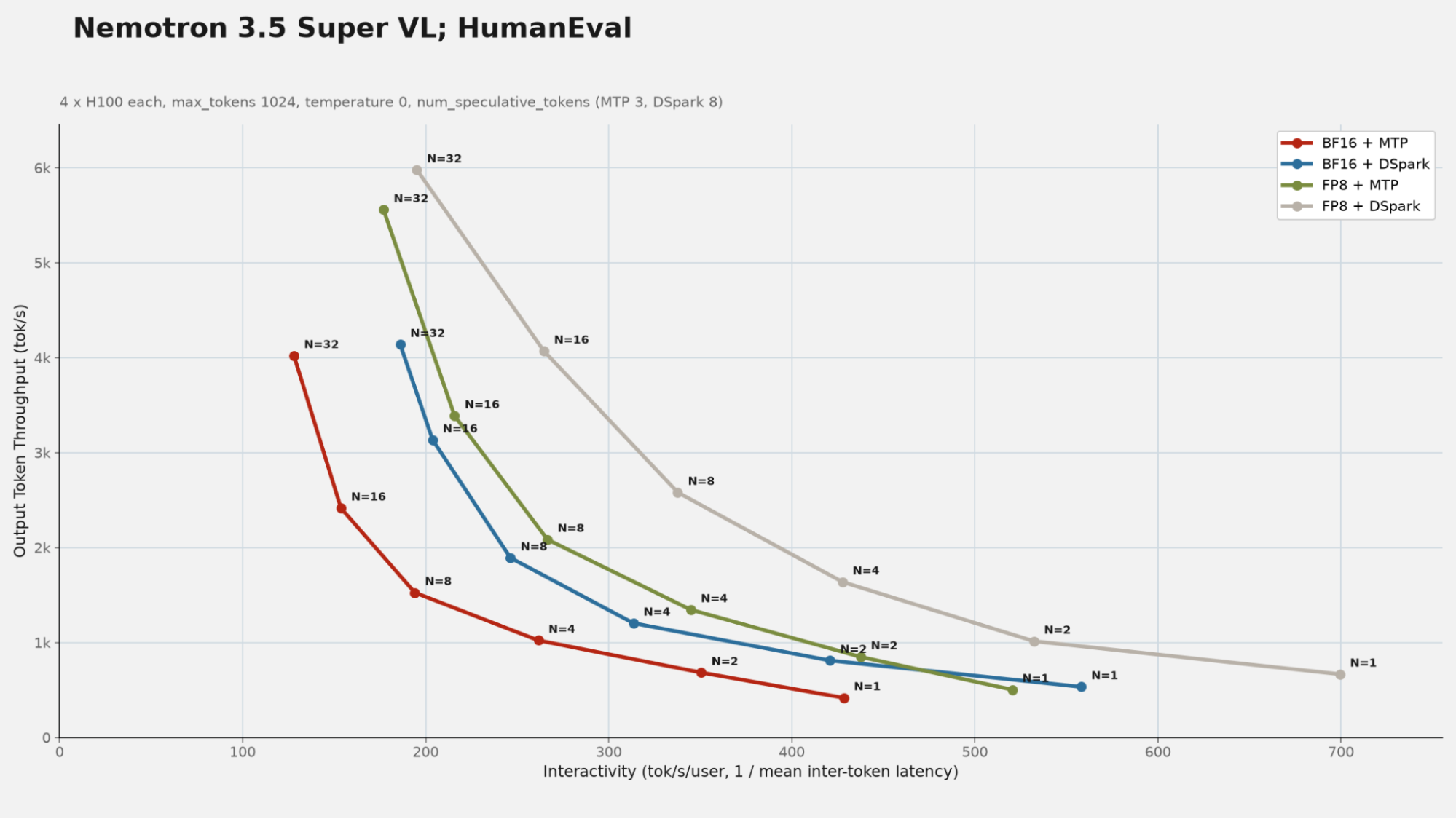
    Throughput versus interactivity plot for HumanEval, where FP8 plus DSpark achieves the highest throughput and streaming speed.
    Figure 3: Benchmark comparisons using the HumanEval dataset across concurrency levels.
    Throughput versus interactivity plot for math reasoning, showing FP8 plus DSpark achieving peak throughput above 7,000 tok/s.
    Figure 4: Benchmark comparisons using the math_reasoning dataset across concurrency levels.
    Throughput versus interactivity plot for RAG, showing FP8 plus DSpark leading in both throughput and streaming speed.
    Figure 5: Benchmark comparisons using the RAG dataset across concurrency levels.

    Nemotron 3.5 Super VL models are available for inference through Red Hat Inference Hub on Red Hat AI Factory with NVIDIA.

    Related Posts

    • Configure NVIDIA Blackwell GPUs for Red Hat AI workloads

    • Dynamic GPU slicing with Red Hat OpenShift and NVIDIA MIG

    • How to set up NVIDIA NIM on Red Hat OpenShift AI

    • Deliver generative AI at scale with NVIDIA NIM on OpenShift AI

    • 2:4 Sparse Llama FP8: SOTA performance for NVIDIA Hopper GPUs

    • Introducing Machete, a mixed-input GEMM kernel optimized for NVIDIA Hopper GPUs

    Recent Posts

    • Optimized support for Open NVIDIA Nemotron 3.5 Super VL

    • Red Hat OpenShift Virtualization memory management overview

    • vLLM vs. SGLang: Choosing the right inference engine for your workload

    • Configure Red Hat OpenShift Dev Spaces for enterprise security

    • Test and deploy bootable containers with bootc virtualization kit (bcvk)

    What’s up next?

    Learning Path Get started with vLLM feature share

    Get started with vLLM

    Learn how to compress, serve, and benchmark LLMs with vLLM.
    Red Hat Developers logo LinkedIn YouTube Twitter Facebook

    Platforms

    • Red Hat AI
    • Red Hat Enterprise Linux
    • Red Hat OpenShift
    • Red Hat Ansible Automation Platform
    • See all products

    Build

    • Developer Sandbox
    • Developer tools
    • Interactive tutorials
    • API catalog

    Quicklinks

    • Learning resources
    • E-books
    • Cheat sheets
    • Blog
    • Events
    • Newsletter

    Communicate

    • About us
    • Contact sales
    • Find a partner
    • Report a website issue
    • Site status dashboard
    • Report a security problem

    RED HAT DEVELOPER

    Build here. Go anywhere.

    We serve the builders. The problem solvers who create careers with code.

    Join us if you’re a developer, software engineer, web designer, front-end designer, UX designer, computer scientist, architect, tester, product manager, project manager or team lead.

    Sign me up

    Red Hat legal and privacy links

    • About Red Hat
    • Jobs
    • Events
    • Locations
    • Contact Red Hat
    • Red Hat Blog
    • Inclusion at Red Hat
    • Cool Stuff Store
    • Red Hat Summit
    © 2026 Red Hat

    Red Hat legal and privacy links

    • Privacy statement
    • Terms of use
    • All policies and guidelines
    • Digital accessibility
    Ask AI