Redhat Developers  Logo
  • AI

    Get started with AI

    • Red Hat AI
      Accelerate the development and deployment of enterprise AI solutions.
    • AI learning hub
      Explore learning materials and tools, organized by task.
    • AI interactive demos
      Click through scenarios with Red Hat AI, including training LLMs and more.
    • AI/ML learning paths
      Expand your OpenShift AI knowledge using these learning resources.
    • AI quickstarts
      Focused AI use cases designed for fast deployment on Red Hat AI platforms.
    • No-cost AI training
      Foundational Red Hat AI training.

    Featured resources

    • OpenShift AI learning
    • Open source AI for developers
    • AI product application development
    • Open source-powered AI/ML for hybrid cloud
    • AI and Node.js cheat sheet

    Red Hat AI Factory with NVIDIA

    • Red Hat AI Factory with NVIDIA is a co-engineered, enterprise-grade AI solution for building, deploying, and managing AI at scale across hybrid cloud environments.
    • Explore the solution
  • Learn

    Self-guided

    • Documentation
      Find answers, get step-by-step guidance, and learn how to use Red Hat products.
    • Learning paths
      Explore curated walkthroughs for common development tasks.
    • Guided learning
      Receive custom learning paths powered by our AI assistant.
    • See all learning

    Hands-on

    • Developer Sandbox
      Spin up Red Hat's products and technologies without setup or configuration.
    • Interactive labs
      Learn by doing in these hands-on, browser-based experiences.
    • Interactive demos
      Click through product features in these guided tours.

    Browse by topic

    • AI/ML
    • Automation
    • Java
    • Kubernetes
    • Linux
    • See all topics

    Training & certifications

    • Courses and exams
    • Certifications
    • Skills assessments
    • Red Hat Academy
    • Learning subscription
    • Explore training
  • Build

    Get started

    • Red Hat build of Podman Desktop
      A downloadable, local development hub to experiment with our products and builds.
    • Developer Sandbox
      Spin up Red Hat's products and technologies without setup or configuration.

    Download products

    • Access product downloads to start building and testing right away.
    • Red Hat Enterprise Linux
    • Red Hat AI
    • Red Hat OpenShift
    • Red Hat Ansible Automation Platform
    • See all products

    Featured

    • Red Hat build of OpenJDK
    • Red Hat JBoss Enterprise Application Platform
    • Red Hat OpenShift Dev Spaces
    • Red Hat Developer Toolset

    References

    • E-books
    • Documentation
    • Cheat sheets
    • Architecture center
  • Community

    Get involved

    • Events
    • Live AI events
    • Red Hat Summit
    • Red Hat Accelerators
    • Community discussions

    Follow along

    • Articles & blogs
    • Developer newsletter
    • Videos
    • Github

    Get help

    • Customer service
    • Customer support
    • Regional contacts
    • Find a partner

    Join the Red Hat Developer program

    • Download Red Hat products and project builds, access support documentation, learning content, and more.
    • Explore the benefits

LLM quantization guide: How to do it, and how it helps

Quantizing Large Language Models: A Guide for Reducing Memory Footprint and Cost

September 2, 2026
Cedric Clyburn
Related topics:
Artificial intelligence
Related products:
Red Hat AI

    Model sizes have roughly doubled every year (see figure 1), and GPU memory hasn't come close to keeping up. So when a new frontier open model is released, how do you actually deploy it to serve one user, or perhaps one thousand at a time, on hardware you can realistically get your hands on?
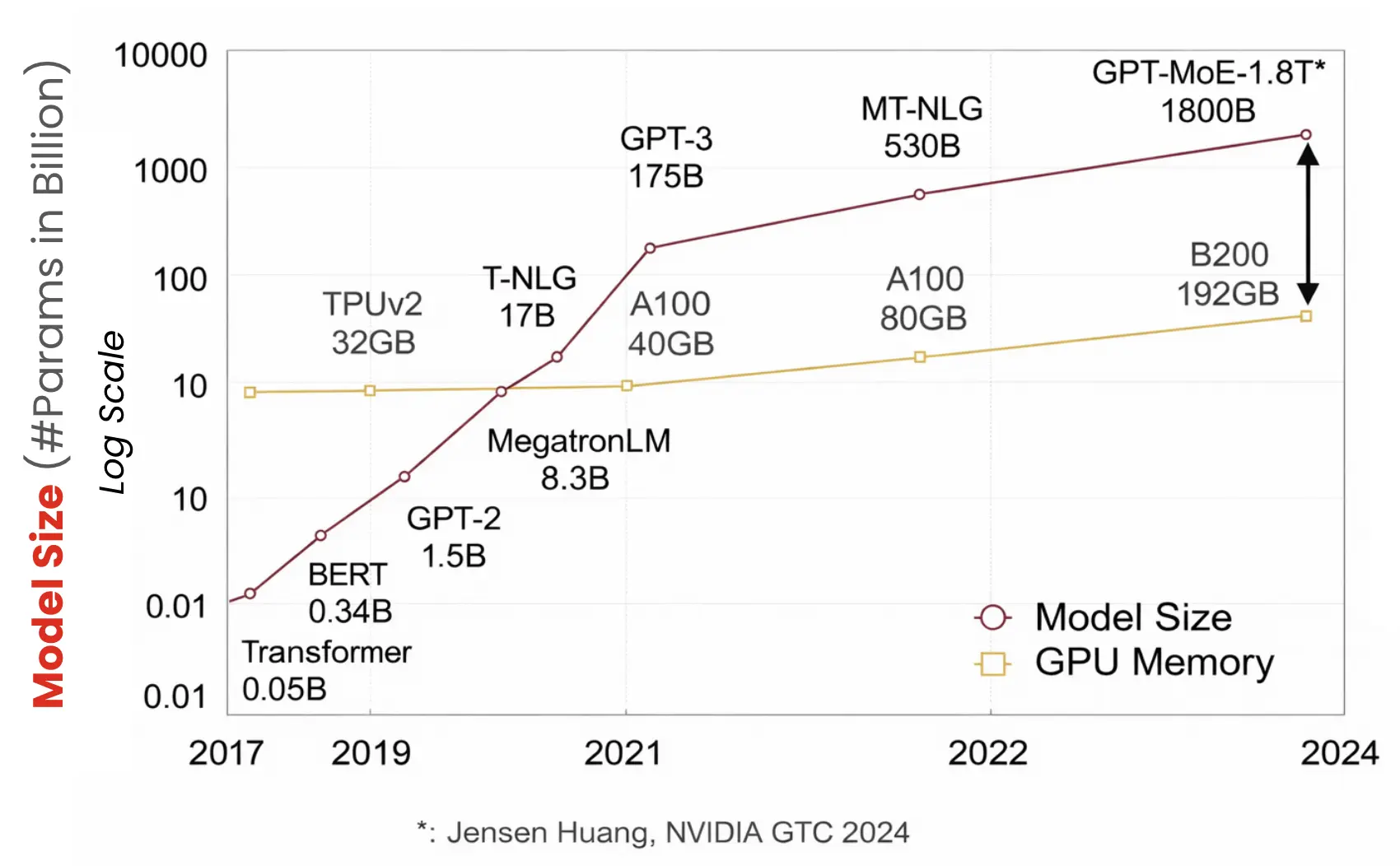
    Model sizes (like with ChatGPT) have grown far faster than the memory available on a single GPU (using NVIDIA GPU's as examples).
    Figure 1: Model sizes (like with ChatGPT) have grown far faster than the memory available on a single GPU (using NVIDIA GPU's as examples).

    This challenge is exactly why almost every large language model (LLM) running in production today is quantized. By the end of this article, you'll know:

    • What quantization actually does to a model
    • Where in the inference stack it actually pays off
    • Which algorithm and format to pick, and what each one costs you

    What is LLM quantization?

    When a lab releases a new LLM, its weights usually ship in BF16 (brain floating point): 16 bits for every single number. With billions of parameters, that requires a lot of memory, and it's why the model won't fit on most hardware.

    So let's ask the obvious question: Do we really need all 16? Usually not. Quantization maps each weight into a lower-bit format: FP8 (floating point, decimals), INT8 (integers like 3 or -127), INT4, and so on.
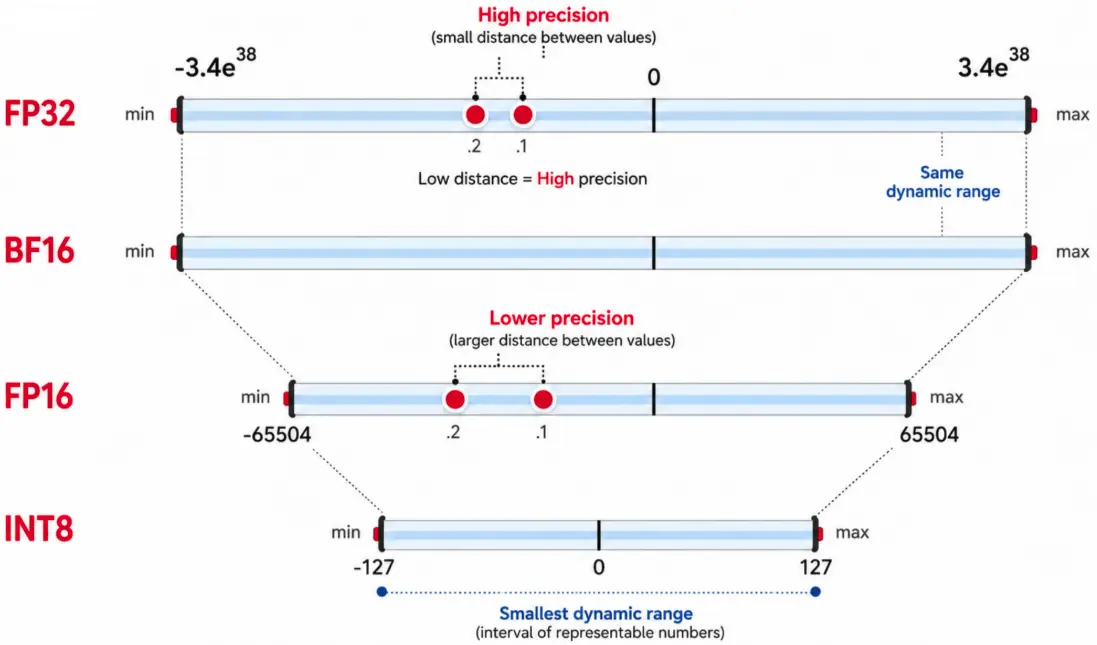
    Each step down in precision, from FP32 to INT8, stores every number in fewer bits and a smaller dynamic range.
    Figure 2: Each step down in precision, from FP32 to INT8, stores every number in fewer bits and a smaller dynamic range.

    Each step down decreases the memory requirements, as illustrated by figure 2. Fewer bits per number, and a smaller model overall. I particularly enjoy this example from Maarten Grootendorst on how quantization reduces the number of bits (colors) to represent the original model, or in this case, cookie (see figure 3).
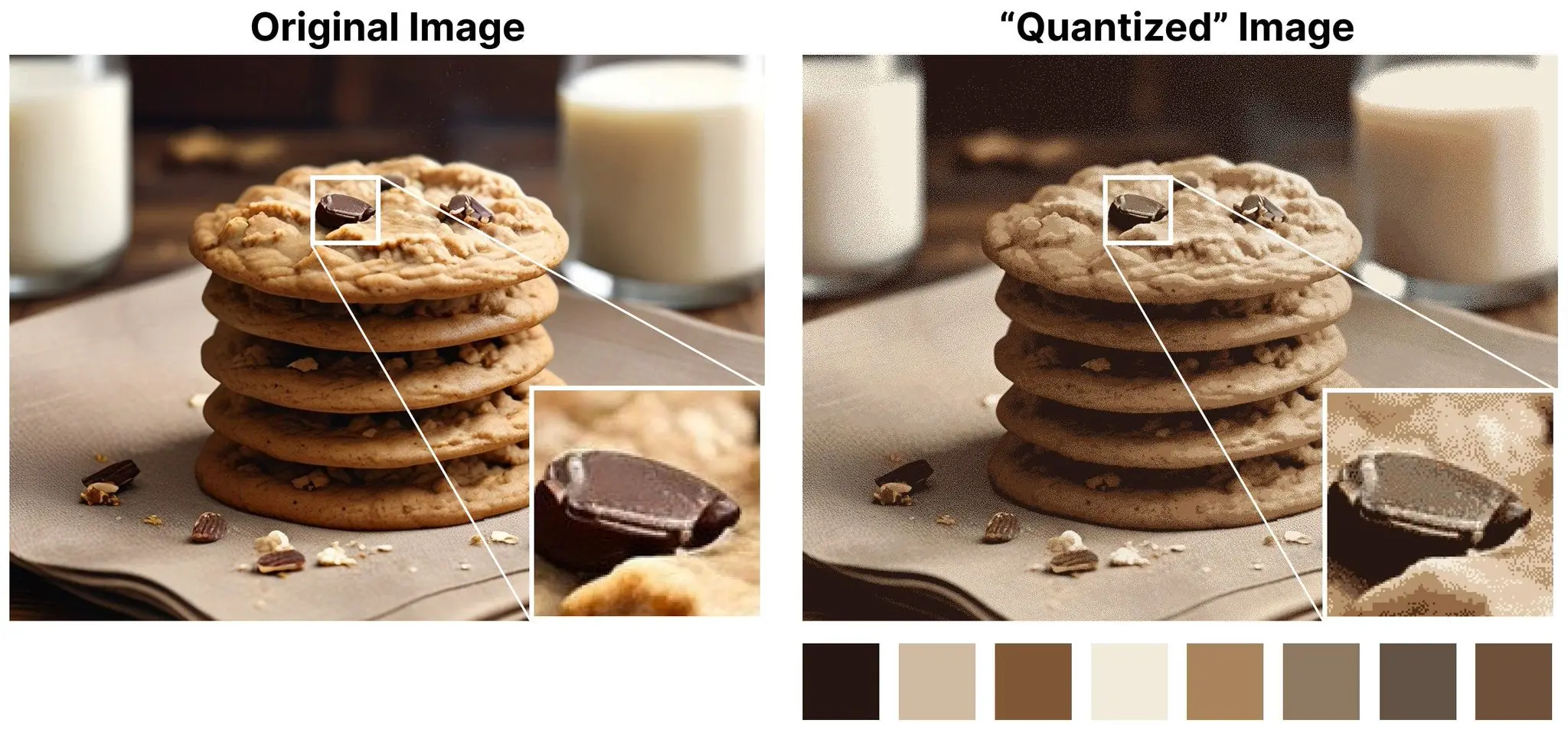
    This image by Maarten Grootendorst, demonstrates that quantizing a photographic image reduces the number of colors used to represent it, in the same way quantizing a model reduces the bits used to represent each weight.
    Figure 3: This image by Maarten Grootendorst, demonstrates that quantizing a photographic image reduces the number of colors used to represent it, in the same way quantizing a model reduces the bits used to represent each weight.

    The result: Less GPU compute and total cost for AI

    Let's take Llama 4 Scout, at 109B parameters. It was released at BF16, which is 2 bytes per parameter:

    • BF16: 109B × 2 bytes per parameter = ~220 GB → You need three 80 GB GPUs
    • INT8/FP8: 109B × 1 byte per parameter = ~109 GB → Two GPUs
    • INT4/FP4: ~55 GB → One GPU

    It's the same model, but you're running it on 1 GPU instead of 3. That's a 75% reduction in memory footprint, and with the scarcity of hardware these days, it's a big deal. It also means you can consolidate far more models onto the same cluster, which is the whole premise behind running Model-as-a-Service for your developers.

    Where inside the model does this happen?

    A model is essentially a stack of layers performing massive matrix multiplications in order to produce your result, known as transformer blocks (figure 4). Each block has a self-attention section with 4 linear layers (the Q, K, V, and O projections) and a feed-forward network with 3 more (gate, up, down). These layers are where almost all of the model's parameters live, and almost all of the compute happens. So that's what gets quantized, and exactly what a tool like LLM Compressor operates on.
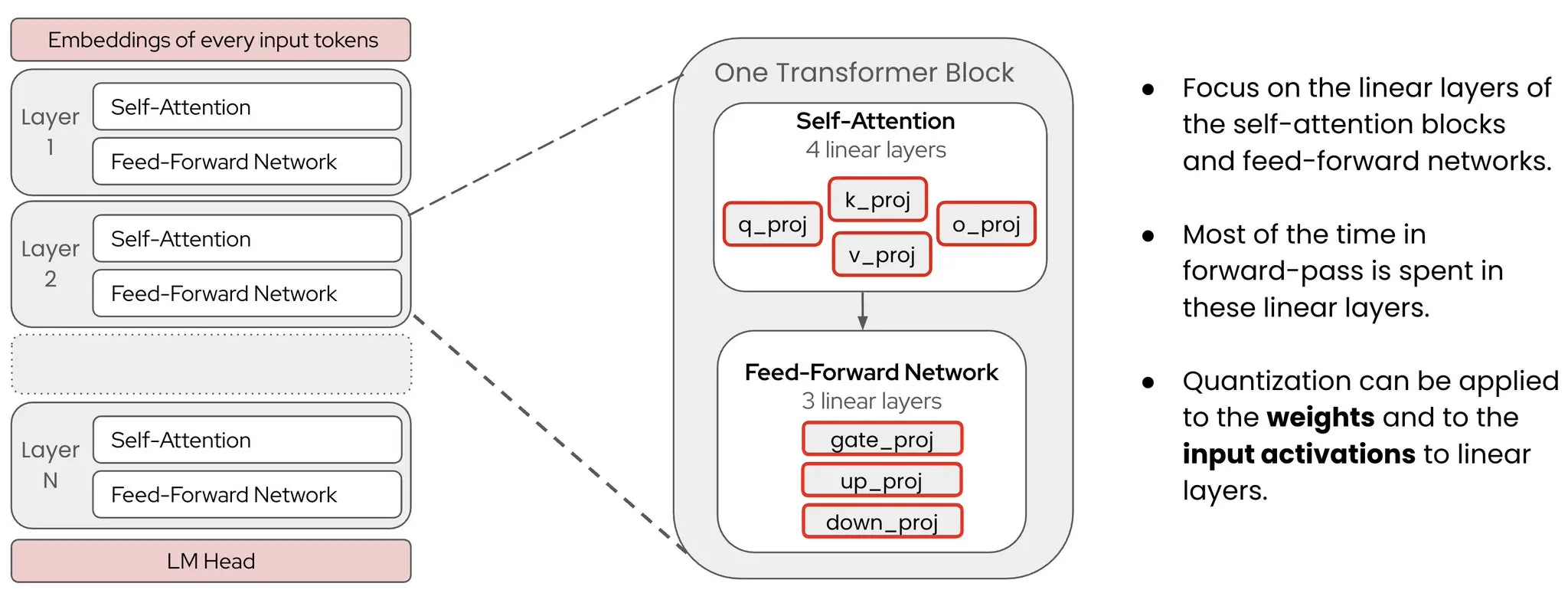
    Quantization is applied to the linear layers inside each transformer block, where nearly all of the parameters and compute live.
    Figure 4: Quantization is applied to the linear layers inside each transformer block, where nearly all of the parameters and compute live.

    The embedding layer at the start and the LM head at the end are typically excluded to preserve accuracy (and they're a small fraction of the parameters anyway).

    Weights and activations are 2 different wins

    There are 2 things inside a linear layer you can quantize, and they pay off in completely different places (see figure 5).

    • Weights: The model's learned parameters. Every forward pass pulls them from high-bandwidth memory (HBM) into fast on-chip SRAM. Cutting them from 16 to 8 bits slashes data movement in half. This is a massive latency win for token generation (the decoding phase), which is heavily memory-bound.
    • Activations: The tensors flowing through the model. Tensor cores churn through more operations per second when these numbers are lower precision. For example, Hopper GPUs feature dedicated FP8 cores, whereas older Ampere chips rely on INT8. This is a huge throughput win for prompt processing, also known as the prefill phase of inference, which is heavily compute-bound.
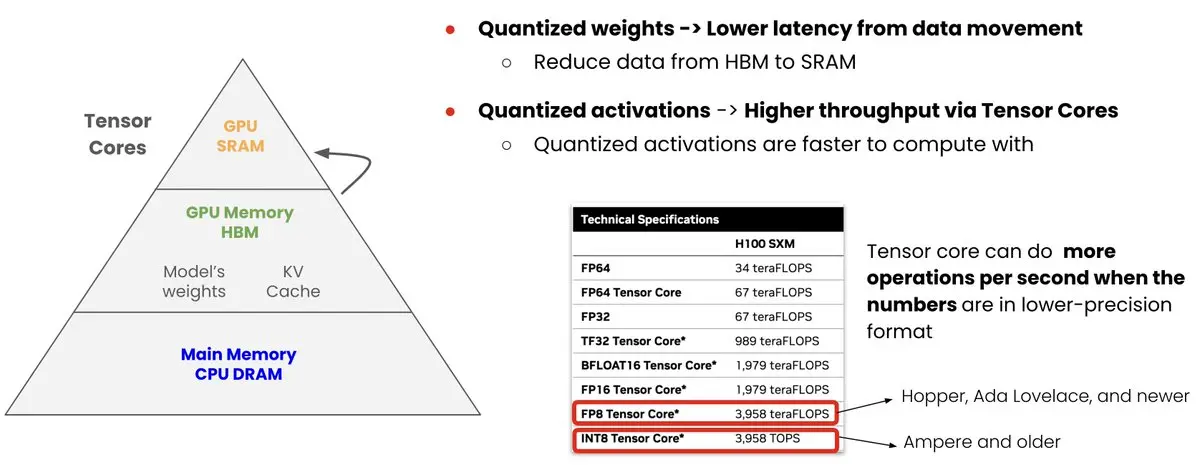
    Quantizing weights cuts the data movement between HBM and SRAM, while quantizing activations lets the tensor cores compute faster.
    Figure 5: Quantizing weights cuts the data movement between HBM and SRAM, while quantizing activations lets the tensor cores compute faster.

    So, weight quantization speeds up the data movement side of inference, and activation quantization speeds up the compute side. Quantizing both is what unlocks the full speedup. By the way, the naming is W{bits}A{bits}: Weights, then activations.

    SchemeWhat you getReach for it when
    W8A16Half the weight memory, no tensor core speedupMemory-bound, or hardware without FP8/INT8 tensor cores
    W8A8Both winsHopper or newer, serving real concurrency. The production default
    W4A164× smaller weights, most aggressive on sizeFitting a model onto one card, can trade throughput for it


    But what type of model quantization should you actually download?

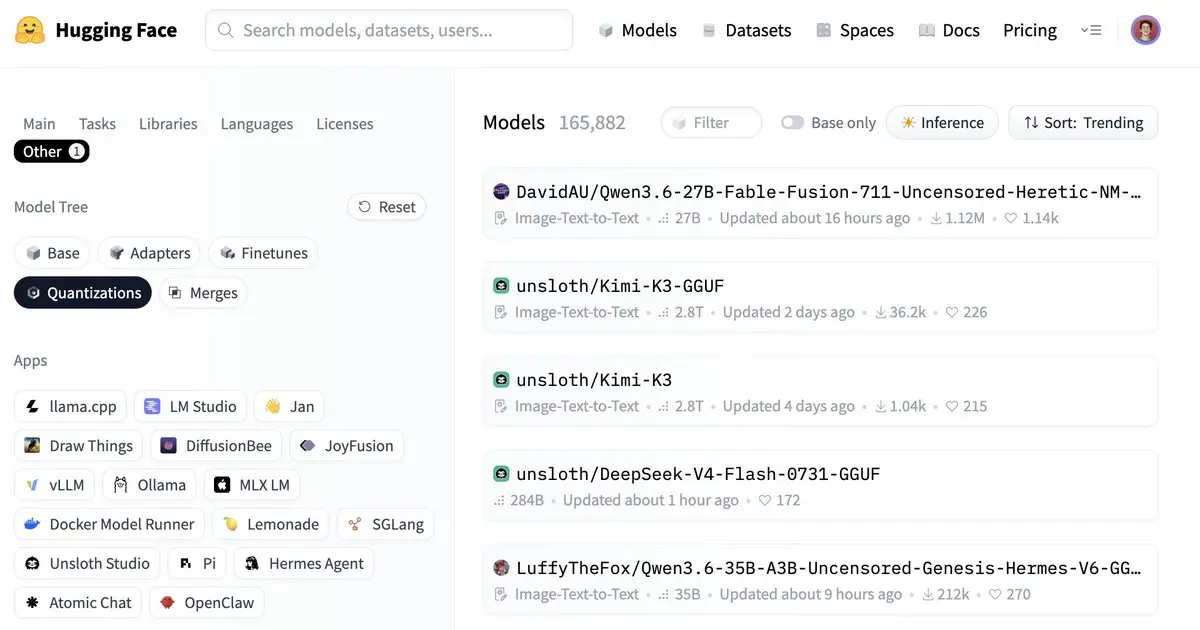
    Searching for a single popular model on Hugging Face returns dozens of quantization formats, and they are not interchangeable.
    Figure 6: Searching for a single popular model on Hugging Face returns dozens of quantization formats, and they are not interchangeable.

    This is where it gets tricky. Search any popular model on Hugging Face and you'll get hundreds of results (figure 6), from GGUF, NVFP4, AWQ-INT4, MLX-4bit, 4bpw, 5.5bit, AutoRound. They are not interchangeable, and the right answer depends entirely on which inference engine you're running.

    • GGUF: llama.cpp, Ollama, LM Studio. Local inference on CPU or a consumer GPU.
    • MLX: Apple silicon.
    • FP8, NVFP4, AWQ, GPTQ, compressed-tensors: vLLM and data center GPUs.
    Does it make the model dumber?

    Done correctly, essentially no. But "done correctly" is what I want to emphasize.

    Naive quantization, where you round every number down and cross your fingers, does hurt. What works are calibrated techniques like GPTQ, AWQ, and SmoothQuant, which run a small representative dataset through the model to figure out which weights matter most and protect those. All 3 are implemented in LLM Compressor, the open source library Red Hat maintains for producing vLLM-ready checkpoints.

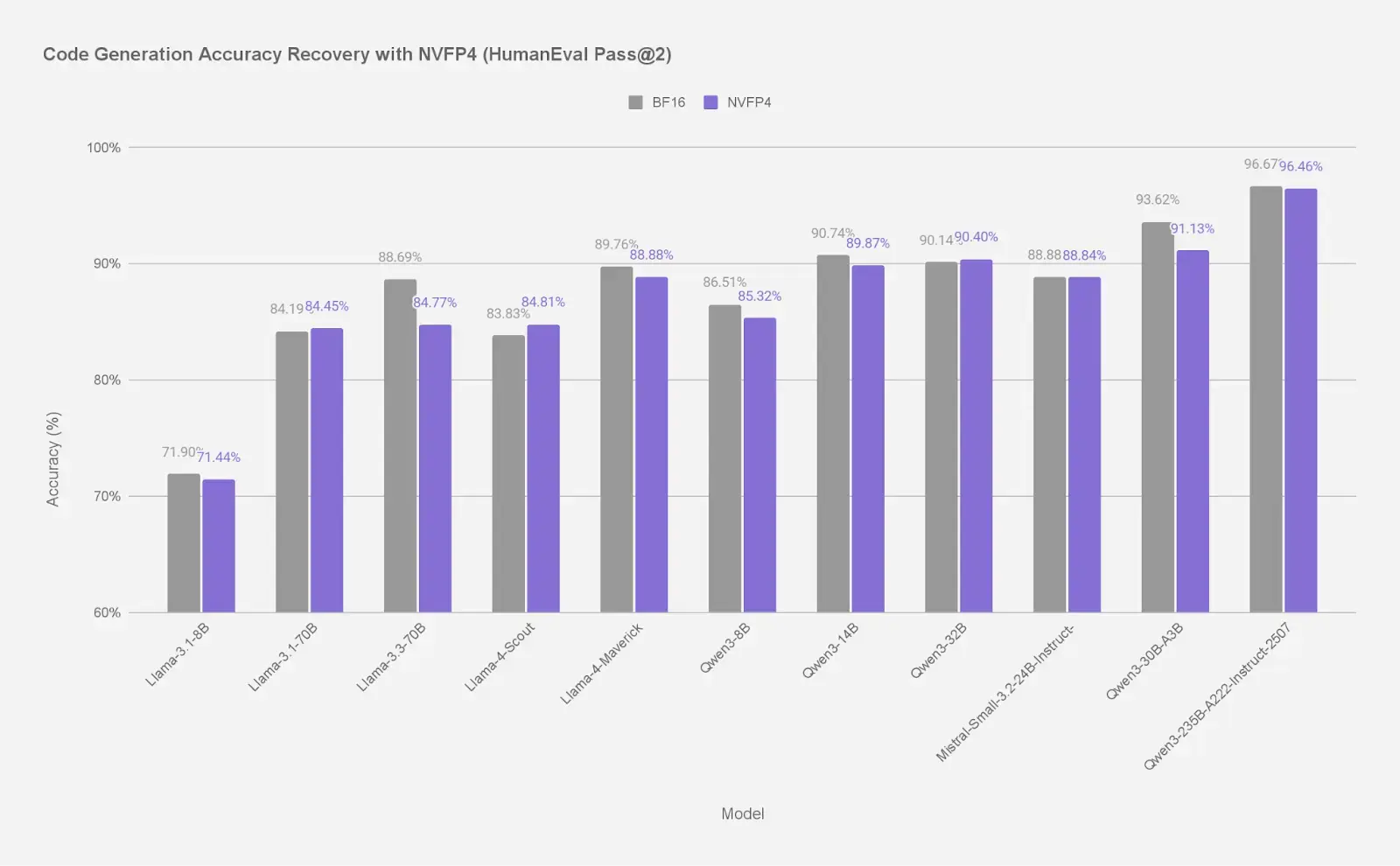
    The Red Hat AI team published NVFP4 versions of a big spread of open models this year, from 8B up past 400B, and the recovery numbers are the interesting part (illustrated in figure 7):

    • 70B–235B models: ~99% of BF16 accuracy
    • ~30B models: 97–99%
    • 7B–14B models: ~95–98%
    Accuracy recovery of quantized models compared to their BF16 baselines, across model sizes.
    Figure 7: Accuracy recovery of quantized models compared to their BF16 baselines, across model sizes.

    What's quite interesting is that recovery gets better as models get bigger, which is backward from what most people assume, and mixture of experts (MoE) models hold up especially well. If you want the receipts, we ran over half a million evaluations on quantized LLMs, and we dug separately into how quantized models handle long-context tasks as well.

    What quantization looks like under load

    If you're deploying a model for a team, this is the part that matters most. We benchmarked Llama 3 70B on two H100s with GuideLLM, FP16 versus FP8 weights-and-activations, on a retrieval-augmented generation (RAG) style workload of roughly 1024 tokens in and 128 out (illustrated in figure 8):

    • Throughput: 158 → 474 input tokens/sec
    • Time to first token under load: Over 30,000ms → about 4,800ms
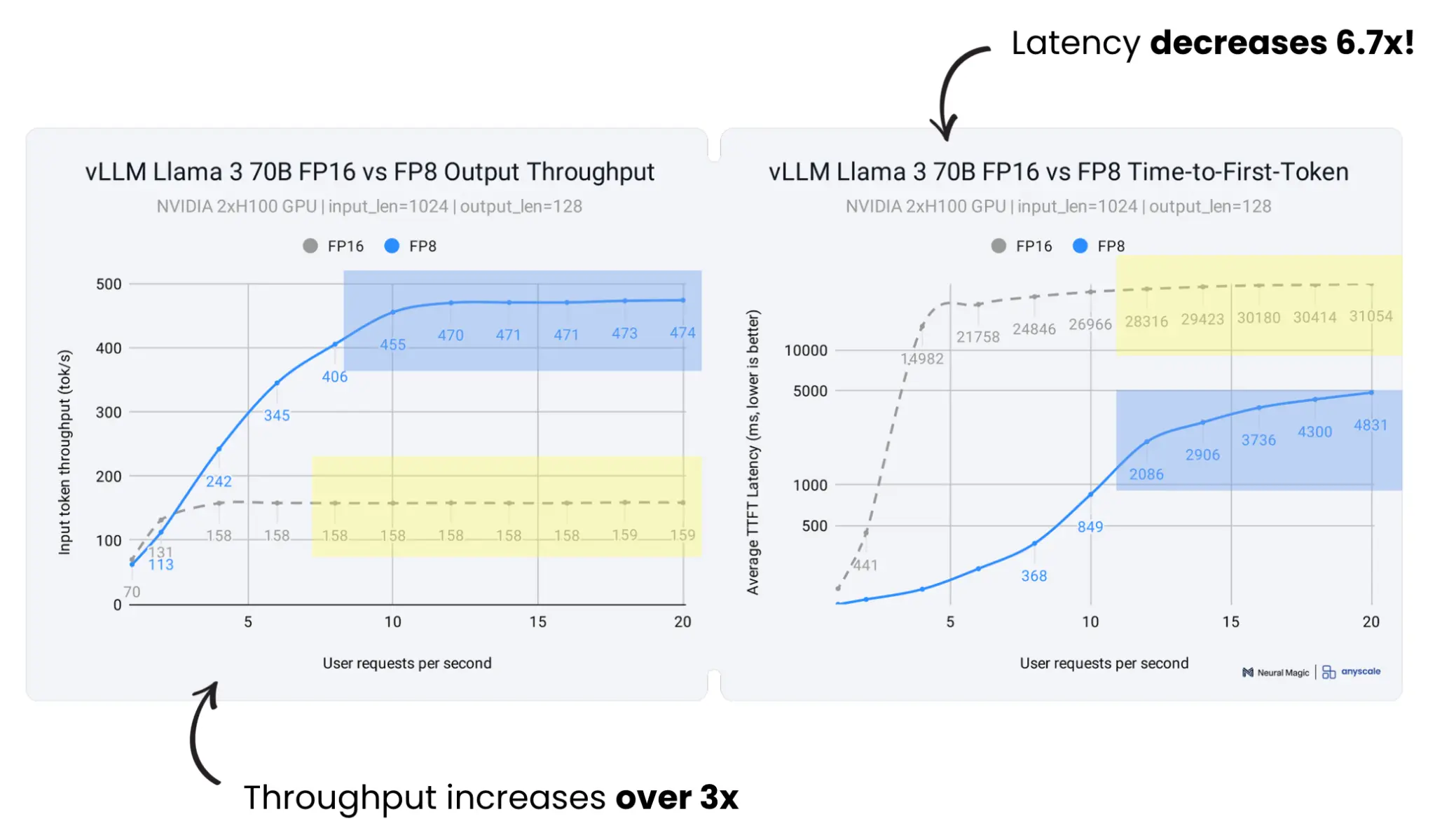
    The same Llama 3 70B deployment on the same two H100s, FP16 versus FP8, showing over 3x the throughput and a 6.7x drop in time to first token under load.
    Figure 8: The same Llama 3 70B deployment on the same two H100s, FP16 versus FP8, showing over 3x the throughput and a 6.7x drop in time to first token under load.

    This comparison was performed with the same GPUs and the same model. But, the difference is entirely what precision, or quantization, you're running at.

    Conclusion

    What's important to take away is that quantization isn't a sacrifice you make because you may not have enough hardware. If you're using modern algorithms and validate your accuracy against real benchmarks, it's a powerful way to fit a frontier model onto the GPUs you already have, serve far more users, and cut your time to first token by an order of magnitude under load.
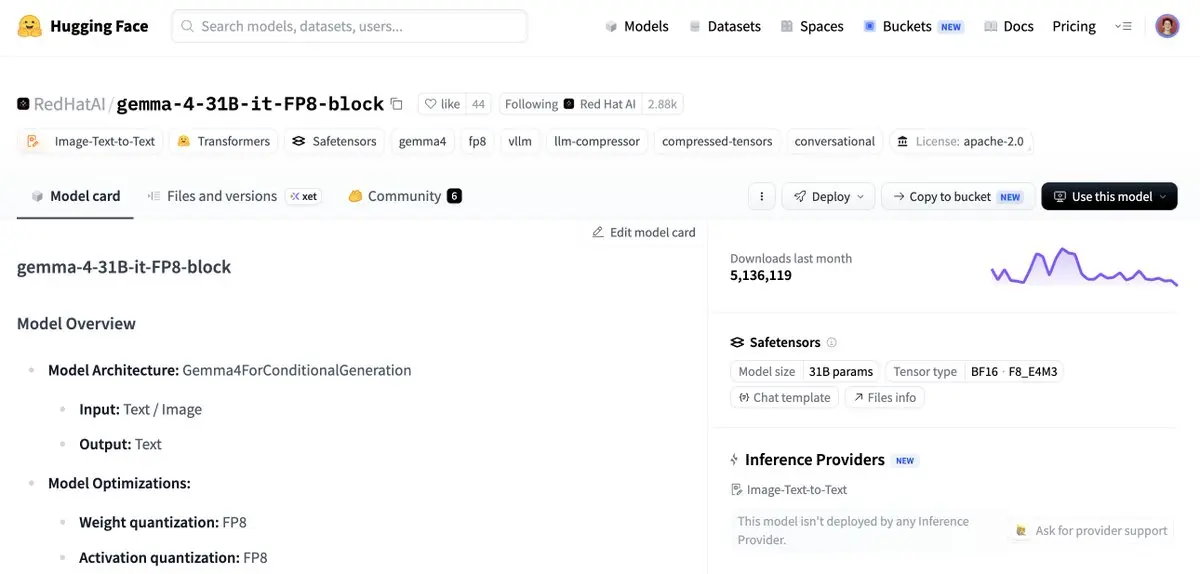
    Red Hat AI publishes pre-compressed models on Hugging Face, with the weight and activation quantization scheme listed right on the model card.
    Figure 9: Red Hat AI publishes pre-compressed models on Hugging Face, with the weight and activation quantization scheme listed right on the model card.

    If you want to get started, Red Hat AI publishes pre-compressed models on Hugging Face (see figure 9), including Kimi, Qwen, Gemma, and more, along with the recovery benchmarks from native precision to the quantized version, so you can decide whether it works for you. And when you're ready to put one into production, Red Hat AI Inference Server ships vLLM with these optimizations built in, and Red Hat OpenShift AI handles the scaling once a single GPU is no longer enough. Plus, it's all built from open source, from the model layer to the application stack itself.

    Related Posts

    • Accelerating large language models with NVFP4 quantization

    • LLM Compressor 0.9.0: Attention quantization, MXFP4 support, and more

    • Advancing low‑bit quantization for LLMs: AutoRound x LLM Compressor

    • Optimizing generative AI models with quantization

    • Multimodal model quantization support through LLM Compressor

    Recent Posts

    • LLM quantization guide: How to do it, and how it helps

    • Kafka Monthly Digest: August 2026

    • Orchestrate production RAG with OpenShift AI

    • Developing LLM guardrail configs locally with NeMo Guardrails

    • Red Hat OpenShift autoscaling using MachineSet autoscaler with KEDA

    Red Hat Developers logo LinkedIn YouTube Twitter Facebook

    Platforms

    • Red Hat AI
    • Red Hat Enterprise Linux
    • Red Hat OpenShift
    • Red Hat Ansible Automation Platform
    • See all products

    Build

    • Developer Sandbox
    • Developer tools
    • Interactive tutorials
    • API catalog

    Quicklinks

    • Learning resources
    • E-books
    • Cheat sheets
    • Blog
    • Events
    • Newsletter

    Communicate

    • About us
    • Contact sales
    • Find a partner
    • Report a website issue
    • Site status dashboard
    • Report a security problem

    RED HAT DEVELOPER

    Build here. Go anywhere.

    We serve the builders. The problem solvers who create careers with code.

    Join us if you’re a developer, software engineer, web designer, front-end designer, UX designer, computer scientist, architect, tester, product manager, project manager or team lead.

    Sign me up

    Red Hat legal and privacy links

    • About Red Hat
    • Jobs
    • Events
    • Locations
    • Contact Red Hat
    • Red Hat Blog
    • Inclusion at Red Hat
    • Cool Stuff Store
    • Red Hat Summit
    © 2026 Red Hat

    Red Hat legal and privacy links

    • Privacy statement
    • Terms of use
    • All policies and guidelines
    • Digital accessibility
    Ask AI