Introduction
Testing is an important part of software development as it provides a first line of assurance that changes to code will work as intended. While many tests can be executed independently, others require supporting infrastructure, such as databases or queues.
Test Containers enable this infrastructure to be run ephemerally as containers running alongside the application assets. These containers are created when unit tests are executed and then automatically torn down once the tests are completed -- enabling reproducible tests that can be executed anywhere.
However, running Test Containers in OpenShift Pipelines has been challenging since individual tasks are executed in a container within the pod. Test Containers in a containerized pipeline requires the ability to run a container within a container (aka Docker in Docker [often referred to as DinD]). This has traditionally been problematic in OpenShift and Kubernetes environments where enabling this feature requires a high level of privileges and disabling container isolation on the host.
A new feature introduced in OpenShift 4.20 is user namespaces which enables running container processes on the host in their own uniquely mapped UID and GID namespaces, ensuring the container remains isolated on the host rather than sharing the UID/GID namespace of the host. This feature enables us to run podman in a pod to execute the test containers while providing the desired security and isolation.
This blog will walk you through the process of leveraging the user namespaces feature with OpenShift Pipelines when running test containers.
Important: There is a crun 1.27 regression in OpenShift 4.22 and OpenShift 5.0 (when using RHCOS 9.8, fixed in RHCOS 10) that can cause storage volumes to leak with user namespaces depending on the storage provider. Check the following JIRA for the latest status of this issue.
Prerequisites
The following must be satisfied prior to using this demo:
- OpenShift 4.21+ where the user namespaces feature is GA and enabled by default
- OpenShift Pipelines installed on the cluster from OperatorHub
- Have an account on an OpenShift cluster with sufficient permissions to:
- Create a namespace
- Create a RoleBinding within a Namespace and associating it with a ClusterRole
Running the Demonstration
To execute the demonstration, follow these steps.
1. Clone the repository:
git clone https://github.com/gnunn1/pipeline-user-namespaces2. Change into the cloned directory:
cd pipeline-user-namespaces3. Apply the manifests with Kustomize using oc to create the demo resources in the petclinic namespace:
oc apply -k .Output will be as follows:
namespace/petclinic created
serviceaccount/pipeline-user-namespace created
rolebinding.rbac.authorization.k8s.io/pipeline-user-namespaces created
pipeline.tekton.dev/petclinic created
task.tekton.dev/maven created
4. Execute the Pipeline by creating a PipelineRun resource:
oc create -f pipelinerun-user-namespaces.yamlOutput:
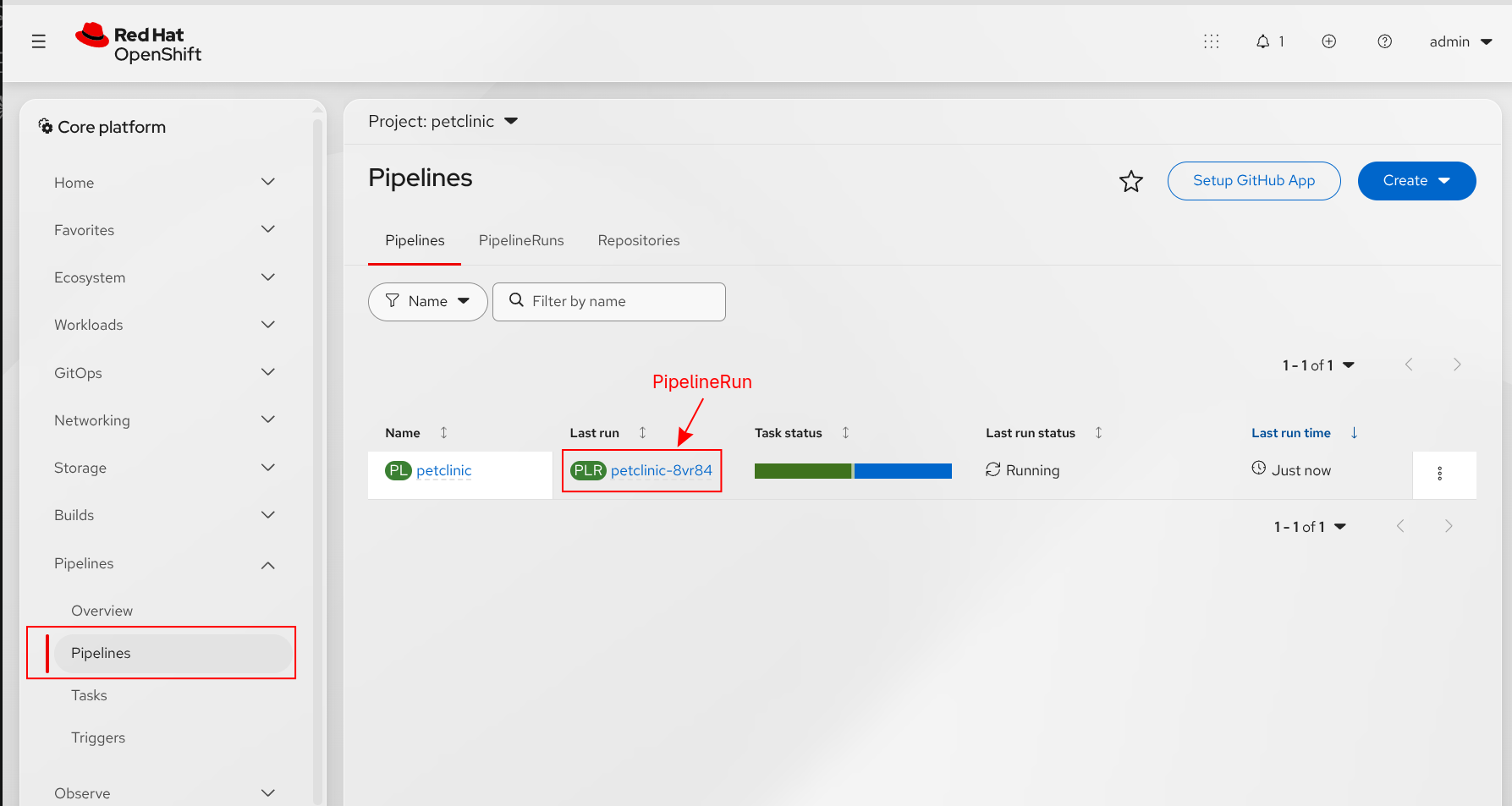
pipelinerun.tekton.dev/petclinic-8vr84 createdTo view the status of the PipelineRun as its executing, in the OpenShift Console, navigate to Pipelines and click the PipelineRun in the petclinic Project as shown below:
When executing the demo it should run successfully to completion:
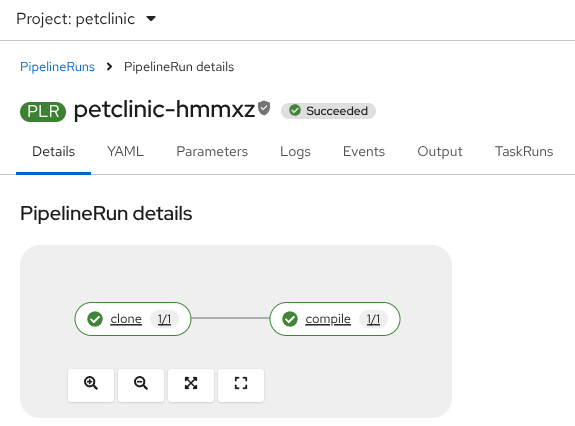
And, when looking at the logs for the compile task, notice the execution of the tests which relies on Test Containers to make a database available:
2026-11-12T15:58:50.968600668Z [INFO] -------------------------------------------------------
2026-11-12T15:58:50.968600668Z [INFO]  T E S T S
2026-11-12T15:58:50.968600668Z [INFO] -------------------------------------------------------
2026-11-12T15:58:54.857517938Z 2026-11-12 15:58:54,759 INFO  [org.testcontainers.DockerClientFactory] (build-9) Testcontainers version: 2.0.5
2026-11-12T15:58:56.240836709Z 2026-11-12 15:58:56,162 INFO  [org.testcontainers.dockerclient.DockerClientProviderStrategy] (build-9) Found Docker environment with Environment variables, system properties and defaults. Resolved dockerHost=unix:///var/run/podman/podman.sock
2026-11-12T15:58:56.263513796Z 2026-11-12 15:58:56,258 INFO  [org.testcontainers.images.PullPolicy] (build-9) Image pull policy will be performed by: DefaultPullPolicy()
2026-11-12T15:58:56.263513796Z 2026-11-12 15:58:56,259 INFO  [org.testcontainers.utility.ImageNameSubstitutor] (build-9) Image name substitution will be performed by: DefaultImageNameSubstitutor (composite of 'ConfigurationFileImageNameSubstitutor' and 'PrefixingImageNameSubstitutor')
2026-11-12T15:58:58.677918017Z [INFO] Running org.quarkus.samples.petclinic.OwnersResourceTest
2026-11-12T15:58:58.757898436Z 2026-11-12 15:58:58,691 INFO  [org.testcontainers.DockerClientFactory] (Thread-11) Docker host IP address is localhost
2026-11-12T15:58:58.858094714Z 2026-11-12 15:58:58,757 INFO  [org.testcontainers.DockerClientFactory] (Thread-11) Connected to docker:
2026-11-12T15:58:58.858094714Z   Server Version: 5.8.5
2026-11-12T15:58:58.858094714Z   API Version: 1.44
2026-11-12T15:58:58.858094714Z   Operating System: rhel
2026-11-12T15:58:58.858094714Z   Total Memory: 126177 MB
2026-11-12T15:58:58.858094714Z 2026-11-12 15:58:58,759 WARN  [org.testcontainers.utility.ResourceReaper] (Thread-11)
2026-11-12T15:58:58.858094714Z ********************************************************************************
2026-11-12T15:58:58.858094714Z Ryuk has been disabled. This can cause unexpected behavior in your environment.
2026-11-12T15:58:58.858094714Z ********************************************************************************
2026-11-12T15:58:58.858094714Z 2026-11-12 15:58:58,761 INFO  [org.testcontainers.DockerClientFactory] (Thread-11) Checking the system...
2026-11-12T15:58:58.858320681Z 2026-11-12 15:58:58,761 INFO  [org.testcontainers.DockerClientFactory] (Thread-11) ✔︎ Docker server version should be at least 1.6.0
2026-11-12T15:58:58.858373415Z 2026-11-12 15:58:58,775 INFO  [tc.docker.io/library/postgres:18] (Thread-11) Pulling docker image: docker.io/library/postgres:18. Please be patient; this may take some time but only needs to be done once.
2026-11-12T15:58:59.158656895Z 2026-11-12 15:58:59,151 INFO  [tc.docker.io/library/postgres:18] (docker-java-stream-1318287060) Starting to pull image
2026-11-12T15:58:59.258793748Z 2026-11-12 15:58:59,185 INFO  [tc.docker.io/library/postgres:18] (docker-java-stream-1318287060) Pulling image layers:  0 pending,  1 downloaded,  0 extracted, (0 bytes/0 bytes)
2026-11-12T15:58:59.258793748Z 2026-11-12 15:58:59,204 INFO  [tc.docker.io/library/postgres:18] (docker-java-stream-1318287060) Pulling image layers:  2 pending,  2 downloaded,  0 extracted, (0 bytes/? MB)
2026-11-12T15:58:59.258831441Z 2026-11-12 15:58:59,229 INFO  [tc.docker.io/library/postgres:18] (docker-java-stream-1318287060) Pulling image layers:  3 pending,  3 downloaded,  0 extracted, (0 bytes/? MB)
2026-11-12T15:58:59.258870814Z 2026-11-12 15:58:59,253 INFO  [tc.docker.io/library/postgres:18] (docker-java-stream-1318287060) Pulling image layers:  4 pending,  4 downloaded,  0 extracted, (0 bytes/? MB)
2026-11-12T15:58:59.358931352Z 2026-11-12 15:58:59,272 INFO  [tc.docker.io/library/postgres:18] (docker-java-stream-1318287060) Pulling image layers:  4 pending,  5 downloaded,  0 extracted, (0 bytes/? MB)
2026-11-12T15:58:59.358931352Z 2026-11-12 15:58:59,348 INFO  [tc.docker.io/library/postgres:18] (docker-java-stream-1318287060) Pulling image layers:  5 pending,  6 downloaded,  0 extracted, (0 bytes/? MB)
2026-11-12T15:58:59.358957784Z 2026-11-12 15:58:59,355 INFO  [tc.docker.io/library/postgres:18] (docker-java-stream-1318287060) Pulling image layers:  4 pending,  7 downloaded,  0 extracted, (0 bytes/? MB)
2026-11-12T15:58:59.459125090Z 2026-11-12 15:58:59,365 INFO  [tc.docker.io/library/postgres:18] (docker-java-stream-1318287060) Pulling image layers:  3 pending,  8 downloaded,  0 extracted, (0 bytes/? MB)
2026-11-12T15:58:59.459125090Z 2026-11-12 15:58:59,382 INFO  [tc.docker.io/library/postgres:18] (docker-java-stream-1318287060) Pulling image layers:  3 pending,  9 downloaded,  0 extracted, (0 bytes/? MB)
2026-11-12T15:58:59.459157152Z 2026-11-12 15:58:59,442 INFO  [tc.docker.io/library/postgres:18] (docker-java-stream-1318287060) Pulling image layers:  3 pending, 10 downloaded,  0 extracted, (0 bytes/? MB)
2026-11-12T15:58:59.459157152Z 2026-11-12 15:58:59,451 INFO  [tc.docker.io/library/postgres:18] (docker-java-stream-1318287060) Pulling image layers:  2 pending, 11 downloaded,  0 extracted, (0 bytes/? MB)
2026-11-12T15:59:01.662750366Z 2026-11-12 15:59:01,645 INFO  [tc.docker.io/library/postgres:18] (docker-java-stream-1318287060) Pulling image layers:  1 pending, 12 downloaded,  0 extracted, (80 MB/? MB)
2026-11-12T15:59:03.866162031Z 2026-11-12 15:59:03,852 INFO  [tc.docker.io/library/postgres:18] (docker-java-stream-1318287060) Pulling image layers:  0 pending, 13 downloaded,  0 extracted, (80 MB/110 MB)
2026-11-12T15:59:03.866162031Z 2026-11-12 15:59:03,859 INFO  [tc.docker.io/library/postgres:18] (docker-java-stream-1318287060) Pulling image layers:  0 pending, 14 downloaded,  0 extracted, (80 MB/110 MB)
2026-11-12T15:59:03.966288532Z 2026-11-12 15:59:03,899 INFO  [tc.docker.io/library/postgres:18] (docker-java-stream-1318287060) Pulling image layers:  0 pending, 14 downloaded,  0 extracted, (80 MB/110 MB)
2026-11-12T15:59:03.966288532Z 2026-11-12 15:59:03,900 INFO  [tc.docker.io/library/postgres:18] (docker-java-stream-1318287060) Pull complete. 14 layers, pulled in 4s (downloaded 80 MB at 20 MB/s)
2026-11-12T15:59:03.966319254Z 2026-11-12 15:59:03,900 INFO  [tc.docker.io/library/postgres:18] (Thread-11) Image docker.io/library/postgres:18 pull took PT5.125386306S
2026-11-12T15:59:03.966319254Z 2026-11-12 15:59:03,934 INFO  [tc.docker.io/library/postgres:18] (Thread-11) Creating container for image: docker.io/library/postgres:18
2026-11-12T15:59:03.966319254Z 2026-11-12 15:59:03,941 WARN  [tc.docker.io/library/postgres:18] (Thread-11) Reuse was requested but the environment does not support the reuse of containers
2026-11-12T15:59:03.966319254Z To enable reuse of containers, you must set 'testcontainers.reuse.enable=true' in a file located at /tekton/home/.testcontainers.properties
2026-11-12T15:59:04.066543383Z 2026-11-12 15:59:04,014 INFO  [tc.docker.io/library/postgres:18] (Thread-11) Container docker.io/library/postgres:18 is starting: 5b90c729b01922bab284eaa540dc9c8d00edac8a229ffc22dba7333cd1e54098
2026-11-12T15:59:05.569021436Z 2026-11-12 15:59:05,477 INFO  [tc.docker.io/library/postgres:18] (Thread-11) Container docker.io/library/postgres:18 started in PT1.543139688S
2026-11-12T15:59:05.569021436Z 2026-11-12 15:59:05,477 INFO  [tc.docker.io/library/postgres:18] (Thread-11) Container is started (JDBC URL: jdbc:postgresql://localhost:39079/quarkus?loggerLevel=OFF)
2026-11-12T15:59:05.569055758Z 2026-11-12 15:59:05,479 INFO  [io.quarkus.datasource.deployment.devservices.DevServicesDatasourceProcessor] (Thread-11) Dev Services for default datasource (postgresql) started - container ID is 5b90c729b019
2026-11-12T15:59:05.982191911Z 2026-11-12 15:59:05,915 INFO  [org.hibernate.orm.core] (main) HHH000001: Hibernate ORM core version 7.4.9.Final
2026-11-12T15:59:06.182543941Z 2026-11-12 15:59:06,089 INFO  [org.hibernate.orm.connections.pooling] (main) HHH10001005: Database info:
2026-11-12T15:59:06.182543941Z         Database JDBC URL [undefined/unknown]
2026-11-12T15:59:06.182543941Z         Database driver: undefined/unknown
2026-11-12T15:59:06.182543941Z         Database dialect: PostgreSQLDialect
2026-11-12T15:59:06.182543941Z         Database version: 14.0
2026-11-12T15:59:06.182543941Z         Default catalog/schema: unknown/unknown
2026-11-12T15:59:06.182543941Z         Autocommit mode: undefined/unknown
2026-11-12T15:59:06.182543941Z         Isolation level: <unknown>
2026-11-12T15:59:06.182543941Z         JDBC fetch size: undefined/unknown
2026-11-12T15:59:06.182543941Z         Pool: undefined/unknown
2026-11-12T15:59:06.182543941Z         Minimum pool size: undefined/unknown
2026-11-12T15:59:06.182543941Z         Maximum pool size: undefined/unknown
2026-11-12T15:59:06.283059422Z 2026-11-12 15:59:06,268 INFO  [org.hibernate.validator.internal.util.Version] (main) HV000001: Hibernate Validator 9.1.5.Final
2026-11-12T15:59:07.849818019Z 2026-11-12 15:59:07,811 INFO  [io.quarkus] (main) quarkus-petclinic 1.0.0-SNAPSHOT on JVM (powered by Quarkus 3.40.1.1) started in 15.266s. Listening on: http://localhost:8081
2026-11-12T15:59:07.849818019Z 2026-11-12 15:59:07,812 INFO  [io.quarkus] (main) Profile test activated.
2026-11-12T15:59:07.849851002Z 2026-11-12 15:59:07,812 INFO  [io.quarkus] (main) Installed features: [agroal, cdi, compose, hibernate-orm, hibernate-orm-panache, hibernate-validator, jdbc-postgresql, kubernetes, narayana-jta, qute, rest, rest-jackson, rest-qute, smallrye-context-propagation, smallrye-health, vertx, web-dependency-locator]
2026-11-12T15:59:09.642556450Z [INFO] Tests run: 4, Failures: 0, Errors: 0, Skipped: 0, Time elapsed: 10.88 s -- in org.quarkus.samples.petclinic.OwnersResourceTest
2026-11-12T15:59:09.643011255Z [INFO] Running org.quarkus.samples.petclinic.VetsResourceTest
2026-11-12T15:59:09.658273025Z [INFO] Tests run: 1, Failures: 0, Errors: 0, Skipped: 0, Time elapsed: 0.031 s -- in org.quarkus.samples.petclinic.VetsResourceTest
2026-11-12T15:59:09.668624088Z 2026-11-12 15:59:09,663 INFO  [io.quarkus] (main) quarkus-petclinic stopped in 0.023s
2026-11-12T15:59:10.438976679Z [INFO]
2026-11-12T15:59:10.438976679Z [INFO] Results:
2026-11-12T15:59:10.438976679Z [INFO]
2026-11-12T15:59:10.439413682Z [INFO] Tests run: 5, Failures: 0, Errors: 0, Skipped: 0
2026-11-12T15:59:10.439413682Z [INFO]
Understanding the Demonstration
A goal of this demonstration was to use as much of the out-of-the-box capabilities of OpenShift as possible to provide maximum supportability and to avoid teams having to maintain their own set of content, including container images.
Assigning Security Context Constraint
To support user namespaces, OpenShift provides a Security Context Constraints (SCC) called nested-containers that enables the usage of this feature. In the demo, we use a RoleBinding to enable this SCC for a new ServiceAccount, pipeline-user-namespace in the petclinic namespace.
apiVersion: rbac.authorization.k8s.io/v1
kind: RoleBinding
metadata:
  name: pipeline-user-namespaces
roleRef:
  apiGroup: rbac.authorization.k8s.io
  kind: ClusterRole
  name: system:openshift:scc:nested-container
subjects:
  - kind: ServiceAccount
name: pipeline-user-namespaceImportant: As mentioned in the prerequisites section, creating this RoleBinding requires cluster-scoped permissions as it is bound to a ClusterRole. If you are a namespace administrator, you may need a cluster administrator to create this resource.
We have opted to assign the SCC to a dedicated ServiceAccount rather than use the default pipeline ServiceAccount that OpenShift Pipelines utilizes so that other tasks, which do not need this capability, are not impacted.
Custom Tekton Resources
A series of custom Tekton resources are used to support this demonstration. A custom Maven task is used rather than the out of the box task in order to support the following requirements:
- Rootless Podman requires additional devices so it can run in its own network namespace
- We need to make Podman available as a sidecar and set the DOCKER_HOST environment variable in the maven container so that Test Containers knows the location to run containers
- The podman sidecar requires specific security context settings that cannot be specified in a PipelineRun/TaskRun.
Below is the Maven task that is used. Take note that we are using existing Red Hat supported images for OpenJDK and Podman.
apiVersion: tekton.dev/v1
kind: Task
metadata:
  annotations:
    # Tekton copies task annotations onto the TaskRun pod. CRI-O reads this one
    # and exposes the two devices rootless podman needs: /dev/net/tun so that
    # pasta can give each nested container its own network namespace, and
    # /dev/fuse so that fuse-overlayfs can be used instead of the much slower
    # vfs storage driver.
    io.kubernetes.cri-o.Devices: "/dev/fuse,/dev/net/tun"
  name: maven
spec:
  description: >-
    Runs a Maven build alongside a rootless podman sidecar so that tests using
    Testcontainers can start nested containers.

    The TaskRun must be run with a pod template that sets "hostUsers: false" and
    with a service account bound to an SCC that requires a pod level user
    namespace and allows the SETUID and SETGID capabilities, such as the
    OpenShift provided "nested-container" SCC. See scc-rolebinding.yaml.

    Only the podman sidecar is granted those capabilities, the maven step itself
    runs with the default restricted capability set and simply talks to the
    podman socket over DOCKER_HOST.
  params:
    - name: GOALS
      description: The maven goals to run.
      type: array
      default:
        - package
    - name: SUBDIRECTORY
      description: The subdirectory within the source workspace holding the maven project.
      type: string
      default: ""
    - name: MAVEN_IMAGE
      description: Image providing the JDK and maven. Red Hat supported, no custom build required.
      type: string
      default: registry.redhat.io/ubi9/openjdk-21:latest
    - name: PODMAN_IMAGE
      description: Image providing podman. Ships a "podman" user (uid 1000) with subuid/subgid ranges and file capabilities on newuidmap/newgidmap, which is what rootless nested containers need.
      type: string
      default: registry.redhat.io/rhel9/podman:latest
  workspaces:
    - name: source
      description: The workspace holding the maven project.
    - name: maven-repository
      description: Workspace used as the local maven repository, allowing it to be cached between runs.
  steps:
    - name: maven-goals
      image: $(params.MAVEN_IMAGE)
      workingDir: $(workspaces.source.path)/$(params.SUBDIRECTORY)
      command:
        - /usr/bin/mvn
      args:
        - -B
        - -Dmaven.repo.local=$(workspaces.maven-repository.path)/repository
        - $(params.GOALS[*])
      env:
        - name: HOME
          value: /tekton/home
        # Testcontainers talks to the podman sidecar over the shared socket.
        - name: DOCKER_HOST
          value: unix:///var/run/podman/podman.sock
        # Ryuk needs to mount the container socket into a container of its own,
        # which rootless podman in a user namespace will not allow.
        - name: TESTCONTAINERS_RYUK_DISABLED
          value: "true"
      computeResources:
        requests:
          cpu: "500m"
          memory: 1Gi
        limits:
          cpu: "2"
          memory: 2Gi
      volumeMounts:
        - name: podman-socket
          mountPath: /var/run/podman
  sidecars:
    - name: podman
      image: $(params.PODMAN_IMAGE)
      env:
        - name: HOME
          value: /home/podman
        - name: CONTAINERS_CONF_OVERRIDE
          value: /tmp/containers-override.conf
      # Supplied as args rather than command so that the image entrypoint is
      # left intact. Tekton shuts a sidecar down by swapping in its "nop"
      # image, which only works if its own entrypoint still runs.
      args:
        - /bin/bash
        - -c
        - |
          set -e
          # The Red Hat podman image ships a containers.conf tuned for running
          # podman as a nested engine on the host network, which leaves
          # containers it starts with no published ports. Testcontainers needs
          # the published ports, so give each container its own network
          # namespace. Everything else in the shipped config is left alone.
          #
          # This works because OpenShift Pipelines adds the
          # "io.kubernetes.cri-o.Devices: /dev/fuse,/dev/net/tun" annotation to
          # TaskRun pods, so pasta (i.e. rootless user-mode networking in podman) can
          # set up the tap device and podman can use
          # fuse-overlayfs rather than falling back to the much slower vfs
          # storage driver.
          cat > "${CONTAINERS_CONF_OVERRIDE}" <<'EOF'
          [containers]
          netns = "private"
          EOF
          exec podman system service --time=0 unix:///var/run/podman/podman.sock
      securityContext:
        runAsUser: 1000
        capabilities:
          add:
            - SETGID
            - SETUID
          drop:
            - ALL
        # Lets podman call the setcap'd newuidmap/newgidmap to create the
        # nested user namespace each container runs in.
        allowPrivilegeEscalation: true
        # Required so that podman can mount /proc inside nested containers.
        procMount: Unmasked
      computeResources:
        requests:
          cpu: "500m"
          memory: 1Gi
        limits:
          cpu: "2"
          memory: 4Gi
      volumeMounts:
        - name: podman-socket
          mountPath: /var/run/podman
        - name: podman-storage
          mountPath: /home/podman/.local/share/containers
  volumes:
    - name: podman-socket
      emptyDir: {}
    - name: podman-storage
      emptyDir: {}
Next, we need to create a PipelineRun to execute the Pipeline. To support user namespaces, we will need to specify a custom security context for the Maven (i.e. compile) task as well as the pipeline-user-namespace ServiceAccount that executes only for this task. All other tasks continue to run using the default pipeline ServiceAccount and associated SCC.
apiVersion: tekton.dev/v1
kind: PipelineRun
metadata:
  labels:
    tekton.dev/pipeline: petclinic
  generateName: petclinic-
  namespace: petclinic
spec:
  params:
    - name: SOURCE_GIT_REVISION
      value: master
    - name: SOURCE_GIT_URL
      value: https://github.com/gnunn-gitops/quarkus-petclinic
  pipelineRef:
    name: petclinic
  taskRunSpecs:
    - pipelineTaskName: compile
      serviceAccountName: pipeline-user-namespace
      podTemplate:
        hostUsers: false
        securityContext:
          fsGroup: 1000
          fsGroupChangePolicy: OnRootMismatch
          runAsUser: 1000
          runAsGroup: 1000
          runAsNonRoot: true
  timeouts:
    pipeline: 1h0m0s
  workspaces:
    - name: git-source
      volumeClaimTemplate:
        spec:
          accessModes:
            - ReadWriteOnce
          resources:
            requests:
              storage: 10Gi
    # The local maven repository is scratch space for the run. Backing it with a
    # PVC to cache dependencies across runs is possible, but Tekton's affinity
    # assistant (coschedule=workspaces by default) rejects a TaskRun that binds
    # more than one PVC, so that would mean either sharing a single PVC with the
    # source workspace via subPaths or setting coschedule=pipelineruns.
    - name: maven-repository
      emptyDir: {}
Conclusion
In this blog, we reviewed how to leverage the user namespaces feature in OpenShift 4.21+ with OpenShift Pipelines to support Test Containers in unit tests. By leveraging this feature, tools which require access to execute using a specific UID (such as TestContainers) can operate successfully.
AI Disclaimer: All wording and original demonstration is the work of the authors. An AI assistant was used to optimize the demonstration, removing some unneeded resources and leveraging OOTB Red Hat containers instead of creating a custom image.
Thanks to Andrew Block for proof-reading this blog.

