This is the first article of a two-part series on operator-chaos, an open source chaos engineering framework for Kubernetes operators. In this series, we discuss why traditional chaos tools miss the most dangerous class of operator failures, introduce the four injection modes that operator-chaos provides, and run it against cert-manager on a live cluster. In the next article, we show what happens when operators fail these tests.
Your chaos tests are passing. Your operators are not resilient.
Here's a scenario that might feel familiar. You have a Kubernetes operator running in production. You are diligent about resilience testing, so you run Krkn or Litmus against it. Kill pods. Block network traffic. Exhaust resource quotas. Everything passes. Green across the board. You ship with confidence.
Then something mundane happens. Someone accidentally scales your controller Deployment to zero replicas. A brief API server blip disconnects your controller's watch stream. A colleague deletes a Service that your operator created, thinking it was left over from a test. And your operator never recovers. Users start reporting errors hours later. The Deployment is sitting at zero replicas, the Service is gone, and your operator's reconciliation loop is doing nothing about it.
Why? Because killing pods and watching them restart only tests one thing: The Kubernetes deployment controller. It tells you nothing about whether your operator will restore its full desired state when something drifts.
We built operator-chaos to find these gaps. It is an open source Go framework (requiring Go 1.26+) that tests Kubernetes operator reconciliation with 20 failure injection types across four categories, four injection modes ranging from black-box command-line interface (CLI) to per-action interceptors, and structured verdicts that tell you exactly what your operator did (or did not do) when things went wrong.
What makes operator reconciliation different
A Kubernetes operator does not just manage pods. It manages a resource graph: Deployments, Services, ConfigMaps, Secrets, RoleBindings, Leases, ValidatingWebhookConfigurations, and CustomResourceDefinitions. The reconciliation loop is supposed to enforce the entire desired state of that graph, not just check whether individual resources exist.
Traditional chaos tools ask a single question, illustrated in figure 1: Does the pod come back?
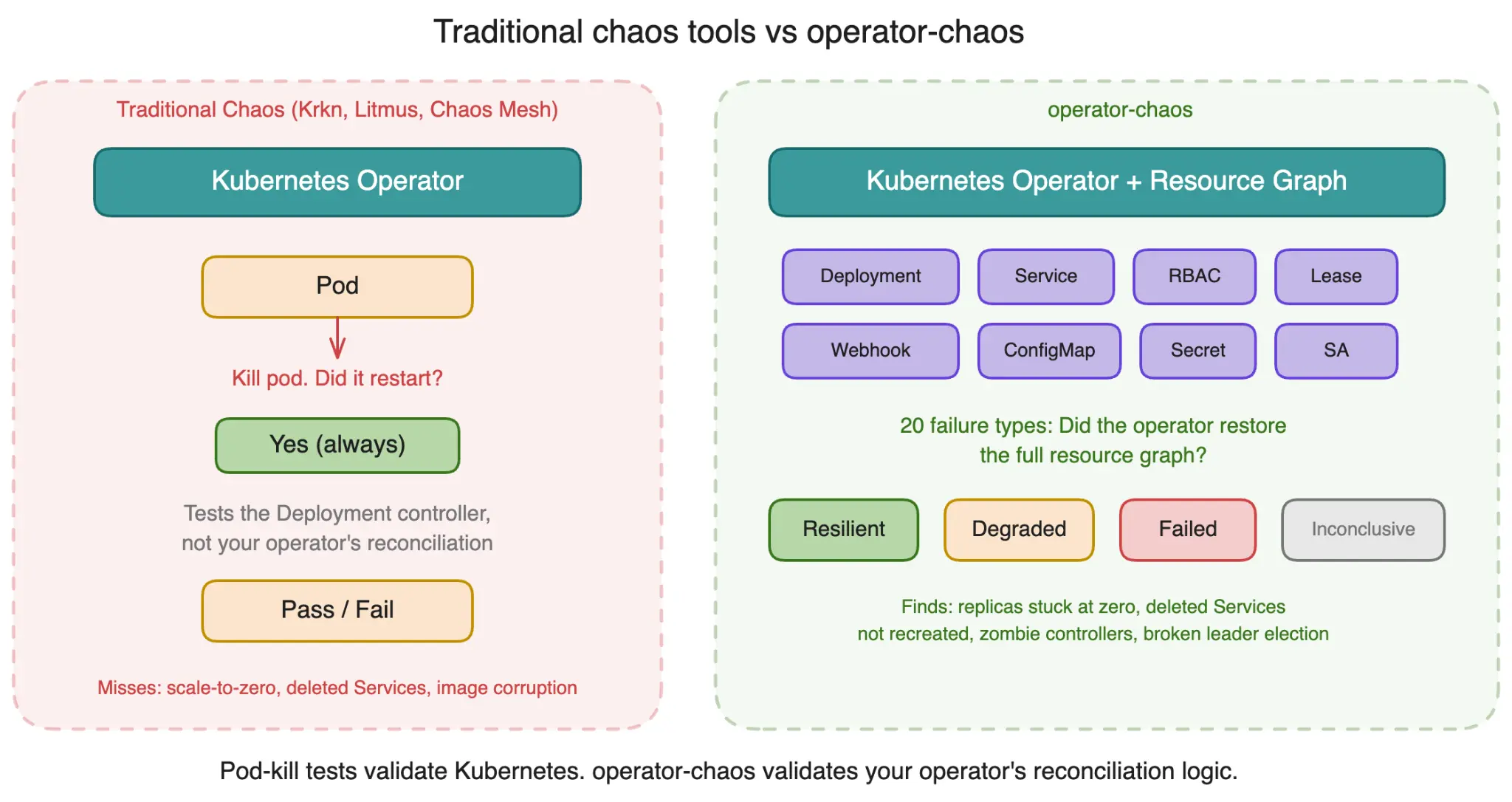
That question has a simple answer, and it is almost always "yes" because the Kubernetes Deployment controller handles pod restarts. You are testing built-in Kubernetes functionality, not your operator's reconciliation logic.
The harder questions are the ones that expose real production failures:
- If someone scales your Deployment to zero replicas, does the operator detect it and restore the intended replica count?
- If a Service gets deleted, does the operator recreate it?
- If a container image gets corrupted (triggering ImagePullBackOff), does the operator detect the stuck rollout and fix it?
- If the leader election Lease gets deleted, does the operator re-establish leadership?
These are not hypothetical scenarios. They are things that happen in real clusters, caused by human error, automation bugs, or other controllers competing for the same resources. And most operators silently fail when they happen.
Knowledge models: Teaching operator-chaos what your operator manages
To understand what your operator manages, operator-chaos uses knowledge models. A knowledge model is a YAML file that declares the operator's namespace, its components, the resources each component creates, and what "healthy" looks like. This lets the framework inject failures that are semantically meaningful to your operator, not just generic infrastructure disruptions. Figure 2 displays a typical knowledge model workflow.
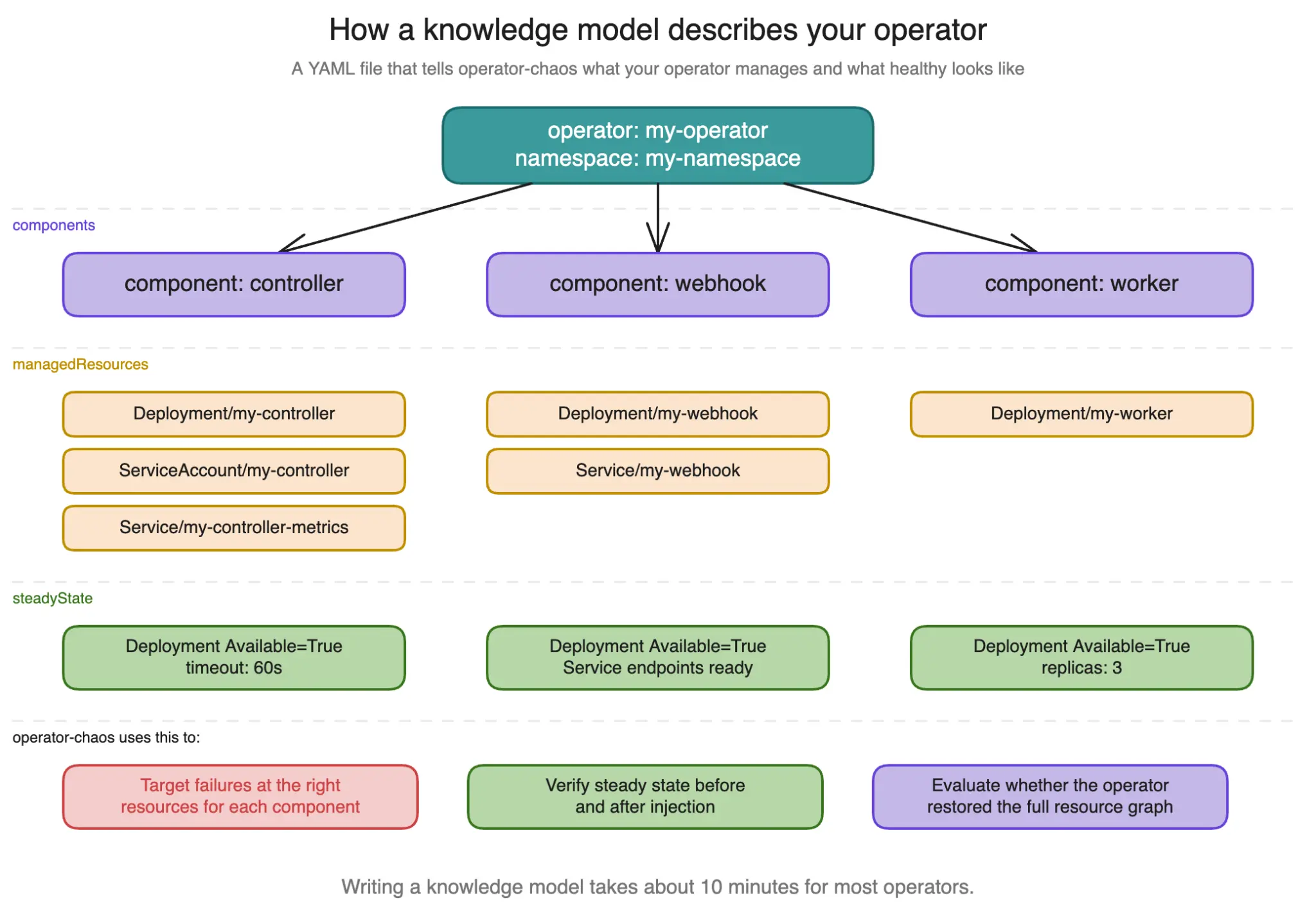
Here is a trimmed example for cert-manager:
operator:
  name: cert-manager
  namespace: cert-manager

components:
  - name: cert-manager-controller
    controller: cert-manager-operator
    managedResources:
      - apiVersion: apps/v1
        kind: Deployment
        name: cert-manager
        namespace: cert-manager
        labels:
          app.kubernetes.io/name: cert-manager
        expectedSpec:
          replicas: 1
    steadyState:
      checks:
        - type: conditionTrue
          apiVersion: apps/v1
          kind: Deployment
          name: cert-manager
          namespace: cert-manager
          conditionType: Available
      timeout: "60s"

recovery:
  reconcileTimeout: "300s"
  maxReconcileCycles: 10
Three components (controller, webhook, CA injector), each with a managed Deployment and a steady-state check looking for Available=True. Writing this took about 10 minutes.
Twenty failure types across four categories
The framework ships with twenty failure injection types, organized into four categories:
- Infrastructure failures test basic recovery: PodKill, NetworkPartition, QuotaExhaustion, NamespaceDeletion, DeploymentScaleZero.
- Configuration failures test spec drift detection: ConfigDrift, CRDMutation, LabelStomping, ClientFault, ImageCorrupt, CrashLoopInject.
- Access control failures test permission and webhook resilience: RBACRevoke, WebhookDisrupt, WebhookLatency.
- Lifecycle failures test resource graph integrity: FinalizerBlock, OwnerRefOrphan, SecretDeletion, ResourceDeletion, LeaderElectionDisrupt, PDBBlock.
Every experiment produces a structured verdict, not just pass/fail:
- Resilient: The operator restored the full desired state within the recovery timeout.
- Degraded: The operator is running, but it did not correct the drift.
- Failed: The operator crashed, stopped reconciling, or entered an unrecoverable state.
- Inconclusive: The pre-check failed, or the test could not determine the outcome.
The experiment lifecycle
Every experiment follows the same five-phase lifecycle, regardless of injection type. Figure 3 displays the phases of an experiment's lifecycle.
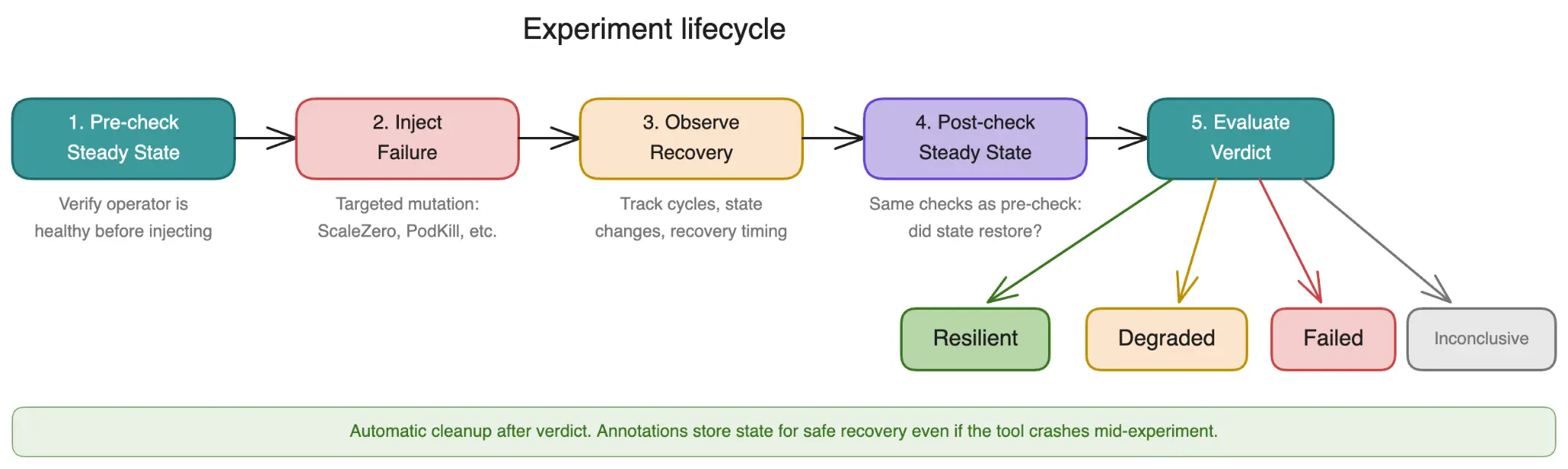
- Steady-state pre-check: Before injecting anything, operator-chaos verifies the operator is healthy.
- Failure injection: The framework injects a specific, operator-semantic failure.
- Observation: The framework watches for recovery, tracking reconciliation cycles, resource state changes, and timing.
- Steady-state post-check: The framework runs the same health checks from Phase 1 to see if the operator restored the desired state.
- Verdict evaluation: Based on the evidence, the framework assigns a structured verdict.
Cleanup happens automatically after the verdict, whether the experiment passed or failed.
Four injection modes
This is the core architectural decision in operator-chaos. We provide four injection modes, each targeting a different layer of the operator's stack.
Mode 1: CLI (ChaosExperiment CRs)
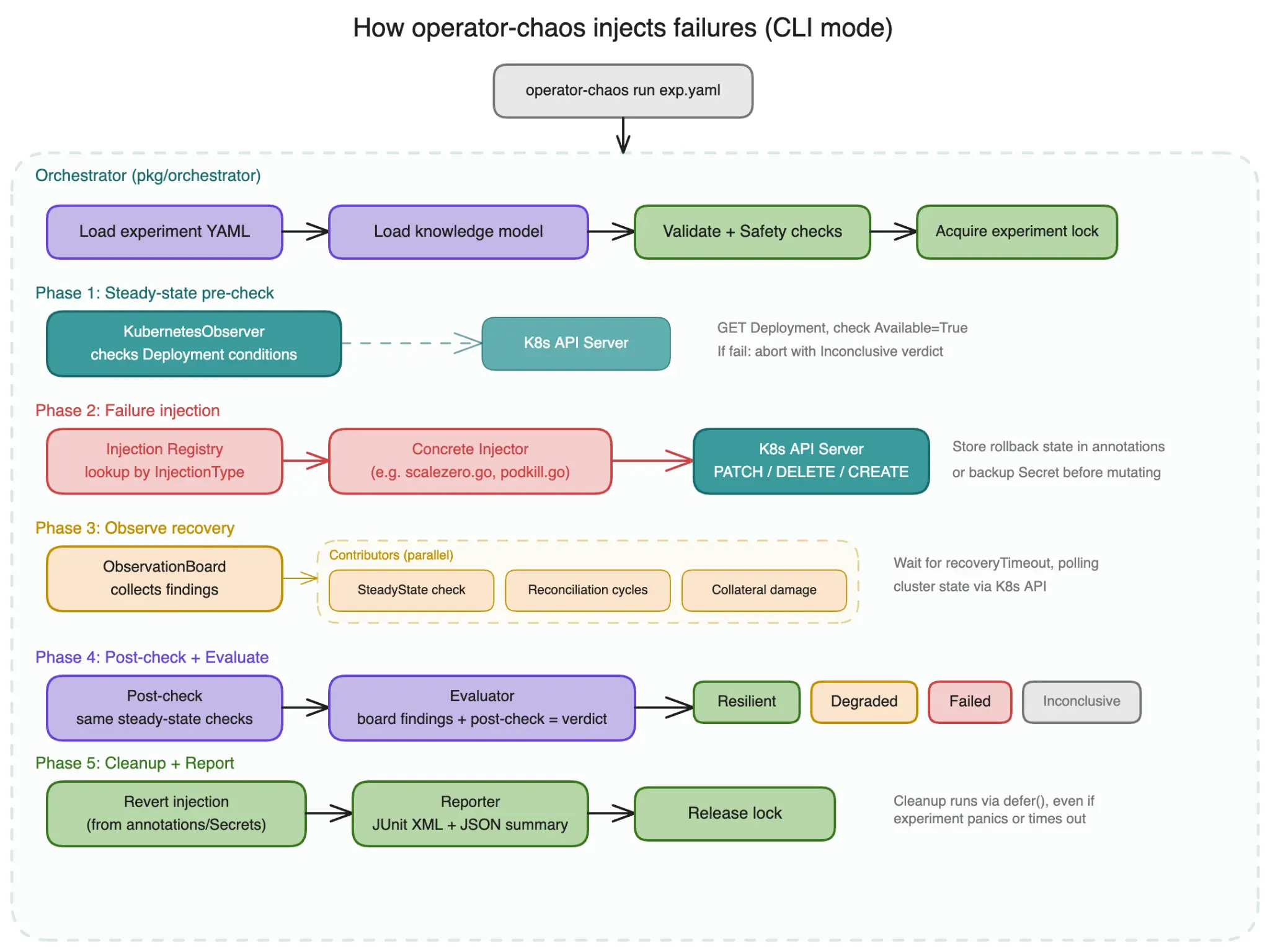
External, black-box, zero code changes. You write ChaosExperiment YAML files, point them at a running operator on a live cluster, and get verdicts.
operator-chaos run experiments/cert-manager/deployment-scale-zero.yaml
  --knowledge knowledge/cert-manager.yaml -v
[PRE-CHECK] Steady state verified (1/1 checks passed)
[INJECT]    DeploymentScaleZero: scaled Deployment cert-manager to 0 replicas
[OBSERVE]   Deployment cert-manager: replicas restored to 1 (2.1s after injection)
[OBSERVE]   Deployment cert-manager: Available=True (5.3s after injection)
[POST-CHECK] Steady state verified (1/1 checks passed)
[VERDICT]   Resilient
            Recovery time: 5.3s
When to use it: First pass on any operator. CI/CD gates. No code changes needed.
Figure 4 provides an overview of how operator-chaos injects failures in this mode.
Mode 2: Transport-level (chaostransport)
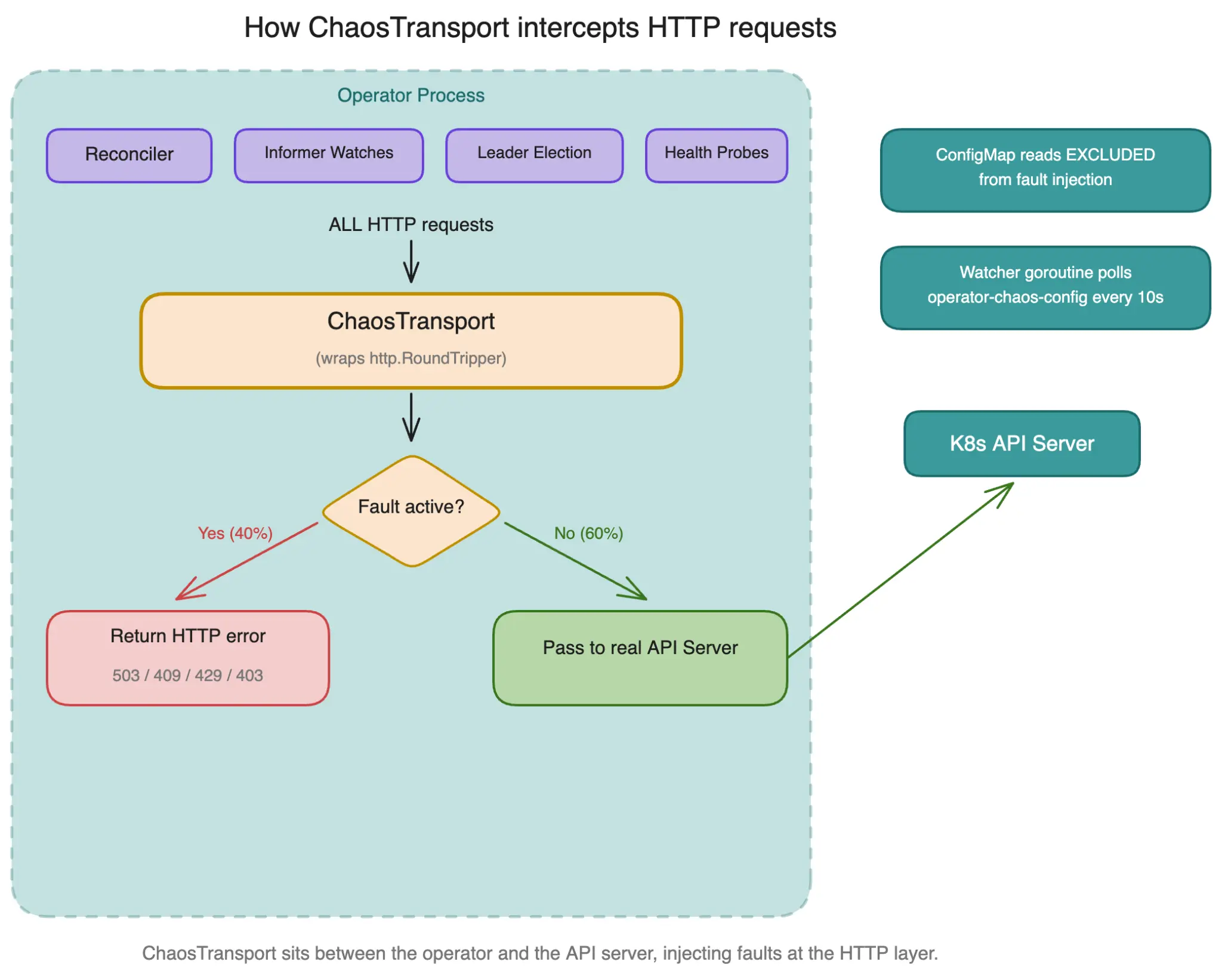
Wraps http.RoundTripper with rest.Config.WrapTransport, intercepting every HTTP request the operator makes to the API server. Integration is three lines:
cfg := ctrl.GetConfigOrDie()
ct := chaostransport.NewChaosTransport(chaostransport.NewFaultConfig(nil))
cfg.WrapTransport = ct.WrapTransport
When to use it: Testing how the operator handles API server failures that affect informers, watches, and the full HTTP path.
Figure 5 demonstrates how ChaosTransport intercepts HTTP requests.
Mode 3: Client-level (ChaosClient)
Wraps client.Client and intercepts CRUD operations. More targeted than transport-level, you can fail specific operations without affecting leader election and health probes.
faults := sdk.NewFaultConfig(map[sdk.Operation]sdk.FaultSpec{
    sdk.OpUpdate: {ErrorRate: 0.5, Error: "update conflict"},
})
cc := chaosclient.NewChaosClient(realClient, faults)
When to use it: Testing how reconcilers handle specific API operation failures without breaking infrastructure.
Mode 4: Action pipeline (ActionInterceptor)
In this mode, the finest details are possible. Instead of "fail all updates" you say "fail the deploy action 50% of the time" or "skip the garbage collection action entirely."
interceptor := chaostransport.NewActionInterceptor(map[string]chaostransport.ActionFaultConfig{
    "deploy": {FailBefore: "simulated deploy failure", ErrorRate: 0.5},
    "gc":     {Skip: true},
})
When to use it: Testing specific reconciliation steps in isolation. Simulating partial failures in multi-step pipelines.
Comparing the four modes
The four injection modes each targets a different layer, as summarized in figure 6.
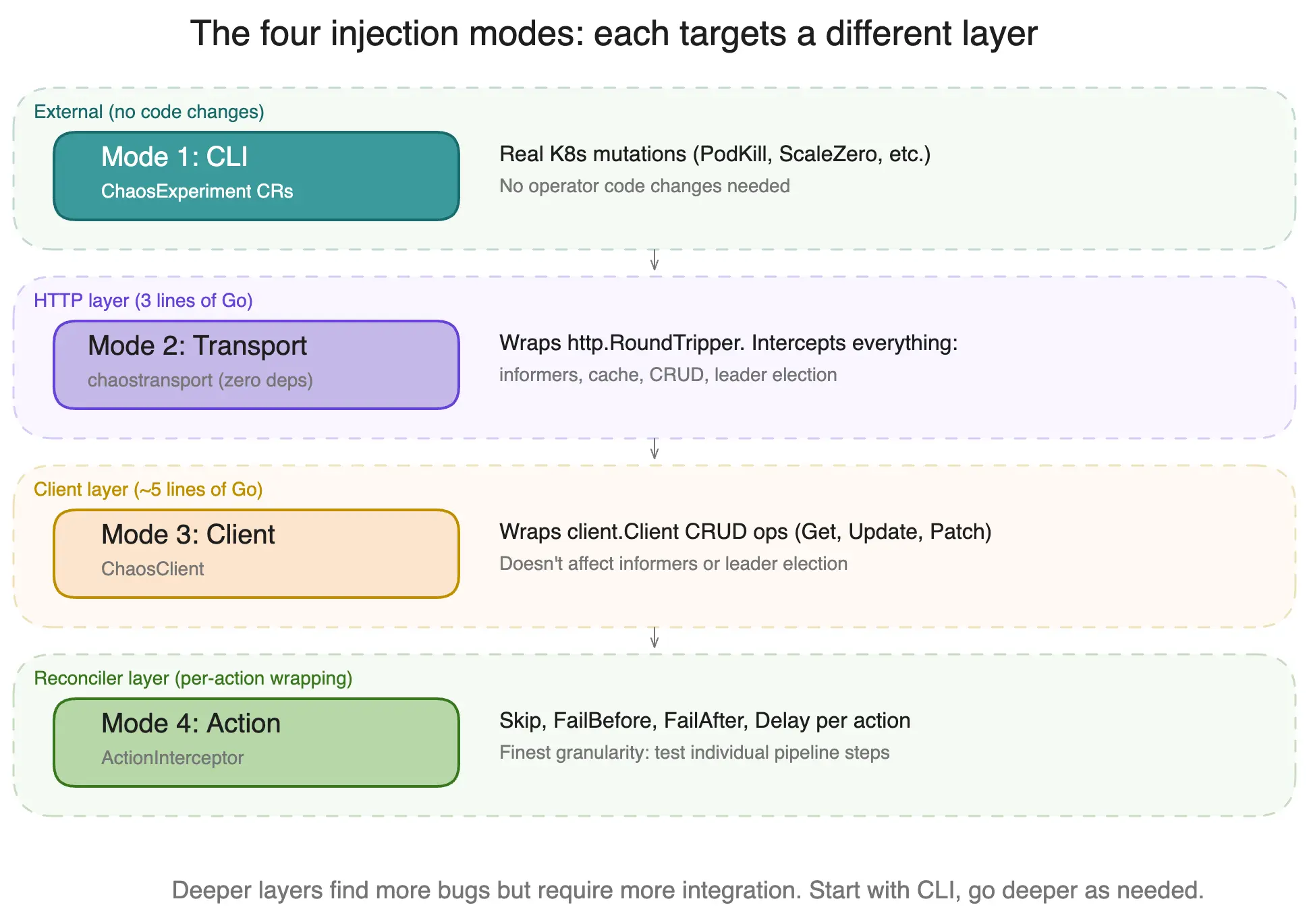
Here's a summary of what each mode does best:
| Mode | Layer | Code changes | Catches informer faults | Per-action targeting | Best for |
|---|---|---|---|---|---|
| CLI | External | None | N/A (real mutations) | No | First pass, CI/CD |
| Transport | HTTP | 3 lines | Yes | No | Full-stack API faults |
| Client | client.Client | approximately 5 lines | No | No | Targeted CRUD faults |
| Action | Reconciler actions | Per-action | No | Yes | Pipeline step isolation |
The chaostransport zero-dependency module
Operators in the OpenDataHub ecosystem are pinned to different controller-runtime and k8s.io versions. If the chaos SDK imports controller-runtime v0.20, none of those operators can go get it without a major dependency upgrade.
The chaostransport sub-module solves this. Its go.mod is exactly two directives:
module github.com/opendatahub-io/operator-chaos/pkg/chaostransport
go 1.22.0
Zero dependencies on controller-runtime or any k8s.io library. Any operator can import it:
go get github.com/opendatahub-io/operator-chaos/pkg/chaostransportNo version conflicts. No transitive dependency hell.
ConfigMap-driven runtime control
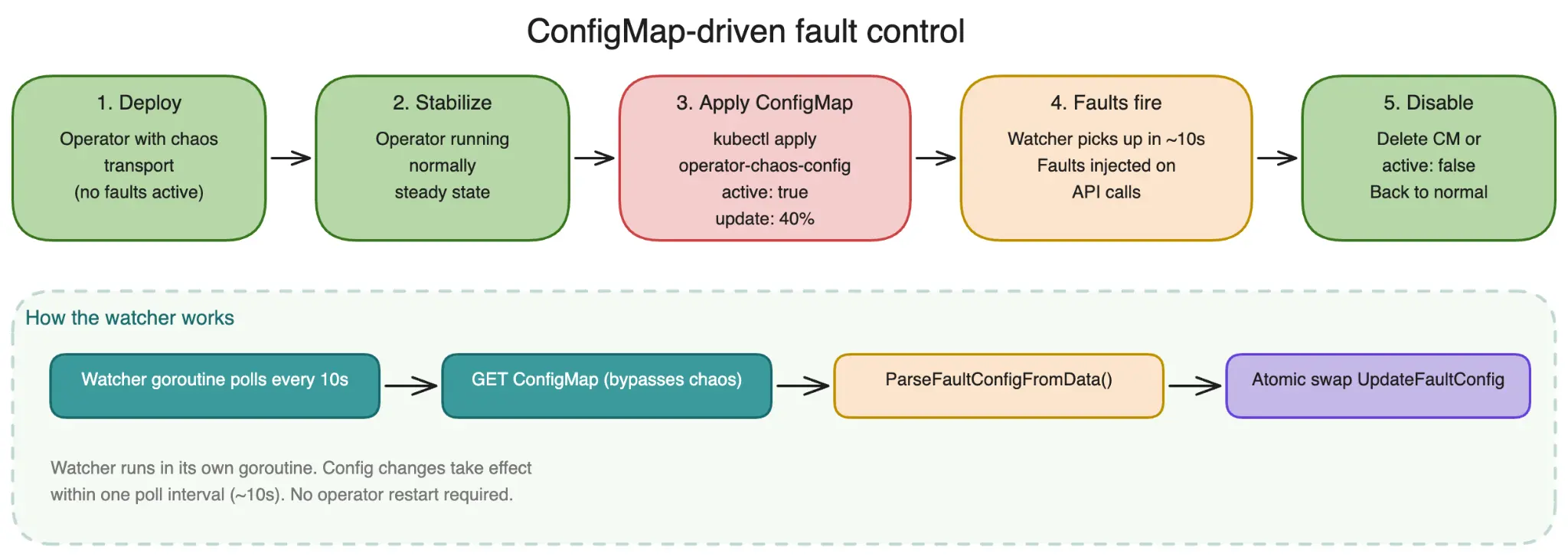
Both the SDK and the chaostransport module support dynamic fault configuration using a ConfigMap called operator-chaos-config. The chaostransport module provides a ParseFaultConfigFromData helper that parses fault configuration from a ConfigMap's data map. Operators implement a simple watcher goroutine (typically 10-15 lines) that reads the ConfigMap periodically and calls UpdateFaultConfig to swap the configuration atomically.
apiVersion: v1
kind: ConfigMap
metadata:
  name: operator-chaos-config
  namespace: my-operator
data:
  config: |
    {
      "active": true,
      "faults": {
        "update": {"errorRate": 0.3, "error": "chaos conflict"},
        "get":    {"errorRate": 0.1, "error": "chaos unavailable"}
      }
    }
Figure 7 provides an overview of ConfigMap-driven fault control. Deploy the instrumented operator, wait for steady state, apply the ConfigMap. The watcher picks it up within 10 seconds. When done, delete the ConfigMap or set active to false.
Live demo: cert-manager passing 18/18
In this demonstration, you can see that the cert-manager-operator actively reconciles the Deployment specs. When any drift occurs, the managing controller detects the change and corrects it. Recovery times are consistently under 5 seconds because watches trigger immediate reconciliation.
operator-chaos suite experiments/cert-manager/
  --knowledge knowledge/cert-manager.yaml --recursive --report-dir results/
Running 18 experiments from experiments/cert-manager/

  [1/18]  cert-manager-controller-pod-kill .................. Resilient (3.4s)
  [2/18]  cert-manager-controller-network-partition ......... Resilient (8.2s)
  [3/18]  cert-manager-controller-label-stomping ............ Resilient (2.1s)
  [4/18]  cert-manager-controller-quota-exhaustion .......... Resilient (4.7s)
  [5/18]  cert-manager-controller-rbac-revoke ............... Resilient (6.3s)
  [6/18]  cert-manager-webhook-pod-kill ..................... Resilient (3.1s)
  [7/18]  cert-manager-webhook-network-partition ............ Resilient (7.9s)
  [8/18]  cert-manager-webhook-label-stomping ............... Resilient (1.8s)
  [9/18]  cert-manager-webhook-quota-exhaustion ............. Resilient (4.2s)
  [10/18] cert-manager-webhook-webhook-cert-corrupt ......... Resilient (5.6s)
  [11/18] cert-manager-cainjector-pod-kill .................. Resilient (2.9s)
  [12/18] cert-manager-cainjector-network-partition ......... Resilient (8.4s)
  [13/18] cert-manager-cainjector-label-stomping ............ Resilient (1.9s)
  [14/18] cert-manager-cainjector-quota-exhaustion .......... Resilient (3.8s)
  [15/18] cert-manager-image-corrupt ....................... Resilient (12.4s)
  [16/18] cert-manager-crashloop-inject .................... Resilient (11.7s)
  [17/18] cert-manager-resource-deletion-service ........... Resilient (4.1s)
  [18/18] cert-manager-pdb-block ........................... Resilient (2.3s)

Suite complete: 18/18 Resilient, 0 Degraded, 0 Failed
Fuzz testing harness
The pkg/sdk/fuzz/ package provides a fuzz testing harness that integrates with Go's native testing.F fuzzer. It generates random FaultConfig values, wires them into a ChaosClient, constructs a fresh reconciler, runs reconciliation, and checks invariants.
func FuzzMyReconciler(f *testing.F) {
    f.Add(uint16(0x01FF), uint8(0), uint16(32768))
    f.Fuzz(func(t *testing.T, opMask uint16, faultType uint8, intensity uint16) {
        h := fuzz.NewHarness(myFactory, myScheme, myRequest, seedObjects...)
        h.AddInvariant(fuzz.ObjectExists(key, &myv1.MyResource{}))
        fc := fuzz.DecodeFaultConfig(opMask, faultType, intensity)
        if err := h.Run(t, fc); err != nil {
            t.Fatal(err)
        }
    })
}
The harness catches panics, distinguishes chaos-injected errors from real errors, and verifies post-conditions. Particularly good at finding edge cases like "Get fails but Create succeeds, then Delete fails."
Get started with operator-chaos in 5 minutes
You can start using operator-chaos today.
Step 1: Install
First, install the latest release.
go install github.com/opendatahub-io/operator-chaos/cmd/operator-chaos@latestStep 2: Knowledge model
Write a minimal knowledge model, replacing names with your operator's values.
Step 3: Run preflight
Run a preflight check:
operator-chaos preflight --knowledge knowledge.yaml -vStep 4: Experiment
Generate and run your first experiment:
operator-chaos init --component controller --operator my-operator --type PodKill > experiment.yaml
operator-chaos run experiment.yaml --knowledge knowledge.yaml -v
Step 5: Find bugs
Try the experiments that actually find bugs:
operator-chaos init --component controller --operator my-operator --type DeploymentScaleZero > scale-zero.yaml
operator-chaos run scale-zero.yaml --knowledge knowledge.yaml -v
Step 6: Add SDK-level chaos (optional)
Optionally, you can add extra chaos to your tests:
go get github.com/opendatahub-io/operator-chaos/pkg/chaostransportThen add three lines to your operator's main().
Tips and best practices
- Start with CLI mode: Run the full suite before writing any SDK integration code.
- Tier your experiments: PodKill (Tier 1) should always pass. DeploymentScaleZero (Tier 3) is where real bugs hide.
- Use the zero-dependency module: If your operator imports any version of controller-runtime, use chaostransport to avoid dependency conflicts.
- Watch your own infrastructure, not just your CRDs: Set up informers for every resource type your operator manages.
- Use server-side apply: It simplifies spec enforcement. Operators that use server-side apply consistently pass more experiments.
- Test with ConfigMap-driven faults before hardcoding: Deploy, toggle with ConfigMap, observe.
- Add fuzz tests for critical reconcilers: Even 30 seconds of fuzzing covers more failure combinations than a hand-written test suite.
Conclusion
PodKill tells you how the Kubernetes Deployment controller works. DeploymentScaleZero tells you whether your operator works. They are testing completely different things, and most chaos test suites only run the first one. The operator-chaos project gives you four injection modes to test at every layer, from external black-box mutations all the way down to individual reconciler actions.
Not every operator passes. In the next article, we reveal what happens when operators fail these tests, and what the failure patterns tell us about reconciliation design.
Learn more
- Documentation
- GitHub
- Full experiment library (22 operators, 429 experiments)
- Red Hat Developer Sandbox (try it without installing anything)

