This guide provides the steps for preparing and executing a database performance test using HammerDB on various database platforms. You can run HammerDB workloads on MariaDB, PostgreSQL, or Microsoft SQL Server running on Fedora, CentOS, and Red Hat Enterprise Linux (RHEL) machines, with virtual test machines deployed on Red Hat OpenShift Virtualization. I will summarize the steps and share necessary information and tools to get benchmark results for various databases deployed on OpenShift virtual machines.
Prerequisites
Before starting the workload generation, ensure the following components are in place:
Red Hat OpenShift cluster and Red Hat OpenShift Virtualization
- Operational cluster: You need an operational Red Hat OpenShift Container Platform cluster (4.20 or later) with compute and storage resources.
- Virtualization: The Red Hat OpenShift Virtualization operator must be installed and configured.
- Storage backend: You must have a functional storage backend that supports dynamic storage provisioning for the dynamic allocation of persistent volume claims (PVC) used by virtual machines. In this document, I use OpenShift Data Foundation storage based on Ceph, but any other storage also works.
Virtual machines
- Database virtual machines: Built upon base Linux virtual machine (VM) images (RHEL, CentOS, Fedora) suitable for running the target databases (MariaDB, PostgreSQL, Microsoft SQL on Linux).
- For virtual machines, I provide templates and an example script that uses CentOS 9 for virtual machines.
The following virtual machine specifications are critical for successful benchmark execution. It is imperative that all test instances strictly adhere to these architectural recommendations to ensure operational compatibility with the benchmarking workflow. Each virtual machine must satisfy this criteria.
Dedicated storage
Allocate a secondary block device specifically for database workloads. You can use this example script as a template for deploying virtual machines with this required disk configuration.
SSH authentication
Automated access through passwordless SSH is required. The most efficient method to enable this involves utilizing a Kubernetes secret during the creation process, for example:
kubectl create secret generic \
vmkeyroot --from-file=/root/.ssh/id_rsa.pub
In this example, when a secret named vmkeyroot is detected, the deployment scripts automatically map the credentials to the new instances.
Deployment methodology
This reference Bash script facilitates the creation of test virtual machines. Although alternative provisioning methods may be employed, the presence of distinct block devices and pre-configured SSH access remains a non-negotiable prerequisite.
Run the benchmarking tests
I'm using the scripts in ioscale/db to demonstrate how the tests work.
First, you must create test machines. Use the example script:
# ./multivm.sh -p db -c 3 --cores 64 \
--memory 128Gi --datastorage 10Gi --opstorage 10Gi
This creates three virtual machines for testing. I recommend the CentOS Stream 9 image for this virtualization environment. The multivm.sh script utilizes this distribution to ensure optimal compatibility. While alternative distributions like Fedora offer extensive package availability, CentOS 9 provides streamlined access to essential mariadb-server and postgresql binaries. Note that current automation logic in the ioscale/db repository specifically targets systems utilizing the dnf or yum package managers. After virtual machine creation, confirm that they are listed in the dbtest namespace:
$ oc get vm -n dbtest
NAME   AGE    STATUS    READY
db-1   107m   Running   True
db-2   107m   Running   True
db-3   107m   Running   True
In each VM, there's a dedicated block device to use for the database:
virtctl -n default ssh root@vmi/db-3
[root@db-vmroot-3 ~]# fdisk -l |grep vd
Disk /dev/vda: 1 MiB, 1048576 bytes, 2048 sectors
Disk /dev/vdb: 10 GiB, 10737418240 bytes, 20971520 sectors
/dev/vdb1  *     2048 20971486 20969439  10G 83 Linux
Disk /dev/vdc: 10 GiB, 429496729600 bytes, 838860800 sectors
Crucially, /dev/vdc is provisioned as the primary volume for database operations. Utilizing a dedicated block device for these workloads facilitates the tracking of I/O performance, and allows for the construction of precise PromQL queries when monitoring virtual machine storage metrics.
The size of the dedicated block device used for testing must be planned for the number of warehouses tested. A single warehouse takes approximately 150 MB on disk, so the disk size must be planned accordingly when test virtual machines are created, based on the number of warehouses in test. For example, 500 warehouses requires 100 GB disk space.
Figure 1 illustrates the benchmarking workflow for MariaDB, PostgreSQL, and Microsoft SQL Server instances, utilizing automation logic found in the ioscale/db repository.
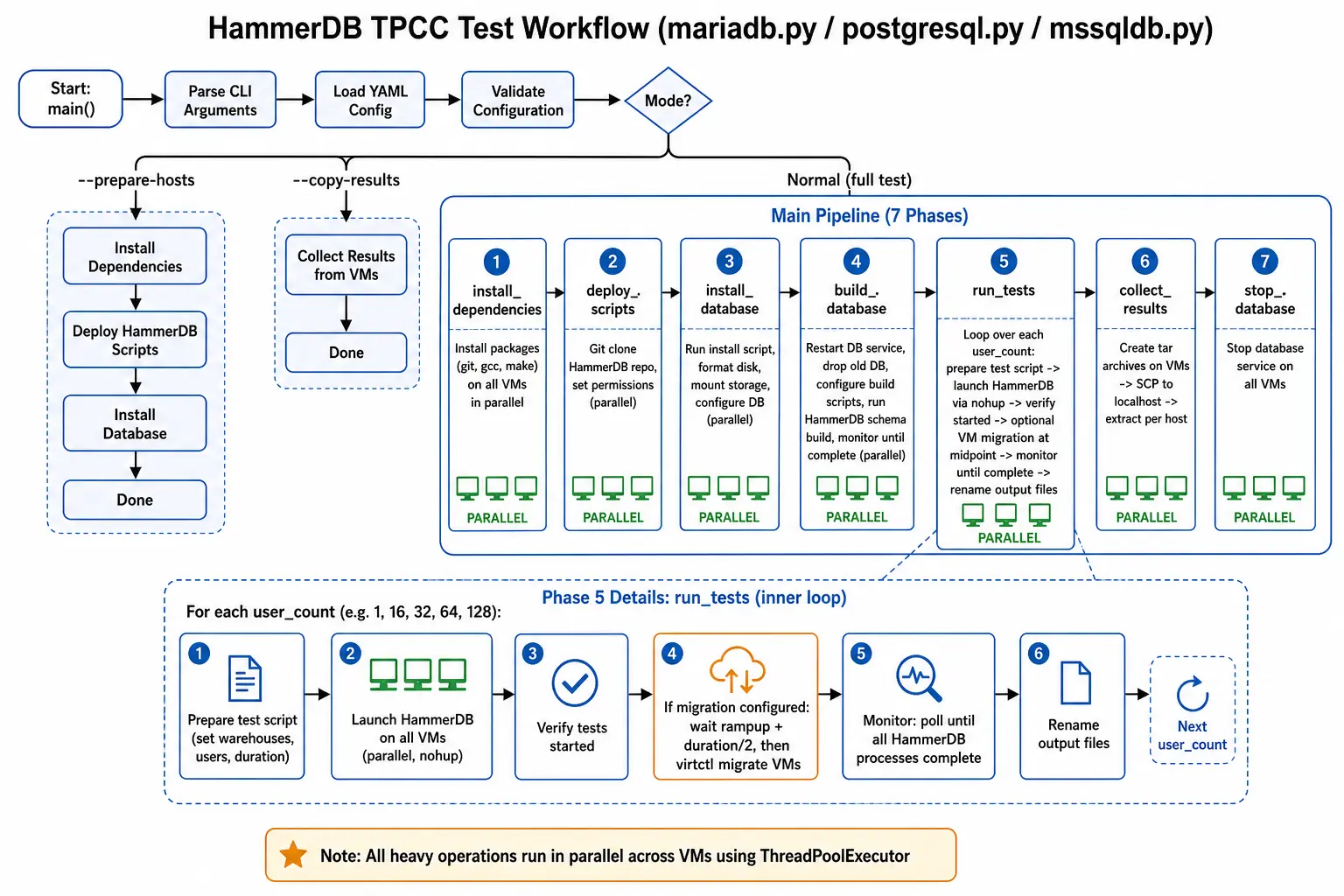
Upon confirming that the virtual instances are fully provisioned and reachable through passwordless SSH, the benchmarking phase may commence. For clarity, and to facilitate a deeper technical understanding of the underlying workflow, this article outlines the manual execution methodology for initiating these tests.
Following the naming convention established in my earlier examples (ranging from db-1 to db-3), a MariaDB workload generation is triggered by invoking podman. You can run one test at a time on a set of test machines (defined in namespace), but it is possible to run combinations of tests if necessary, where MariaDB test machines are placed in a mariadb namespace, PostgreSQL test machines in a postgresql namespace, and so on.
A MariaDB example:
podman run --rm \
  -e HOST_PATTERN="db-{1..3}" \
  -e NAMESPACE="default" \
  -e DESCRIPTION="mariadb perf test" \
  -e DISK_LIST="/dev/vdc" \
  -e WAREHOUSE_COUNT=50 \
  -e TEST_DURATION=5 \
  -e USER_COUNT="1 10 20 50" \
  -e HAMMERDB_REPO="https://github.com/ekuric/ioscale.git" \
  -e HAMMERDB_PATH="/root/hammerdb-tpcc-wrapper-scripts" \
  -e HAMMERDB_INSTALL_DIR="/usr/local/HammerDB" \
  -v ./mariadb-results:/work/results \
  -v /root/.ssh/id_rsa:/root/.ssh/id_rsa:ro \
  -v /root/.kube/config:/root/.kube/config \
  --privileged \
  quay.io/ekuric/mariadb-benchmark:latest
Executing this command initiates the benchmarking sequence across the targeted instances defined by the HOST_PATTERN="db-{1..3}" parameter. This workflow utilizes /dev/vdc as the primary volume for database operations, provisioning a dataset of 50 warehouses to evaluate performance testing different numbers of HammerDB users ( in this exampl,e 1, 10, 20, and 50 virtual users).
On test machines in /usr/local/HammerDB, it is possible to check the build progress. For example, for the db-1 virtual machine:
tail -f build_mssql1.outComprehensive documentation and further configuration examples are available in the official Git repository.
The operational workflow involves mounting the local SSH private key to the container with -v /root/.ssh/id_rsa:/root/.ssh/id_rsa:ro to enable secure, automated access to the benchmarking instances. This relies on the distribution of the public key during the provisioning phase using a Kubernetes secret. For these evaluations, the mariadb-benchmark image is constructed using a specific Dockerfile layered on a standardized base image. The same approach is used for Microsoft SQL Server and PostgreSQL workloads.
Total execution time is a direct function of the configured user count and the test duration. Upon completion, the benchmark artifacts are persisted to the mariadb-results directory or an alternative user-defined local volume mapping.
These provisioned virtual environments remain compatible for PostgreSQL benchmarking, necessitating only the substitution of the target Podman container image.
A PostgreSQL example:
podman run --rm \
  -e HOST_PATTERN="db-{1..3}" \
  -e NAMESPACE="default" \
  -e DESCRIPTION="postgresql perf test" \
  -e DISK_LIST="/dev/vdc" \
  -e WAREHOUSE_COUNT=50 \
  -e TEST_DURATION=5 \
  -e USER_COUNT="1 10 20 50" \
  -e HAMMERDB_REPO="https://github.com/ekuric/ioscale.git" \
  -e HAMMERDB_PATH="/root/hammerdb-tpcc-wrapper-scripts" \
  -e HAMMERDB_INSTALL_DIR="/usr/local/HammerDB" \
  -v ./postgresql-results:/work/results \
  -v /root/.ssh/id_rsa:/root/.ssh/id_rsa:ro \
  -v /root/.kube/config:/root/.kube/config \
  --privileged \
  quay.io/ekuric/postgresql-benchmark:latest
For Microsoft SQL Server, you can utilize packages from Microsoft publicrepositories to get Microsoft SQL Server packages installed in your virtual machines. After Microsoft SQL Server is installed and started (using the mssqldb.py script), start the test using Podman:
podman run --rm \
  -e HOST_PATTERN="db-{1..3}" \
  -e NAMESPACE="default" \
  -e DESCRIPTION="mssql perf test" \
  -e DISK_LIST="/dev/vdc" \
  -e WAREHOUSE_COUNT=50 \
  -e BUILD_USERS=50 \
  -e TEST_DURATION=5 \
  -e USER_COUNT="1 10 20 50" \
  -e MSSQL_PASS="mssqlpasswd1!" \
  -e REBUILDDB=true \
  -e HAMMERDB_REPO="https://github.com/ekuric/ioscale.git" \
  -e HAMMERDB_PATH="/root/hammerdb-tpcc-wrapper-scripts" \
  -v ./mssqldb-results:/work/results \
  -v /root/.ssh/id_rsa:/root/.ssh/id_rsa:ro \
  -v /root/.kube/config:/root/.kube/config \
  --privileged \
  quay.io/ekuric/mssqldb-benchmark:latest
Test results
Test results are saved in ./mariadb-results, in the directory where the Podman command was executed. Test results are separated by each test machine, and from there it's possible to read TPM per machine or draw them with the extract_db_results script.
$ ls -l mariadb-results/
mariadb-20260518-mariadb_perf_test.txt
mariadb-results-20260518-141623-mariadb_perf_test


$ ls -l mariadb-results/mariadb-results-20260518-141623-mariadb_perf_test/
drwxr-xr-x. 2 root root   128 May 18 14:16 db-1
drwxr-xr-x. 2 root root   128 May 18 14:16 db-2
drwxr-xr-x. 2 root root   128 May 18 14:16 db-3
drwxr-xr-x. 2 root root   128 May 18 14:16 db-4
drwxr-xr-x. 2 root root   128 May 18 14:16 db-5
-rw-r--r--. 1 root root 10033 May 18 14:16 mariadb-20260518-mariadb_perf_test.txt


$ ls -l mariadb-results/mariadb-results-20260518-141623-mariadb_perf_test/db-1/
-rw-r--r--. 1 root root 122758 May 18 14:07 build_mariadb1.out
-rw-r--r--. 1 root root   3119 May 18 14:12 test_mariadb_2026.05.18_5pod_pod1_10.out
-rw-r--r--. 1 root root   4809 May 18 14:16 test_mariadb_2026.05.18_5pod_pod1_20.out
Conclusion
In each of these examples, there are three test machines (db-1, db-2, and db-3), and all these example servers are used for test demonstration purposes. I've tested this process successfully with hundreds of virtual machines.
The process here focuses on virtual machines running onRed Hat OpenShift. However, the same process works for any other environment, provided the same requirements are imposed on test (virtual) machines. I've used these tests successfully on bare metal, VMWare and KVM virtual machines, or a combination of all of these. For more information and detailed guidance, refer to ioscale/db documentation.
I want to thank Red Hat Perf and Scale team members Jenifer Abrams, Shekhar Berry, Abhishek Bose, Sonali Badal, Saipramod Goud Kola, who contributed and ran initial tests.

