Cloud data platforms like Databricks and Snowflake are racing to embed AI directly into SQL. With Trino's AI functions, the open source ecosystem has the same capability, and on Red Hat OpenShift AI, you can bring your own models, your own data, and your own infrastructure.
This article provides an overview of an architecture connecting a modern Apache Iceberg lakehouse to LLM-hosted models using nothing but SQL. No Python notebooks. No ETL pipelines. No ML frameworks. Just SQL queries that "think."
The architecture
The stack runs entirely on OpenShift, and is illustrated in Figure 1.
- Red Hat OpenShift AI hosts LLMs as a Model-as-a-Service (MaaS) endpoint—in our case, Llama 4 Scout 17B via NVIDIA
- Trino is the distributed SQL engine that federates queries across multiple data sources
- Apache Iceberg on MinIO S3 provides the open table format lakehouse, managed by a Nessie catalog server
- PostgreSQL (with pgvector) adds a relational/vector data source
- HuggingFace datasets (hotel reviews, financial news) provide real-world text data for AI Function demos
- Trino Query UI gives analysts a web-based SQL editor
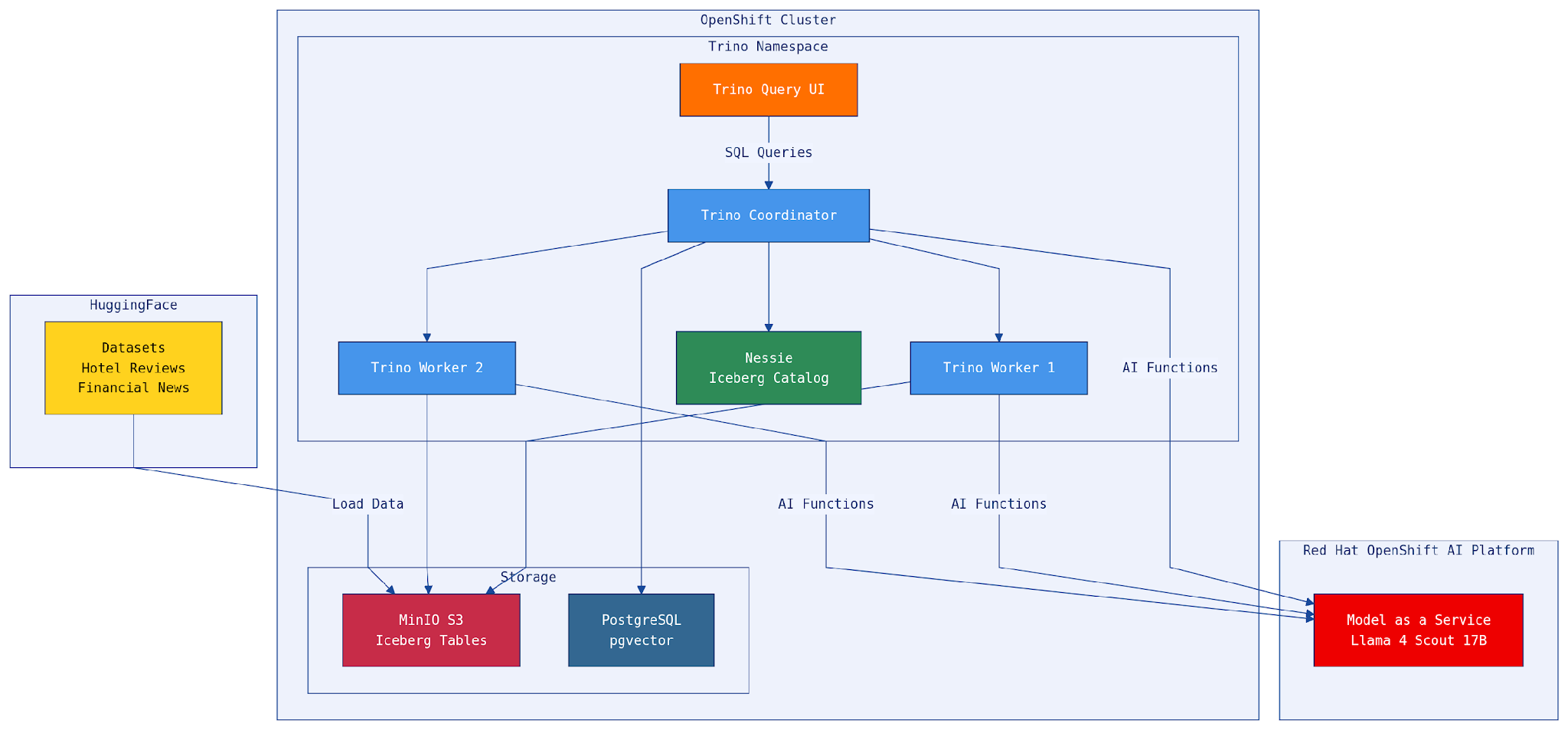
The key insight: Trino sits at the center, federating across data sources and LLM endpoints in a single query. A data analyst can join Iceberg tables with PostgreSQL, run sentiment analysis on the results, classify them by category, and generate an executive summary—all in one SQL statement.
What are AI functions?
Trino AI functions let you call an LLM directly from SQL. They're built-in functions that transform and enrich text data using large language models, without leaving your SQL environment (see Figure 2).
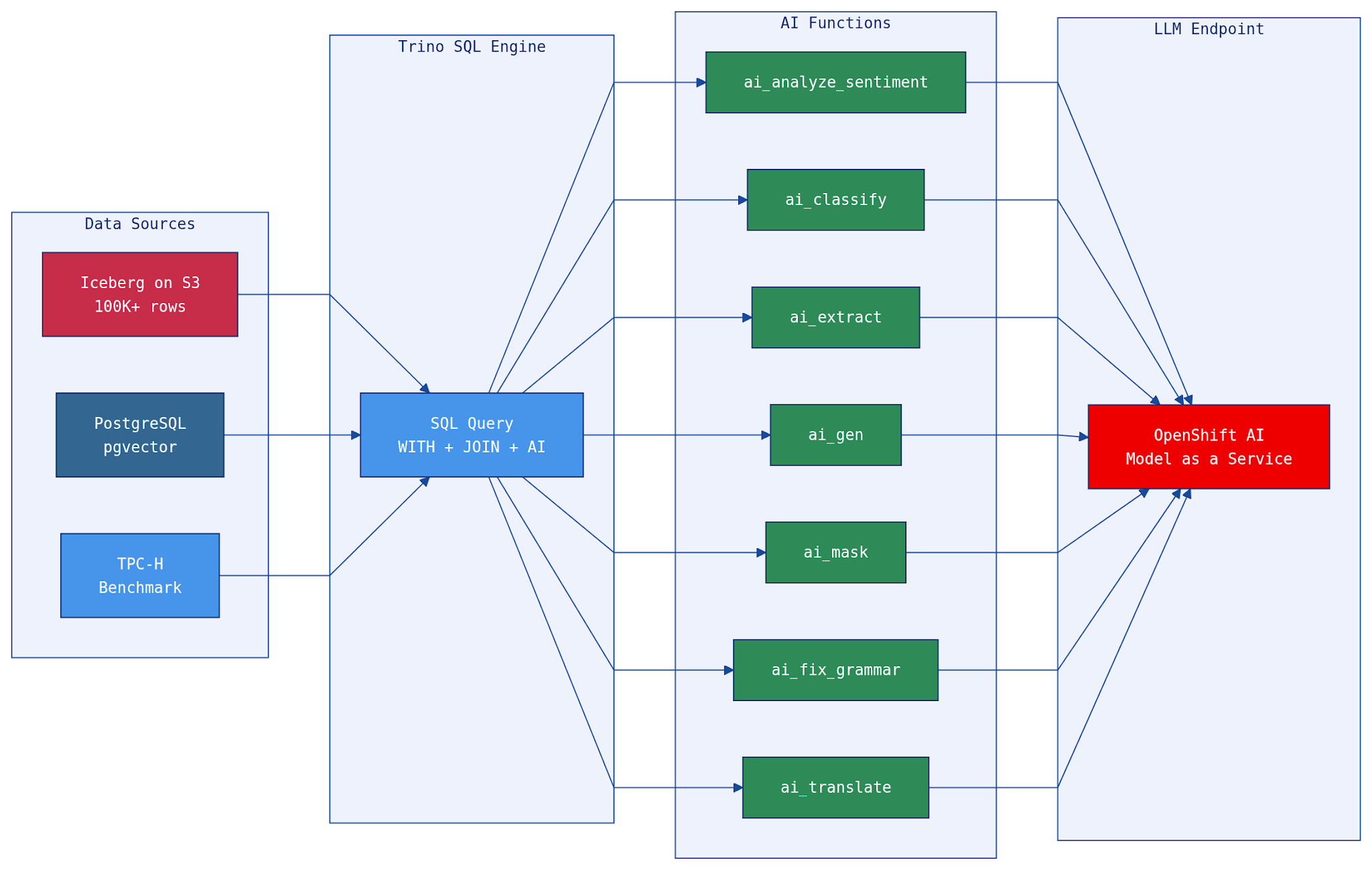
Seven functions cover the most common text analysis patterns:
ai_analyze_sentiment(text)- What it does: Classifies text as positive, negative, neutral, or mixed
- Example use case: Customer feedback triage, threat detection
ai_classify(text, labels)- What it does: Assigns text to one of your predefined categories
- Example use case: Log categorization, spam detection, risk classification
ai_extract(text, labels)- What it does: Pulls structured data from unstructured text
- Example use case: Entity extraction from logs, parsing incident reports
ai_fix_grammar(text)- What it does: Corrects grammar and improves readability
- Example use case: Cleaning noisy log data, polishing reports
ai_gen(prompt)- What it does: Generates new text from a prompt
- Example use case: Executive summaries, threat reports, daily briefings
ai_mask(text, labels)- What it does: Replaces sensitive data with [MASKED]
- Example use case: PII redaction, compliance exports
ai_translate(text, language)- What it does: Translates text to a target language
- Example use case: Multilingual log analysis, international collaboration
The functions connect to any OpenAI-compatible endpoint. On Red Hat OpenShift AI, that means you can use any model served with vLLM, NVIDIA NIM, or the MaaS gateway, keeping your data and models within your own infrastructure.
Why this matters: Data meets model
Traditional approaches to applying AI to enterprise data involve extracting data, running it through Python notebooks, calling APIs, and loading results back. This can create fragile pipelines, data movement overhead, and security concerns.
With AI functions in SQL:
- Data stays in place: Queries run where the data lives‚S3, PostgreSQL, or any Trino-connected source. No ETL to a separate ML environment.
- Models are services: The LLM is an API call, not a deployment you manage in your notebook. Red Hat OpenShift AI handles serving, scaling, and GPU allocation.
- SQL is the interface: Data engineers and analysts already know SQL. No new frameworks, no new languages, no new tools.
- Results are composable: AI Function outputs are regular SQL columns. You can filter, join, aggregate, and export them like any other data.
Query UI in action
The Trino Query UI lets analysts write and execute AI-enriched SQL queries directly in the browser—no CLI required. Figure 3 shows the knowledge graph example extracting technologies from semantically related developer articles.
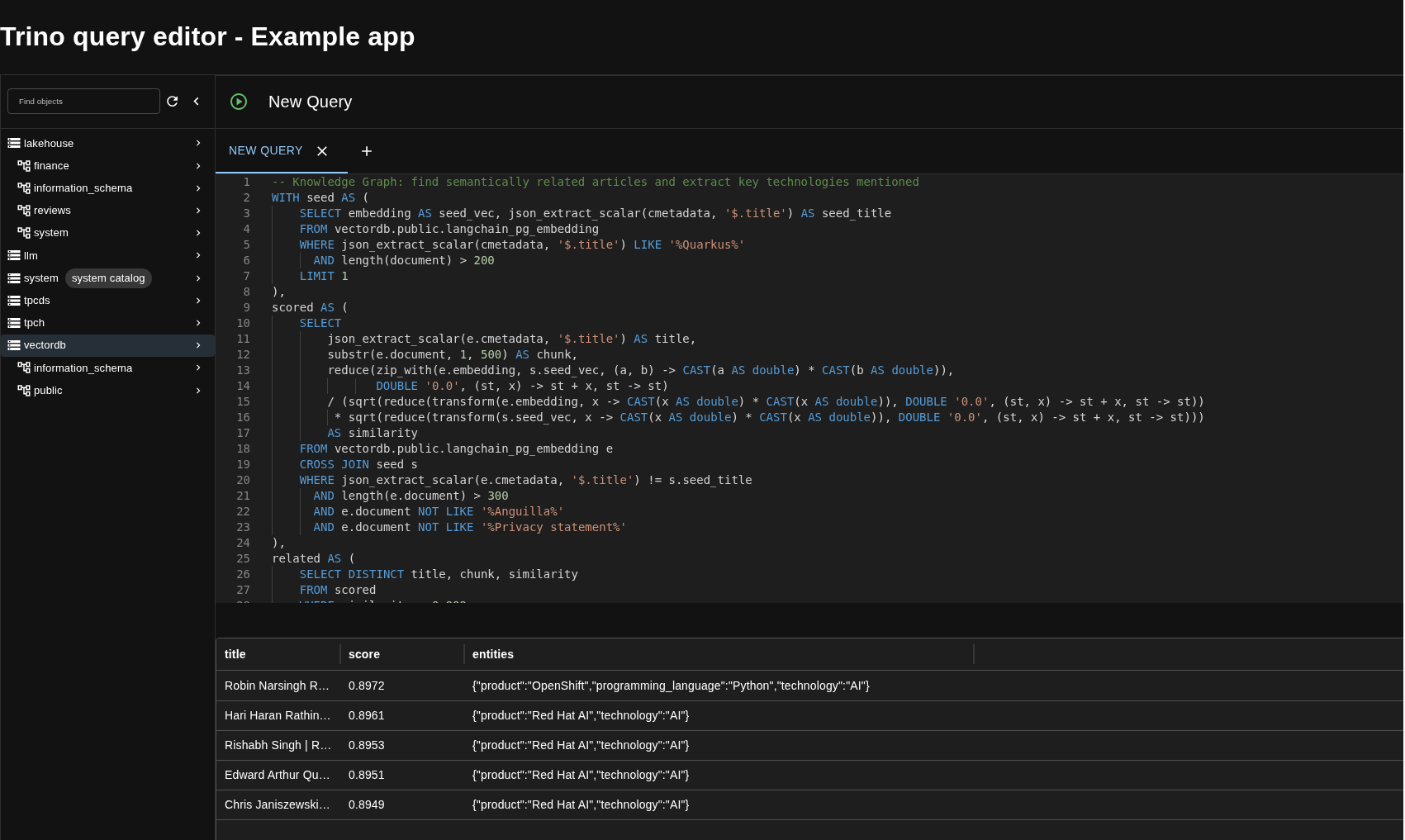
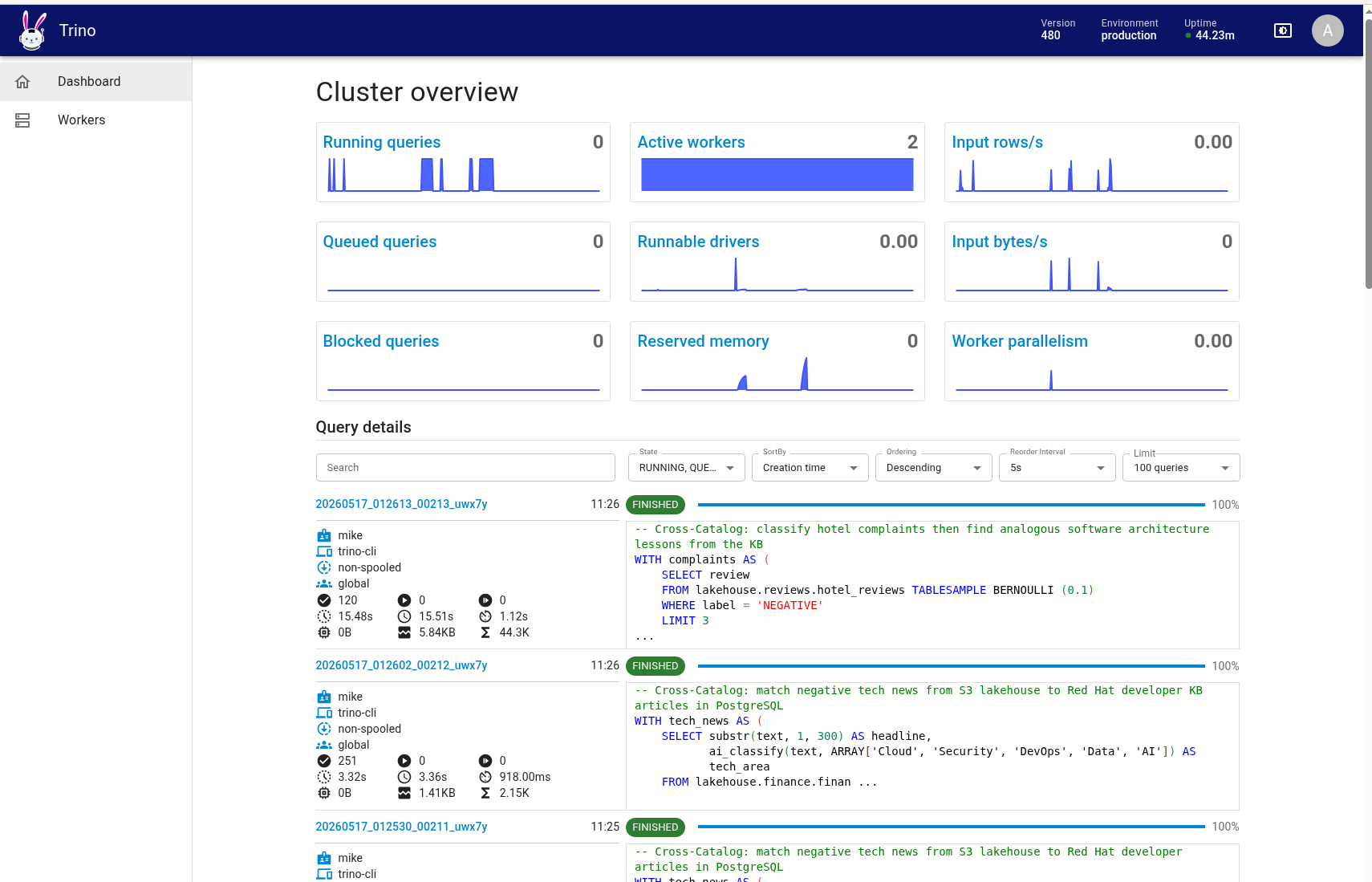
Figure 4 is the Trino cluster dashboard showing active workers processing AI function queries in parallel across the distributed engine.
34 examples: From security analysis to financial intelligence
We built 34 example queries that demonstrate every AI function across three domains: cybersecurity log analysis, financial intelligence, and developer knowledge base search. Here's the breakdown:
| # | Example | AI functions |
|---|---|---|
| 01-03 | Sentiment analysis: Insider threats, phishing emails, support requests | ai_analyze_sentiment |
| 04-07 | Classification: Firewall logs, phishing subjects, SIEM alerts, web requests | ai_classify |
| 08-10 | Entity extraction: Authentication logs, file integrity monitoring, process logs | ai_extract |
| 11-12 | Grammar correction: Firewall logs, IDS alerts | ai_fix_grammar |
| 13-14 | Text generation: Threat report summary, anomaly explanation | ai_gen |
| 15-16 | PII masking: Login events, firewall logs | ai_mask |
| 17-18 | Translation: Japanese firewall logs, Spanish IDS alerts | ai_translate |
| # | Example | AI functions | Data source |
|---|---|---|---|
| 19 | Review intelligence pipeline | ai_analyze_sentiment + ai_classify + ai_extract | 17K hotel reviews |
| 20 | Executive summary from guest feedback | ai_gen | 17K hotel reviews |
| 21 | PII-safe multilingual review export | ai_mask + ai_fix_grammar + ai_translate | 17K hotel reviews |
| 22 | Market mood ring: AI vs. human labels | ai_analyze_sentiment + ai_gen | 100K financial news |
| 23 | Financial threat intelligence | ai_classify + ai_extract + ai_mask | 100K financial news |
| 24 | Multilingual trading desk | ai_translate + ai_analyze_sentiment | 100K financial news |
| 25 | AI editorial pipeline | ai_fix_grammar + ai_gen + ai_classify | 100K financial news |
| 26 | Daily analyst morning briefing | ai_gen | 100K financial news |
The lakehouse examples are the most interesting because they combine multiple AI functions in a single query against real data stored in Apache Iceberg on S3. For example, the Market Mood Ring (example 22) cross-validates AI sentiment against human-assigned labels and explains disagreements:
WITH sample AS (
    SELECT text, label AS human_label,
           ai_analyze_sentiment(text) AS ai_sentiment
    FROM lakehouse.finance.financial_news TABLESAMPLE BERNOULLI (0.05)
    LIMIT 5
)
SELECT substr(text, 1, 80) AS snippet,
       human_label, ai_sentiment,
       CASE WHEN human_label != ai_sentiment THEN 'DISAGREE' ELSE 'AGREE' END AS verdict,
       ai_gen('In one sentence, explain why this financial news might be seen as '
              || ai_sentiment || ': ' || substr(text, 1, 500)) AS reasoning;
Daily Briefing (example 26) aggregates negative financial news into an analyst morning report:
WITH bad_news AS (
    SELECT text FROM lakehouse.finance.financial_news TABLESAMPLE BERNOULLI (0.5)
    WHERE label = 'negative' LIMIT 10
)
SELECT ai_gen(
    'You are a senior financial analyst. Write a concise morning briefing (5 bullet
    points max) summarizing key risks and themes: ' ||
    (SELECT json_format(CAST(array_agg(text) AS JSON)) FROM bad_news)
) AS morning_briefing;
These aren't toy examples. They query 100,000 real financial news articles stored as Iceberg tables on MinIO S3, with the LLM inference happening in parallel across Trino workers.
Part of a modern data mesh
This architecture isn't just a demo, but a pattern for how enterprises can operationalize AI within a data mesh strategy:
- Data products: Each Iceberg table (hotel reviews, financial news, vector embeddings) is a self-describing data product with its own schema, quality guarantees, and access controls.
- Federated governance: Trino federates across MinIO S3, PostgreSQL, and benchmark datasets without moving data. Domain teams own their sources; Trino provides a unified query layer.
- AI as a shared capability: The LLM endpoint is a platform service. Any domain team can call
ai_classify()orai_gen()from SQL queries without provisioning GPUs or managing model lifecycles. - Open standards: Apache Iceberg, S3-compatible storage, OpenAI-compatible API, and SQL. No proprietary lock-in—swap MinIO for AWS S3, swap the LLM for Claude or GPT, swap Nessie for AWS Glue. The architecture is portable.
Red Hat OpenShift AI: The platform advantage
Running this on Red Hat OpenShift AI provides specific advantages:
Model serving at scale
OpenShift AI's MaaS gateway handles model serving, load balancing, and GPU scheduling. Models are exposed as simple REST endpoints that Trino calls using the OpenAI-compatible protocol.
Security by default
OpenShift's Security Context Constraints (SCCs) enforce non-root containers, capability dropping, and namespace isolation. Data never leaves the cluster.
One-click deployment
The entire stack—MinIO, Nessie, Trino, Query UI—deploys with a single install.sh script. Environment variables configure the LLM endpoint, S3 credentials, and optional PostgreSQL catalog.
Kubernetes-native operations
Helm charts, Kubernetes jobs for data loading, OpenShift Routes for external access. Standard Kubernetes tooling for day-2 operations.
Hybrid search: When vectors meet AI functions
The architecture gets even more interesting when you connect Trino to a vector database. Our PostgreSQL instance (with pgvector) stores 154,000 document chunks from every article on developers.redhat.com, each with a 768-dimensional embedding vector. These embeddings power the Red Hat Developer RAG chatbot.
With Trino, we can compute cosine similarity in pure SQL—no pgvector operators needed—and combine it with AI functions for hybrid semantic + AI analysis:
-- Cosine similarity computed entirely in Trino SQL
reduce(
    zip_with(a.embedding, b.embedding,
             (x, y) -> CAST(x AS double) * CAST(y AS double)),
    DOUBLE '0.0', (s, x) -> s + x, s -> s
) / (sqrt(..) * sqrt(..)) AS cosine_similarity;
This opens up powerful patterns that neither vector search nor AI functions can achieve alone.
| # | Example | What it does | Functions used |
|---|---|---|---|
| 27 | Semantic Reading List | Find articles similar to a seed by cosine similarity, generate a curated reading list | Cosine similarity + ai_gen |
| 28 | Topic Discovery | Classify random knowledge base chunks into Red Hat product areas | ai_classify |
| 29 | Content Quality Audit | Analyze tone and fix grammar across the knowledge base | ai_analyze_sentiment + ai_fix_grammar + ai_classify |
| 30 | Knowledge Graph | Find semantically related articles, extract technologies and products mentioned | Cosine similarity + ai_extract |
| 31 | Multilingual Knowledge Base | Find similar articles, translate to Japanese and Korean on-the-fly | Cosine similarity + ai_translate |
For example, the Semantic Reading List (example 27) finds the 5 most similar articles to an LLM tutorial using cosine similarity over 768-dimensional embeddings, then asks the LLM to generate a reading list:
WITH seed AS (
    SELECT embedding AS seed_vec
    FROM vectordb.public.langchain_pg_embedding
    WHERE json_extract_scalar(cmetadata, '$.title') LIKE '%LLM%'
    LIMIT 1
),
similar_docs AS (
    SELECT DISTINCT
        json_extract_scalar(e.cmetadata, '$.title') AS title,
        json_extract_scalar(e.cmetadata, '$.source') AS url,
        reduce(zip_with(e.embedding, s.seed_vec,
               (a, b) -> CAST(a AS double) * CAST(b AS double)),
               DOUBLE '0.0', (st, x) -> st + x, st -> st)
        / (sqrt(reduce(transform(e.embedding, ..), ..))
         * sqrt(reduce(transform(s.seed_vec, ..), ..)))
        AS similarity
    FROM vectordb.public.langchain_pg_embedding e
    CROSS JOIN seed s
    ORDER BY similarity DESC
    LIMIT 5
)
SELECT ai_gen(
    'Create a reading list from these articles: ' ||
    (SELECT json_format(CAST(array_agg(title) AS JSON)) FROM similar_docs)
) AS reading_list;
The result is a semantically curated, LLM-summarized reading list built from a single SQL query that spans a vector database and an LLM endpoint. In one run, it surfaced articles on Llama Stack, AI safeguards, Compressed Granite, and AI Agents, all semantically related to the seed article, ranked by embedding similarity, and summarized by the LLM.
Knowledge Graph (example 30) maps the technology landscape around a topic by finding related articles with embedding similarity, then extracting products, technologies, and programming languages from each:
"Accelerate model training on OpenShift AI..." 0.7742 {product=SFTTrainer, language=Python, technology=Trainer}"Accelerated expert-parallel distributed..." 0.6786 {product=granite-4.0, language=Python, technology=FSDP}"Optimizing LLMs for accuracy | RHEL AI..." 0.6617 {product=tokenizer, language=Python, technology=LINUX}This is hybrid search in its purest form: Vector similarity narrows the search space, AI functions enrich and structure the results, and SQL ties it all together. No external search infrastructure, no separate ML pipeline—just a query.
Federated queries: Joining across data sources
The real power emerges when you join data across catalogs. Trino federates queries across the Iceberg lakehouse on S3 and PostgreSQL in a single statement—something no single database can do alone.
| # | Example | Data sources | AI functions |
|---|---|---|---|
| 32 | News-to-Docs: match financial news to KB articles | lakehouse.finance + vectordb | ai_classify + ai_gen |
| 33 | Reviews-to-Architecture: hotel complaints as software lessons | lakehouse.reviews + vectordb | ai_classify + ai_gen |
| 34 | Federated Intelligence Briefing | lakehouse.finance + vectordb | ai_gen |
The Federated Intelligence Briefing (example 34) is the most ambitious. It pulls negative tech news from the S3 lakehouse, finds related Red Hat developer articles from PostgreSQL, and generates a structured intelligence report connecting market risks to technology solutions:
WITH negative_news AS (
    SELECT text FROM lakehouse.finance.financial_news -- Iceberg on S3
    WHERE label = 'negative' AND text LIKE '%technology%'
    LIMIT 5
),
kb_highlights AS (
    SELECT json_extract_scalar(cmetadata, '$.title') AS title
    FROM vectordb.public.langchain_pg_embedding -- PostgreSQL
    WHERE json_extract_scalar(cmetadata, '$.title') LIKE '%OpenShift%'
    LIMIT 5
)
SELECT ai_gen( -- LLM via MaaS
    'Write an intelligence briefing connecting these market risks: ' ||
    (SELECT json_format(..) FROM negative_news) ||
    ' to these technology solutions: ' ||
    (SELECT json_format(..) FROM kb_highlights)
) AS intelligence_briefing;
A single SQL query that reads from S3, reads from PostgreSQL, calls an LLM, and produces an executive-ready intelligence report. Three data sources, one query, zero data movement.
The results are striking. In one run, the briefing automatically connected the SolarWinds supply-chain breach to Red Hat OpenShift Service Mesh as a mitigation strategy, linked Uber's service outages to Quarkus serverless architecture as a resilience pattern, and recommended OpenShift Pipelines for CI/CD hardening in response to Oracle's manual support struggles. The LLM drew these connections entirely on its own. The query just put the right data in front of it by federating across an S3 data lake and a PostgreSQL knowledge base in a single SQL statement.
Get started
The entire stack deploys in under 10 minutes. The source code is in a Git repository.
Start with the install:
export OPENAI_API_KEY=<your-maas-token>
export OPENAI_BASE_URL=https://your-openshift-ai-endpoint
export HF_TOKEN=<your-huggingface-token>
export POSTGRES_HOST=postgres.your-namespace.svc.cluster.local
./install.sh
Then run the example queries:
./examples/run_all.shOr open the Trino Query UI in your browser and start writing SQL that "thinks."

