With the release of Red Hat Enterprise Linux 10.2 (also available in RHEL 9.8), system accounts is an exciting new feature in Identity Management in Red Hat Enterprise Linux (IdM). This feature introduces a separate class of accounts within IdM designed to enable fine-grained access control for operations performed on regular user accounts without compromising the security properties of our identity-centric system.
Through extensive research into customer use cases, we identified one particular high-demand capability: enabling password rotation for regular users in IdM systems. While system accounts support multiple potential use cases, this was a key driver for the feature. Traditionally, passwords set in IdM for user accounts are static, and customers often rely on complex external solutions to rotate them within their environments. With system accounts, we provide an elegant, integrated, and streamlined way to achieve this by using an entity specifically designed for this purpose.
CyberArk is the primary credential password management provider deployed across many customer environments. With this in mind, we launched a joint effort involving three key groups:
- The RHEL IdM Engineering team is responsible for developing the system accounts feature.
- Strategic customers helped define, validate, and test the use case through their TAMs.
- The CyberArk Integrations Engineering team
After months of close collaboration, we are excited to announce that CyberArk can now seamlessly rotate passwords for user accounts managed in IdM. This integration delivers significant value to organizations seeking stronger credential management practices and further positions Identity Management as a key component of modern enterprise security ecosystems.
Benefits of sysaccounts
The sysaccounts feature bypasses the reset on next login requirement as well as OTP constraints (when enforced in the environment), while still enforcing password complexity and length policies. The reset on next login behavior is particularly important because it makes regular user accounts unsuitable for automated password management workflows. If we use a standard user account to perform password rotations, every password change forces the user to reset the password again at the next login, effectively breaking the automation process.
Historically, using regular user accounts for application LDAP binds or automated password rotation has been problematic. Requirements (for example, mandatory password resets or OTP authentication) designed for interactive users naturally interfere with non-interactive application workflows. Many applications rely on LDAP connections and require service identities that can authenticate without being subject to interactive authentication mechanisms. For example, in environments where OTP enforcement is mandatory for all user accounts, applications using regular user accounts for LDAP binds would fail to authenticate.
The sysaccounts feature addresses these challenges by providing dedicated accounts that can be granted fine-grained permissions while remaining exempt from user-oriented requirements, such as OTP enforcement and mandatory password resets. At the same time, password quality controls, including complexity and length requirements of the destination user, remain fully enforced. This approach enables secure application integration without compromising the overall security posture of the deployment.
Set up the environment: CyberArk and IdM
The first requirement for this setup is to create an account in the IdM environment, specifically, a new account of type sysaccount. You will use this account to rotate the passwords of a regular user account. It is important to clearly distinguish between these two account types because each serves a different purpose within the system.
Next, we will walk through the setup of system accounts. To create and configure one, execute the following commands:
[root@server /]# kinit admin
Password for admin@IPA.TEST: <some_admin_password>
[root@server /]# ipa sysaccount-add cyberark --random
-------------------------------
Added system account "cyberark"
-------------------------------
  Privileged: False
  System account ID: cyberark
  Random password: <random_password>
  Account disabled: False
Next, you will go through the privilege-permissions-role triad:
[root@server /]# ipa privilege-add 'cyberark change privilege'
-------------------------------------------
Added privilege "cyberark change privilege"
-------------------------------------------
  Privilege name: cyberark change privilege
[root@server /]# ipa privilege-add-permission 'cyberark change privilege'  --permission 'System: Change User password'
  Privilege name: cyberark change privilege
  Permissions: System: Change User password
-----------------------------
Number of permissions added 1
-----------------------------
You need the system: change user password to allow the system account to operate on password changes.
Next, we will continue with the roles:
[root@server /]# ipa role-add 'cyberark role'
--------------------------
Added role "cyberark role"
--------------------------
  Role name: cyberark role
[root@server /]# ipa role-add-privilege 'cyberark role' --privilege 'cyberark change privilege'
  Role name: cyberark role
  Privileges: cyberark change privilege
----------------------------
Number of privileges added 1
----------------------------
[root@server /]# ipa role-add-member 'cyberark role' --sysaccounts 'cyberark'
  Role name: cyberark role
  Privileges: cyberark change privilege
  Member system accounts: cyberark
-------------------------
Number of members added 1
-------------------------
Lastly, you will run:
 [root@server /]# ipa sysaccount-policy cyberark --privileged=TRUE
ipa: WARNING: Password reset permission is local to server server.ipa.test.
Restart the Directory Server services on it. Run the command 'ipa sysaccount-policy' against each server you want to allow or disable to reset passwords on.
  Privileged: True
  System account ID: cyberark
  Account disabled: False
  Roles: cyberark role
This final command allows a system account to update user passwords without forcing users to change them at their next login, which is the default behavior in IdM. It is important to note that this configuration is not replicated across the IdM environment, so we must apply it only on the servers that CyberArk will use to connect. In other words, if CyberArk requires communication with multiple IdM servers, we must execute this update on each of those servers individually.
At this point, the configuration on the IdM side is complete. The next step is to configure CyberArk and integrate it with FreeIPA.
To begin, import the CyberArk plug-in developed for IdM. The plug-in can be downloaded from the CyberArk Marketplace.
Once the plug-in has been downloaded, follow these steps to import it into CyberArk:
- Log into the Password Vault Web Access (PVWA) with an administrative account.
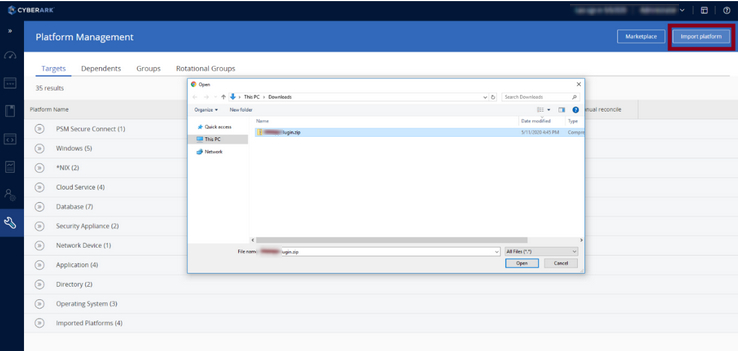
- Go to Administration → Platform Management (Figure 1).
- Click on Import Platform and select the zip containing the
RedHatFreeIPAPlugin.zipplug-in.
Next, navigate to: Administration → Platform Management → RedHatFreeIPAM → Edit → Automatic Password Management → Additional Policy Settings → Use SSL
You can choose to use SSL for the connection through LDAP(s). You can disable the certificate verification with IgnoreUntrustedCertificate. But the plug-in only works on LDAPS port 636, so this port is mandatory. Thus, the only option is to disable certificate verification.
After that, the remaining configuration is straightforward. You simply need to create a reconcile account in CyberArk. In our case, this account is the same account that we previously configured as the IdM sysaccount, only the terminology differs between the two products.
CyberArk uses this reconcile account to authenticate and bind to IdM when performing password management operations. Once the reconcile account has been configured, you can select the IdM users whose credentials should be managed and rotated by CyberArk.
At this point, the integration between CyberArk and IdM is complete, enabling automated password rotation while maintaining the security controls and policies defined in IdM.
In CyberArk, you can see this in the logs. The relevant section is the plug-in section, which is clearly identified in the log output. A successful change of password shows (only the relevant lines):
30/03/2026 05:14:36.950 | Info -> PluginsRunner :: RunPlugin -> --------------------------------- Plugin Section Start --------------------------------------
30/03/2026 05:14:36.950 | Info -> Change :: run -> START
30/03/2026 05:14:36.950 | Info -> BaseAction :: InitParameters -> START
30/03/2026 05:14:36.950 | Info -> Parameters :: Init -> START
30/03/2026 05:14:36.950 | Info -> ParametersManager :: GetMandatoryParameter -> START
30/03/2026 05:14:36.950 | Info -> ParametersManager :: GetMandatoryParameter -> Parameter UserDN = uid=<system-account>,cn=sysaccounts,cn=etc,dc=example,dc=com.
30/03/2026 05:14:36.950 | Info -> ParametersManager :: GetMandatoryParameter -> END
30/03/2026 05:14:36.965 | Info -> ParametersManager :: GetOptionalParameter -> Using UseSSL from platform properties. Value=No.
30/03/2026 05:14:36.981 | Info -> ParametersManager :: HandleDefaultValue -> Parameter LDAPPasswordPropertyOnReconcile is not defined or is empty on both account and platform level configuration. Using default value mysecretPassword.
30/03/2026 05:14:36.981 | Info -> Parameters :: Init -> END
30/03/2026 05:14:36.981 | Info -> BaseAction :: InitParameters -> END
30/03/2026 05:14:36.981 | Info -> BaseAction :: InitConnect -> START
30/03/2026 05:14:37.590 | Info -> BaseAction :: InitConnect -> END
30/03/2026 05:14:37.590 | Info -> BaseAction :: ChangePassword -> START
30/03/2026 05:14:37.590 | Info -> BaseAction :: ChangePassword -> The UseLDAPReplaceInChange parameter have been set. Using Replace LDAP operation in the request
30/03/2026 05:14:37.868 | Info -> BaseAction :: ChangePassword -> END
30/03/2026 05:14:37.868 | Info -> Utils :: WriteRCWithMessageToLog -> Change CPM action ended successfully
30/03/2026 05:14:37.868 | Info -> Change :: run -> END
30/03/2026 05:14:37.868 | Info -> PluginsRunner :: RunPlugin -> --------------------------------- Plugin Section End --------------------------------------
30/03/2026 05:14:37.868 | Info -> q :: c -> Plugin results :
30/03/2026 05:14:37.868 | Info -> q :: c -> exit code = 0
30/03/2026 05:14:37.868 | Info -> q :: c -> Message = Change:
30/03/2026 05:14:37.868 | Info -> q :: j -> Action finished successfully.
Summary
We have demonstrated how to integrate CyberArk with IdM to deliver fully automated credential rotation. Enable this using the new system accounts feature introduced in RHEL 9.8 and 10.2. This capability provides an elegant, integrated, and streamlined way for external systems like CyberArk to rotate credentials in IdM. With your RHEL subscription, you can replicate these tests in your own environment without any additional subscriptions. If you are not already a RHEL subscriber, get a no-cost trial from Red Hat.
Acknowledgments
Special thanks to the Palo Alto Networks (CyberArk) team, especially Tologon Eshimkanov and Niels van Bennekom, for their close collaboration, technical expertise, and continued support throughout the development and validation of this integration. Their commitment and partnership were key factors in making this initiative a success.

