Every AI agent shares a common problem: when the conversation ends, the context disappears. The agent forgets what it learned, what you prefer, and what you were working on. Traditional retrieval-augmented generation (RAG) systems try to patch this with vector databases, but they fragment context, pile up token costs, and behave like black boxes when retrievals go wrong.
MemPalace, an open source context database achieving 96.6% Recall@5 on LongMemEval, organizes AI memory as a hierarchical virtual filesystem instead of flat vectors. But here's the catch: MemPalace's Model Context Protocol (MCP) server uses stdin/stdout, which is perfect for local CLI tools but incompatible with Kubernetes.
This article explains how we built an HTTP/WebSocket wrapper that makes MemPalace production-ready on Red Hat OpenShift AI, with health probes, service mesh integration, and full OpenShift Security Context Constraint compliance, enabling stateful context for AI inference models. This pattern works for any MCP server in the ecosystem.
This work provides the essential memory component for agentic AI workflows. Red Hat AI focuses on accelerating these workflows by providing an agile, stable foundation for multi-step tasks.
Who should read this
This guide addresses the real-world operational challenges of persistent memory architectures. You will find this content highly relevant if you work in one of the following roles:
- Platform engineers deploying AI infrastructure on Red Hat OpenShift
- Site reliability engineers (SREs) managing stateful machine learning workloads with persistent memory requirements
- Data scientists building agentic workflows that need context across sessions
- Developers integrating Model Context Protocol servers into production systems
What you'll learn
By walking through this deployment, you will explore how to integrate persistent context layers with enterprise inference engines. Specifically, you will learn how to:
- Build an HTTP/WebSocket wrapper for stdio-based MCP servers
- Create UBI 9 containers with ChromaDB for OpenShift deployment
- Implement Kubernetes health probes for stateful AI services
- Deploy production-ready MCP servers that meet restricted-v2 Security Context Constraints (SCCs)
- Connect clients via WebSocket, REST API, or Python SDK
- Understand how the MCP server pattern fits into Red Hat AI's optimized enterprise inference platform, which uses runtimes like vLLM for compute efficiency
What does MemPalace do?
MemPalace replaces flat vector search with a structured virtual filesystem for AI context. Instead of dumping embeddings into a database and hoping semantic search finds the right chunks, MemPalace organizes everything (memories, documents, conversations, skills) into a hierarchical directory tree accessible via 29 MCP tools.
The interesting part is semantic search combined with directory traversal. When your agent needs to remember "how authentication works in the API," MemPalace doesn't just do a vector similarity lookup across everything. It first identifies the right directory (/projects/api-service/docs/), then searches within that scope, recursively drilling down through subdirectories. MemPalace logs every step of that traversal, so when retrieval fails, you can debug the cause instead of tweaking similarity thresholds in the dark.
MemPalace also supports session-based memory accumulation. Agents create sessions, add messages, and when they commit, MemPalace extracts durable memories that persist across future conversations. Over time, agents build context that improves their responses, not just within a single chat, but across weeks of interactions.
The underlying storage uses ChromaDB for vector embeddings and a temporal knowledge graph for entity relationships. You can mine entire GitHub repositories, conversation transcripts, or local files, and MemPalace indexes everything into searchable, structured context.
The deployment architecture with Red Hat AI
MemPalace's MCP server traditionally runs as a local CLI tool using stdin and stdout for JSON-RPC 2.0 messages:
$ mempalace-mcp --palace ~/.mempalace
{"jsonrpc":"2.0","method":"tools/list","params":{},"id":1}
{"jsonrpc":"2.0","id":1,"result":{"tools":[...]}}
This works for local development but breaks in Kubernetes, which needs HTTP endpoints for health probes, network-accessible services for concurrent clients, and proper lifecycle management.
Our solution is to build an HTTP/WebSocket wrapper that bridges to the existing MCP implementation without changing the protocol.
In Red Hat AI, the underlying LLM serving runs on an inference stack built on KServe, using optimized runtimes like vLLM for compute efficiency and high throughput. Our exploratory work on MemPalace's MCP server demonstrates a crucial capability: integrating specialized agentic AI components, like persistent memory, alongside the core inference engine.
Figure 1 shows the MemPalace deployment architecture on OpenShift AI.
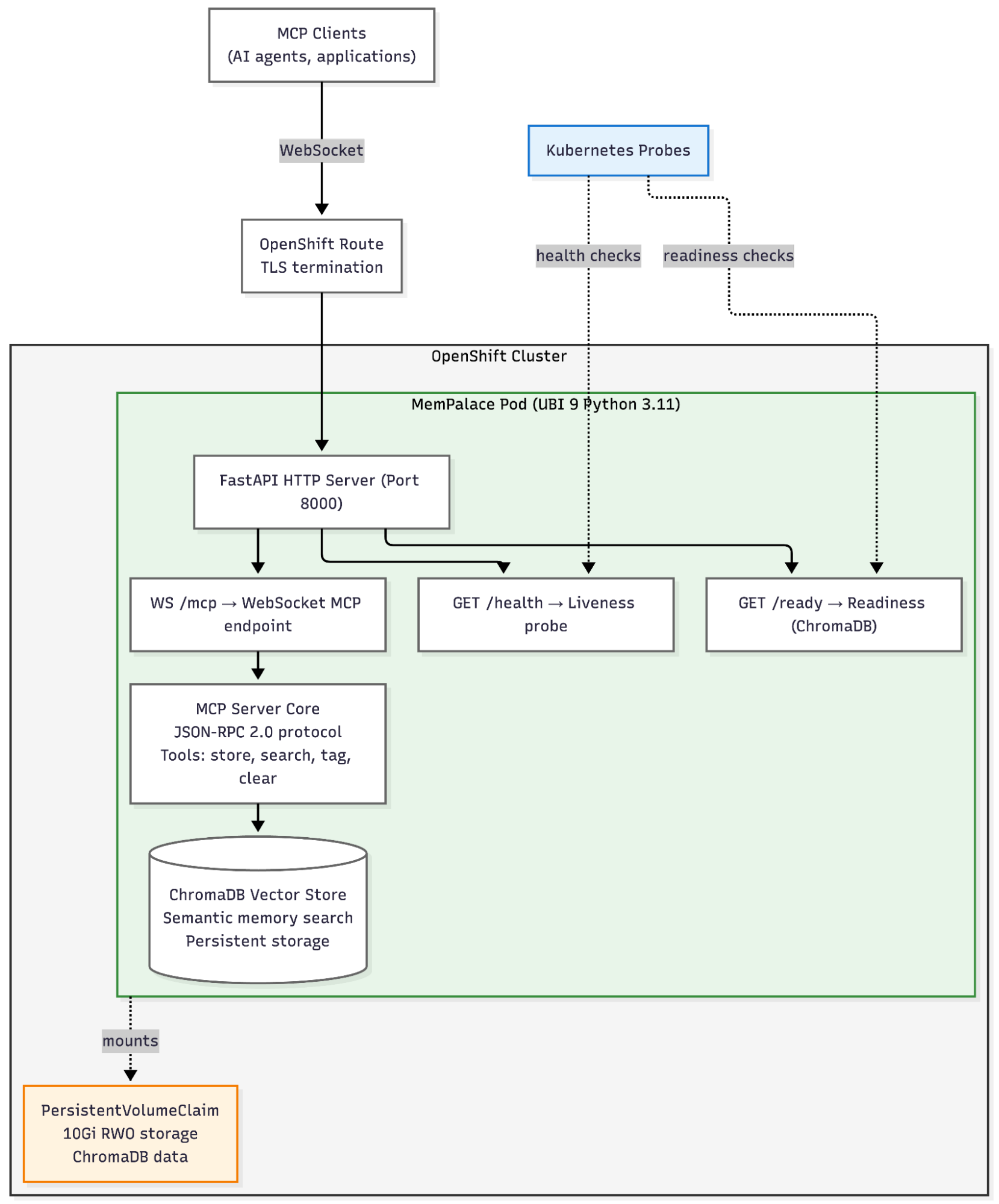
The deployment runs from quay.io/aicatalyst/mempalace:latest, a UBI 9-based container image that solves ChromaDB's sqlite3 version incompatibility (more on that below). The HTTP wrapper exposes three endpoints:
GET /health: Liveness probe that returns 200 if process is aliveGET /ready: Readiness probe that validates the ChromaDB connection and returns 503 if not readyWS /mcp: WebSocket endpoint for MCP JSON-RPC 2.0 protocol
Persistent storage backs the ChromaDB vector index and palace file storage. An OpenShift route provides TLS edge termination for external access.
Building the HTTP wrapper
The wrapper is a single Python file. You can find the complete implementation in the MemPalace repository:
mempalace/mcp_http_server.py (~160 lines)Clone and inspect:
git clone https://github.com/aicatalyst-team/mempalace-openshift.git
cd mempalace
cat mempalace/mcp_http_server.py
Key design decisions:
- Preserve synchronous execution: ChromaDB's client isn't async-safe, and the existing MCP implementation uses module-level state. We use
asyncio.to_thread()to runhandle_request()in a thread pool to avoid rewriting the entire server. - WebSocket transport: Maintains JSON-RPC semantics while enabling network access and concurrent clients.
- No breaking changes: The existing
mempalace-mcpstdio interface remains unchanged for local use.
Add the HTTP dependencies to your pyproject.toml file:
[project.optional-dependencies]
server = [
    "fastapi>=0.115.0,<1",
    "uvicorn[standard]>=0.32.0,<1",
    "websockets>=13.0,<14",
]

[project.scripts]
mempalace-mcp-http = "mempalace.mcp_http_server:main"
Building the UBI 9 container image
OpenShift requires Red Hat Universal Base Image (UBI) containers. The challenge: ChromaDB needs sqlite3 version 3.35.0 or later, while UBI 9 ships with 3.34.x.
To address this, install pysqlite3-binary and override the Python sqlite3 module using sitecustomize.py.
Dockerfile.ubi:
FROM registry.access.redhat.com/ubi9/python-311:latest

USER 0
RUN dnf install -y gcc gcc-c++ sqlite-devel && \
    dnf clean all && rm -rf /var/cache/dnf

USER 1001
WORKDIR /opt/app-root/src
COPY --chown=1001:0 . .

# Install MemPalace with HTTP server dependencies
RUN pip install --no-cache-dir pysqlite3-binary && \
    pip install --no-cache-dir -e ".[dev,server]"

# Force pysqlite3 usage via sitecustomize.py
RUN echo -e '__import__("pysqlite3")\nimport sys\nsys.modules["sqlite3"] = sys.modules.pop("pysqlite3")' \
    > /opt/app-root/lib64/python3.11/site-packages/sitecustomize.py

ENV MEMPALACE_HOME=/opt/app-root/data
ENV PYTHONUNBUFFERED=1

# OpenShift uses arbitrary UID but always GID 0
RUN mkdir -p /opt/app-root/data && \
    chgrp -R 0 /opt/app-root/data && \
    chmod -R g=u /opt/app-root/data

VOLUME ["/opt/app-root/data"]
EXPOSE 8000

ENTRYPOINT ["mempalace-mcp-http"]
CMD ["--host", "0.0.0.0", "--port", "8000"]
To build and push your container image, use the following commands:
cd /path/to/mempalace
podman build -f Dockerfile.ubi -t quay.io/aicatalyst/mempalace:latest --platform linux/amd64 .
podman push quay.io/aicatalyst/mempalace:latest
Deploying to OpenShift
To deploy MemPalace to OpenShift, use the manifests located in openshift/mempalace-deployment.yaml. These manifests include:
- A
PersistentVolumeClaim(20 GiB) for stateful storage. - A
Deploymentobject configured with health probes. - A
ClusterIPservice to expose the application within the cluster.
To deploy the application, clone the repository and apply the manifests:
Dockerfile.ubie/memp
git clone https://github.com/aicatalyst-team/mempalace-openshift
cd mempalace-openshift
oc apply -k manifests/
To verify your deployment, run the following commands:
$ oc get pods -n hermes-mempalace -l app=mempalace
NAME                         READY   STATUS    RESTARTS   AGE
mempalace-579b44f54b-jkkjk   1/1     Running   0          5m

$ oc run test --rm -i --image=curlimages/curl -- \
  curl -s http://mempalace.hermes-mempalace.svc.cluster.local:8000/health
{"status":"healthy","protocol":"mcp-over-websocket"}
Why this architecture matters for OpenShift AI teams
The HTTP wrapper is more than just a MemPalace feature; it's a pattern that makes the entire MCP ecosystem production-ready on Kubernetes.
This architecture is crucial because it provides the operational backbone for AgentOps practices within Red Hat AI. By adopting a standard HTTP/WebSocket transport, an MCP server becomes a manageable AI asset in the AI Hub and Gen AI Studio, enabling developers to consume it via a unified API layer.
The resulting architecture decouples the context layer from the inference layer, allowing each to be optimized independently: MemPalace achieves context efficiency by reducing token cost, while OpenShift AI focuses on compute efficiency through high-performance serving runtimes like vLLM. This approach allows the MemPalace service to integrate with Red Hat OpenShift AI’s Models-as-a-Service (MaaS) capabilities, providing governed access, token metering, and rate limiting just like a standard LLM inference endpoint.
This integration is critical for agentic workflows. Because agentic AI relies on multi-step reasoning and autonomous actions, it requires a robust governance and security foundation—the same foundation that MaaS provides for enterprise-wide AI adoption. By treating the context layer as a first-class citizen alongside your models, you ensure that your agentic memory is just as secure and measurable as your inference engine.
Compliant with restricted-v2 SCC
The manifests run cleanly under OpenShift's default Security Context Constraint, featuring runAsNonRoot: true and allowPrivilegeEscalation: false, with all unnecessary capabilities dropped and the seccomp profile set to RuntimeDefault. The implementation avoids privileged containers or fsGroup: 0 overrides, relying instead on chgrp -R 0 and chmod -R g=u to accommodate OpenShift's arbitrary UID requirements while maintaining GID 0 compatibility.
Kubernetes-native lifecycle management
The use of health probes improves service resilience. The liveness probe (/health) confirms the process is responsive, while the readiness probe (/ready) validates ChromaDB connectivity. This separation means transient backend issues don't kill the pod, as the service is simply removed from the load balancer until it is ready.
Support for concurrent clients.
Unlike traditional stdio-based MCP servers that are limited to a single connection, the WebSocket endpoint supports multiple agents connecting simultaneously, with each client maintaining independent JSON-RPC sessions over persistent connections.
RHEL 9 compatibility
The combination of pysqlite3-binary and sitecustomize.py resolves the sqlite3 version mismatch without the need to compile from source or patch ChromaDB internals. This works because Python's import system allows preloading pysqlite3 and aliasing it to sqlite3 before the application initializes.
Connecting to and using MemPalace
Once the stack is running, clients can connect via the REST API, Python SDK, or the command line.
Test the WebSocket MCP protocol:
import asyncio
import json
import websockets

async def test_mcp():
    uri = "ws://mempalace.hermes-mempalace.svc.cluster.local:8000/mcp"

    async with websockets.connect(uri) as ws:
        # Initialize
        request = {
            "jsonrpc": "2.0",
            "method": "initialize",
            "params": {"protocolVersion": "2025-11-25"},
            "id": 1
        }
        await ws.send(json.dumps(request))
        response = json.loads(await ws.recv())
        print(f"Server: {response['result']['serverInfo']['name']}")

        # List tools
        request = {"jsonrpc": "2.0", "method": "tools/list", "params": {}, "id": 2}
        await ws.send(json.dumps(request))
        response = json.loads(await ws.recv())
        print(f"Tools: {len(response['result']['tools'])}")

asyncio.run(test_mcp())
Output:
Server: mempalace v3.3.3
Tools: 29
Available MCP tools include semantic search (mempalace_search), conversation mining (mempalace_mine_conversation), knowledge graph queries (mempalace_kg_query), and 26 more for managing the virtual filesystem, sessions, and memories.
Python WebSocket client example:
import asyncio
import json
import websockets

async def search_memory(query):
    uri = "ws://mempalace.hermes-mempalace.svc.cluster.local:8000/mcp"
    async with websockets.connect(uri) as ws:
        # Initialize
        await ws.send(json.dumps({
            "jsonrpc": "2.0",
            "method": "initialize",
            "params": {"protocolVersion": "2025-11-25"},
            "id": 1
        }))
        await ws.recv()  # Skip init response

        # Search
        await ws.send(json.dumps({
            "jsonrpc": "2.0",
            "method": "tools/call",
            "params": {
                "name": "mempalace_search",
                "arguments": {"query": query}
            },
            "id": 2
        }))
        response = json.loads(await ws.recv())
        return response['result']

# Usage
results = asyncio.run(search_memory("authentication implementation details"))
Agents that connect to your OpenShift-hosted MemPalace gain access to a structured knowledge base, accumulated memories, and a retrieval pipeline that provides full visibility into how context is selected.
Client access: REST API, Python SDK, and CLI
Beyond WebSocket transport, you can access MemPalace through standard HTTP tools, enabling your OpenShift cluster to function as a shared context backend for your team's AI workflows.
REST API
Since the HTTP wrapper is built on FastAPI, you can access auto-generated documentation and interact with endpoints directly.
curl -s http://mempalace:8000/docs # Interactive API documentationFastAPI automatically generates an OpenAPI schema and Swagger UI at /docs, which provides a comprehensive reference for all available endpoints.
Python SDK
The native MemPalace client provides a high-level interface for developers to interact with the context layer, abstracting away the underlying WebSocket communication.
from mempalace import Client

client = Client(url="ws://mempalace:8000/mcp")
client.search("how does caching work")
client.create_session("user-123")
client.add_memory("User prefers async/await over callbacks")
Command-line interface
For rapid debugging and interactive exploration of your context database, you can use the CLI directly against your deployed service.
mempalace --url ws://mempalace:8000/mcp status
mempalace --url ws://mempalace:8000/mcp search "API authentication"
The bigger picture
MemPalace's hierarchical filesystem approach is fundamentally different from flat vector RAG. While traditional vector databases were designed for similarity search, MemPalace is designed for the structured, evolving context that agentic workflows require.
The HTTP/WebSocket wrapper pattern we built applies to any stdio-based MCP server. As of early 2026, the Model Context Protocol ecosystem includes dozens of servers (filesystem access, database queries, API integrations) that rely on stdio transport. This wrapper pattern makes every one of these servers production-ready for Kubernetes environments.
Implementation considerations
When deploying this architecture, keep the following factors in mind:
- Maturity: MemPalace is under active development, and this HTTP wrapper is an experimental contribution. We recommend thorough testing before integrating it into production workloads.
- Scaling limitations: The current deployment uses
replicas: 1because ChromaDB stores data locally. To support multi-replica deployments, you would need to implement shared RWX storage or an S3-backed ChromaDB configuration. - Security: For external access, ensure you configure an OpenShift route with TLS termination, an OAuth proxy for authentication, and per-client rate limiting.
Moving toward agentic infrastructure
This architecture demonstrates the potential of combining Red Hat OpenShift AI's enterprise model serving capabilities (such as autoscaling, health checks, and GPU scheduling) with structured context management. By bridging the gap between local protocol designs and enterprise orchestration, you provide your agentic workflows with a stable, manageable, and hardened foundation that aligns with enterprise security baselines.
Try it now
You can deploy MemPalace on your OpenShift cluster in under five minutes.
Clone the repository and apply the manifests to your cluster:
git clone https://github.com/aicatalyst-team/mempalace-openshift
cd mempalace-openshift
oc apply -k manifests/
Connect your AI agents and explore structured memory:
python3 -c "
import asyncio, json, websockets

async def test():
    uri = 'ws://mempalace.mempalace.svc.cluster.local:8000/mcp'
    async with websockets.connect(uri) as ws:
        await ws.send(json.dumps({
            'jsonrpc': '2.0',
            'method': 'initialize',
            'params': {'protocolVersion': '2025-11-25'},
            'id': 1
        }))
        response = json.loads(await ws.recv())
        print(f"Connected: {response['result']['serverInfo']['name']}")

asyncio.run(test())
"
The deployment includes:
- A UBI 9-based container configured for ChromaDB compatibility.
- Health probes optimized for Kubernetes lifecycle management.
- A 20 GiB persistent volume for vector storage.
- An MCP server implementation with 29 built-in tools for filesystem, session, and memory management.
Questions or feedback? Open an issue on GitHub or share your deployment experience with the community.
Conclusion
You have successfully deployed MemPalace as a production-grade MCP server on Red Hat OpenShift AI by implementing the following architecture:
- Building an HTTP/WebSocket wrapper that preserves the existing stdio protocol.
- Creating a UBI 9-based container image with ChromaDB support.
- Implementing Kubernetes liveness and readiness probes.
- Configuring the deployment to comply with
restricted-v2Security Context Constraints.
Deployment outcome: You can transition from a fresh OpenShift cluster to a running MemPalace MCP server in under five minutes. Single PVC, zero privileged containers, full Kubernetes lifecycle management.
This wrapper pattern is not unique to MemPalace; it applies to any stdio-based MCP server. By adopting this approach, you can enable the broader MCP ecosystem to run on enterprise Kubernetes platforms.
The HTTP/WebSocket wrapper represents a novel contribution not present in upstream MemPalace, demonstrating how Red Hat's expertise in enterprise deployments can help open source AI tools meet the rigorous requirements of production environments.
If your team is exploring structured context management for AI agents as an alternative to flat vector search, you can get started by reviewing the deployment manifests on GitHub. If you're running OpenShift 4.x with available storage, you can initialize your instance with a single command: oc apply -k.
MemPalace is an independent open source project licensed under the MIT License. The OpenShift deployment manifests and HTTP wrapper developed for this project will be contributed under the Apache License 2.0.
Resources
For further exploration of the technologies discussed in this guide, see the following resources:
- Deployment code: MemPalace on OpenShift repository
- Model Context Protocol: Official MCP documentation
- Red Hat platform: Red Hat OpenShift AI product page
- Base images: Red Hat Universal Base Image (UBI) catalog

