This article demonstrates the legacy way and a new way to permanently set a network interface administratively down with NetworkManager and nmcli commands.
Since the very first NetworkManager announcement in 2004 (figure 1), a key property of NetworkManager has been the ability to set all managed interfaces that sense carrier to up. This makes sense with desktops that need to juggle Wi-Fi and wired connections. But sometimes, especially with servers and appliances, we want interfaces to always stay down across bootstraps, even if they sense carrier. Maybe an interface is unused and we want to make sure nothing bad happens if somebody mistakenly connects a cable to it. Or maybe it's part of a manual failover design and needs to be down until somebody sets it to up.
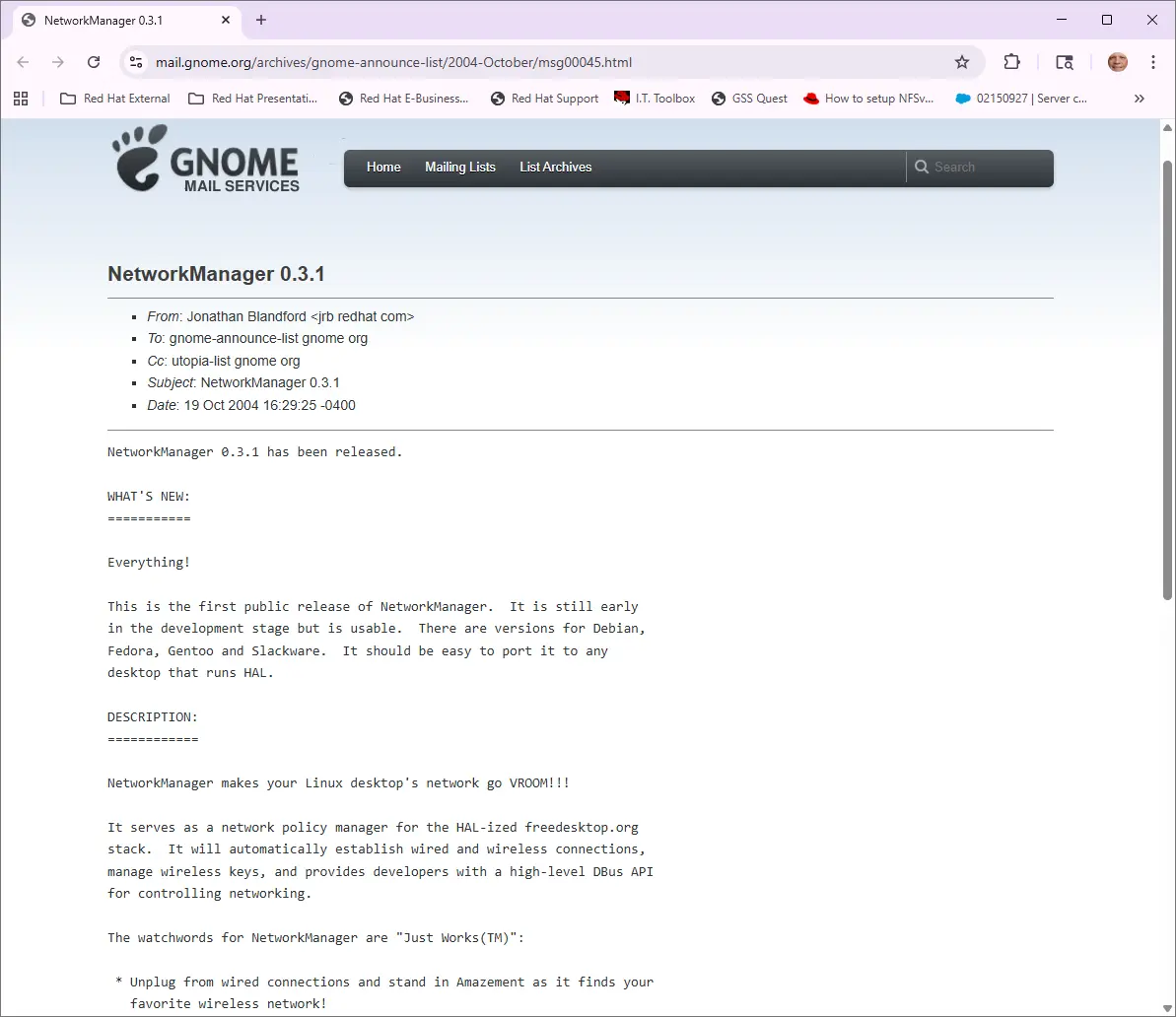
We can issue ip link set {interface} down, but the only way to keep it down permanently is to tell NetworkManager to not manage it. Otherwise, NetworkManager brings it back up at the next restart. Prior to NetworkManager 1.57 and a backport to 1.56.1, this meant setting up a special configuration file, which is a hassle with appliances and complicates automated deployments. NetworkManager 1.57 introduced a way to do this without managing a special .conf file. This new capability first appeared in a backported Fedora 44 update, and then in Fedora 45, Red Hat Enterprise Linux (RHEL) versions 9.9 and 10.3.
Old and new ways to do it
NetworkManager introduced an abstract concept called "connections", and provided nmcli commands to associate 0 or 1 interfaces with a connection. We can set an interface to down and disassociate it from any connection, but this does not set the interface down permanently.
Use this nmcli command to associate a NetworkManager connection named MyConnection with an interface named enp5s4:
nmcli connection modify MyConnection connection.interface-name enp5s4Use this ip command to immediately set interface named enp5s4 to down:
ip link set enp5s4 downUse this nmcli command to immediately disconnect interface enp5s4 from any NetworkManager connection:
nmcli device disconnect enp5s4To make sure the NetworkManager connection named MyConnection stays disconnected from any interfaces:
nmcli connection modify MyConnection connection.autoconnect noBut at the next bootstrap, NetworkManager still sets all interfaces that sense carrier to up, whether or not they are associated with NetworkManager connections. The only way to keep an interface down across bootstraps is to tell NetworkManager to not manage it.
The old way to persistently set an interface state
With NetworkManager 1.56 and earlier, prior to RHEL 9.9, RHEL 10.3, and a June 2026 Fedora 44 update, in order to set an interface named enp5s4 permanently down, you had to create a special configuration file.
For example, a file /etc/NetworkManager/conf.d/99-unmanage-enp5s4.conf can tell NetworkManager to not manage the enp5s4 interface:
# cat /etc/NetworkManager/conf.d/99-unmanage-enp5s4.conf
[device-enp5s4]
match-device=interface-name:enp5s4
manage=0
The ip command can immediately set the interface to down:
ip link set enp5s4 downBecause NetworkManager is not managing the interface, that state becomes permanent, even across reboots. To set it to up again, you can do so manually with the ip command:
ip link set enp5s4 upThe new way to set an interface state
With NetworkManager 1.57 and newer, starting with Fedora 45, RHEL 9.9, and RHEL 10.3 (and backported to 1.56.1 in a Fedora 44 update), you can use nmcli to set an interface's state permanently.
To set an interface named enp5s4 permanently down:
nmcli device set enp5s4 managed --permanent downThis immediately sets enp5s4 to the down state, similar to the ip link set enp5s4 down command. It keeps the interface unmanaged and in a down state across reboots.
If you only want to keep the interface named enp5s4 permanently unmanaged without immediately setting it to down:
nmcli device set enp5s4 managed --permanent noNote that if you've already set --permanent down in a previous command, then you don't need --permanent no in this one.
To revert this change, you can use the same command with one of these arguments instead of no:
yes: Force the device to be managed by NetworkManager.up: Force the device to be managed by NetworkManager, and immediately set its state toup(likeip link set enp5s4 up).reset: Do not force the device to any value of NetworkManager-managed. This is useful if you previously usedmanaged --permanent yes/up/no/downand you want to clear it, so more general configuration rules may apply.
For example:
nmcli device set enp5s4 managed --permanent resetExample: The old way
With NetworkManager 1.56 and earlier, prior to RHEL 9.9, RHEL 10.3, and a May, 2026 Fedora 44 update, set up a custom configuration file to tell NetworkManager this device is unmanaged and then either reboot or restart NetworkManager:
# cat /etc/NetworkManager/conf.d/99-unmanage-enp5s4.conf[device-enp5s4]
match-device=interface-name:enp5s4
manage=0
#
# systemctl restart NetworkManager
Now that NetworkManager no longer manages it, manage it yourself with the ip command.
# ip link show enp5s4
4: enp5s4: <BROADCAST,MULTICAST,UP,LOWER_UP> mtu 1500 qdisc fq_codel state UP mode DEFAULT group default qlen 1000
    link/ether 00:30:18:c3:cb:1e brd ff:ff:ff:ff:ff:ff
    altname enx003018c3cb1e
# ip link set enp5s4 down
# ip link show enp5s4
4: enp5s4: <BROADCAST,MULTICAST> mtu 1500 qdisc fq_codel state DOWN mode DEFAULT group default qlen 1000
    link/ether 00:30:18:c3:cb:1e brd ff:ff:ff:ff:ff:ff
    altname enx003018c3cb1e
#
# reboot
#
login as: root
root@10.10.10.74's password:
Last login: Mon Dec 22 10:00:31 2025 from 10.10.10.104
# ip link show dev enp5s4
4: enp5s4: <BROADCAST,MULTICAST> mtu 1500 qdisc noop state DOWN mode DEFAULT group default qlen 1000
    link/ether 00:30:18:c3:cb:1e brd ff:ff:ff:ff:ff:ff
    altname enx003018c3cb1e
Example: The new way
With NetworkManager 1.57 and newer, on Fedora 45 and newer, RHEL 9.9 and newer, and RHEL 10.3 and newer (and backported to 1.56.1 in a Fedora 44 update), we no longer need a custom configuration file. Use nmcli to set it permanently down and unmanaged:
# ip link show enp5s4
4: enp5s4: <BROADCAST,MULTICAST,UP,LOWER_UP> mtu 1500 qdisc fq_codel state UP mode DEFAULT group default qlen 1000
    link/ether 00:30:18:c3:cb:1e brd ff:ff:ff:ff:ff:ff
    altname enx003018c3cb1e
# nmcli device set enp5s4 managed --permanent down
# ip link show enp5s4
4: enp5s4: <BROADCAST,MULTICAST> mtu 1500 qdisc fq_codel state DOWN mode DEFAULT group default qlen 1000
    link/ether 00:30:18:c3:cb:1e brd ff:ff:ff:ff:ff:ff
    altname enx003018c3cb1e
# reboot
Look at /var/log/messages to see messages similar to this:
May  6 12:51:13 example NetworkManager[1089]: <info>  [1778089873.6194] config: signal: SET_VALUES,values,values-intern (/etc/NetworkManager/NetworkManager.conf, /usr/lib/NetworkManager/conf.d/22-wifi-mac-addr.conf, /var/lib/NetworkManager/NetworkManager-intern.conf)
May  6 12:51:13 example NetworkManager[1089]: <info>  [1778089873.6203] device (enp5s4): state change: disconnected -> unmanaged (reason 'unmanaged-user-explicit', managed-type: 'removed')
May  6 12:51:13 example kernel: r8169 0000:05:04.0 enp5s4: Link is Down
May  6 12:51:13 example avahi-daemon[1092]: Interface enp5s4.IPv6 no longer relevant for mDNS.
May  6 12:51:13 example avahi-daemon[1092]: Leaving mDNS multicast group on interface enp5s4.IPv6 with address fe80::230:18ff:fec3:cb1e.
May  6 12:51:13 example avahi-daemon[1092]: Withdrawing address record for fe80::230:18ff:fec3:cb1e on enp5s4.
May  6 12:51:13 example NetworkManager[1089]: <info>  [1778089873.6280] audit: op="device-managed" interface="enp5s4" ifindex=4 pid=1891 uid=0 result="success"

Broadcast message from root@example on pts/0 (Wed 2026-05-06 12:41:15 CDT):

The system will reboot now!
After the reboot, the device is still administratively down and unmanaged. Use nmcli to reset it back to managed and --permanent up.
# ip link show enp5s4
4: enp5s4: <BROADCAST,MULTICAST> mtu 1500 qdisc noop state DOWN mode DEFAULT group default qlen 1000
    link/ether 00:30:18:c3:cb:1e brd ff:ff:ff:ff:ff:ff
    altname enx003018c3cb1e
# nmcli device set enp5s4 managed --permanent up
# ip link show enp5s4
4: enp5s4: <NO-CARRIER,BROADCAST,MULTICAST,UP> mtu 1500 qdisc fq_codel state DOWN mode DEFAULT group default qlen 1000
    link/ether 00:30:18:c3:cb:1e brd ff:ff:ff:ff:ff:ff
    altname enx003018c3cb1e
# echo "wait a few seconds" ; sleep 6
# ip link show enp5s4
4: enp5s4: <BROADCAST,MULTICAST,UP,LOWER_UP> mtu 1500 qdisc fq_codel state UP mode DEFAULT group default qlen 1000
    link/ether 00:30:18:c3:cb:1e brd ff:ff:ff:ff:ff:ff
    altname enx003018c3cb1e
Look at /var/log/messages to see messages similar to this (note the three second delay before bringing the device up):
May  6 12:47:13 example NetworkManager[1089]: <info>  [1778089633.9214] config: signal: SET_VALUES,values,values-intern (/etc/NetworkManager/NetworkManager.conf, /usr/lib/NetworkManager/conf.d/22-wifi-mac-addr.conf, /var/lib/NetworkManager/NetworkManager-intern.conf)
May  6 12:47:13 example NetworkManager[1089]: <info>  [1778089633.9225] device (enp5s4): state change: unmanaged -> unavailable (reason 'user-requested', managed-type: 'external')
May  6 12:47:13 example kernel: RTL8211B Gigabit Ethernet r8169-0-520:00: attached PHY driver (mii_bus:phy_addr=r8169-0-520:00, irq=MAC)
May  6 12:47:13 example NetworkManager[1089]: <info>  [1778089633.9891] audit: op="device-managed" interface="enp5s4" ifindex=4 pid=1807 uid=0 result="success"
May  6 12:47:13 example kernel: r8169 0000:05:04.0 enp5s4: Link is Down
May  6 12:47:16 example kernel: r8169 0000:05:04.0 enp5s4: Link is Up - 1Gbps/Full - flow control off
May  6 12:47:16 example NetworkManager[1089]: <info>  [1778089636.2671] device (enp5s4): carrier: link connected
May  6 12:47:16 example NetworkManager[1089]: <info>  [1778089636.2695] device (enp5s4): state change: unavailable -> disconnected (reason 'carrier-changed', managed-type: 'assume')
May  6 12:47:18 example avahi-daemon[1092]: Joining mDNS multicast group on interface enp5s4.IPv6 with address fe80::230:18ff:fec3:cb1e.
May  6 12:47:18 example avahi-daemon[1092]: New relevant interface enp5s4.IPv6 for mDNS.
May  6 12:47:18 example avahi-daemon[1092]: Registering new address record for fe80::230:18ff:fec3:cb1e on enp5s4.*.
Conclusion
With this new nmcli capability, you can "float" network interfaces between connections, leaving some up and others down as you see fit to manage manual failover scenarios. Take advantage of this new nmcli capability to modernize your networking setup.

