Platform teams invest enormous effort in tuning pod autoscaling, storage throughput, and service mesh configurations. Yet one of the most disruptive failure modes in high-density container environments comes from the Domain Name System (DNS), a service that predates containers entirely. This article will focus on how to protect identity infrastructure from DNS-related bottlenecks in cloud-native environments.
When you migrate from traditional virtual machine (VM) workloads to a high-density Kubernetes or Red Hat OpenShift Container Platform, the character of DNS traffic changes fundamentally. What was once a steady, predictable stream of resolution requests becomes a sharp, parallel burst. If your underlying identity and DNS infrastructure is not tuned for this new reality, you will hit an invisible wall, one that does not manifest as a CPU spike or a memory leak but as intermittent, phantom timeouts that can bring a production cluster to its knees.
Field observation and the parallelism paradox
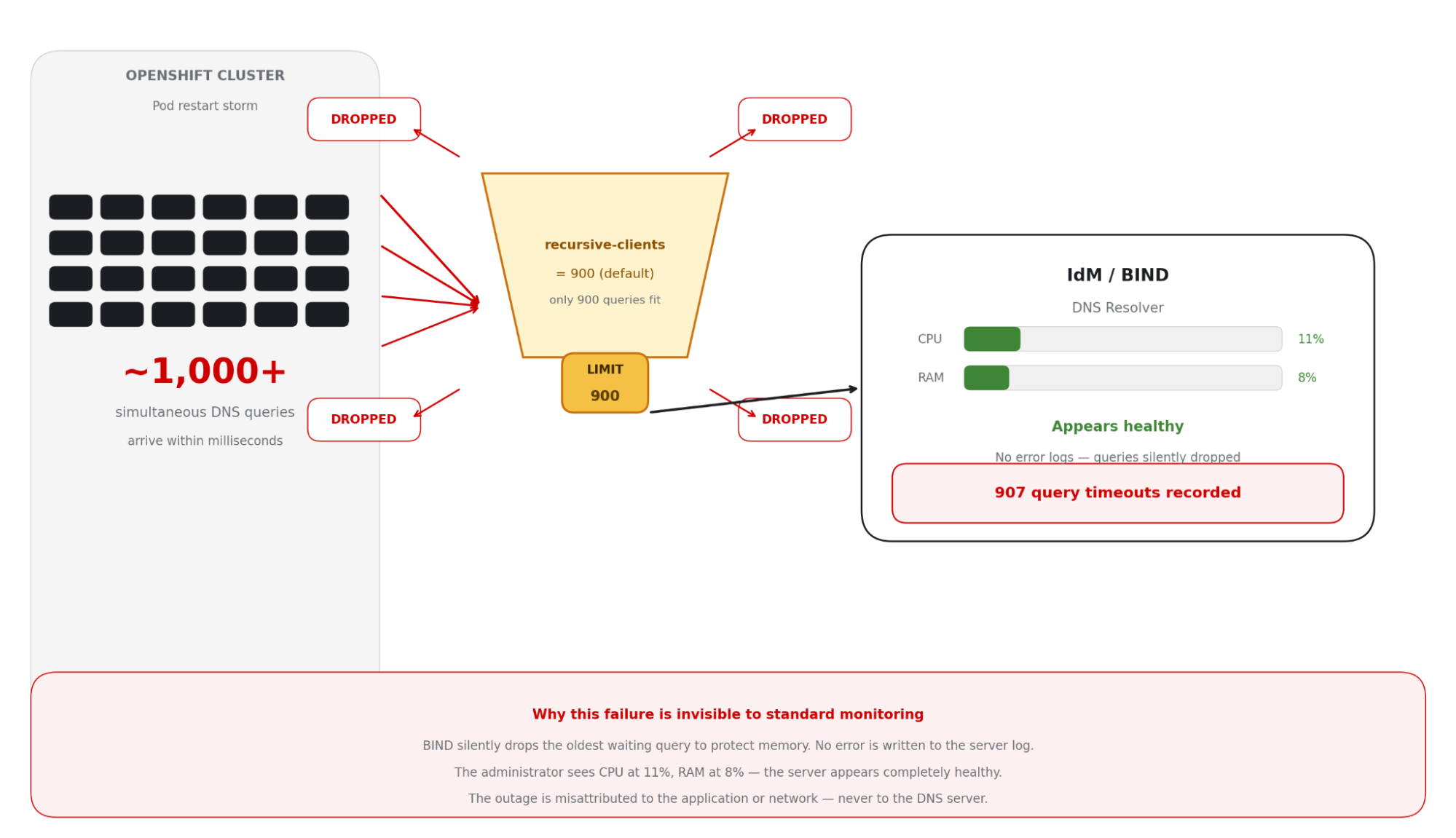
This failure mode is particularly dangerous because the DNS server often shows low CPU and memory use at the time of the incident. It is silently dropping queries rather than struggling to process them.
Modern container platforms achieve high availability through massive parallelism. When a cluster scales out, or a large application restarts, hundreds or thousands of pods simultaneously issue service-discovery requests and external resource lookups.
In many enterprise environments, Identity Management (IdM) handles these requests built on BIND. These systems are robust and feature-rich, but they ship with conservative defaults designed for general-purpose use, not for the hyper-scale demands of a 100-node OpenShift cluster. Understanding why requires a look at how recursive DNS resolution actually works.
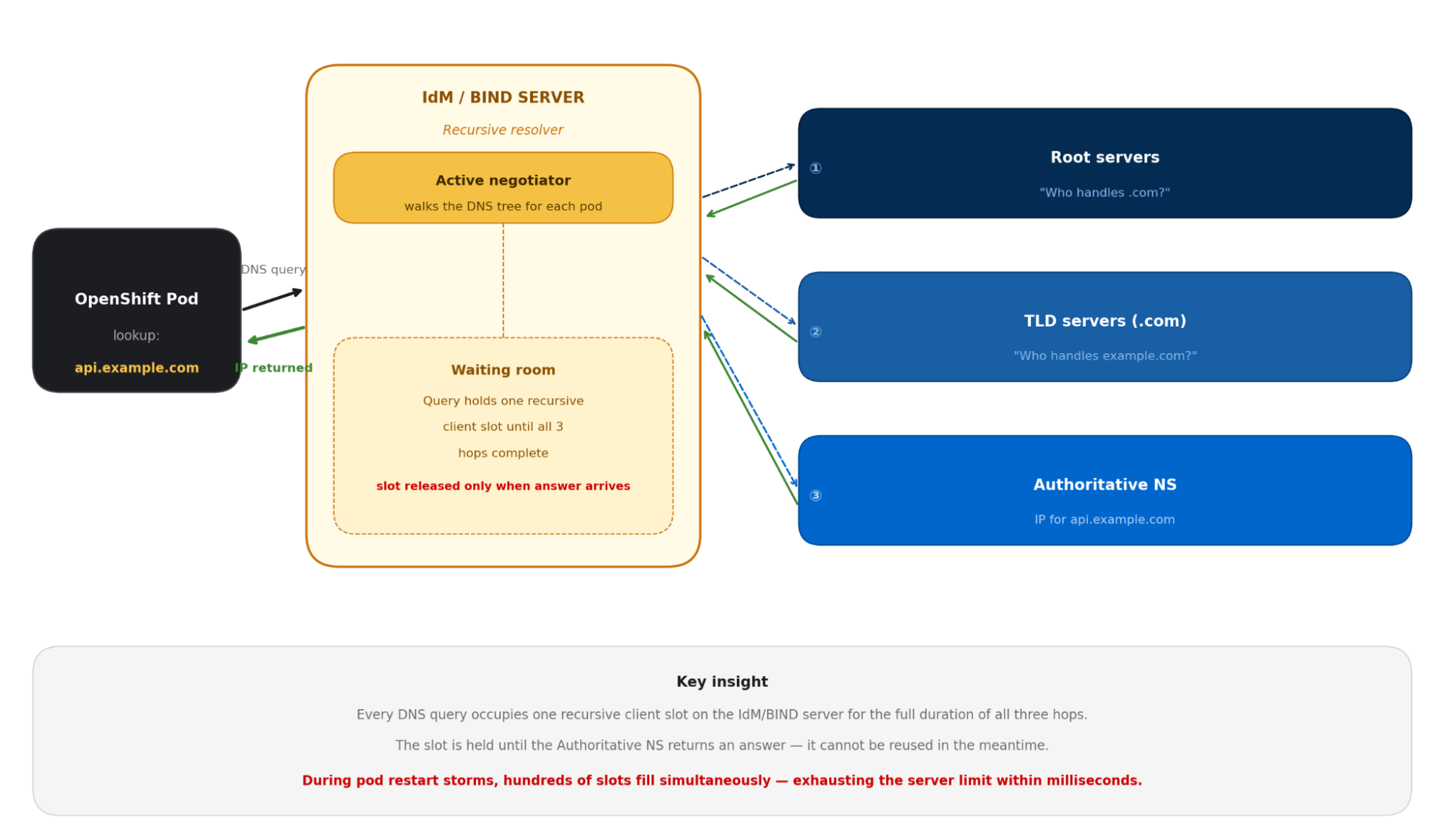
The key insight is that each pod query that hits the IdM server occupies a recursive client slot, a memory reservation that persists until the full round-trip through the DNS hierarchy is complete. Under normal VM-based workloads, this slot count rarely causes concern. Under Kubernetes parallelism, it becomes a hard ceiling.
When safe defaults become bottlenecks
During architectural reviews with high-scale customers, the same pattern surfaces repeatedly. The infrastructure looks healthy, network use is low; but applications are experiencing intermittent resolution failures. The culprit is the recursive client limit in BIND.
Parameter | Default Values | Impact on OpenShift |
|---|---|---|
recursive-clients | 900 (older IDM Configs) | Exceeded within milliseconds during a pod restart storm |
Query drop behaviour | Silent drop (oldest query) | Application sees a timeout — no server-side error log |
Server CPU/RAM at drop time | Typically <20% utilised | Administrators see a healthy server — completely misleading |
This issue is difficult to diagnose. When the recursive client limit is reached, BIND drops the oldest waiting query to protect its own memory. The server logs nothing at default log levels. The pod sees a timeout. The system administrator sees a server at 15% CPU. The result is a mystery often misattributed to the application or the network. In one production review, this pattern produced 907 documented query timeouts in a single cluster event.
Figure 2 illustrates the recursion limit bottleneck.
A multi-layered defense strategy
Resolving this issue requires more than a single configuration change. The recommended approach is a defense-in-depth strategy that addresses both the immediate limit and the underlying architectural pattern that creates the pressure in the first place.
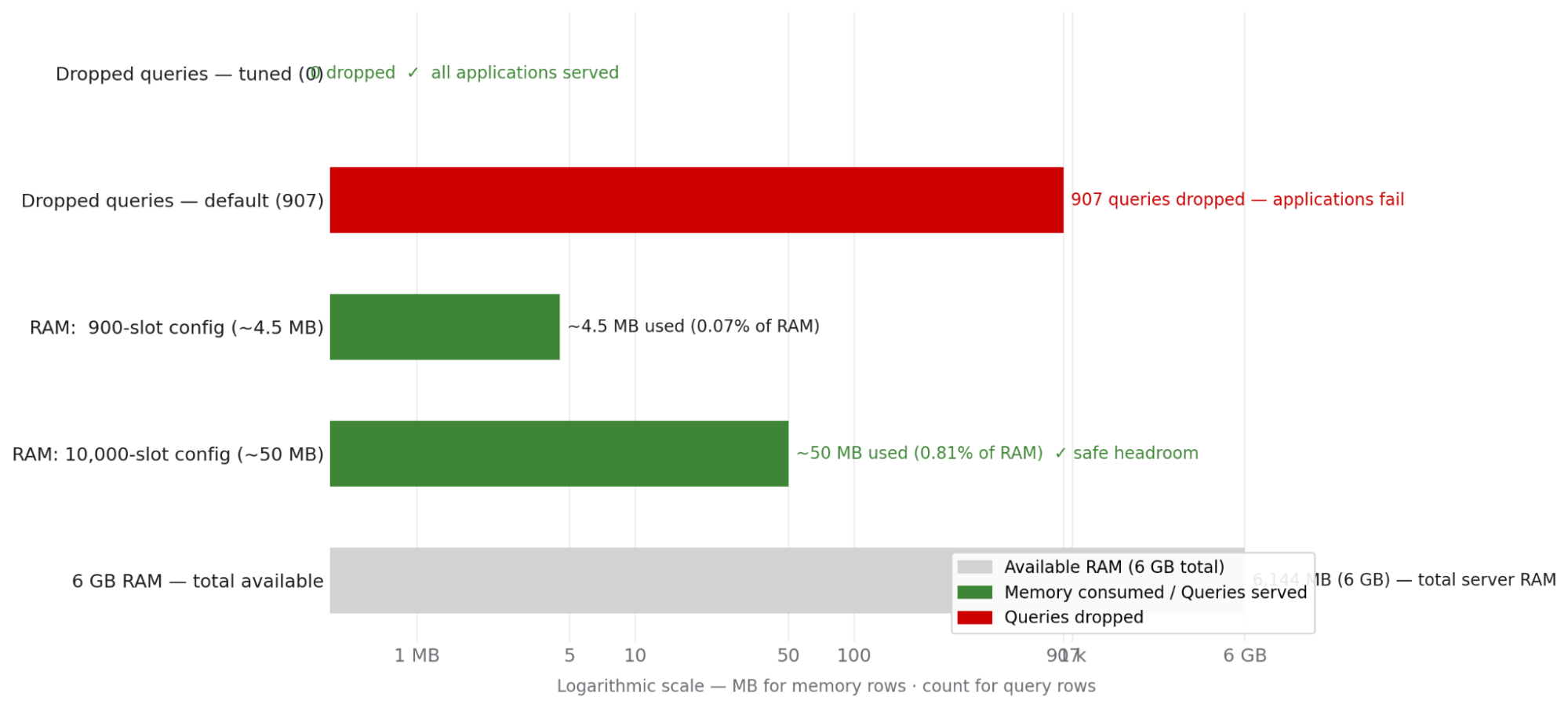
Decouple capacity limits from hardware constraints: The first step is aligning your infrastructure limits with your platform's actual density. Increasing the recursive client limit is often viewed with hesitation due to potential memory concerns—but this concern is frequently based on outdated assumptions about the memory cost per client slot.
On a modern IdM host with 6 GB of RAM, raising the limit from 900 to 10,000 concurrent recursive clients uses approximately 50 MB of additional RAM—less than 1% of available memory (Figure 3). The hardware headroom is substantial. What looks like a risk is actually an arbitrarily conservative default.
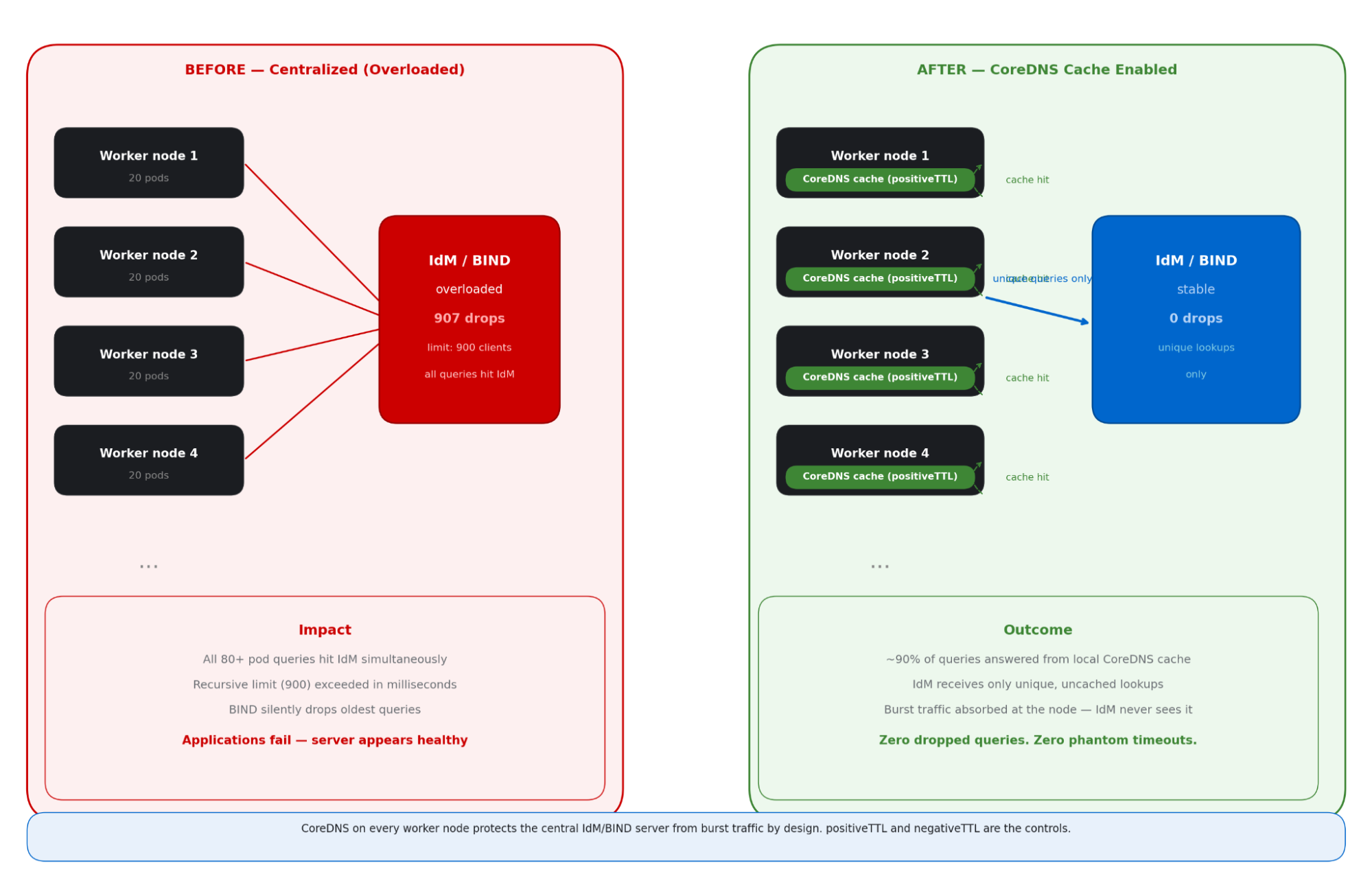
Shift the cache to the edge with OpenShift CoreDNS caching: The most elegant solution to DNS congestion is not making the central server bigger, it is making it quieter. The OpenShift Container Platform DNS infrastructure runs CoreDNS as a DaemonSet, placing a DNS resolver pod on each worker node. The CoreDNS cache plug-in has two key parameters—positiveTTL and negativeTTL—that control how long resolved records are held in memory before a fresh upstream query is needed.
By default, both values are 0, meaning CoreDNS performs no caching at all, and each single pod DNS lookup results in a fresh upstream query to Identity Management. Tuning these two parameters is the highest-leverage configuration change available for protecting IdM from burst traffic.
Benefits and outcomes of a single strategy of CoreDNS caching at the edge:
- Latency reduction: Cached responses are served in microseconds from local memory, bypassing network round-trips entirely.
- Traffic deduplication: 100 pods requesting the same record generate a single upstream query, not 100. The upstream server sees a fraction of prior load.
- Failure insulation: If the upstream IdM server is momentarily busy, the node cache continues serving known records, breaking the coupling between IdM health and application availability.
The CoreDNS cache on each worker node acts as a shield, absorbing the burst of identical DNS queries from multiple pods and only forwarding a single query upstream to the Identity Management (IdM) server (Figure 4).
The long-term caching solution for OpenShift Container Platform
Raising the recursive-clients limit protects Identity Management from being overwhelmed when the query storm arrives. But the more powerful long-term approach is preventing that storm from forming in the first place. That is the role of the built-in CoreDNS cache; and by default, it is switched off.
The OpenShift Container Platform DNS infrastructure runs CoreDNS as a DaemonSet: one resolver pod per worker node, handling all DNS resolution for pods on that node. This setup already provides local DNS handling. What is missing, by default, is caching. The CoreDNS cache plug-in exposes two parameters in the DNS Operator custom resource. Both default to 0.
Note: NodeLocal DNSCache is a Kubernetes community add-on, not available in OpenShift Container Platform. The equivalent built-in mechanism is the CoreDNS cache plug-in, managed via the DNS operator using positiveTTL and negativeTTL. Since both default to 0, the local CoreDNS pod on each worker node acts as a pass-through resolver out of the box, providing no cache protection until these values are explicitly configured.
What each parameter controls
The positiveTTL controls how long CoreDNS holds a successful DNS response—an answer where a domain resolves to an IP address. With the default of 0, CoreDNS defers to the TTL embedded in the DNS record itself. For many internal-service records in OpenShift Container Platform, this embedded TTL is short (typically 5–30 seconds), offering minimal protection against repeated upstream queries during burst events.
The negativeTTL controls how long CoreDNS caches a negative response—an NXDOMAIN answer returned when a domain is not found. With the default of 0, each failed lookup triggers a fresh upstream query to IdM. This is the more impactful parameter for OpenShift clusters because of a mechanism called DNS search-domain expansion that silently multiplies the NXDOMAIN query rate on each pod restart.
The hidden amplifier: DNS search domain expansion
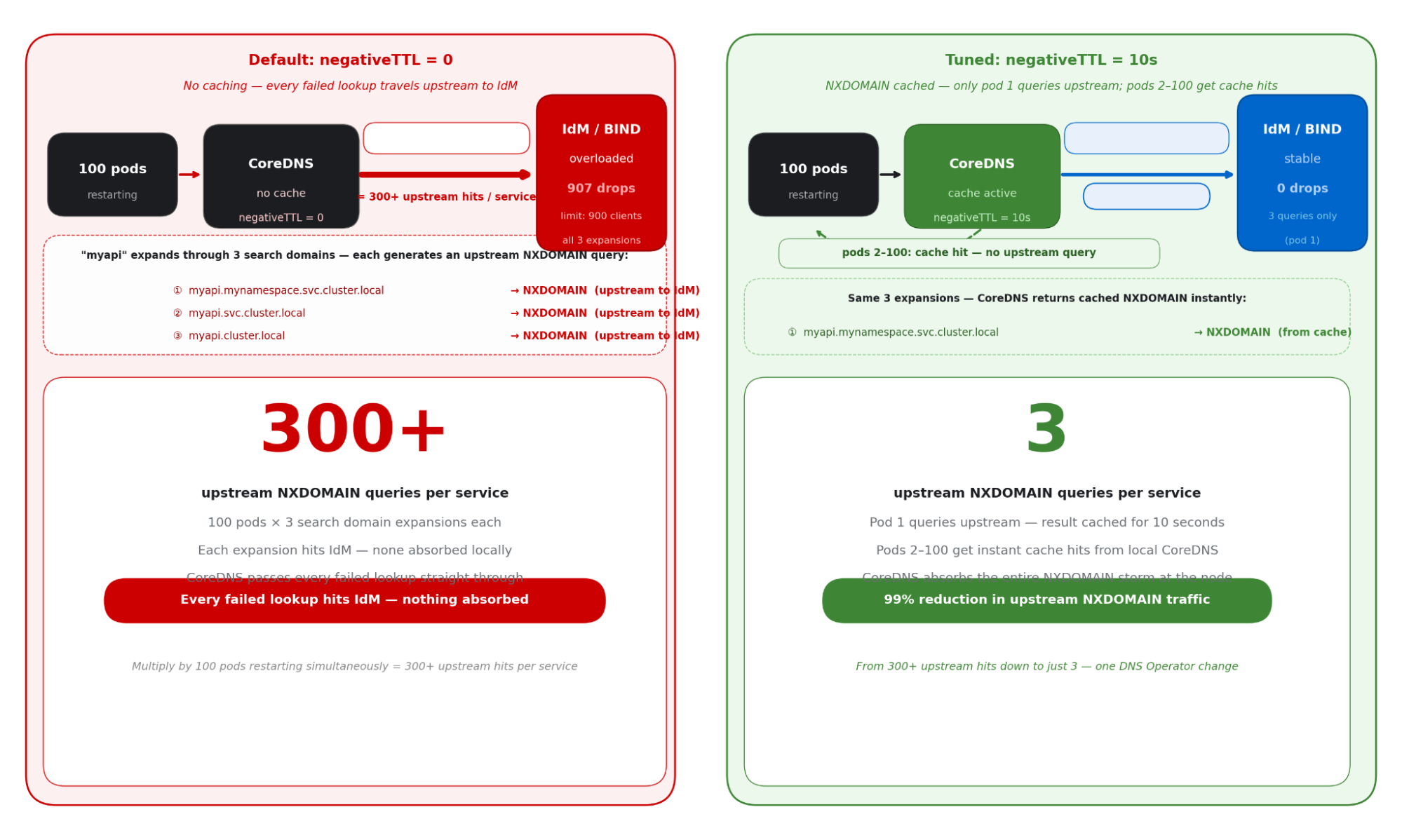
When a pod resolves a short name like myapi, the resolver in OpenShift Container Platform does not query that name directly. It expands it through a sequence of search domains in order, generating an NXDOMAIN upstream query for each one that does not match before the correct record is found.
# Pod looks up: "myapi"  --  resolver expands through search domains:
1.  myapi.mynamespace.svc.cluster.local  → NXDOMAIN  (goes upstream to IdM)
2.  myapi.svc.cluster.local              → NXDOMAIN  (goes upstream to IdM)
3.  myapi.cluster.local                  → NXDOMAIN  (goes upstream to IdM)
4.  myapi.example.com                    → resolved  (positive answer from IdM)
# With negativeTTL = 0:   100 pods × 3 NXDOMAIN lookups × 5 services = 1,500 upstream hits
# With negativeTTL = 10s: 3 NXDOMAIN lookups × 5 services = 15 upstream hits  (99% reduction)
Figure 5 illustrates how the DNS search domain expansion mechanism multiplies a single failed service lookup into multiple upstream NXDOMAIN queries to the IdM server, demonstrating the amplification problem that negativeTTL is designed to solve.
Configure the DNS operator
Set both parameters through the DNS operator custom resource. The change propagates to all CoreDNS pods cluster-wide within minutes, requiring no node reboots or pod restarts. The patch command is a single line.
apiVersion: operator.openshift.io/v1
kind:       DNS
metadata:
  name:  default
spec:
  cache:
    positiveTTL:  5m     # Starting point -- CoreDNS upstream default is 300s; tune shorter if your rolling update window is under 5 min
    negativeTTL:  30s    # RFC 2308 baseline -- even 10s absorbs 99% of NXDOMAIN storms; validate against your cache miss rate
# Apply with:
# oc patch dns.operator/default --type=merge \
#   -p '{"spec":{"cache":{"positiveTTL":"5m","negativeTTL":"30s"}}}'
# Verify rollout:
# oc rollout status daemonset/dns-default -n openshift-dns
# Monitor cache effectiveness after applying:
# oc exec -n openshift-dns <coredns-pod> -- wget -qO- http://localhost:9153/metrics | grep coredns_cache
Reasoning through the right values for your environment
The Red Hat official documentation does not specify positiveTTL and negativeTTL values for OpenShift clusters. The tuning decision reduces to two questions you must answer for your own cluster.
First, how frequently do your services redeploy? A rolling update changes service endpoint IPs. If your positiveTTL is longer than your deployment window, pods on any given node may briefly resolve a stale IP.
Second, how quickly does DNS staleness become operationally harmful? For a trading platform, staleness measured in minutes is unacceptable. For a SCADA system that redeployed last quarter, it is irrelevant. These two axes, deployment velocity and staleness tolerance are the only variables that genuinely determine where your values should land.
Important note: These are starting points, not prescribed values.
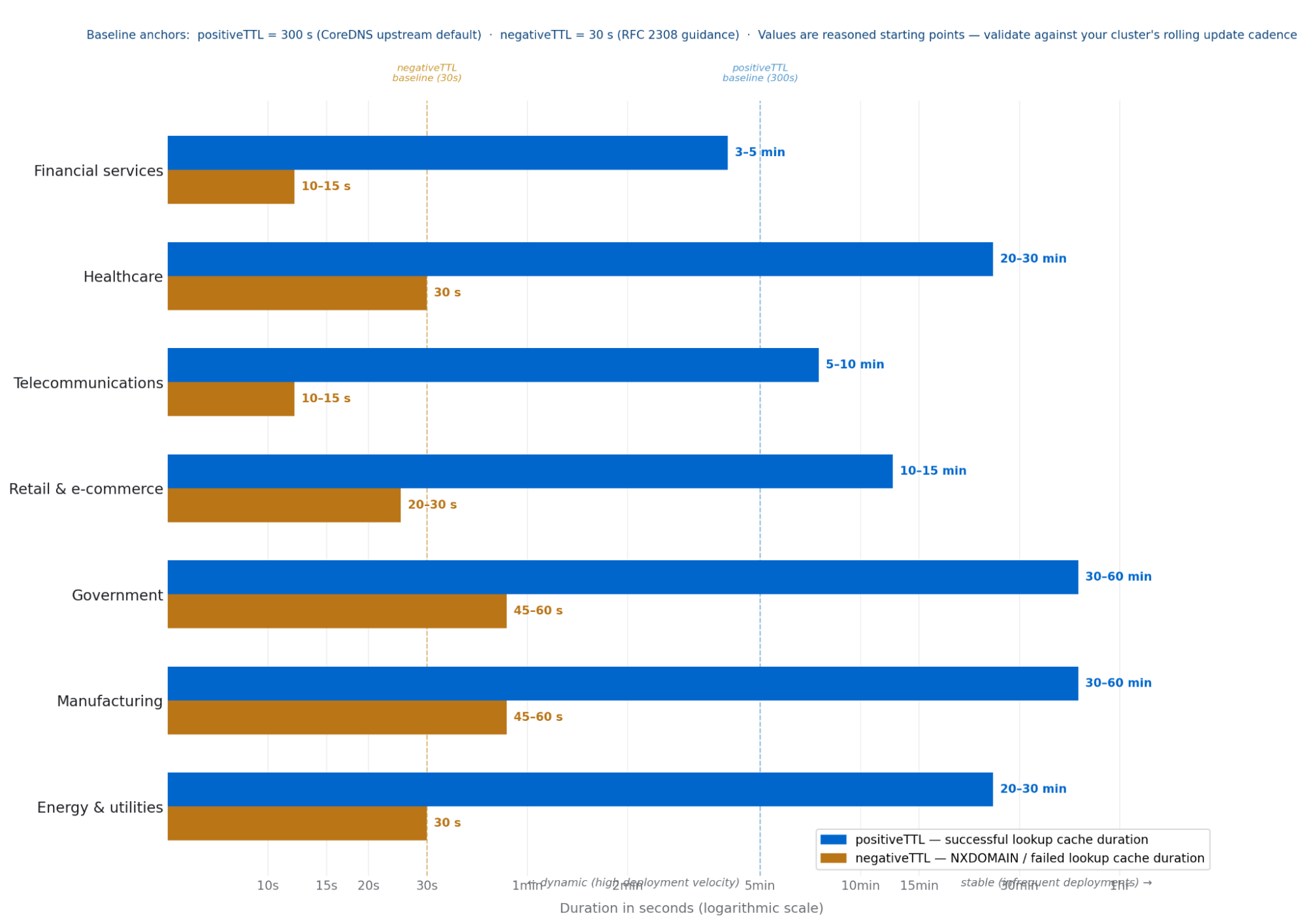
The values in Figure 6 and the following table are reasoned starting points from typical deployment patterns and workload stability characteristics. Before treating any value as a production default, validate it against your cluster's actual rolling update cadence using oc get dns.operator/default -o yaml and observe CoreDNS cache metrics with oc exec -n openshift-dns.
Industry | positiveTTL | negativeTTL | Key Driver |
|---|---|---|---|
Financial services | 3–5 min | 10–15 sec | Continuous CI/CD deployments and zero staleness tolerance on latency-critical payment and fraud detection paths demand short values on both parameters. |
Healthcare | 20-30 min | 30 sec | EHR and clinical systems deploy in controlled maintenance windows; stable IPs justify a long positiveTTL, while 30 s negativeTTL (the RFC 2308 baseline) ensures prompt convergence after a care system recovery. |
Teleco | 5–10 min | 10–15 sec | Enormous subscriber query volume makes negativeTTL configuration especially impactful; short values ensure rapid DNS convergence when subscriber-facing NFV services recover after an incident. |
Retail | 10–15 min | 20–30 sec | Peak event asymmetry is the key consideration — a 10–15 min positiveTTL provides maximum cache protection precisely during the highest-traffic windows of the year. |
Government | 30–60 min | 45–60 sec | Formal change management cycles make service IPs among the most stable of any OpenShift workload type; longer TTLs are safe and appropriate. |
Manufacturing | 30–60 min | 45–60 sec | OT system IPs rarely change and edge factory clusters often operate over constrained WAN links — long TTLs reduce upstream query rate and WAN exposure simultaneously. |
Energy & utilities | 20–30 min | 30 sec | Stable SCADA and grid systems tolerate a long positiveTTL, but safety monitoring paths need negativeTTL held at the 30 s RFC baseline to ensure prompt DNS recovery after a transient failure. |
Validating against your own cluster
Measure your rolling update window with oc rollout history deployment/<your-service>. Your positiveTTL should be shorter than this window if endpoint freshness is critical. After applying, watch coredns_cache_hits_total versus coredns_cache_misses_total via oc exec -n openshift-dns <pod> -- wget -qO- http://localhost:9153/metrics | grep coredns_cache.
A miss rate above 40% suggests your TTL is too short; below 5% you have room to tighten it.
Engineering for resilience: the combined outcome
In production environments where all three parameters have been tuned (i.e., recursive-clients, positiveTTL, and negativeTTL) the combination converts unstable, timeout-prone clusters into platforms capable of handling full-scale rolling restarts without a single dropped DNS query. The NXDOMAIN storm disappears. The upstream IdM load drops by over 90%. The 907-timeout failure mode becomes structurally impossible.
The deeper benefit is predictability: when DNS is reliable, application restarts stay fast, health checks succeed on first attempt, and operators can trust that a failing pod has a genuine application problem, not a phantom infrastructure timeout.
The following table summarizes the recommended configuration posture.
Concern | Default | Recommendation |
|---|---|---|
recursive-clients limit | 900 — exceeded during pod storms | 2000-5000-10,000 — sized to cluster burst capacity |
CoreDNS positiveTTL | 0s — no caching, every query hits IdM | 300s baseline (CoreDNS default) — shorter for high-velocity deployments, longer for stable OT/Gov workloads |
CoreDNS negativeTTL | 0s — failed lookups retry immediately, storm not absorbed | 30s baseline (RFC 2308 guidance) — even 10s eliminates 99% of NXDOMAIN storm; extend only for stable environments |
Upstream traffic from pods | Every query goes upstream | ~90% absorbed by CoreDNS cache; unique queries only |
IdM server under pod storm | Silent drops, phantom timeouts (907 recorded) | Stable — shielded by CoreDNS cache layer |
Final thoughts
Treat DNS as a Tier-0 service. Do not wait for a production incident to investigate your recursion limits or your caching strategy. The default configuration is right for its original context. However, an OpenShift Container Platform cluster housing 100 nodes and thousands of concurrent pods presents an environment fundamentally unlike the one for which the current default settings were designed.
Analyze your traffic patterns, tune for the burst, and shield your identity services with caching. Stability is not found in the defaults. It is found in the architecture.

