Page
The recovery process

In this lesson, we ensure storage data is copied to a backup site, syncing, then restoring the virtual machines (VMs) through custom plugins that automatically align with the changed storage location at the new site. This completes the data recovery process.
Prerequisites:
- Set up your VM disaster recovery environment
- Back up and confirm metadata from a virtual machine (VM)
In this lesson, you will:
- Synchronize storage data between the primary and disaster recovery sites
- Restore metadata with OpenShift APIs for Data Protection (OADP) so VMs can find their disks immediately upon startup
- Verify the restored PVC and PV metadata
- Verify recovery with the OADP plugin logs
Synchronize storage data
At the disaster recovery site, the first action is to ensure the data is synchronized. This is handled by the storage system. For our NFS simulation, we use rsync to copy the volume data from the primary NFS server to the disaster recovery NFS server. You can substitute rsync with any other underlying data transfer tool for storage.
# Simulate storage replication by copying the PV directory
sudo rsync -avh --progress /srv/nfs/openshift-01/pvc-b6d75156-0c58-422f-8bf8-6e40ed054c5d /srv/nfs/openshift-02/
Restore metadata with OADP
Create a Velero Restore object on the disaster recovery (DR) cluster. This will recreate the VM and other resources from the backup. The PV patching plugin will automatically re-map the storage.
The OADP on the DR system will do the following:
- Copy metadata backup from S3 storage.
- Extract the metadata backup in the DR system.
- Filter out CR based on the config defined in the Restore CR object.
- Apply both the system-built-in OADP plugin and the DIY OADP plugin.
- Apply the changed CR into the disaster recovery system.
cat << EOF > $BASE_DIR/data/install/oadp-restore.yaml
apiVersion: velero.io/v1
kind: Restore
metadata:
  name: restore-metadata-excluding-pvs-03
  namespace: openshift-adp
spec:
  # 1. Specify the backup to restore from
  backupName: vm-full-metadata-backup-03
  # 2. Whitelist the resources to restore. This provides granular control.
  includedResources:
    # KubeVirt / OCP-V VM resources
    - virtualmachines.kubevirt.io
    - virtualmachineinstances.kubevirt.io
    - datavolumes.cdi.kubevirt.io
    - virtualmachineclusterinstancetypes.instancetype.kubevirt.io
    - virtualmachineclusterpreferences.instancetype.kubevirt.io
    - controllerrevisions.apps
    # Standard Kubernetes workload resources
    - pods
    - deployments
    - statefulsets
    - daemonsets
    - jobs
    - cronjobs
    # OpenShift-specific workload resources
    - deploymentconfigs
    - buildconfigs
    # Application networking configuration
    - services
    - routes.route.openshift.io
    - ingresses
    # Application configuration and storage claims (including PVs)
    - configmaps
    - secrets
    - persistentvolumeclaims
    - persistentvolumes
  # 3. CRITICAL: Exclude snapshot-related resources
  # We are restoring from a materialized PVC, not the snapshot itself.
  excludedResources:
    - snapshot
    - snapshotcontent
    - virtualMachineSnapshot
    - virtualMachineSnapshotContent
    - VolumeSnapshot
    - VolumeSnapshotContent
  # 4. Set the resource conflict policy
  # 'update' will overwrite existing resources if a restore is re-run.
  existingResourcePolicy: 'update'
  # 5. Ensure PVs are restored so the plugin can patch them.
  restorePVs: true

EOF
oc apply -f $BASE_DIR/data/install/oadp-restore.yaml
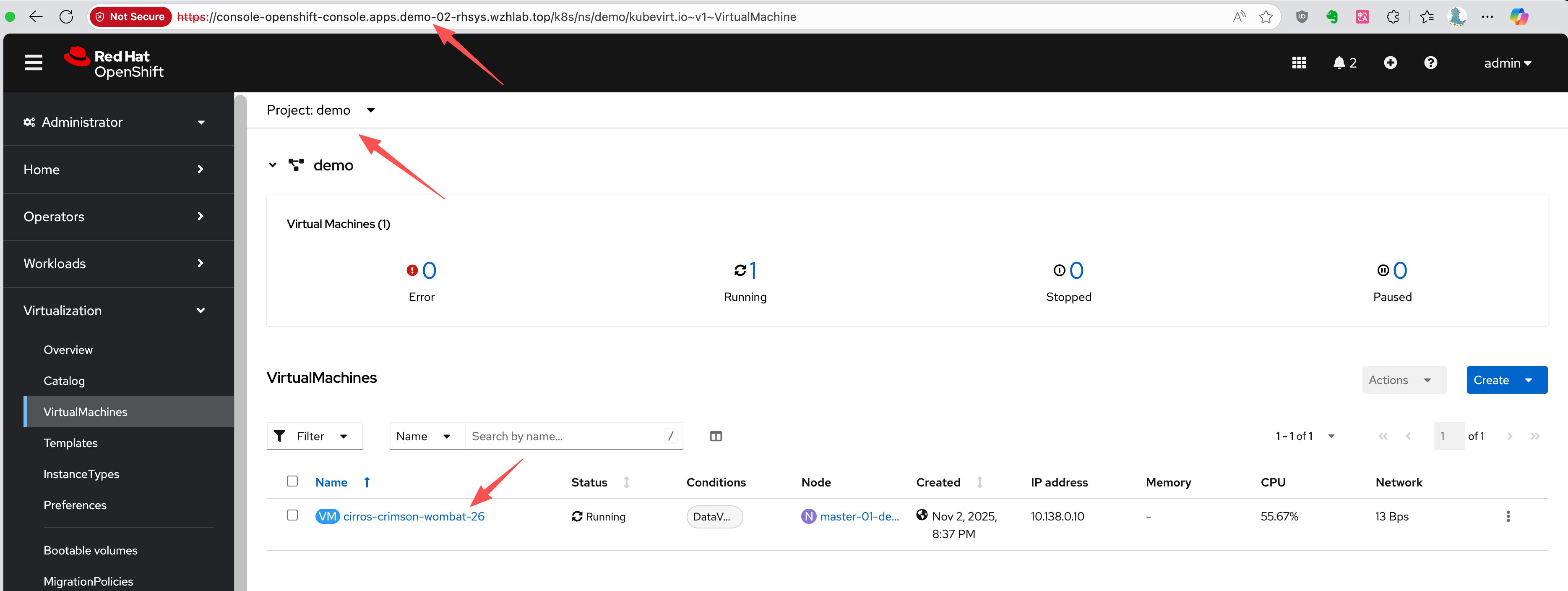
After the restore is completed, the VM will be created on the DR cluster and connected to the replicated data (Figure 1).
Verify the restored metadata
The restored PVC metadata shows that it is bound to the same PV name as on the primary site:
kind: PersistentVolumeClaim
apiVersion: v1
metadata:
  name: cirros-crimson-wombat-26-volume
  namespace: demo
  # ......
spec:
  accessModes:
    - ReadWriteMany
  resources:
    requests:
      storage: '235635999'
  volumeName: pvc-b6d75156-0c58-422f-8bf8-6e40ed054c5d
  storageClassName: nfs-csi
  volumeMode: Filesystem
# ......
The restored PV metadata shows the effect of the patching plugin. The share and volumeHandle now point to the disaster recovery site's NFS server directory (/openshift-02).
kind: PersistentVolume
apiVersion: v1
metadata:
  name: pvc-b6d75156-0c58-422f-8bf8-6e40ed054c5d
  # ......
spec:
  capacity:
    storage: '235635999'
  csi:
    driver: nfs.csi.k8s.io
    volumeHandle: 192.168.99.1#openshift-02#pvc-b6d75156-0c58-422f-8bf8-6e40ed054c5d##
    volumeAttributes:
      csi.storage.k8s.io/pv/name: pvc-b6d75156-0c58-422f-8bf8-6e40ed054c5d
      csi.storage.k8s.io/pvc/name: tmp-pvc-43d11600-7b1c-4a3f-997c-8e99526bdd32
      csi.storage.k8s.io/pvc/namespace: openshift-virtualization-os-images
      server: 192.168.99.1
      share: /openshift-02
      storage.kubernetes.io/csiProvisionerIdentity: 1761996473487-3594-nfs.csi.k8s.io
      subdir: pvc-b6d75156-0c58-422f-8bf8-6e40ed054c5d
  accessModes:
    - ReadWriteMany
  claimRef:
    kind: PersistentVolumeClaim
    namespace: demo
    name: cirros-crimson-wombat-26-volume
    uid: 4150f267-fc79-4234-a188-9dbd0b993fc2
    apiVersion: v1
    resourceVersion: '138499'
  persistentVolumeReclaimPolicy: Retain
  storageClassName: nfs-csi
  mountOptions:
    - hard
    - nfsvers=4.2
    - rsize=1048576
    - wsize=1048576
    - noatime
    - nodiratime
    - actimeo=60
    - timeo=600
    - retrans=3
  volumeMode: Filesystem
Check the OADP plugin logs
Check the OADP plugin logs for Starting ModifyPVFieldsAction for PV or Applying rule for path. The Velero pod logs on the DR cluster confirm that the PV patching plugin executed successfully.
When the Velero pod runs, it loads the DIY plugins and runs the plugins during backup and restore steps. We can check to confirm if the plugins are running by looking for keywords in the logs. Based on the logic of the plugins, the patching logic for PV in disaster recovery occurs and works as expected.
oc logs -n openshift-adp -l app.kubernetes.io/name=velero --tail=-1 | grep modify-pv-handle.go
# time="2025-11-05T11:41:57Z" level=info msg="Starting ModifyPVFieldsAction for PV..." cmd=/plugins/velero-plugins-wzhlab-top-pv-patch logSource="/src/github.com/konveyor/openshift-velero-plugin/velero-plugins-wzhlab-top-pv-patch/modify-pv-handle.go:66" pluginName=velero-plugins-wzhlab-top-pv-patch restore=openshift-adp/restore-metadata-excluding-pvs-03
# time="2025-11-05T11:41:57Z" level=info msg="Applying rule for path: spec.csi.volumeAttributes.share" cmd=/plugins/velero-plugins-wzhlab-top-pv-patch logSource="/src/github.com/konveyor/openshift-velero-plugin/velero-plugins-wzhlab-top-pv-patch/modify-pv-handle.go:98" pluginName=velero-plugins-wzhlab-top-pv-patch restore=openshift-adp/restore-metadata-excluding-pvs-03
# time="2025-11-05T11:41:57Z" level=info msg="PV pvc-5183c8de-817f-4d45-947c-a02ccc18d422: Match found for path spec.csi.volumeAttributes.share. Changing from '/openshift-01' to '/openshift-02'" cmd=/plugins/velero-plugins-wzhlab-top-pv-patch logSource="/src/github.com/konveyor/openshift-velero-plugin/velero-plugins-wzhlab-top-pv-patch/modify-pv-handle.go:126" pluginName=velero-plugins-wzhlab-top-pv-patch restore=openshift-adp/restore-metadata-excluding-pvs-03
# time="2025-11-05T11:41:57Z" level=info msg="Applying rule for path: spec.csi.volumeHandle" cmd=/plugins/velero-plugins-wzhlab-top-pv-patch logSource="/src/github.com/konveyor/openshift-velero-plugin/velero-plugins-wzhlab-top-pv-patch/modify-pv-handle.go:98" pluginName=velero-plugins-wzhlab-top-pv-patch restore=openshift-adp/restore-metadata-excluding-pvs-03
# time="2025-11-05T11:41:57Z" level=info msg="PV pvc-5183c8de-817f-4d45-947c-a02ccc18d422: Match found for path spec.csi.volumeHandle. Changing from '192.168.99.1#openshift-01#pvc-5183c8de-817f-4d45-947c-a02ccc18d422##' to '192.168.99.1#openshift-02#pvc-5183c8de-817f-4d45-947c-a02ccc18d422##'" cmd=/plugins/velero-plugins-wzhlab-top-pv-patch logSource="/src/github.com/konveyor/openshift-velero-plugin/velero-plugins-wzhlab-top-pv-patch/modify-pv-handle.go:126" pluginName=velero-plugins-wzhlab-top-pv-patch restore=openshift-adp/restore-metadata-excluding-pvs-03
# time="2025-11-05T11:41:57Z" level=info msg="PV pvc-5183c8de-817f-4d45-947c-a02ccc18d422 was modified." cmd=/plugins/velero-plugins-wzhlab-top-pv-patch logSource="/src/github.com/konveyor/openshift-velero-plugin/velero-plugins-wzhlab-top-pv-patch/modify-pv-handle.go:139" pluginName=velero-plugins-wzhlab-top-pv-patch restore=openshift-adp/restore-metadata-excluding-pvs-03
# time="2025-11-05T11:41:57Z" level=info msg="Starting ModifyPVFieldsAction for PV..." cmd=/plugins/velero-plugins-wzhlab-top-pv-patch logSource="/src/github.com/konveyor/openshift-velero-plugin/velero-plugins-wzhlab-top-pv-patch/modify-pv-handle.go:66" pluginName=velero-plugins-wzhlab-top-pv-patch restore=openshift-adp/restore-metadata-excluding-pvs-03
# time="2025-11-05T11:41:57Z" level=info msg="Applying rule for path: spec.csi.volumeAttributes.share" cmd=/plugins/velero-plugins-wzhlab-top-pv-patch logSource="/src/github.com/konveyor/openshift-velero-plugin/velero-plugins-wzhlab-top-pv-patch/modify-pv-handle.go:98" pluginName=velero-plugins-wzhlab-top-pv-patch restore=openshift-adp/restore-metadata-excluding-pvs-03
# time="2025-11-05T11:41:57Z" level=info msg="PV pvc-b6d75156-0c58-422f-8bf8-6e40ed054c5d: Match found for path spec.csi.volumeAttributes.share. Changing from '/openshift-01' to '/openshift-02'" cmd=/plugins/velero-plugins-wzhlab-top-pv-patch logSource="/src/github.com/konveyor/openshift-velero-plugin/velero-plugins-wzhlab-top-pv-patch/modify-pv-handle.go:126" pluginName=velero-plugins-wzhlab-top-pv-patch restore=openshift-adp/restore-metadata-excluding-pvs-03
# time="2025-11-05T11:41:57Z" level=info msg="Applying rule for path: spec.csi.volumeHandle" cmd=/plugins/velero-plugins-wzhlab-top-pv-patch logSource="/src/github.com/konveyor/openshift-velero-plugin/velero-plugins-wzhlab-top-pv-patch/modify-pv-handle.go:98" pluginName=velero-plugins-wzhlab-top-pv-patch restore=openshift-adp/restore-metadata-excluding-pvs-03
# time="2025-11-05T11:41:57Z" level=info msg="PV pvc-b6d75156-0c58-422f-8bf8-6e40ed054c5d: Match found for path spec.csi.volumeHandle. Changing from '192.168.99.1#openshift-01#pvc-b6d75156-0c58-422f-8bf8-6e40ed054c5d##' to '192.168.99.1#openshift-02#pvc-b6d75156-0c58-422f-8bf8-6e40ed054c5d##'" cmd=/plugins/velero-plugins-wzhlab-top-pv-patch logSource="/src/github.com/konveyor/openshift-velero-plugin/velero-plugins-wzhlab-top-pv-patch/modify-pv-handle.go:126" pluginName=velero-plugins-wzhlab-top-pv-patch restore=openshift-adp/restore-metadata-excluding-pvs-03
# time="2025-11-05T11:41:57Z" level=info msg="PV pvc-b6d75156-0c58-422f-8bf8-6e40ed054c5d was modified." cmd=/plugins/velero-plugins-wzhlab-top-pv-patch logSource="/src/github.com/konveyor/openshift-velero-plugin/velero-plugins-wzhlab-top-pv-patch/modify-pv-handle.go:139" pluginName=velero-plugins-wzhlab-top-pv-patch restore=openshift-adp/restore-metadata-excluding-pvs-03
Now that you’ve implemented disaster recovery with storage replication and OADP, let's learn how to automate and manage metadata backups.

