Page
Create a metadata backup at the primary site

In this lesson, we inspect the virtual machine (VM) to be able to confirm data is successfully preserved in the disaster recovery solution, as well as back up metadata from the VM while excluding its volume data.
Prerequisites:
In this lesson, you will:
- Inspect the persistent volume claims (PVC) and PersistentVolumes (PV) metadata
- Create a Velero backup
- Verify the new PVC with the OpenShift APIs for Data Protection (OADP) plugin logs
Inspect the virtual machine
Assume we have a project named demo on the primary site (cluster-01) containing a running VM. We will inspect the VM's status, the PV it uses, and the snapshot it takes. Later, we will check them again on the disaster recovery system (Figure 1).
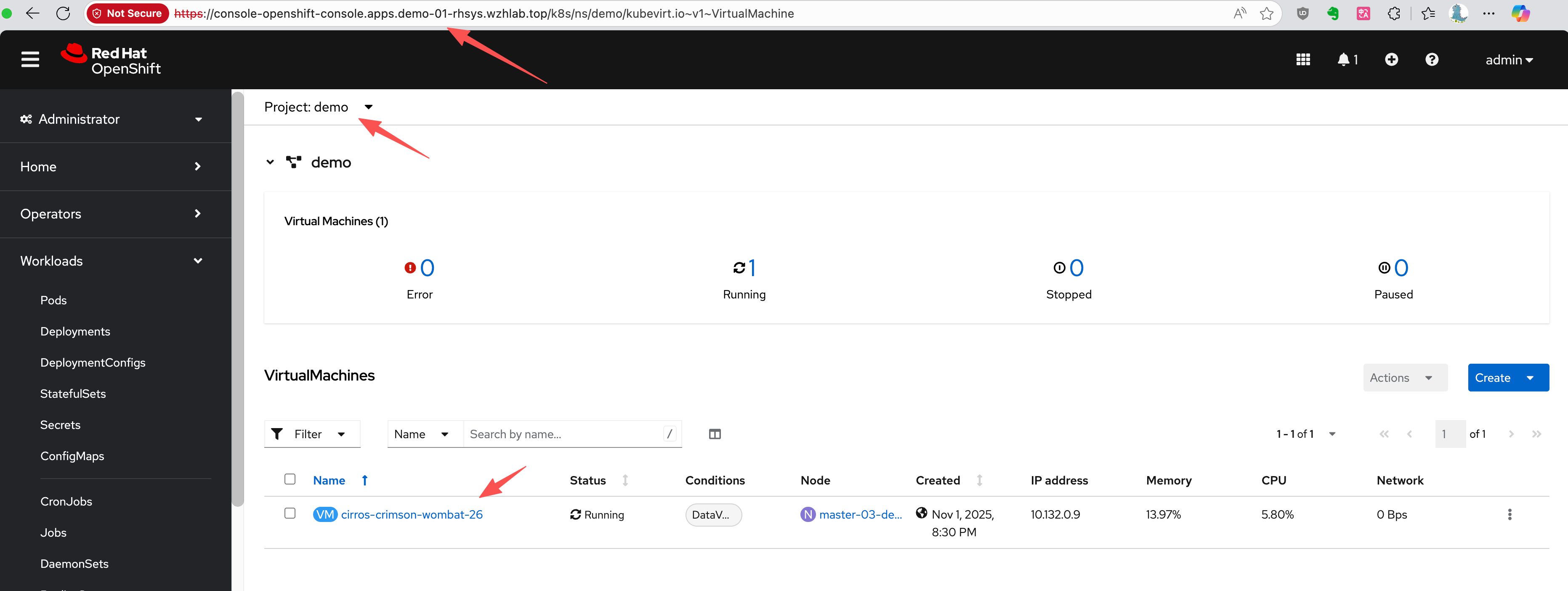
First, let's identify the VM and its associated PVC, PV, and VolumeSnapshot.
# Get the VM name
oc get vm -n demo
# NAME                       AGE     STATUS    READY
# cirros-crimson-wombat-26   3d20h   Running   True

# Get the PVC name associated with the VM
oc get vm cirros-crimson-wombat-26 -n demo -o jsonpath='{.spec.template.spec.volumes[*].dataVolume.name}' && echo
# cirros-crimson-wombat-26-volume

# Get the PV name bound to the PVC
oc get pvc cirros-crimson-wombat-26-volume -n demo -o jsonpath='{.spec.volumeName}' && echo
# pvc-7147333f-2db5-4b3f-9320-aac8da5170e2

# Get the snapshot from the vm/pvc
oc get volumesnapshot -n demo -o jsonpath='{.items[?(@.spec.source.persistentVolumeClaimName=="cirros-crimson-wombat-26-volume")].metadata.name}' && echo
# vmsnapshot-f1cafd2b-beb7-47a1-8f9c-c9c0d52569c5-volume-rootdisk
Create a backup
Now, create a Velero Backup object. The key configuration here is snapshotVolumes: false, which instructs OADP to back up only the resource definitions (YAML) and not the data within the volumes.
cat << EOF > $BASE_DIR/data/install/oadp-backup.yaml
apiVersion: velero.io/v1
kind: Backup
metadata:
  name: vm-full-metadata-backup-03
  namespace: openshift-adp
spec:
  # 1. Specify the namespace to back up
  includedNamespaces:
    - demo
  # 2. Ensure cluster-scoped resources like PVs are included in the metadata backup.
  # While Velero typically includes PVs linked to PVCs automatically, setting this
  # to 'true' makes the behavior explicit.
  includeClusterResources: true
  # 3. CRITICAL: Disable Velero's native volume snapshots.
  # This tells Velero to NOT create data snapshots of the PVs.
  # It will only save the PV and PVC object definitions.
  snapshotVolumes: false
  snapshotMoveData: false
  defaultVolumesToFsBackup: false
  # 4. Specify the S3 storage location defined in the DPA
  storageLocation: default
  # 5. Set a Time-To-Live (TTL) for the backup object
  ttl: 720h0m0s # 30 days
EOF
oc apply -f $BASE_DIR/data/install/oadp-backup.yaml
Inspect the metadata
The OADP plugin will need to modify the content of PV and PVC metadata during the restore stage, so inspect and confirm the original metadata now to verify proper disaster recovery later.
Here is the metadata for the original PVC:
kind: PersistentVolumeClaim
apiVersion: v1
metadata:
  name: cirros-crimson-wombat-26-volume
  namespace: demo
  # ......
spec:
  accessModes:
    - ReadWriteMany
  resources:
    requests:
      storage: '235635999'
  volumeName: pvc-b6d75156-0c58-422f-8bf8-6e40ed054c5d
  storageClassName: nfs-csi
  volumeMode: Filesystem
  dataSource:
    apiGroup: cdi.kubevirt.io
    kind: VolumeCloneSource
    name: volume-clone-source-916cf253-27ae-4f9a-8456-1e61d775206d
  dataSourceRef:
    apiGroup: cdi.kubevirt.io
    kind: VolumeCloneSource
    name: volume-clone-source-916cf253-27ae-4f9a-8456-1e61d775206d
# .....
And here is the corresponding PV metadata. Note that it points to the NFS share on /openshift-01.
kind: PersistentVolume
apiVersion: v1
metadata:
  name: pvc-b6d75156-0c58-422f-8bf8-6e40ed054c5d
  # ......
spec:
  capacity:
    storage: '235635999'
  csi:
    driver: nfs.csi.k8s.io
    volumeHandle: 192.168.99.1#openshift-01#pvc-b6d75156-0c58-422f-8bf8-6e40ed054c5d##
    volumeAttributes:
      csi.storage.k8s.io/pv/name: pvc-b6d75156-0c58-422f-8bf8-6e40ed054c5d
      csi.storage.k8s.io/pvc/name: tmp-pvc-43d11600-7b1c-4a3f-997c-8e99526bdd32
      csi.storage.k8s.io/pvc/namespace: openshift-virtualization-os-images
      server: 192.168.99.1
      share: /openshift-01
      storage.kubernetes.io/csiProvisionerIdentity: 1761996473487-3594-nfs.csi.k8s.io
      subdir: pvc-b6d75156-0c58-422f-8bf8-6e40ed054c5d
  accessModes:
    - ReadWriteMany
  claimRef:
    namespace: demo
    name: cirros-crimson-wombat-26-volume
    uid: 43d11600-7b1c-4a3f-997c-8e99526bdd32
    resourceVersion: '126830'
  persistentVolumeReclaimPolicy: Retain
  storageClassName: nfs-csi
  mountOptions:
    - hard
    - nfsvers=4.2
    - rsize=1048576
    - wsize=1048576
    - noatime
    - nodiratime
    - actimeo=60
    - timeo=600
    - retrans=3
  volumeMode: Filesystem
# ......
Verify the new PVC
The snapshot-to-PVC plugin creates a new PVC restored from SnapShot. Note the name, which is a concatenation of the original PVC name and the snapshot name, as defined by the plugin's logic.
kind: PersistentVolumeClaim
apiVersion: v1
metadata:
  name: cirros-crimson-wombat-26-volume-vmsnapshot-f1cafd2b-beb7-47a1-8f9c-c9c0d52569c5-volume-rootdisk
  namespace: demo
  # ......
spec:
  accessModes:
    - ReadWriteMany
  resources:
    requests:
      storage: '235635999'
  volumeName: pvc-5183c8de-817f-4d45-947c-a02ccc18d422
  storageClassName: nfs-csi
  volumeMode: Filesystem
  dataSource:
    apiGroup: snapshot.storage.k8s.io
    kind: VolumeSnapshot
    name: vmsnapshot-f1cafd2b-beb7-47a1-8f9c-c9c0d52569c5-volume-rootdisk
  dataSourceRef:
    apiGroup: snapshot.storage.k8s.io
    kind: VolumeSnapshot
    name: vmsnapshot-f1cafd2b-beb7-47a1-8f9c-c9c0d52569c5-volume-rootdisk
# .....
Check the plugin logs
Velero pod logs will show the OADP plugin as it processes the snapshot and creates the new PVC. The plugin's output will show one of the following messages: Starting CreatePvcFromSnapshotAction or Processing VolumeSnapshot.
oc logs -n openshift-adp -l app.kubernetes.io/name=velero --tail=-1 | grep create-pvc-from-snapshot.go
# time="2025-11-05T11:59:58Z" level=info msg="Starting CreatePvcFromSnapshotAction for VolumeSnapshot..." backup=openshift-adp/vm-full-metadata-backup-03 cmd=/plugins/velero-plugins-wzhlab-top-restore-pvc-from-snapshot logSource="/src/github.com/konveyor/openshift-velero-plugin/velero-plugins-wzhlab-top-restore-pvc-from-snapshot/create-pvc-from-snapshot.go:55" pluginName=velero-plugins-wzhlab-top-restore-pvc-from-snapshot
# time="2025-11-05T11:59:58Z" level=info msg="Processing VolumeSnapshot demo/vmsnapshot-f1cafd2b-beb7-47a1-8f9c-c9c0d52569c5-volume-rootdisk" backup=openshift-adp/vm-full-metadata-backup-03 cmd=/plugins/velero-plugins-wzhlab-top-restore-pvc-from-snapshot logSource="/src/github.com/konveyor/openshift-velero-plugin/velero-plugins-wzhlab-top-restore-pvc-from-snapshot/create-pvc-from-snapshot.go:62" pluginName=velero-plugins-wzhlab-top-restore-pvc-from-snapshot
# time="2025-11-05T11:59:58Z" level=info msg="Source PVC for snapshot is demo/cirros-crimson-wombat-26-volume" backup=openshift-adp/vm-full-metadata-backup-03 cmd=/plugins/velero-plugins-wzhlab-top-restore-pvc-from-snapshot logSource="/src/github.com/konveyor/openshift-velero-plugin/velero-plugins-wzhlab-top-restore-pvc-from-snapshot/create-pvc-from-snapshot.go:70" pluginName=velero-plugins-wzhlab-top-restore-pvc-from-snapshot
# time="2025-11-05T11:59:58Z" level=info msg="Attempting to create new PVC demo/cirros-crimson-wombat-26-volume-vmsnapshot-f1cafd2b-beb7-47a1-8f9c-c9c0d52569c5-volume-rootdisk from snapshot vmsnapshot-f1cafd2b-beb7-47a1-8f9c-c9c0d52569c5-volume-rootdisk" backup=openshift-adp/vm-full-metadata-backup-03 cmd=/plugins/velero-plugins-wzhlab-top-restore-pvc-from-snapshot logSource="/src/github.com/konveyor/openshift-velero-plugin/velero-plugins-wzhlab-top-restore-pvc-from-snapshot/create-pvc-from-snapshot.go:107" pluginName=velero-plugins-wzhlab-top-restore-pvc-from-snapshot
# time="2025-11-05T11:59:58Z" level=info msg="Successfully created new PVC demo/cirros-crimson-wombat-26-volume-vmsnapshot-f1cafd2b-beb7-47a1-8f9c-c9c0d52569c5-volume-rootdisk." backup=openshift-adp/vm-full-metadata-backup-03 cmd=/plugins/velero-plugins-wzhlab-top-restore-pvc-from-snapshot logSource="/src/github.com/konveyor/openshift-velero-plugin/velero-plugins-wzhlab-top-restore-pvc-from-snapshot/create-pvc-from-snapshot.go:117" pluginName=velero-plugins-wzhlab-top-restore-pvc-from-snapshot
# time="2025-11-05T11:59:58Z" level=info msg="Waiting for PVC demo/cirros-crimson-wombat-26-volume-vmsnapshot-f1cafd2b-beb7-47a1-8f9c-c9c0d52569c5-volume-rootdisk to become bound..." backup=openshift-adp/vm-full-metadata-backup-03 cmd=/plugins/velero-plugins-wzhlab-top-restore-pvc-from-snapshot logSource="/src/github.com/konveyor/openshift-velero-plugin/velero-plugins-wzhlab-top-restore-pvc-from-snapshot/create-pvc-from-snapshot.go:120" pluginName=velero-plugins-wzhlab-top-restore-pvc-from-snapshot
# time="2025-11-05T11:59:58Z" level=info msg="PVC demo/cirros-crimson-wombat-26-volume-vmsnapshot-f1cafd2b-beb7-47a1-8f9c-c9c0d52569c5-volume-rootdisk is still in phase Pending, waiting..." backup=openshift-adp/vm-full-metadata-backup-03 cmd=/plugins/velero-plugins-wzhlab-top-restore-pvc-from-snapshot logSource="/src/github.com/konveyor/openshift-velero-plugin/velero-plugins-wzhlab-top-restore-pvc-from-snapshot/create-pvc-from-snapshot.go:146" pluginName=velero-plugins-wzhlab-top-restore-pvc-from-snapshot
# time="2025-11-05T12:00:03Z" level=info msg="PVC demo/cirros-crimson-wombat-26-volume-vmsnapshot-f1cafd2b-beb7-47a1-8f9c-c9c0d52569c5-volume-rootdisk is now bound." backup=openshift-adp/vm-full-metadata-backup-03 cmd=/plugins/velero-plugins-wzhlab-top-restore-pvc-from-snapshot logSource="/src/github.com/konveyor/openshift-velero-plugin/velero-plugins-wzhlab-top-restore-pvc-from-snapshot/create-pvc-from-snapshot.go:142" pluginName=velero-plugins-wzhlab-top-restore-pvc-from-snapshot
# time="2025-11-05T12:00:03Z" level=info msg="Returning original VolumeSnapshot and adding new PVC cirros-crimson-wombat-26-volume-vmsnapshot-f1cafd2b-beb7-47a1-8f9c-c9c0d52569c5-volume-rootdisk to the backup." backup=openshift-adp/vm-full-metadata-backup-03 cmd=/plugins/velero-plugins-wzhlab-top-restore-pvc-from-snapshot logSource="/src/github.com/konveyor/openshift-velero-plugin/velero-plugins-wzhlab-top-restore-pvc-from-snapshot/create-pvc-from-snapshot.go:162" pluginName=velero-plugins-wzhlab-top-restore-pvc-from-snapshot
This completes your primary site backup. Now let’s work through the full data recovery process.

