Page
Deploy a vLLM inference workload to validate GPU partitioning

Now that your AMD Instinct accelerators are successfully partitioned into 64 devices and ready for scheduling, you need to verify that workloads can be scheduled onto the partitioned GPU resources.
To validate the newly partitioned setup, you will deploy a vLLM server to host a large language model. While the general process is similar to the official vLLM documentation, the following steps are specifically tailored for a Red Hat OpenShift environment using partitioned AMD Instinct GPUs.
Prerequisites:
- GPU partitioning verified and node taint removed.
- Storage backend configured.
- A user access token created in Hugging Face.
In this lesson, you will:
- Create storage, service account, and role-based access control (RBAC) resources for an inference server.
- Deploy vLLM requesting a single partitioned GPU (
amd.com/gpu: 1) resource. - Observe GPU memory and compute utilization on the partitioned device.
vLLM validation
Test your control over your partitioned resources by deploying a single model on a single, partitioned resource.
Optional: Create a
PersistentVolumeClaim(PVC) to store the model cache. In this learning path, we have used LVMS as the storage backend.cat <<EOF | tee 01_pvc.yaml | oc apply -f - --- apiVersion: v1 kind: PersistentVolumeClaim metadata: name: vllm-models spec: accessModes: - ReadWriteOnce resources: requests: storage: 50Gi storageClassName: lvms-vg1 EOFOptional: Create a Kubernetes Secret (only required for accessing gated models in Hugging Face).
cat <<EOF | tee 02_secret.yaml | oc apply -f -
---
apiVersion: v1
kind: Secret
metadata:
  name: hf-token
type: Opaque
stringData:
  token: <hf_xxxxxxxxxxxxxxxxxxxxxxxxxxxxx>
EOF
Create a
Deploymentfor vLLM. For this learning path, we use a small LLM model like meta-llama/Llama-3.1-8B-Instruct for validation.
Note: Theresourcessection explicitly requests exactly one logical partition (amd.com/gpu: "1"):cat <<EOF | tee 03_deployment.yaml | oc apply -f - --- apiVersion: v1 kind: ServiceAccount metadata: name: vllm --- apiVersion: rbac.authorization.k8s.io/v1 kind: RoleBinding metadata: name: vllm-anyuid roleRef: apiGroup: rbac.authorization.k8s.io kind: ClusterRole name: system:openshift:scc:anyuid subjects: - kind: ServiceAccount name: vllm --- apiVersion: apps/v1 kind: Deployment metadata: name: vllm labels: app: vllm spec: replicas: 1 selector: matchLabels: app: vllm template: metadata: labels: app: vllm spec: serviceAccountName: vllm containers: - name: vllm image: docker.io/rocm/vllm:latest command: - python3 - -m - vllm.entrypoints.openai.api_server - --model - <model-name-goes-here> # -> e.g. meta-llama/Llama-3.1-8B-Instruct - --dtype - float16 - --max-model-len - "4096" - --tensor-parallel-size - "1" - --host - "0.0.0.0" - --port - "8000" env: - name: HF_TOKEN valueFrom: secretKeyRef: name: hf-token key: token - name: HF_HOME value: /models ports: - containerPort: 8000 name: http resources: requests: amd.com/gpu: "1" cpu: "4" memory: 16Gi limits: amd.com/gpu: "1" cpu: "8" memory: 32Gi volumeMounts: - name: models mountPath: /models - name: shm mountPath: /dev/shm volumes: - name: models persistentVolumeClaim: claimName: vllm-models - name: shm emptyDir: medium: Memory sizeLimit: 16Gi tolerations: - key: amd.com/gpu operator: Exists effect: NoSchedule EOFOptional: Create a
ServiceandRouteto expose the vLLM server to the outside world. Skip this step if you are not using a route to enable public access to the model.cat <<EOF | tee 04_service_route.yaml | oc apply -f - --- apiVersion: v1 kind: Service metadata: name: vllm-server labels: app: vllm spec: ports: - port: 8000 targetPort: 8000 name: http selector: app: vllm --- apiVersion: route.openshift.io/v1 kind: Route metadata: name: vllm-server labels: app: vllm spec: to: kind: Service name: vllm-server port: targetPort: http tls: termination: edge EOFTo test and validate the full
Deployment, use the exposed API and the deployed monitoring service:VLLM_URL=$(oc get route vllm-server -o jsonpath='{.spec.host}')Test the API:
curl -sk -X POST https://${VLLM_URL}/v1/chat/completions \
  -H "Content-Type: application/json" \
  -d '{
    "model": "meta-llama/Llama-3.1-8B-Instruct",
    "messages": [{"role": "user", "content": "What is AI?"}],
    "temperature": 0.1
  }' | jq .

{
  "id": "chatcmpl-99b123e22a32d99e",
  "object": "chat.completion",
  "created": 1772549128,
  "model": "meta-llama/Llama-3.1-8B-Instruct",
  "choices": [
    {
      "index": 0,
      "message": {
        "role": "assistant",
        "content": "Artificial Intelligence (AI) refers to the simulation of human intelligence in machines that are programmed to think and learn like humans. The term can also be applied to any machine that exhibits traits associated with a human mind such as learning and problem-solving.\n\nAI technology is based on the principle of creating algorithms that can process data, identify patterns, and make decisions with minimal human intervention. This is achieved through various techniques such as machine learning, natural language processing, and computer vision.\n\nThere are several types of AI, including:\n\n1. **Narrow or Weak AI**: This type of AI is designed to perform a specific task, such as facial recognition, language translation, or playing chess. Narrow AI is trained on a specific dataset and is not capable of general reasoning or problem-solving.\n\n2. **General or Strong AI**: This type of AI is designed to perform any intellectual task that a human can. General AI is still in the realm of science fiction, but researchers are working towards creating AI systems that can learn and adapt like humans.\n\n3. **Superintelligence**: This type of AI is significantly more intelligent than the best human minds. Superintelligence is a hypothetical concept that is still being researched and debated.\n\nAI has many applications in various fields, including:\n\n1. **Virtual assistants**: AI-powered virtual assistants, such as Siri, Alexa, and Google Assistant, can perform tasks such as setting reminders, sending messages, and making phone calls.\n\n2. **Image recognition**: AI-powered image recognition systems can identify objects, people, and patterns in images.\n\n3. **Natural language processing**: AI-powered natural language processing systems can understand and generate human language, enabling applications such as language translation and chatbots.\n\n4. **Predictive analytics**: AI-powered predictive analytics systems can analyze data and make predictions about future events or trends.\n\n5. **Robotics**: AI-powered robots can perform tasks such as assembly, welding, and navigation.\n\nThe benefits of AI include:\n\n1. **Increased efficiency**: AI can automate tasks, freeing up human time and resources.\n\n2. **Improved accuracy**: AI can perform tasks with high accuracy and speed.\n\n3. **Enhanced decision-making**: AI can analyze large amounts of data and provide insights that can inform decision-making.\n\nHowever, AI also raises concerns about:\n\n1. **Job displacement**: AI may displace human workers in certain industries.\n\n2. **Bias and fairness**: AI systems can perpetuate biases and unfairness if they are trained on biased data.\n\n3. **Security and privacy**: AI systems can be vulnerable to cyber attacks and data breaches.\n\nOverall, AI has the potential to revolutionize many aspects of our lives, but it also requires careful consideration of its benefits and risks.",
        "refusal": null,
        "annotations": null,
        "audio": null,
        "function_call": null,
        "tool_calls": [],
        "reasoning": null,
        "reasoning_content": null
      },
      "logprobs": null,
      "finish_reason": "stop",
      "stop_reason": null,
      "token_ids": null
    }
  ],
  "service_tier": null,
  "system_fingerprint": null,
  "usage": {
    "prompt_tokens": 39,
    "total_tokens": 582,
    "completion_tokens": 543,
    "prompt_tokens_details": null
  },
  "prompt_logprobs": null,
  "prompt_token_ids": null,
  "kv_transfer_params": null
}
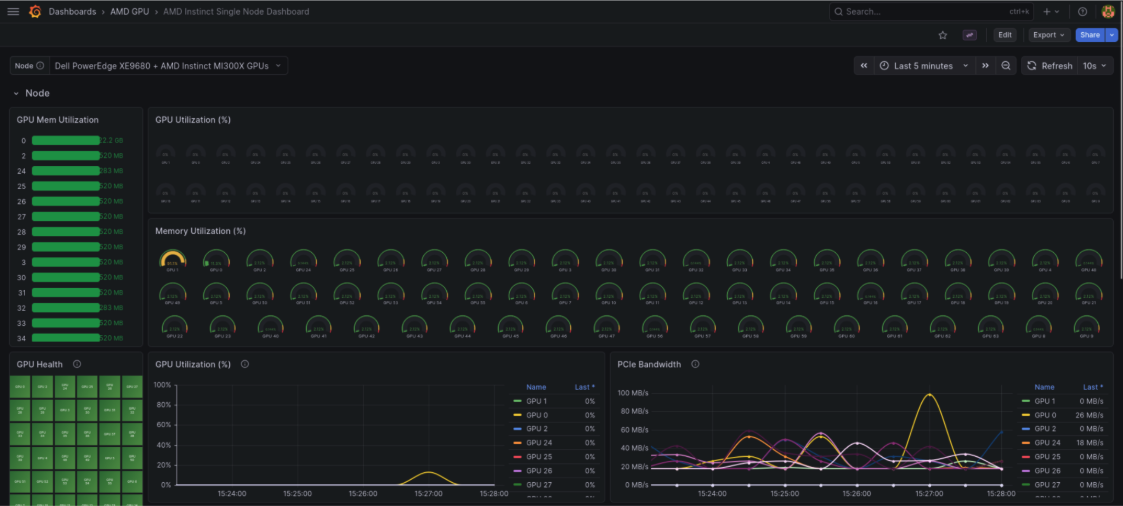
Once the model is deployed and actively processing API requests, you can observe the immediate impact on your partitioned resources. The dashboard shows GPU 0 memory usage at 2.2 GB, consumed by the model weights and KV cache, while the remaining 63 partitions stay idle. (Figure 1).
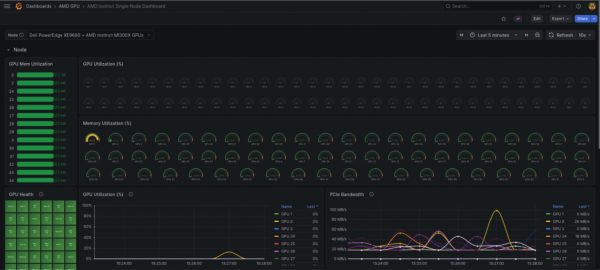
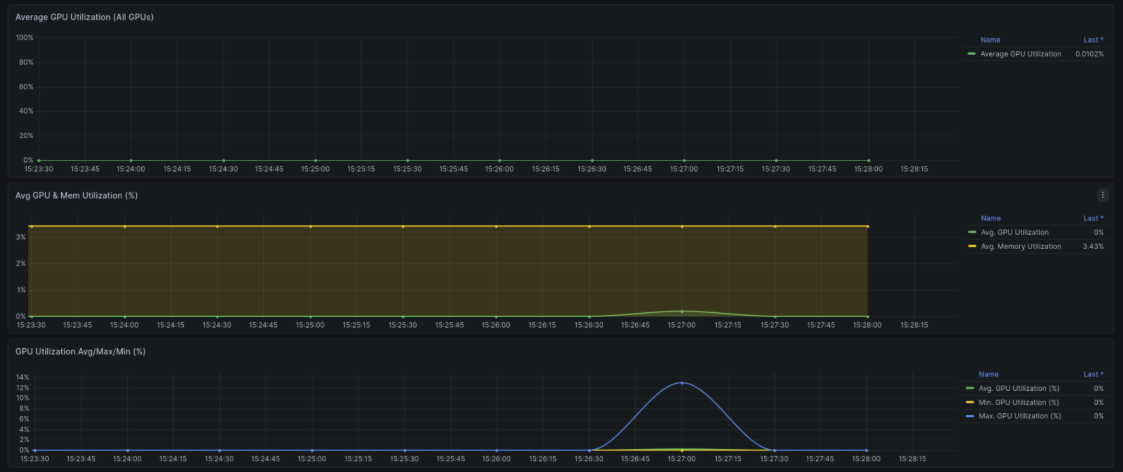
Figure 1: Dashboard view after deploying Llama-3.1-8B-Instruct on a single CPX partition—GPU 0 consumes 2.2 GB for model weights and KV cache while all other partitions remain idle. Observe the GPU compute utilization behavior. Because this is an inference workload, the compute utilization does not sustain a constantly high load. Instead, it experiences a sharp, temporary bump during the short period of time it takes to process the prompt and generate the response (Figure 2).
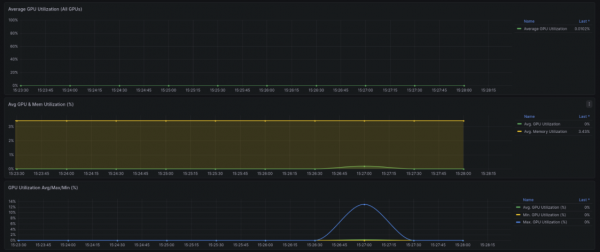
Figure 2: Inference workload compute profile—GPU utilization spikes briefly to ~12% during prompt processing and token generation, then drops back to idle, while memory utilization remains constant at 3.43% holding the model weights.
In this lesson, you deployed a single model occupying just one logical, partitioned GPU. However, this clearly demonstrates the massive scaling potential of this configuration. Because the Core Partition X (CPX) and NPS4 combination allows Kubernetes to recognize 64 GPUs as allocatable resources, this setup could (theoretically) scale to host 64 concurrent models on a single node.
Learning path summary
The device config manager (DCM) on Red Hat OpenShift enables cluster administrators to maximize utilization of AMD Instinct accelerators. By transitioning to advanced partitioning profiles, cluster administrators can drastically increase multi-tenant workload density.
When planning your deployments, ensure you select a supported compute and memory pairing—such as the Core Partition X (CPX) and Non-Uniform Memory Access (NUMA) Per Socket (NPS) 4 (NPS4) memory combination used in this learning path.
By transforming a single physical GPU into up to 64 allocatable resources, you can achieve maximum concurrency, reduce idle resources, and increase AI workload density.
Ready to learn more about AI workloads?
- Introduction to OpenShift AI
- Get started with consuming GPU-hosted large language models on Developer Sandbox
- Automate ML pipelines with OpenShift AI
Acknowledgments
The author would like to acknowledge the thorough reviews of the following individuals, who have directly contributed to enhancing the quality of this learning path:
- Brett Thurber — Director and Distinguished Engineer, Ecosystems Engineering, Red Hat
- Ben Schmaus — Senior Principal Software Engineer, Ecosystems Engineering, Red Hat
- Erwan Gallen — Senior Principal Product Manager, AI Business Unit, Red Hat

