AI
  • Get started with AI

    • Red Hat AI

      Accelerate the development and deployment of enterprise AI solutions.

    • AI learning hub

      Explore learning materials and tools, organized by task.

    • AI interactive demos

      Click through scenarios with Red Hat AI, including training LLMs and more.

    • AI/ML learning paths

      Expand your Red Hat OpenShift AI knowledge using these learning resources.

    • AI quickstarts

      Focused AI use cases designed for fast deployment on Red Hat AI platforms.

    • No-cost AI training

      Foundational Red Hat AI training.

  • Featured resources

    • Red Hat OpenShift AI
    • Open source AI for developers
    • AI product application development
    • Open source-powered AI/ML for hybrid cloud
    • AI and Node.js cheat sheet

Red Hat AI Factory with NVIDIA

Red Hat AI Factory with NVIDIA is a co-engineered, enterprise-grade AI solution for building, deploying, and managing AI at scale across hybrid cloud environments.

Learn
  • Self-guided

    • Documentation

      Find answers, get step-by-step guidance, and learn how to use Red Hat products.

    • Learning paths

      Explore curated walkthroughs for common development tasks.

    • Guided learning

      Receive custom learning paths powered by our AI assistant.

    • See all learning
  • Hands-on

    • Developer Sandbox

      Spin up Red Hat's products and technologies without setup or configuration.

    • Interactive labs

      Learn by doing in these hands-on, browser-based experiences.

    • Interactive demos

      Click through product features in these guided tours.

  • Browse by topic

    • AI/ML
    • Automation
    • Java
    • Kubernetes
    • Linux
    • See all topics
  • Training & certifications

    • Courses and exams
    • Certifications
    • Skills assessments
    • Red Hat Academy
    • Learning subscription
    • Explore training
Build
  • Get started

    • Red Hat build of Podman Desktop

      A downloadable, local development hub to experiment with our products and builds.

    • Developer Sandbox

      Spin up Red Hat's products and technologies without setup or configuration.

  • Download products

    • Red Hat Enterprise Linux
    • Red Hat AI
    • Red Hat OpenShift
    • Red Hat Ansible Automation Platform
    • See all products
  • Featured

    • Red Hat build of OpenJDK
    • Red Hat JBoss Enterprise Application Platform
    • Red Hat OpenShift Dev Spaces
    • Red Hat Developer Toolset
  • References

    • E-books
    • Documentation
    • Cheat sheets
    • Architecture center
Community
  • Get involved

    • Events
    • Live AI events
    • Red Hat Summit
    • Red Hat Accelerators
    • Community discussions
  • Follow along

    • Articles & blogs
    • Developer newsletter
    • Videos
    • Github
  • Get help

    • Customer service
    • Customer support
    • Regional contacts
    • Find a partner

Join the Red Hat Developer program

Download Red Hat products and project builds, access support documentation, learning content, and more.

ConsoleDocsSupport Search
New For you

Recommended

We'll recommend resources you may like as you browse. Try these suggestions for now.

  • Product downloads
  • Cheat sheets
  • Red Hat Developer learning portal
  • Developer blog
  • E-books
  • Developer Sandbox
Log in

Get more with a Red Hat Developer account

  • Product downloads
  • Console access
  • Event registration
  • Training & trials
Explore more account benefitsLog in or register

A subscription may be required for some services.

Contact us

Creating Pipelines with OpenShift 4.4’s new Pipeline Builder and Tekton Pipelines

April 30, 2020
Joel Lord
Related topics:
CI/CDContainersDevOpsKubernetes
Related products:
Red Hat OpenShift

    Tekton was originally part of the Knative project but eventually became a project of its own. It’s been around for just over a year now and is becoming the de facto standard to build continuous delivery pipelines in a Kubernetes-native fashion.

    OpenShift Pipelines are built on top of Tekton and are readily available from the OperatorHub for your Red Hat OpenShift clusters. Red Hat OpenShift Container Platform 4.4 has just taken pipeline creation a step further with the Pipeline Builder. As part of the web console's Developer perspective, the Pipeline Builder makes it even easier for software developers to create their own pipelines.

    Want to see how all this works? Great, let's dive in.

    Steps, Tasks, Pipelines, and Resources

    The goal of Tekton is to create small building blocks that are reusable, composable, and declarative, all in a cloud-native environment. It uses Steps, Tasks, Pipelines, and Resources to do this, as shown in Figure 1.

    Diagram showing the building blocks for a Tekton Pipeline
    Figure 1: Tekton building blocks.
    Figure 1: Tekton building blocks.

    Steps

    A Step is an operation performed on an input. If you are building a Node.js application, it might run some unit tests or validate that the code follows the coding standards that you have in place. Tekton will perform each step inside a container that you provide. For that Node.js application, you can run a Red Hat Universal Base Image with Node.js installed on it. Steps are the most basic unit in Tekton.

    Tasks

    A Task is a list of steps that are executed sequentially. Tekton runs Tasks inside a Kubernetes pod, which allows you to have a shared environment when you are designing a series of steps that are related. For example, you could mount a volume in a Task that would be shared across each step in that specific Task.

    Pipelines

    A Pipeline is a collection of Tasks that can be executed in parallel or sequentially. Tekton provides developers with a lot of flexibility on how and when those tasks should be executed. You could even specify conditions that a Task must meet in order to start the next one.

    Resources

    Most Pipelines require inputs on which to perform tasks, and can also produce outputs. In Tekton, those are known as Resources. Resources can be of many different types like Git repositories, container images, or Kubernetes clusters.

    Pipeline Builder

    Now that we've covered some basic details of Tekton, let's dive into the Pipeline Builder, which is available on the Pipelines page in the Developer Perspective. A good interface is crucial in helping software developers easily build their own pipelines, so the Pipeline Builder's interface provides developers with a visual representation of the Pipelines that can be easily modified to suit your needs. The tasks can be arranged sequentially or in parallel as shown in Figure 2.

    Animation showing how to define task structure

    The side panel also makes it easy to edit the settings for each one of your tasks. From there, you can add parameters or change the associated resources that will be mapped to resources once you start the Pipeline, as shown in Figure 3.

    animation showing how to edit individual task settings

    PipelineRuns

    Once Pipelines are created, the final step is to execute them. The execution of a Pipeline is called a PipelineRun. OpenShift Pipelines makes it easy to trigger those Pipelines. Find the one you want to start in the Pipelines list and select Start. A dialog will appear where you specify the resources to use with this run, which will then create the Pipeline Run and start the execution.

    You will then be prompted on the resources to use with this run. This selection will create the PipelineRun and start the execution. You can then follow the status of this run either from the Pipelines dashboard or by drilling down into one Task to see the details of each Step.
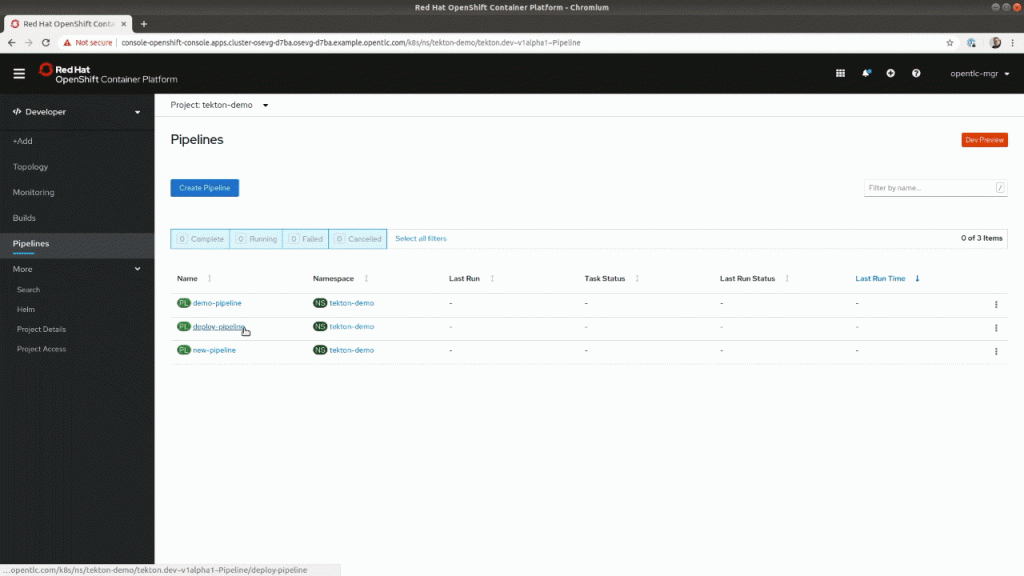
    Figure 4: Visualization of a PipelineRun.

    This visual representation also makes it easier for developers to see where their deployments failed. In the following animation, you can see the execution of a pipeline (PipelineRun) and where it failed. It also prevented this code from being deployed in production. By looking at the output logs, software developers can easily diagnose and find what caused the pipeline to fail.
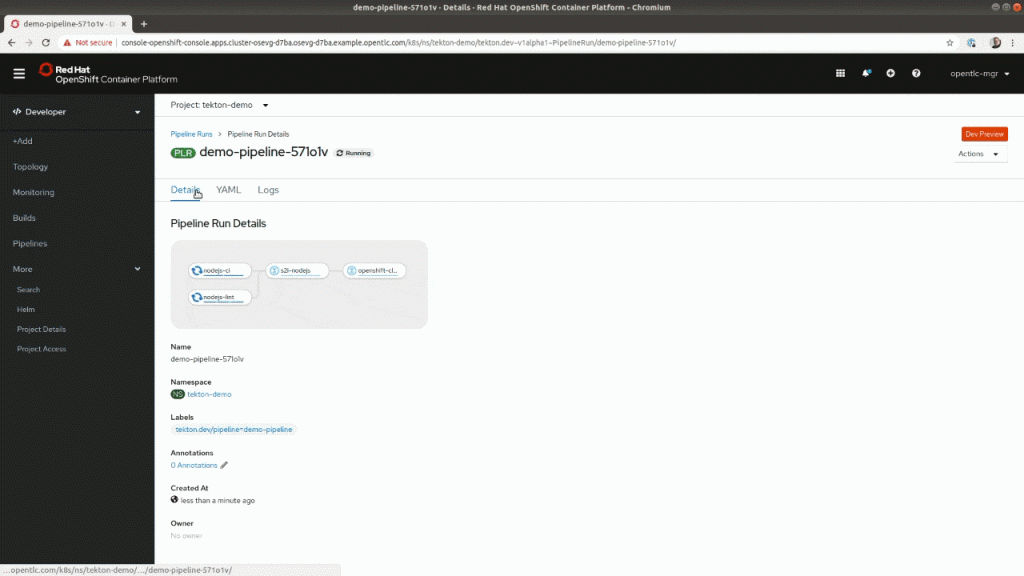
    Figure 5: Accessing failure information from the PipelineRun visualization.

    So, we’ve only scratched the surface of what can be accomplished with OpenShift Pipelines. We hope this new interface and the Pipeline Builder will make it much easier for software engineers to build and maintain their CI/CD deployment pipelines and let them focus on what they actually care about.

    In future releases, we will continue to enhance this area. Keep an eye out for the ability to add triggers, workspace support, and much more!

    Ready to get started?

    Try OpenShift today.

    Provide your feedback

    Share your thoughts here and give us your feedback or ideas for improving the pipeline experience. Join our OpenShift Developer Experience Google Group to participate in discussions and learn about our Office Hours session where you can collaborate with us and provide feedback.

    Learn more

    Interested in learning more about application development with OpenShift? Here are some Red Hat resources that may be helpful: OpenShift Pipelines and Application development on OpenShift.

    Last updated: March 30, 2023

    Recent Posts

    • A day in the life of an NVIDIA H100 on Red Hat OpenShift 5

    • Migrate BuildConfigs to builds for Red Hat OpenShift with one plug-in install

    • Run Red Hat Enterprise Linux CoreOS on NVIDIA BlueField DPUs

    • Agent harness engineering: Separating model capabilities from enforcement

    • What's new for developers in Red Hat Enterprise Linux 10.3 and 9.9

    Red Hat Developers logo

    Platforms

    • Red Hat AI
    • Red Hat Enterprise Linux
    • Red Hat OpenShift
    • Red Hat Ansible Automation Platform
    • See all products

    Build

    • Developer Sandbox
    • Developer tools
    • Interactive tutorials
    • API catalog

    Quicklinks

    • Learning resources
    • E-books
    • Cheat sheets
    • Blog
    • Events
    • Newsletter

    Communicate

    • About us
    • Contact sales
    • Find a partner
    • Report a website issue
    • Site status dashboard
    • Report a security problem

    Red Hat Developer

    Build here. Go anywhere.

    We serve the builders. The problem solvers who create careers with code.

    Join us if you’re a developer, software engineer, web designer, front-end designer, UX designer, computer scientist, architect, tester, product manager, project manager or team lead.

    Sign me up

    Red Hat legal and privacy links

    • About Red Hat
    • Jobs
    • Events
    • Locations
    • Contact Red Hat
    • Red Hat Blog
    • Inclusion at Red Hat
    • Cool Stuff Store
    • Red Hat Summit
    © 2026 Red Hat

    Red Hat legal and privacy links

    • Privacy statement
    • Terms of use
    • All policies and guidelines
    • Digital accessibility
    Ask AI