AI
  • Get started with AI

    • Red Hat AI

      Accelerate the development and deployment of enterprise AI solutions.

    • AI learning hub

      Explore learning materials and tools, organized by task.

    • AI interactive demos

      Click through scenarios with Red Hat AI, including training LLMs and more.

    • AI/ML learning paths

      Expand your Red Hat OpenShift AI knowledge using these learning resources.

    • AI quickstarts

      Focused AI use cases designed for fast deployment on Red Hat AI platforms.

    • No-cost AI training

      Foundational Red Hat AI training.

  • Featured resources

    • Red Hat OpenShift AI
    • Open source AI for developers
    • AI product application development
    • Open source-powered AI/ML for hybrid cloud
    • AI and Node.js cheat sheet

Red Hat AI Factory with NVIDIA

Red Hat AI Factory with NVIDIA is a co-engineered, enterprise-grade AI solution for building, deploying, and managing AI at scale across hybrid cloud environments.

Learn
  • Self-guided

    • Documentation

      Find answers, get step-by-step guidance, and learn how to use Red Hat products.

    • Learning paths

      Explore curated walkthroughs for common development tasks.

    • Guided learning

      Receive custom learning paths powered by our AI assistant.

    • See all learning
  • Hands-on

    • Developer Sandbox

      Spin up Red Hat's products and technologies without setup or configuration.

    • Interactive labs

      Learn by doing in these hands-on, browser-based experiences.

    • Interactive demos

      Click through product features in these guided tours.

  • Browse by topic

    • AI/ML
    • Automation
    • Java
    • Kubernetes
    • Linux
    • See all topics
  • Training & certifications

    • Courses and exams
    • Certifications
    • Skills assessments
    • Red Hat Academy
    • Learning subscription
    • Explore training
Build
  • Get started

    • Red Hat build of Podman Desktop

      A downloadable, local development hub to experiment with our products and builds.

    • Developer Sandbox

      Spin up Red Hat's products and technologies without setup or configuration.

  • Download products

    • Red Hat Enterprise Linux
    • Red Hat AI
    • Red Hat OpenShift
    • Red Hat Ansible Automation Platform
    • See all products
  • Featured

    • Red Hat build of OpenJDK
    • Red Hat JBoss Enterprise Application Platform
    • Red Hat OpenShift Dev Spaces
    • Red Hat Developer Toolset
  • References

    • E-books
    • Documentation
    • Cheat sheets
    • Architecture center
Community
  • Get involved

    • Events
    • Live AI events
    • Red Hat Summit
    • Red Hat Accelerators
    • Community discussions
  • Follow along

    • Articles & blogs
    • Developer newsletter
    • Videos
    • Github
  • Get help

    • Customer service
    • Customer support
    • Regional contacts
    • Find a partner

Join the Red Hat Developer program

Download Red Hat products and project builds, access support documentation, learning content, and more.

ConsoleDocsSupport Search
New For you

Recommended

We'll recommend resources you may like as you browse. Try these suggestions for now.

  • Product downloads
  • Cheat sheets
  • Red Hat Developer learning portal
  • Developer blog
  • E-books
  • Developer Sandbox
Log in

Get more with a Red Hat Developer account

  • Product downloads
  • Console access
  • Event registration
  • Training & trials
Explore more account benefitsLog in or register

A subscription may be required for some services.

Contact us

How to access the Developer Sandbox for Red Hat OpenShift

<p>Accelerate your cloud-native learning with interactive tutorials and use cases</p>

March 30, 2023
Bruno Meseguer
Related topics:
Kubernetes
Related products:
Developer SandboxRed Hat OpenShift

    Red Hat Developer has many labs that you can easily access through your web browser. The Developer Sandbox for Red Hat OpenShift lets you experiment with building and deploying cloud-native applications in a real OpenShift environment using only your web browser.

    With an integrated development environment (IDE) called Red Hat OpenShift Dev Spaces (formerly Red Hat CodeReady Workspaces), the Developer Sandbox is a playground for developers looking to explore Kubernetes-based application platforms. This article provides a step-by-step guide to getting started with the Developer Sandbox, where you can, for example, dive into the process of creating a Camel integration through a web-based interface.

    The best part? No local installs are required, making it easier than ever to get started. The steps in this article will guide you through how to set up your own free-to-use environment.

    Access the Developer Sandbox for Red Hat OpenShift

    1. Navigate to the Developer Sandbox.
    2. Click the red button labeled Start your sandbox for free (Figure 1).
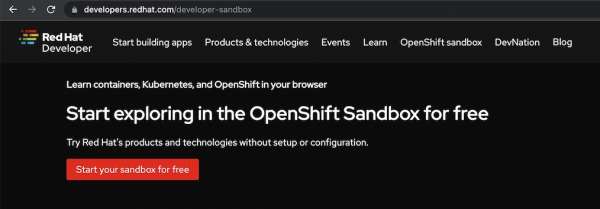
      Click on Start your sandbox for free.
      Figure 1: Start your sandbox for free.
    3. You will then be prompted to log in with your Red Hat account (Figure 2). If you don't have an existing account, click Register for a Red Hat account. Complete the registration process to create an account and then return to this step.
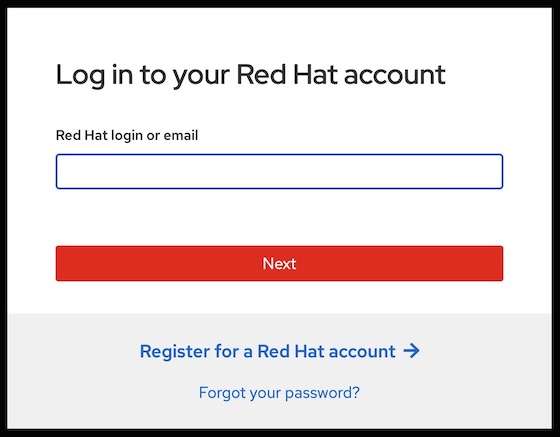
      Log in with your Red Hat account.
      Figure 2: Log in with your Red Hat account.
    4. You should see a screen, as shown in Figure 3. Click the red button: Start using your sandbox. This will take you to the Red Hat OpenShift Dedicated login page.
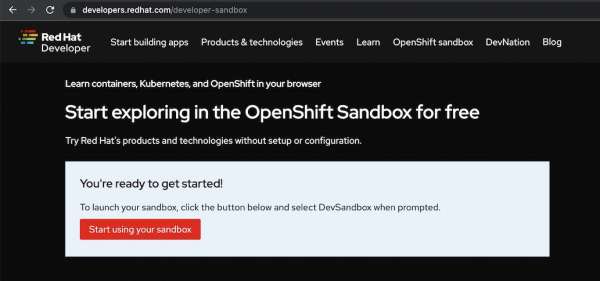
      Start using the Developer Sandbox.
      Figure 3: Start using the Developer Sandbox.
    5. Click the DevSandbox button from this screen (Figure 4).
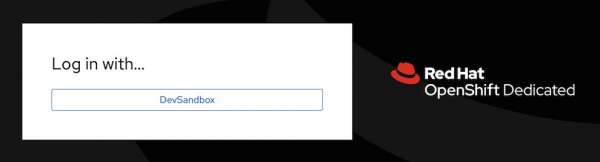
      Log in by selecting the Dev Sandbox button.
      Figure 4: Log in by selecting the Dev Sandbox button.
    6. The Developer Sandbox dashboard landing page will appear. Select the Red Hat OpenShift tile and click Launch. (Figure 5).
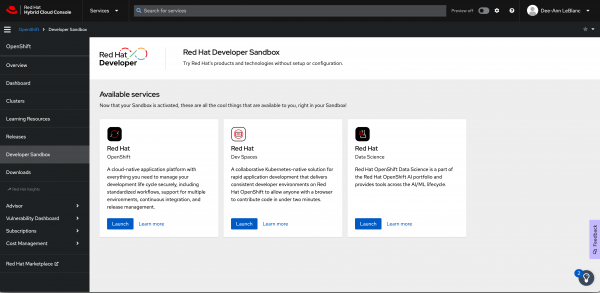
      The console.com dashboard landing page
      Figure 5: The dashboard landing page will appear.
    7. The environment will welcome you with the message (Figure 6).
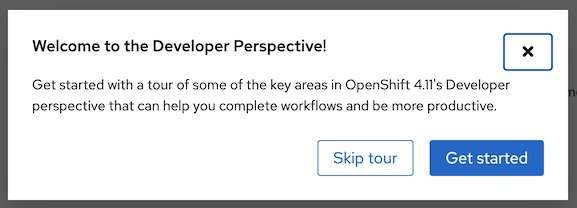
      A Welcome to the Developer Perspective message will appear.
      Figure 5: A Welcome to the Developer Perspective message will appear.

    You have now entered the Developer Sandbox!

    Activities to learn Camel and Camel K

    For developers looking to get started with Camel and Camel K, here are two step-by-step guides you can try:

    • Try Camel K in the Developer Sandbox for Red Hat OpenShift
    • How to run Camel on Spring Boot in the Developer Sandbox
    • Try Camel on Quarkus in the Developer Sandbox for Red Hat OpenShift
    Last updated: February 6, 2024

    Related Posts

    • Access your Developer Sandbox from the command line

    • Learn Quarkus faster in the Developer Sandbox for Red Hat OpenShift

    • Building machine learning models in the cloud

    • Try Camel K in the Developer Sandbox for Red Hat OpenShift

    • Try Camel on Quarkus in the Developer Sandbox for Red Hat OpenShift

    Recent Posts

    • A day in the life of an NVIDIA H100 on Red Hat OpenShift 5

    • Migrate BuildConfigs to builds for Red Hat OpenShift with one plug-in install

    • Run Red Hat Enterprise Linux CoreOS on NVIDIA BlueField DPUs

    • Agent harness engineering: Separating model capabilities from enforcement

    • What's new for developers in Red Hat Enterprise Linux 10.3 and 9.9

    What’s up next?

    Learn how tomove your legacy Java application into a container and deploy it to Kubernetes in minutes using the Developer Sandbox for Red Hat OpenShift.

    Try Java in the sandbox
    Red Hat Developers logo

    Platforms

    • Red Hat AI
    • Red Hat Enterprise Linux
    • Red Hat OpenShift
    • Red Hat Ansible Automation Platform
    • See all products

    Build

    • Developer Sandbox
    • Developer tools
    • Interactive tutorials
    • API catalog

    Quicklinks

    • Learning resources
    • E-books
    • Cheat sheets
    • Blog
    • Events
    • Newsletter

    Communicate

    • About us
    • Contact sales
    • Find a partner
    • Report a website issue
    • Site status dashboard
    • Report a security problem

    Red Hat Developer

    Build here. Go anywhere.

    We serve the builders. The problem solvers who create careers with code.

    Join us if you’re a developer, software engineer, web designer, front-end designer, UX designer, computer scientist, architect, tester, product manager, project manager or team lead.

    Sign me up

    Red Hat legal and privacy links

    • About Red Hat
    • Jobs
    • Events
    • Locations
    • Contact Red Hat
    • Red Hat Blog
    • Inclusion at Red Hat
    • Cool Stuff Store
    • Red Hat Summit
    © 2026 Red Hat

    Red Hat legal and privacy links

    • Privacy statement
    • Terms of use
    • All policies and guidelines
    • Digital accessibility
    Ask AI