Redhat Developers  Logo
  • AI

    Get started with AI

    • Red Hat AI
      Accelerate the development and deployment of enterprise AI solutions.
    • AI learning hub
      Explore learning materials and tools, organized by task.
    • AI interactive demos
      Click through scenarios with Red Hat AI, including training LLMs and more.
    • AI/ML learning paths
      Expand your OpenShift AI knowledge using these learning resources.
    • AI quickstarts
      Focused AI use cases designed for fast deployment on Red Hat AI platforms.
    • No-cost AI training
      Foundational Red Hat AI training.

    Featured resources

    • OpenShift AI learning
    • Open source AI for developers
    • AI product application development
    • Open source-powered AI/ML for hybrid cloud
    • AI and Node.js cheat sheet

    Red Hat AI Factory with NVIDIA

    • Red Hat AI Factory with NVIDIA is a co-engineered, enterprise-grade AI solution for building, deploying, and managing AI at scale across hybrid cloud environments.
    • Explore the solution
  • Learn

    Self-guided

    • Documentation
      Find answers, get step-by-step guidance, and learn how to use Red Hat products.
    • Learning paths
      Explore curated walkthroughs for common development tasks.
    • Guided learning
      Receive custom learning paths powered by our AI assistant.
    • See all learning

    Hands-on

    • Developer Sandbox
      Spin up Red Hat's products and technologies without setup or configuration.
    • Interactive labs
      Learn by doing in these hands-on, browser-based experiences.
    • Interactive demos
      Click through product features in these guided tours.

    Browse by topic

    • AI/ML
    • Automation
    • Java
    • Kubernetes
    • Linux
    • See all topics

    Training & certifications

    • Courses and exams
    • Certifications
    • Skills assessments
    • Red Hat Academy
    • Learning subscription
    • Explore training
  • Build

    Get started

    • Red Hat build of Podman Desktop
      A downloadable, local development hub to experiment with our products and builds.
    • Developer Sandbox
      Spin up Red Hat's products and technologies without setup or configuration.

    Download products

    • Access product downloads to start building and testing right away.
    • Red Hat Enterprise Linux
    • Red Hat AI
    • Red Hat OpenShift
    • Red Hat Ansible Automation Platform
    • See all products

    Featured

    • Red Hat build of OpenJDK
    • Red Hat JBoss Enterprise Application Platform
    • Red Hat OpenShift Dev Spaces
    • Red Hat Developer Toolset

    References

    • E-books
    • Documentation
    • Cheat sheets
    • Architecture center
  • Community

    Get involved

    • Events
    • Live AI events
    • Red Hat Summit
    • Red Hat Accelerators
    • Community discussions

    Follow along

    • Articles & blogs
    • Developer newsletter
    • Videos
    • Github

    Get help

    • Customer service
    • Customer support
    • Regional contacts
    • Find a partner

    Join the Red Hat Developer program

    • Download Red Hat products and project builds, access support documentation, learning content, and more.
    • Explore the benefits

What's New in OpenShift GitOps 1.21

June 26, 2026
Gerald Nunn Sho Weimer
Related topics:
GitOps
Related products:
Red Hat OpenShift GitOps

    GitOps is now the definitive standard for managing Kubernetes cluster configuration and applications. Red Hat continues to see the widespread adoption of the GitOps methodology across our portfolio as customers look for ways to increase efficiency in their operations and development teams.

    Red Hat is pleased to announce that version 1.21 of OpenShift GitOps has been released, bringing with it some exciting new capabilities.

    New in version 1.21

    Argo CD Image Updater is GA

    The Argo CD Image Updater is now Generally Available for use. The Argo CD Image Updater can monitor an image repository and automatically update the Argo CD Application to use the new image. How it updates the Application is dependent on the write-back method chosen, the image updater supports writing directly to the Application (default) or writing the changes in git. 

    Argo CD CLI is GA

    The Argo CD CLI is now generally available, users can now download the CLI from Red Hat rather than relying on the unsupported upstream version. Instructions on how to download the CLI are available. 

    Argo CD Agent Hybrid Architecture (TP)

    Previously it was not possible to deploy the Argo CD application-controller with the Argo CD Agent Control Plane as both would attempt to manage Application resources resulting in conflicts. This is now possible in OpenShift GitOps 1.21 as a Technical Preview feature, the goal of this feature is to enable incremental migration from a standalone Centralized Argo CD architecture to the Argo CD Agent architecture.

    Additionally the previous limitation added complexity to managing the Control Plane cluster itself with the Argo CD instance. Previously to manage the Control Plane cluster itself when using the Argo CD Agent one had to either install a separate standalone Argo CD instance or an Agent in a different namespace than where the Control Plane resides.

    Documentation on this new feature is available upstream.

    Argo CD Web Terminal Operator Support

    While it was possible to enable the Argo CD Web Terminal manually in past releases users can now enable it directly in the Operator using:

    apiVersion: argoproj.io/v1beta1
    kind: ArgoCD
    metadata:
      name: argocd
    spec:
     …
     webhookTerminalEnabled: true

    Note that users must still enable the necessary Kubernetes permissions for the web terminal as per this release note.

    Declarative Management of Webhook Secrets

    Argo CD requires secrets for webhooks to be placed in the shared argocd-secrets Secret on the cluster which either required a manual process or using an additional solution like the External Secrets Operator to add the relevant webhook secrets to the shared secret.

    In this release, standalone secrets can be created for webhooks and the GitOps Operator will automatically copy the secrets into the shared argocd-secrets Secret.

    apiVersion: argoproj.io/v1beta1
    kind: ArgoCD
    metadata:
      name: argocd
    spec:
     …
     webhookSecrets:
        github:
          webhookSecretRef:
            key: token
            name: github-secret

    OpenShift Console Plugin for OpenShift GitOps is TP

    The OpenShift Console Plugin for OpenShift GitOps enables viewing Argo CD resources (Applications, ApplicationSets, AppProjects and Rollouts) directly in the OpenShift Console. This feature has been promoted to Technical Preview from the previous Developer Review.

    This release also includes new views in the plugin to show ApplicationSet resources including steps with Progressive Syncs:
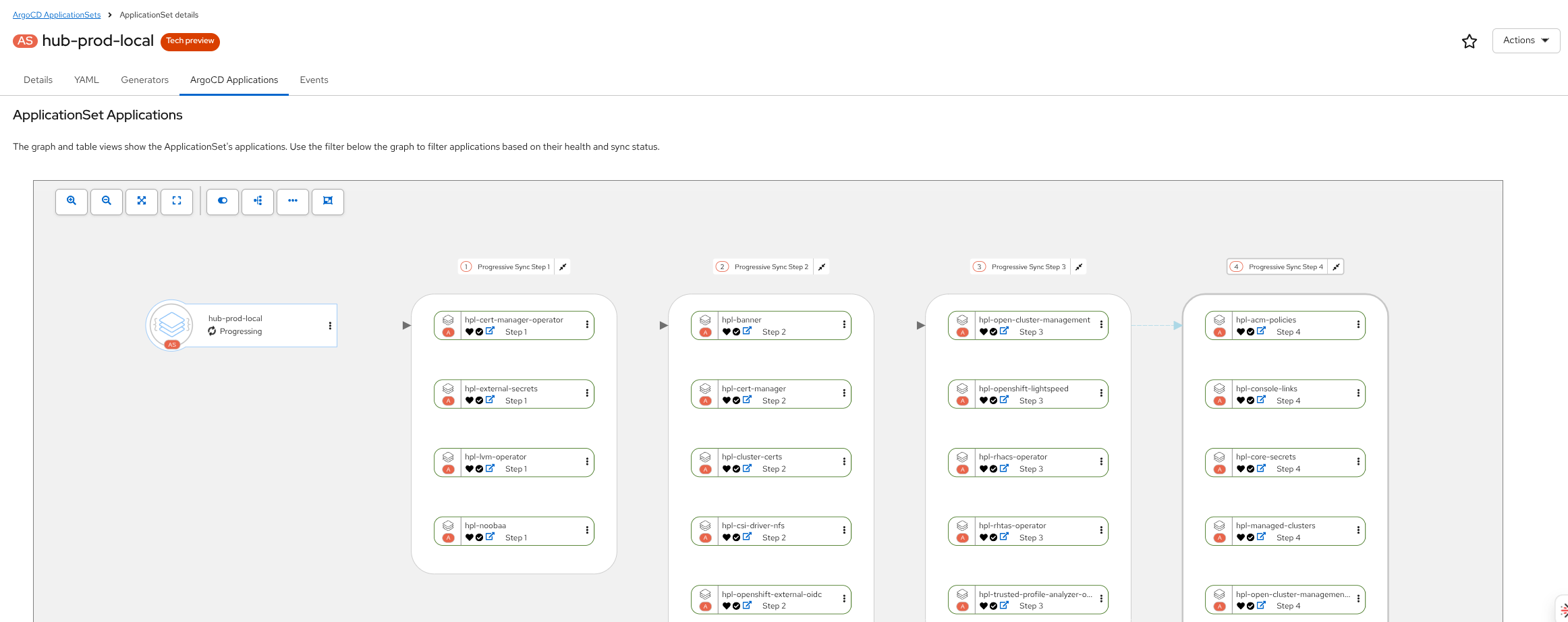
    OpenShift Console ApplicationSet Applications Tab
    OpenShift Console ApplicationSet Applications Tab

    Argo CD 3.4

    This version upgrades Argo CD to 3.4 from 3.3 that was used in OpenShift GitOps 1.20. Some of the changes in Argo CD 3.4 to be aware of include:

    • Additional filtering capabilities are now available in the Argo CD UI including filtering by annotation, additional operational status filtering and the ability to quickly clear filters via a Clear Filters button
    • It is now possible to use Glob, i.e. /env/*.yaml,  patterns for valueFiles in Applications. This is useful when handling overrides whose names may not be known in advance.
    • The new Argo CD Agent hybrid architecture added support for a new annotation to cluster secrets, argocd.argoproj.io/skip-reconcile. When this annotation is set to true the application-controller will not reconcile any Application which use this destination.
    • The Argo CD CLI has a new command, argocd account session-token, which outputs the current session token. This token can then be used in automation and scripts which call the Argo CD API.

    The upstream release blog for Argo CD 3.4 is available and changes to be aware of between 3.3 and 3.4 available in the upstream documentation.

    Conclusion

    OpenShift GitOps 1.21 is a significant update with many new features, to learn more about this update please review the official documentation and release notes.

    Disclaimer: Please note the content in this blog post has not been thoroughly reviewed by the Red Hat Developer editorial team. Any opinions expressed in this post are the author's own and do not necessarily reflect the policies or positions of Red Hat.

    Recent Posts

    • What's New in OpenShift GitOps 1.21

    • Deploying distributed AI inference: Blueprints & troubleshooting

    • How to integrate OpenShift AI and PG Airman MCP Server

    • Build a RHEL environment with image builder and content templates

    • Implement mTLS and zero trust with cert-manager and trust-manager

    Red Hat Developers logo LinkedIn YouTube Twitter Facebook

    Platforms

    • Red Hat AI
    • Red Hat Enterprise Linux
    • Red Hat OpenShift
    • Red Hat Ansible Automation Platform
    • See all products

    Build

    • Developer Sandbox
    • Developer tools
    • Interactive tutorials
    • API catalog

    Quicklinks

    • Learning resources
    • E-books
    • Cheat sheets
    • Blog
    • Events
    • Newsletter

    Communicate

    • About us
    • Contact sales
    • Find a partner
    • Report a website issue
    • Site status dashboard
    • Report a security problem

    RED HAT DEVELOPER

    Build here. Go anywhere.

    We serve the builders. The problem solvers who create careers with code.

    Join us if you’re a developer, software engineer, web designer, front-end designer, UX designer, computer scientist, architect, tester, product manager, project manager or team lead.

    Sign me up

    Red Hat legal and privacy links

    • About Red Hat
    • Jobs
    • Events
    • Locations
    • Contact Red Hat
    • Red Hat Blog
    • Inclusion at Red Hat
    • Cool Stuff Store
    • Red Hat Summit
    © 2026 Red Hat

    Red Hat legal and privacy links

    • Privacy statement
    • Terms of use
    • All policies and guidelines
    • Digital accessibility

    Chat Support

    Please log in with your Red Hat account to access chat support.