If you run a multi-tenant Red Hat OpenShift cluster, you've probably hit this wall: every Velero backup and restore requires cluster-admin privileges. Your application teams can't protect their own workloads. Instead, they open a ticket, wait for the platform team, and hope the backup happens before something breaks. Your platform team, meanwhile, becomes a bottleneck, fielding backup requests instead of building infrastructure.
OpenShift APIs for Data Protection (OADP) is an OpenShift operator for backing up and restoring application workloads and persistent data. It deploys and manages Velero, a widely adopted open source tool for Kubernetes backup, along with plug-ins for Container Storage Interface (CSI) snapshots, cloud storage providers, and OpenShift-specific resources. Together, the OADP operator and Velero handle everything from snapshotting persistent volumes to moving backup data to object storage like Amazon Simple Storage Service (S3).
But in multi-tenant clusters, the question comes up quickly: how do I let my tenants manage their own backups without giving them cluster-admin access?
OADP self-service addresses this gap by giving namespace-scoped users control over their backups without exposing cluster-admin credentials. This feature allows application teams to manage data protection independently while platform teams maintain security.
Prerequisites
Before enabling OADP self-service, you need:
- OpenShift APIs for Data Protection 1.6 or later installed on the cluster (self-service was introduced in OADP 1.5, but 1.6 is the recommended release).
- S3-compatible object storage (or Google Cloud Storage (GCS) or Azure Blob Storage) configured as a backup storage location.
- A non-admin user with editor permissions in their namespace. Specifically, they need access to OADP's custom resources, such as
nonadminbackups.oadp.openshift.ioandnonadminrestores.oadp.openshift.io, to create their own backup jobs. The simplest approach is granting the adminClusterRoleon the user's namespace:
oc create rolebinding my-user-admin \
        --clusterrole=admin \
        --user=my-user \
        --namespace=my-namespace
A user with only view-level RBAC won't be able to create NonAdminBackup or NonAdminRestore resources.
Note on support: The self-service CRDs use v1alpha1 as their API version. This reflects the API maturity, not the feature's support level. OADP self-service is a supported feature starting with OADP 1.5, with OADP 1.6 recommended as the current supported release.
Why Velero alone isn't enough for multi-tenancy
Velero is excellent at what it does. It understands namespaces, handles persistent volumes, and integrates with every major cloud provider's object storage. But there's a gap in its RBAC model that surfaces quickly in multi-tenant environments.
Velero's Backup and Restore custom resources are namespace-scoped, but they live in the Velero installation namespace (typically openshift-adp on OpenShift). Non-admin users don't have RBAC access to create resources in that namespace. So while Velero is namespace-aware in what it backs up, triggering a backup requires access to a namespace that only cluster-admins can reach.
In a shared cluster, this forces platform teams into a bad trade-off: grant tenants cluster-admin rights (a major security risk) or handle every backup request manually, which quickly stalls operations.
OADP self-service fills this gap. It gives namespace-scoped users the ability to trigger, configure, and monitor their own backups without needing access to the OADP namespace.
How OADP self-service works
OADP self-service introduces namespace-scoped custom resources that act as proxies for the Velero resources in the root namespace. Tenants interact with their own namespace; the controller handles everything in the OADP namespace on their behalf.
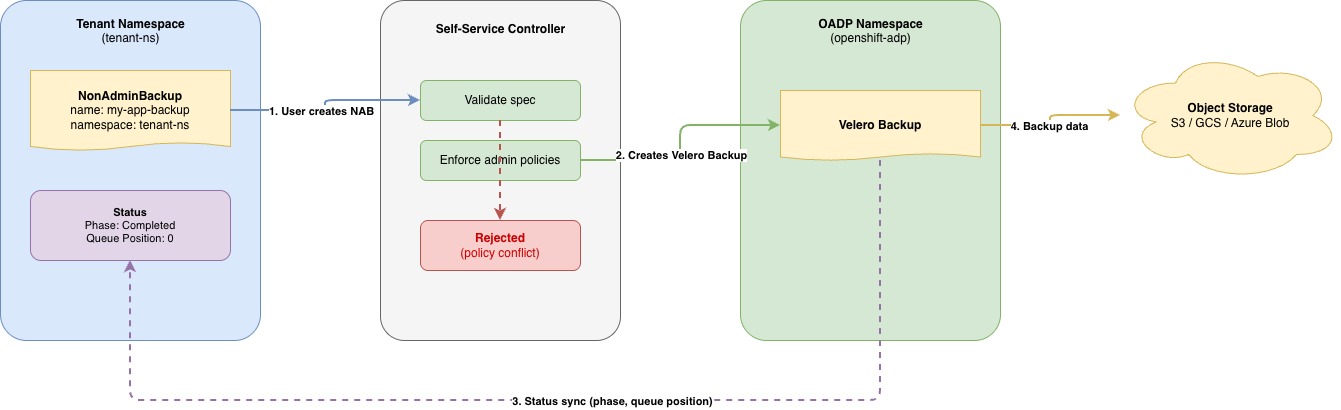
The flow works like this:
- A non-admin user creates a
NonAdminBackupcustom resource in their own namespace. - The self-service controller validates the request against admin-enforced policies configured in the
DataProtectionApplication(DPA) custom resource (CR). - If validation passes, the controller creates a corresponding Velero
Backupin the OADP namespace. - The controller watches the Velero
Backupand continuously syncs status back to the user'sNonAdminBackup, including phase, progress, and queue position. - The user monitors their backup by running
oc get nonadminbackupin their namespace. They never need access to the OADP namespace.
The same pattern applies to restores (NonAdminRestore) and backup storage locations (NonAdminBackupStorageLocation for tenants who need to bring their own storage).
To enable this, a cluster administrator configures the DPA with the self-service feature and any policy constraints:
apiVersion: oadp.openshift.io/v1alpha1
    kind: DataProtectionApplication
    metadata:
      name: velero-dpa
      namespace: openshift-adp
    spec:
      configuration:
        velero:
          defaultPlugins:
            - openshift
            - aws
            - csi
      nonAdmin:
        enable: true
        enforceBackupSpec:
          ttl: "720h0m0s" # 30 days
          snapshotMoveData: true
          defaultVolumesToFsBackup: false
        requireApprovalForBSL: true
The enforceBackupSpec section lets platform teams enforce governance rules that tenants cannot override. In this example, enforcing a 30-day retention period prevents unexpected costs, while forced snapshot offloading helps ensure offsite disaster recovery compliance.
How enforcement works: If a tenant sets a value that conflicts with an enforced field, the controller rejects the NonAdminBackup with a validation error. The controller doesn't silently override the user's value. If the tenant sets the same value as the enforced field, validation passes normally. If the tenant omits the field entirely, the controller applies the enforced value when it creates the Velero Backup.
The requireApprovalForBSL flag adds an approval gate for tenant-provided storage locations, which we cover in the next section.
The guardrails: What admins control
Giving tenants self-service access doesn't mean giving up control. Administrators can enforce 3 types of safeguards.
Enforced spec fields
Administrators set mandatory values in the DPA that tenants cannot override. The most effective ones include:
ttl: How long backups are retained, critical for data retention compliance and storage cost management.snapshotMoveData: Whether volume snapshots are moved to object storage for portability.defaultVolumesToFsBackup: File-system backup (Kopia/Restic) versus CSI snapshot strategy.includedResourcesandexcludedResources: Which Kubernetes resource types are included in backups.
The full policy enforcement suite covers over 20 backup parameters and 14 restore settings, enabling precise control over tenant capabilities.
Automatic cluster-resource exclusion
The controller always excludes cluster-scoped resources that tenants should not be backing up:
- SecurityContextConstraints (SCCs)
- ClusterRoles and ClusterRoleBindings
- CustomResourceDefinitions (CRDs)
- PriorityClasses
- virtualmachineclusterinstancetypes and virtualmachineclusterpreferences
The last two items are KubeVirt resources that define VM instance types and preferences at the cluster level. They belong to the platform, not the tenant, and the controller ensures they stay that way.
BSL approval workflow
When tenants need to use their own backup storage—for example, a team with its own S3 bucket for compliance reasons—they create a NonAdminBackupStorageLocation in their namespace. With requireApprovalForBSL set to true, the controller generates a NonAdminBackupStorageLocationRequest in the OADP namespace. A cluster administrator must approve this request before any backup data flows to that storage, preventing tenants from directing data to unauthorized locations.
Full backup support for OpenShift Virtualization VMs
If you're running OpenShift Virtualization, you might be wondering whether VMs require special handling. They don't, at least not from the tenant's perspective.
OpenShift Virtualization VMs are Kubernetes-native objects. A VirtualMachine CR, its DataVolume resources, and its PersistentVolumeClaim (PVC) resources all live in the tenant's namespace. When a tenant creates a NonAdminBackup for their namespace, the controller backs up everything in it: containers, VMs, and stateful applications. There's no separate workflow for VMs.
Here's what a NonAdminBackup looks like for a namespace that contains a VM:
apiVersion: oadp.openshift.io/v1alpha1
    kind: NonAdminBackup
    metadata:
      name: my-vm-backup
      namespace: tenant-a
    spec:
      backupSpec:
        includedNamespaces:
          - tenant-a
        snapshotMoveData: true
Backing up a VM looks the same as backing up a containerized application. The tenant creates the NonAdminBackup, and the controller takes care of the rest.
OADP 1.6 also introduces VM File Restore, which provides granular file-level access to VM backups without restoring the entire virtual machine. Users first discover available backups through a VirtualMachineBackupsDiscovery resource. They then create a VirtualMachineFileRestore to browse and retrieve individual files via SSH or a FileBrowser web user interface (UI). This is particularly valuable when you need a single configuration file or database dump from a VM backup, not the whole disk.
You configure VM-specific data protection capabilities like these in the DPA alongside the self-service feature, giving you one consistent set of tools to back up both containers and VMs.
Current limitations
OADP self-service is actively evolving. As of OADP 1.6, the following limitations apply:
- No native scheduled backups. There's no self-service schedule CRD. Tenants who need recurring backups can use a Kubernetes
CronJobto createNonAdminBackupresources on a schedule. - No cross-namespace restores. Tenants can only restore to their own namespace. The
namespaceMappingfield inNonAdminRestoreis restricted. - No direct Velero log access. Tenants don't have access to the OADP namespace where Velero runs. To access backup and restore logs, tenants use the
NonAdminDownloadRequestCRD, which proxies log retrieval through the self-service controller. - Backup storage location credentials.
NonAdminBackupStorageLocationrequires long-term cloud credentials (access keys, JSON service account files, client secrets). Tenant-provided storage locations don't support short-lived credential mechanisms like AWS Security Token Service (STS), Google Cloud Platform (GCP) Workload Identity Federation, and Azure Workload Identity.
What this means for your cluster
OADP self-service gives platform teams a repeatable way to enforce backup policies across multiple tenants. You configure policy once in the DPA (retention periods, volume strategies, resource exclusions, and storage approval workflows), and every tenant can self-serve their own backups and restores within those guardrails.
The same architecture protects containerized applications, stateful workloads, and OpenShift Virtualization VMs. Tenants don't need to know or care which type of workload they're protecting. They create a NonAdminBackup, monitor its status, and restore when they need to.
If you're migrating workloads off traditional hypervisors like VMware vSphere to OpenShift Virtualization, consider how much faster application teams move when they can take pre-migration snapshots on demand without waiting for ticket approvals.
OADP self-service is open source under the Apache 2.0 license and ships with OADP 1.6 on OpenShift 4.19 through 4.22.
Get started
Ready to remove the backup bottleneck? Enable nonAdmin.enable: true in your development cluster's DPA custom resource to test policy guardrails before creating tenant role bindings.
To dive deeper, explore our OADP configuration guide, inspect sample manifests on GitHub to see enforcement rules in action, or review the documentation on configuring OADP with OpenShift Virtualization.
Last updated: September 1, 2026
