Red Hat Data Grid is an in-memory, distributed, NoSQL datastore solution. With it, your applications can access, process, and analyze data at in-memory speed to deliver a superior user experience. In-memory Data Grid has a variety of use cases in today's environment, such as fast data access for low-latency apps, storing objects (NoSQL) in a datastore, achieving linear scalability with data distribution/partitioning, and data high-availability across geographies, among many others. With containers getting more attention, the need to have Data Grid running on a container platform like OpenShift is clear, and we are seeing more and more customers aligning their architecture with a datastore running natively on a container platform.
In this article, I will talk about multiple layers of security available while deploying Data Grid on OpenShift. The layers of security offer a combination of security measures provided by Data Grid as well as by OpenShift/Kubernetes.
The Red Hat team has made the deployment of Data Grid quite easy via exposing multiple out-of-the-box OpenShift templates. You can see the various choices available in GitHub. These templates use the same underlying image and are available at the Red Hat container images portal. Different templates expose different parameters that configure Data Grid during deployment time. This makes deployment pretty standard and easy. The "HTTPS template" exposes a bunch of security parameters. Other templates do not define these parameters; however, you could use these parameters during deployment time.
If you would like to practice the following recommendations (except for number 5), see JDG on OpenShift with Hot Rod and Security Enabled on GitHub. There, you can find code snippets and commands.
Securing Data Grid deployments on OpenShift
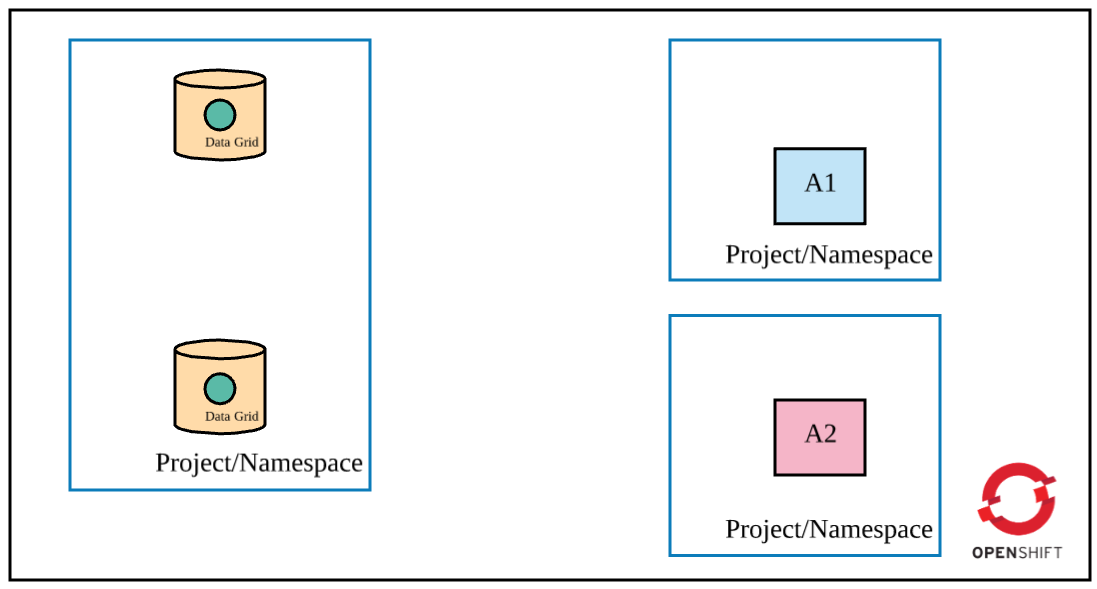
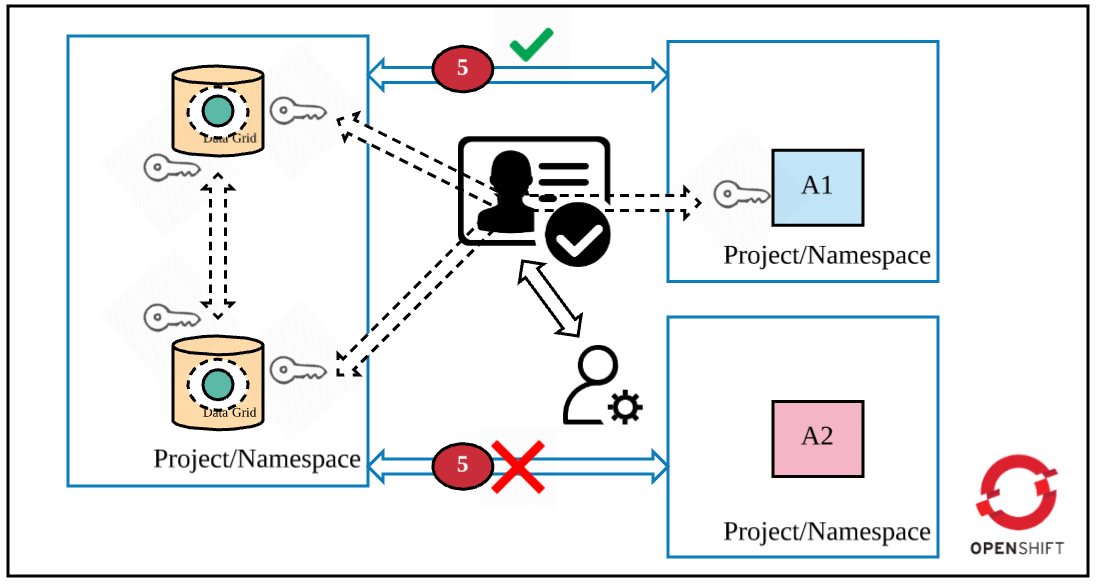
To understand the five layers of security, let's assume the following requirements are met in OpenShift (as shown in the figure):
- Data Grid is deployed in cluster mode.
- Only app 1 (A1) is permitted to access Data Grid (via Hot Rod).
- A cache is declared in Data Grid.
- Apps and Data Grid are deployed in different projects/namespaces (they could be deployed in the same project as well).
Layer 1: Encrypted communication among Data Grid pods in a cluster
In cluster mode, you need Data Grid pods to communicate securely with each other. When A1 accesses Data Grid, the request to locate the key can land on any pod in the cluster. If that pod does not hold the key, the request is moved to another pod holding the key. Furthermore, it is important that any new pod in the Data Grid cluster should authenticate first and then join the cluster. Otherwise, you leave security loopholes in the Data Grid cluster deployment.
Therefore, the first layer of security requires that Data Grid pods authenticate before joining the cluster as well as securely communicate with each other. See Encrypting Traffic Between Clustered Servers to learn more about different types of encryption you could choose (SYM or ASYM).

To achieve encryption, you must create a keystore that will hold the certificate (self-signed or CA authorized). Upload the keystore file as a secret object in OpenShift. You should then set the following parameters while deploying the HTTPS Data Grid template:
JGROUPS_ENCRYPT_NAME: Keystore aliasJGROUPS_ENCRYPT_SECRET: OpenShift secret object name that holds the keyJGROUPS_ENCRYPT_KEYSTORE: The name of the key in the secret object that holds the keystore valueJGROUPS_ENCRYPT_PASSWORD: Password to get access to the keystore
The HTTPS template automatically generates authentication credentials and stores them in the JGROUPS_CLUSTER_PASSWORD parameter. Pods use that parameter value to authenticate while joining a cluster. You could, of course, override this parameter while deploying the Data Grid cluster.
Layer 2: Encrypted communication between applications and the Data Grid cluster
Encrypted communication between a client and the Data Grid cluster is the next recommendation. This is important because the traffic could be intercepted if there is a security breach. There are a couple of ways to access the Data Grid cluster:
- From apps running in OpenShift
- From apps running outside of Data Grid
In the first scenario, an app accesses Data Grid directly via OpenShift's service objects and, therefore, there is a need to deploy Data Grid in a manner that exposes a service URL as the "exposed" URL with encryption enabled. (Note that there are many ways to access Data Grid, namely REST and Hot Rod). In the second scenario, the OpenShift operator should make a change in the Data Grid route object that just passes through the traffic at the OpenShift router. The traffic decryption would happen at the Data Grid cluster. The following diagram depicts the second security requirement. (Most of the time, you would not want to provide direct access to Data Grid to any app running outside of OpenShift). See Encrypting Client to Server Communication to learn more about this security recommendation.
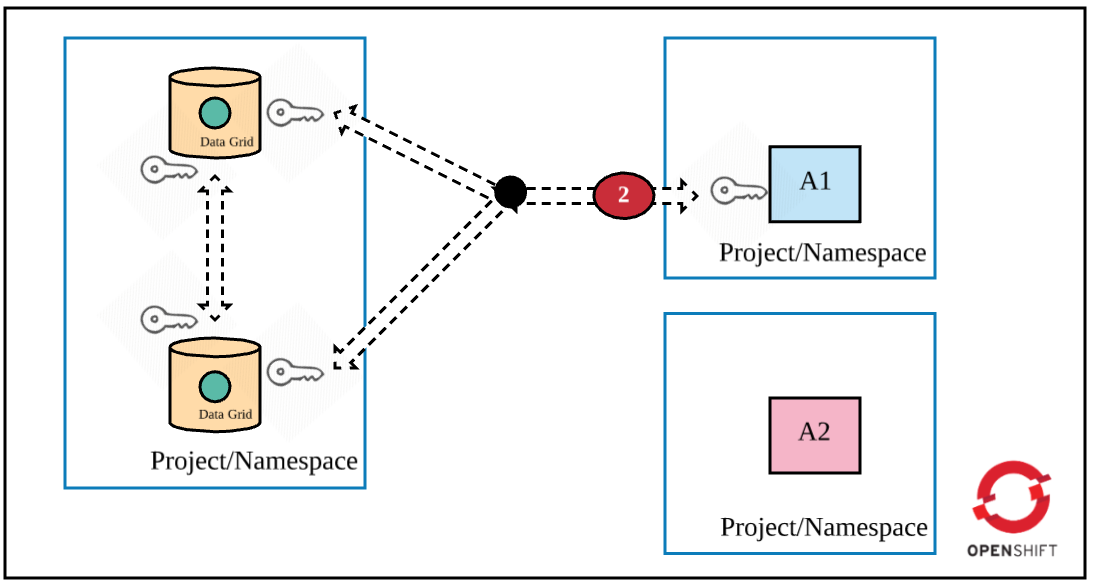
A similar need to create a keystore with a certificate and keystore password is present in this scenario. Create the keystore and upload it as a secret object in OpenShift. Set the following parameters while deploying the HTTPS Data Grid template:
HOTROD_SERVICE_NAME: OpesnSift's service object nameHOTROD_ENCRYPTION: Set totrueHTTPS_NAME: Keystore aliasHTTPS_SECRET: OpenShift secret object name that holds the keystore fileHTTPS_KEYSTORE: Name of the key in the secret object, the value of which is a keystoreHTTPS_PASSWORD: Password to open the keystore
Layer 3: Cache authentication
Now that traffic is encrypted, the next security recommendation is to authenticate a client application when it attempts to access a cache in the Data Grid cluster. The following figure highlights this requirement.
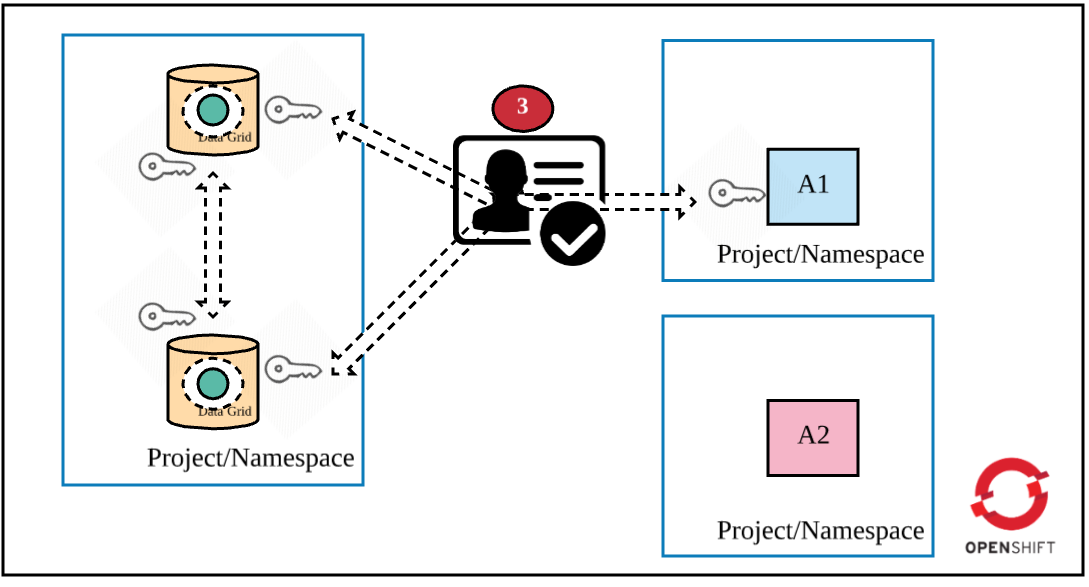
Set the USERNAME and PASSWORD parameters (defined in the HTTPS template) during deployment time.
Layer 4: Cache authorization
A client application can now authenticate against the Data Grid cluster, but you also need to define the actions a client can perform on the cache. RBAC controls would allow you to achieve this objective. During Data Grid deployment, you could define custom roles and assign privileges to them. You can also map a custom role with a cache (you can create more than one cache while deploying the Data Grid cluster). There are many ways to define authorization in Data Grid. See Red Hat JBoss Data Grid Security: Authorization and Authentication for more information.
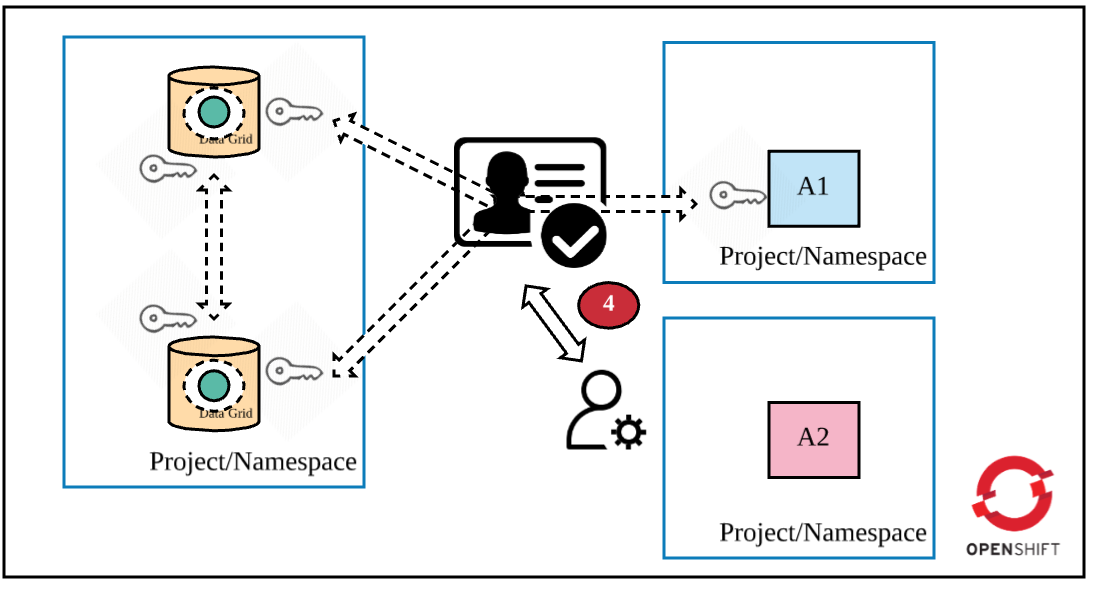
Set the following parameters during HTTPS template deployment:
ADMIN_GROUP: The name of the custom roleCONTAINER_SECURITY_ROLES: The definition of the defined role with one or more cache privileges<CACHE_NAME>_CACHE_SECURITY_AUTHORIZATION_ENABLED: Set totruefor enabling authorization on the<CACHE_NAME><CACHE_NAME>_CACHE_SECURITY_AUTHORIZATION_ROLES: Assignment of<CACHE_NAME>with the custom role defined earlier
Layer 5: Use OpenShift's network policy to restrict traffic between applications
Now your Data Grid cluster is properly set up: All pods of the cluster communicate securely, the client communicates securely with Data Grid, and proper authentication and authorization are set up for accessing the cache. However, I recommend that you further tighten the security around Data Grid via OpenShift's NetworkPolicy objects (or Istio). Network policy is functionality that restricts communication between applications. You could define these rules declaratively and deploy these rules along with Data Grid in the OpenShift cluster. In our scenario, we want only app1 to access the Data Grid cluster. So, here is the final security measure:
Conclusion
You should be careful while deploying databases/caches in container platforms because the platform is multi-tenant and your datastore could be storing sensitive information. If you would like to practice these recommendations (except for number 5 above), see "JDG on Openshift with Hot Rod and Security Enabled on GitHub. There, you can find code snippets and commands to deploy Data Grid securely on OpenShift.
Last updated: March 27, 2023
