As the industry heads toward the Trough of Disillusionment with cloud-native microservices, finally understanding that distributed architectures introduce more complexity (weird, right?), services meshes can help soften the landing and shift some of that complexity out of our applications and place it where it belongs, in the application operational layer.
At Red Hat we are committed to (and actively involved in) the upstream Istio project and working to integrate it into Kubernetes and Red Hat OpenShift to bring the benefits of a service mesh to our customers and the wider communities involved. If you want to play with Istio, check out the Service Mesh Tutorials on learn.Openshift.com. If you want to install it, follow the Istio Kubernetes quickstart instructions and install it on Red Hat OpenShift 3.7 or later (or 3.9 if you want to use auto-injection).
Existing Apps as a Service Mesh
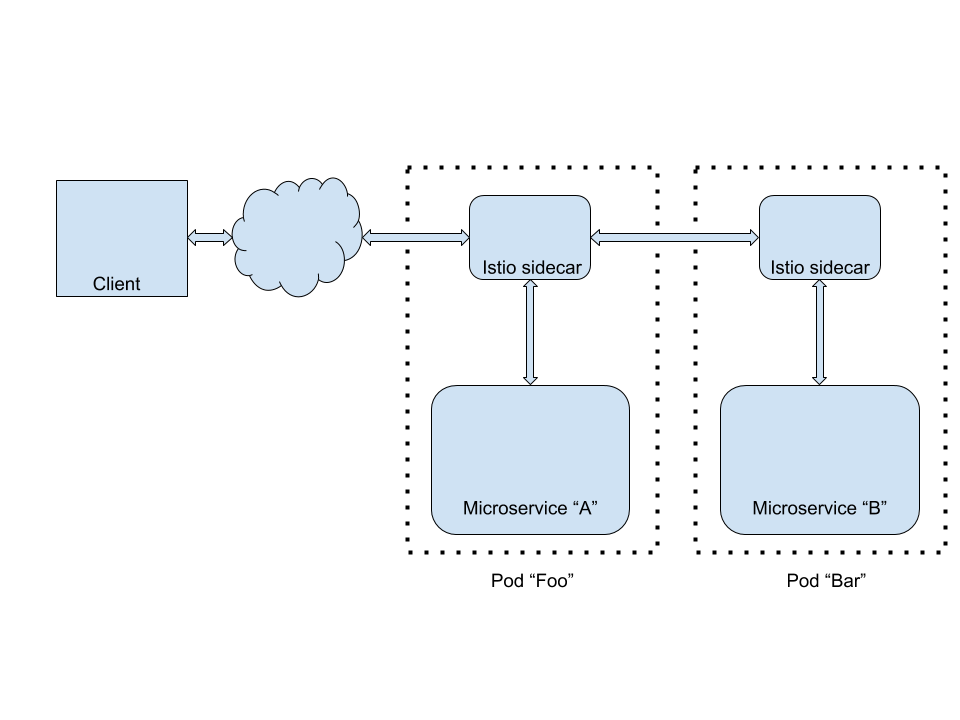
You may have seen the new Coolstore microservices demo floating around the Red Hat ecosystem in the last year; it's a fantastic tool for demonstrating the unique value that Red Hat brings to modern apps, and showcases key use cases around modern application development and integration using the Red Hat stack. Wouldn't it be great if we could deploy existing apps like Coolstore as a service mesh using Istio and Red Hat OpenShift? After all, one of the Goals of Istio is that it transparently brings new value to existing apps without them even knowing about it. It can reduce or eliminate the need for a lot of boilerplate code in the apps themselves for dealing with retries, circuit breakers, TLS, etc.
Let's get to work and Istio-ify Coolstore. We'll assume you already have Red Hat OpenShift 3.9 installed. I am using Red Hat OpenShift Origin 3.9.0.alpha3; at press time Red Hat OpenShift Container Platform 3.9 has not yet been released. We further assume you've installed Istio 0.6.0 or later by following the Istio Quickstart for Kubernetes. Clone the Coolstore repo and then play along:
% git clone https://github.com/jbossdemocentral/coolstore-microservice
And make sure you are logged in as a cluster administrator, or have cluster-admin privileges since it will require you to make some policy and permission changes later on.
Auto-injecting Sidecars
With sidecar auto-injection, your app's pods are automatically festooned with Envoy proxies without even having to change the application's Deployments. This relies on Kubernetes' MutatingAdmissionWebhook, new in Kubernetes 1.9 (and therefore Red Hat OpenShift 3.9). To enable this in Red Hat OpenShift, you'll need to edit your master's config file (master-config.yaml) to add the MutatingAdmissionWebhook:
admissionConfig:
  pluginConfig:
    MutatingAdmissionWebhook:
      configuration:
        apiVersion: v1
        disable: false
        kind: DefaultAdmissionConfig
And also enable the Kubernetes Certificate Signing API in order to use Kubernetes to sign the webhook cert (part of the automatic sidecar injection installation process):
kubernetesMasterConfig:
  controllerArguments:
    cluster-signing-cert-file: [ ca.crt ]
    cluster-signing-key-file: [ ca.key ]
With those changes, restart your master and then follow the automatic sidecar injection installation process.
Note that Red Hat OpenShift has a much more restricted set of default security policies compared to out of the box Kubernetes, so you'll have to allow the injector webhook to run with elevated permissions, as it will try to bind to port 443 in its pod. The Istio project is aware of the complaints about it needing too much privilege, and is working to apply the principal of least privilege:
% oc adm policy add-scc-to-user anyuid -z istio-sidecar-injector-service-account -n istio-system
% oc adm policy add-scc-to-user privileged -z istio-sidecar-injector-service-account -n istio-system
Then restart the injector webhook pod. When new pods are created to run application containers, the MutatingAdmissionWebhook will be consulted and given a chance to change the pod's contents. It will add the necessary "sidecar" containers to transparently intercept all network traffic and all inbound/outbound application traffic.
Next, let's create a test project to house a sample application. Give permissions to the proxy containers to allow them to do the magic, and to run with privileged users so we can rsh into it later:
% oc new-project coolstore-test
% oc adm policy add-scc-to-user privileged -z default,deployer
% oc adm policy add-scc-to-user anyuid -z default,deployer
To enable auto-injection on a Red Hat OpenShift project, you simply label the project (aka namespace):
% oc label namespace $(oc project -q) istio-injection=enabled
From then on, any pods created within that project will get an additional container injected into it. Let's test it out real quick by creating a test pod running a basic Apache HTTPD server:
% oc new-app httpd
And check out the pods:
% oc get pods
NAME           READY STATUS RESTARTS AGE
httpd-1-deploy 1/2   Error  0        6s
See that 1/2 under the READY column? It says 1 of 2 containers is ready. The 2 containers are: the one that executes the deployment; and the one for the auto-injected sidecar. It's always been possible to have multiple containers in a pod, but to date, it has not been widely seen in the wild. Assumptions have been baked into various developer tools which will need revisions to be able to smoothly operate in an istio-ified universe.
Note that the httpd-1-deploy pod isn't running the application; it's the pod that runs the Red Hat OpenShift deployment that is trying to deploy the pod that runs the application (commonly called "the deployer pod"). And as you can see, the status of the deployment is ERROR. The deployer pod log file reveals:
% oc logs -c deployment httpd-1-deploy
error: couldn't get deployment httpd-1: Get https://172.30.0.1:443/api/v1/namespaces/coolstore-test/replicationcontrollers/httpd-1: dial tcp 172.30.0.1:443: getsockopt: connection refused
This is due to a bug in Istio/Envoy. As a workaround, let's hack it to add some sleep time to allow the sidecar proxy extra time to initialize before the _actual_ deployment occurs:
% oc patch dc/httpd -p '{ "spec": { "strategy": { "customParams": { "command": ["/bin/sh", "-c", "sleep 5; echo slept for 5; /usr/bin/openshift-deploy"]}}}}'
deploymentconfig "httpd" patched
Ordinarily, when you patch the deployment it would immediately trigger a new deployment. This brings us to the next problem: the previous deployment isn't ever "done". The problem is that the sidecar proxy attached to the deployer pod hasn't exited (why would it?). So the pod continues to run, and the deployment will not be considered complete until this pod completes and its containers exit; which will be never (until it times out after 6 hours, at which point the entire deployment will be rolled back). Ugh!
So let's cancel our current running (but failed) deployment:
% oc rollout cancel dc/httpd
deploymentconfig "httpd" cancelling
Wait for the pod to be terminated, and then trigger the deployment again:
% oc rollout latest httpd
deploymentconfig "httpd" rolled out
Now the app should roll out since the sleep 5 will give the deployer pod some time to wait for the Istio networking magic to do its thing. Although just as before, the deployer pod will never exit. After a while you will see:
% oc get pods
NAME           READY STATUS    RESTARTS AGE
httpd-2-deploy 1/2   Completed 0        56s
httpd-2-rbwdq  2/2   Running   0        47s
After some time, you can see the actual HTTPD application running within a container in the httpd-2-rbwdq pod, and the deployer pod (httpd-2-deploy) is hanging around since the proxy associated with the deployer pod never exits. Let's kill the proxy associated with the deployer pod so that the deployment finishes. We'll do this by rsh'ing into the deployer pod (specifying the proxy container running istio-proxy), and use pkill to kill the Istio proxy process:
~ % oc rsh -c istio-proxy httpd-2-deploy pkill -f istio
command terminated with exit code 137
You can then run oc get pods and oc get dc/httpd to observe that the application is properly running with its sidecar container:
~ % oc get pods
NAME          READY STATUS  RESTARTS AGE
httpd-2-m29d9 2/2   Running 0        1m
~ % oc get dc
NAME  REVISION DESIRED CURRENT TRIGGERED BY
httpd 2        1       1       config,image(httpd:2.4)
Summary and Observations
Auto-injection of Istio proxies is a compelling new feature that will breathe new life into your Red Hat OpenShift projects. However, there is some fine-tuning needed in Red Hat OpenShift to fully exploit it throughout the application lifecycle features in Red Hat OpenShift related to building and deploying applications. Other observations:
- The networking magic that occurs as part of the proxy initialization appears to temporarily cut off pods from the Red Hat OpenShift network; we worked around this with the veritable sleep hack, but a better solution is needed.
- A more granular mechanism to specify which pods get auto-injected is needed. Currently, it's done at the project (Kubernetes namespace) level with a label, which means _every_ pod created in the namespace will get a proxy injected to it. You can also selectively disable injection per-application using the
sidecar.istio.io/inject: "true"annotation on the Deployment. However, it's unclear how this would affect the special builder and deployer pods created on behalf of applications being built or deployed in Red Hat OpenShift. A solution to this should be implemented in Red Hat OpenShift 3.10. - The deployment of some applications may fail with an odd error
reflect.Value.Addr of unaddressable valuewhen using auto-injection. This is a Go language-level bug that has been resolved in Kubernetes and will appear in the next releases of Red Hat OpenShift. Currently, there is no workaround other than to use manual injection, which we'll cover in the next part of this series of articles. - Auto-injection is great for demos and getting existing apps up and running in the mesh very quickly. However, in a production scenario, I'm not sure I'd want to trust the auto-injector mechanism. Manual injection allows you to do the same magic, but then commit the results to your source-code management system and does not rely on the auto-injection. Another approach I'd probably take is to do builds in a separate cluster and namespace, without any auto-injection at all. Leave the injection to the deployments that occur in my production cluster/namespace.
So let's turn auto-injection off for now:
% oc label namespace $(oc project -q) istio-injection-
The hyphen (-) at the end means "delete the label".
In the next part of this series, we'll show you how to do manual injection (which as of Istio 0.6.0 supports OpenShift DeploymentConfig objects), which we'll apply to the entire Coolstore project for some real fun.
Stay tuned!
** Update: Read Part 2–Manual Injection Now **
Last updated: January 12, 2024

