Redhat Developers  Logo
  • AI

    Get started with AI

    • Red Hat AI
      Accelerate the development and deployment of enterprise AI solutions.
    • AI learning hub
      Explore learning materials and tools, organized by task.
    • AI interactive demos
      Click through scenarios with Red Hat AI, including training LLMs and more.
    • AI/ML learning paths
      Expand your OpenShift AI knowledge using these learning resources.
    • AI quickstarts
      Focused AI use cases designed for fast deployment on Red Hat AI platforms.
    • No-cost AI training
      Foundational Red Hat AI training.

    Featured resources

    • OpenShift AI learning
    • Open source AI for developers
    • AI product application development
    • Open source-powered AI/ML for hybrid cloud
    • AI and Node.js cheat sheet

    Red Hat AI Factory with NVIDIA

    • Red Hat AI Factory with NVIDIA is a co-engineered, enterprise-grade AI solution for building, deploying, and managing AI at scale across hybrid cloud environments.
    • Explore the solution
  • Learn

    Self-guided

    • Documentation
      Find answers, get step-by-step guidance, and learn how to use Red Hat products.
    • Learning paths
      Explore curated walkthroughs for common development tasks.
    • Guided learning
      Receive custom learning paths powered by our AI assistant.
    • See all learning

    Hands-on

    • Developer Sandbox
      Spin up Red Hat's products and technologies without setup or configuration.
    • Interactive labs
      Learn by doing in these hands-on, browser-based experiences.
    • Interactive demos
      Click through product features in these guided tours.

    Browse by topic

    • AI/ML
    • Automation
    • Java
    • Kubernetes
    • Linux
    • See all topics

    Training & certifications

    • Courses and exams
    • Certifications
    • Skills assessments
    • Red Hat Academy
    • Learning subscription
    • Explore training
  • Build

    Get started

    • Red Hat build of Podman Desktop
      A downloadable, local development hub to experiment with our products and builds.
    • Developer Sandbox
      Spin up Red Hat's products and technologies without setup or configuration.

    Download products

    • Access product downloads to start building and testing right away.
    • Red Hat Enterprise Linux
    • Red Hat AI
    • Red Hat OpenShift
    • Red Hat Ansible Automation Platform
    • See all products

    Featured

    • Red Hat build of OpenJDK
    • Red Hat JBoss Enterprise Application Platform
    • Red Hat OpenShift Dev Spaces
    • Red Hat Developer Toolset

    References

    • E-books
    • Documentation
    • Cheat sheets
    • Architecture center
  • Community

    Get involved

    • Events
    • Live AI events
    • Red Hat Summit
    • Red Hat Accelerators
    • Community discussions

    Follow along

    • Articles & blogs
    • Developer newsletter
    • Videos
    • Github

    Get help

    • Customer service
    • Customer support
    • Regional contacts
    • Find a partner

    Join the Red Hat Developer program

    • Download Red Hat products and project builds, access support documentation, learning content, and more.
    • Explore the benefits

Red Hat Container Development Kit (CDK) With Nested KVM

<p>&nbsp;</p> <quillbot-extension-portal></quillbot-extension-portal>

February 13, 2018
Scott McCarty (fatherlinux)
Related topics:
Developer toolsLinuxKubernetesVirtualization
Related products:
Red Hat Enterprise Linux

    Why

    If you are like me, you probably prefer to install new and exploratory software in a fresh virtual machine (VM) or container to insulate your laptop/desktop from software pollution (TM). Red Hat Container Development Kit (CDK) relies on virtualization to create a Red Hat Enterprise Linux (RHEL) virtual machine to run OpenShift (based on Kubernetes). Red Hat specifically supports installation of the CDK on Windows, macOS, and RHEL Server, but if you are running Fedora, RHEL Workstation, or even CentOS, you will run into trouble. If you are not running a supported desktop, you can always use a RHEL Server virtual machine, and this tutorial is for you.

    This tutorial is specific to running RHEL Server as a VM on RHEL Workstation, but these instructions should work for Fedora and CentOS. With a modification of the first step - creating a virtual machine with nested virtualization enabled (vmware, hyper-v) - you should be able to make these instructions work on Windows and macOS as well.  (Note: VirtualBox does not support nested virtualization,  so this will not work with VirtualBox.)

    How

    Create a Virtual Machine

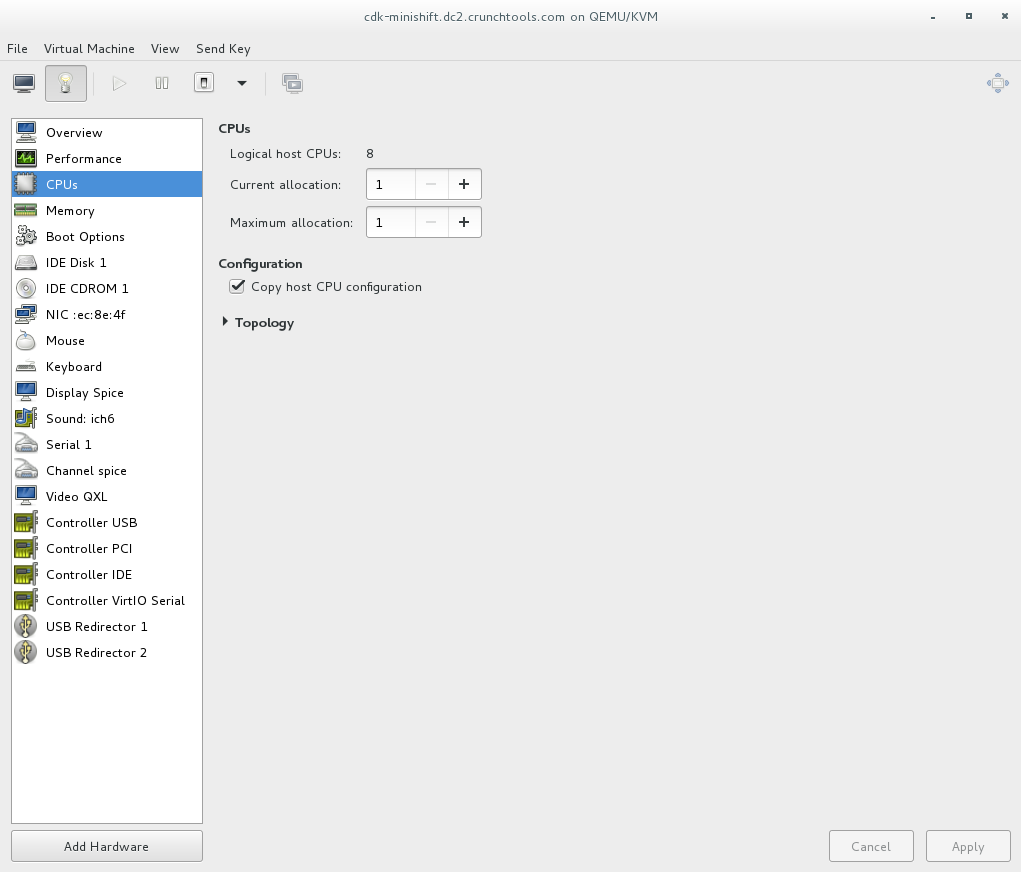
    First, create a new virtual machine and do a RHEL Server installation. Personally, I use virt-manager because it makes it easy to create ephemeral virtual machines for testing. I gave my VM 8192 MB of RAM, and 1 vCPU. While creating the VM, remember to configure the CPU to copy the host configuration. This will enable Nested KVM which will allow you to run virtual machines inside of your new virtual machine - mind....blown....


    Install RHEL

    Download and install RHEL Server, because that's one of the supported platforms for CDK. I won't rewrite the instructions on this because most people can do this without documentation.

    On the new RHEL Installation, install and configure virtualization and a few other tools to make things easier:

    yum install -y qemu-kvm qemu-img libvirt virt-manager xauth firefox

    Install CDK

    In the newly created virtual machine enable, download, and install CDK. Remember to:

    subscription-manager repos --enable rhel-7-server-devtools-rpms
    subscription-manager repos --enable rhel-server-rhscl-7-rpms
    cd /etc/pki/rpm-gpg
    wget -O RPM-GPG-KEY-redhat-devel https://www.redhat.com/security/data/a5787476.txt
    rpm --import RPM-GPG-KEY-redhat-devel
    yum install cdk-minishift docker-machine-kvm


    Now, setup the CDK. This will do everything for you, including putting the OC binary where it needs to be.

    ln -s /root/.minishift/cache/oc/v3.7.14/linux/oc /usr/bin/oc
    minishift setup-cdk
    minishift start


    Up and Running

    These are instructions usually missed by tutorials. Notice, the oc command is automatically configured to connect to the Kubernetes/OpenShift environment in the virtual machine (which is inside the virtual machine you created - mic drop)

    oc get pods
    oc get pv
    oc get node

    You can also get directly into the CDK virtual, virtual machine by using the following command. From here you can run docker commands, look at underlying storage, etc:

    minishift ssh
    docker ps
    docker images


    Or, go into the browser console with this command. This will show you the OpenShift web console in a browser, displayed over X11 to your laptop (that's why we installed xauth). Warning, you have to disable SELinux:

    setenforce 0
    minishift console


    Now, you have a fully functional OpenShift environment up and running, and you are ready explore just about any Kubernetes or OpenShift tutorial on the Internet. You even have persistent volumes set up for storage tests.


    Tips & Tricks

    Tip: if the minishift setup fails, you can always delete and start again with:

    minishift delete
    minishift cdk-setup

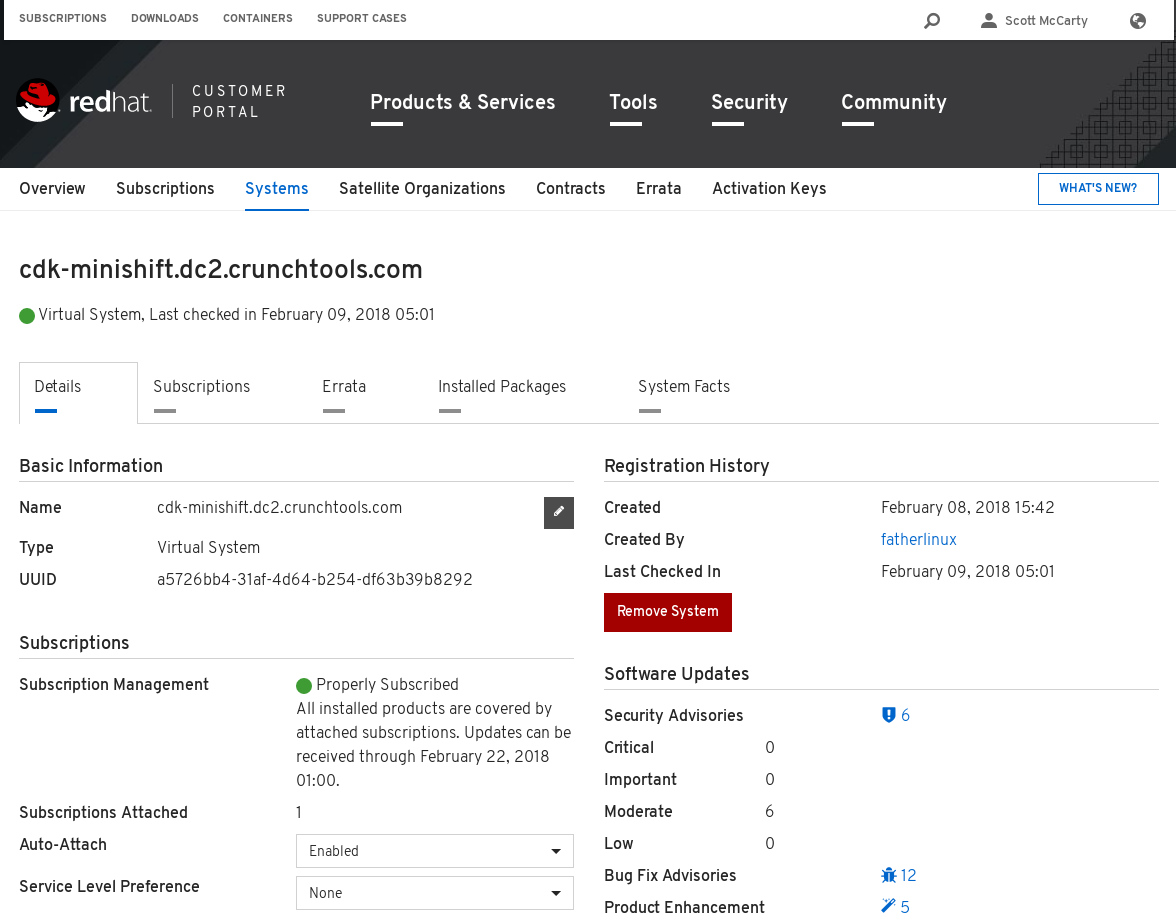
    Tip: Sometimes you have to manually delete the subscription on the Red Hat Portal so that you can run the CDK setup again. Just use the Remove System button:
     

    Tip: Since we are doing nested virtualization, every now and then you will end up with some funky network problems or other problems. Just, delete the CDK and reboot the virtual machine:

    minishift delete
    reboot
    Last updated: December 1, 2023

    Recent Posts

    • MCP servers vs. skills: Choosing the right context for your AI

    • How to route external and local LLMs with Models-as-a-Service

    • Protect data offloaded to GPU-accelerated environments with OpenShift sandboxed containers

    • Case study: Measuring energy efficiency on the x64 platform

    • How to prevent AI inference stack silent failures

    Red Hat Developers logo LinkedIn YouTube Twitter Facebook

    Platforms

    • Red Hat AI
    • Red Hat Enterprise Linux
    • Red Hat OpenShift
    • Red Hat Ansible Automation Platform
    • See all products

    Build

    • Developer Sandbox
    • Developer tools
    • Interactive tutorials
    • API catalog

    Quicklinks

    • Learning resources
    • E-books
    • Cheat sheets
    • Blog
    • Events
    • Newsletter

    Communicate

    • About us
    • Contact sales
    • Find a partner
    • Report a website issue
    • Site status dashboard
    • Report a security problem

    RED HAT DEVELOPER

    Build here. Go anywhere.

    We serve the builders. The problem solvers who create careers with code.

    Join us if you’re a developer, software engineer, web designer, front-end designer, UX designer, computer scientist, architect, tester, product manager, project manager or team lead.

    Sign me up

    Red Hat legal and privacy links

    • About Red Hat
    • Jobs
    • Events
    • Locations
    • Contact Red Hat
    • Red Hat Blog
    • Inclusion at Red Hat
    • Cool Stuff Store
    • Red Hat Summit
    © 2026 Red Hat

    Red Hat legal and privacy links

    • Privacy statement
    • Terms of use
    • All policies and guidelines
    • Digital accessibility

    Chat Support

    Please log in with your Red Hat account to access chat support.