In a previous post, we introduced QinQ support for Open vSwitch. This post will investigate how QinQ performs relative to alternatives (VXLAN, GENEVE) in both throughput and CPU utilization. This will give us some understanding why we might consider QinQ over VXLAN or GENEVE.
We're going to look at the following tunnel types and configurations:
- VXLAN-SW
- VXLAN in software only. No hardware offload.
- VXLAN-HW
- VXLAN with hardware offload. This includes UDP tunnel segmentation offload and receives side flow steering.
- GENEVE-SW
- GENEVE in software only. No hardware offload.
- QinQ-SW
- QinQ in software only. No hardware offload.
- QinQ-HW
- QinQ with hardware offloads. This includes S-VLAN parsing. Unfortunately, the NIC used for testing does not support S-VLAN insert.
Test Description
All tests were run on the same hardware and software using the OVS kernel data path. The setup consists of two directly connected nodes. VLAN tagged traffic is passed from a network namespace, through a OVS bridge, and finally to the physical network. This simulates containers or virtual machines communicating with each other on separate host nodes.
Tests were divided into two categories: single stream and multiple streams. A single stream test uses a single instance of netperf and uses only a single tunnel. A multiple stream test uses multiple instances of netperf or iperf3 and utilizes multiple tunnels as well. For VXLAN and GENEVE, this means each host uses multiple outer IP addresses for the encapsulation. For QinQ multiple outer VLAN IDs were used. Traffic from each namespace is mapped to a specific tunnel.
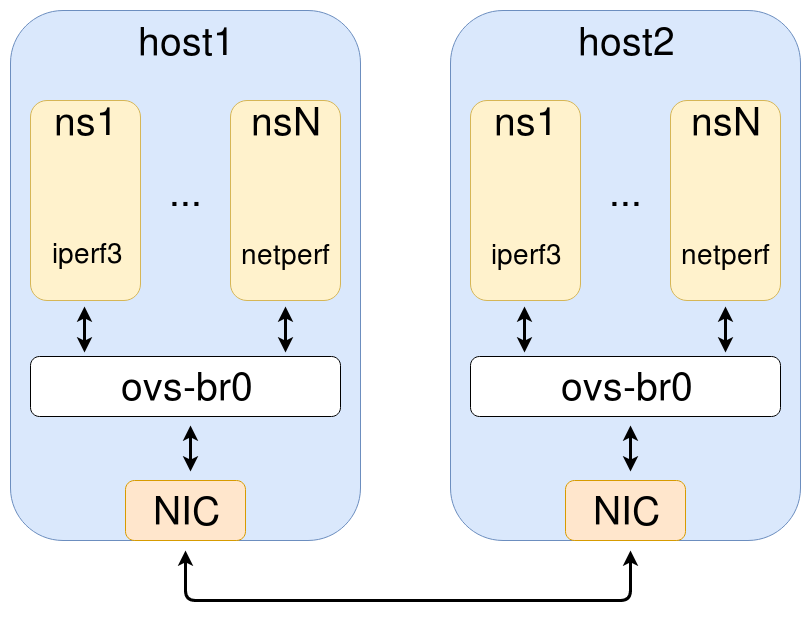
Test Configuration
Specifically, the following hardware and software were used:
- kernel: 4.12.0-rc2 (a3995460491d
- NIC: mlx4, ConnectX-3 Pro, MT27520 (firmware 2.40.5000)
- CPU: Xeon E5-2690
The OVS configuration was minimal with only half a dozen ports - port 1 being the tunnel interface toward the physical network. Ports 2-6 are Linux veth interfaces associated with the namespaces we use for traffic generation.
The following are snippets of the flow rules for both VXLAN and GENEVE. Through the magic of OVS, they're identical. For northbound traffic (toward the physical network), it sets the tunnel destination. For southbound traffic (toward the namespace), it matches the tunnel we received the traffic on and directs it toward the appropriate namespace.
in_port=1,tun_dst=10.222.0.1 action=output:2
in_port=2 action=set_field:10.222.0.6->tun_dst,output:1
...
...
in_port=1,tun_dst=10.222.0.5 action=output:6
in_port=6 action=set_field:10.222.0.10->tun_dst,output:1
The following are snippets of the flow rules for QinQ. For northbound traffic, a VLAN tag is added with TPID 0x88a8. For southbound traffic, it matches the outer VLAN ID, removes the VLAN tag, and then directs it toward the appropriate namespace.
in_port=1,dl_vlan=1 action=pop_vlan,output:2
in_port=2 action=push_vlan:0x88a8,mod_vlan_vid:1,output:1
...
...
in_port=1,dl_vlan=5 action=pop_vlan,output:6
in_port=6 action=push_vlan:0x88a8,mod_vlan_vid:5,output:1
Test Results
Our first results are from the single instance netperf test. This is a single netperf instance over a single tunnel. The benefits of QinQ and VXLAN with hardware offload are very apparent. QinQ achieves almost double the performance of VXLAN-SW and GENEVE-SW.
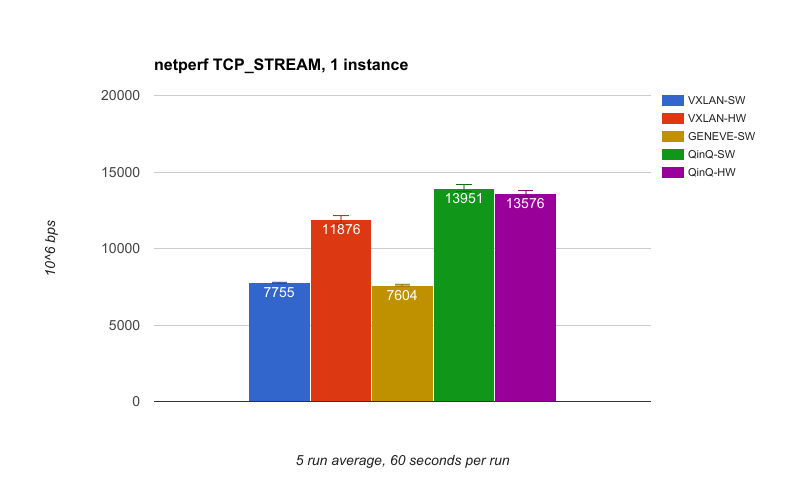
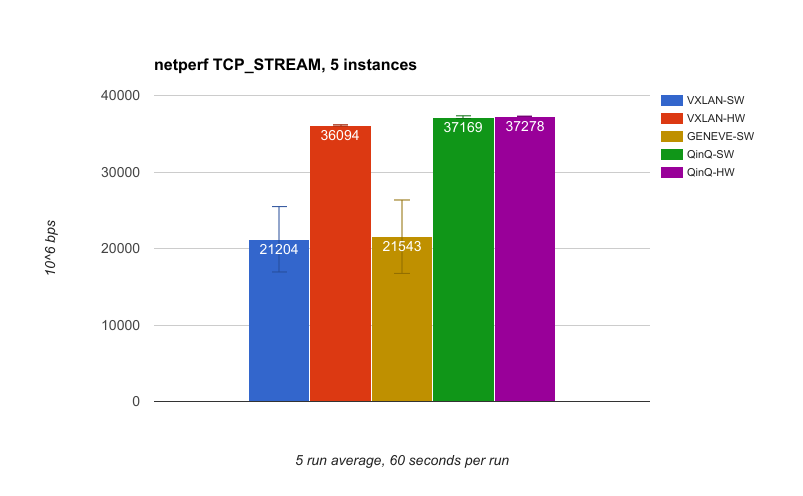
The second set of results is again using netperf, but this time with 5 instances of netperf and 5 tunnels. This utilizes more CPU cores and NIC receives queues. We see the same performance gap between tunnel types as with the single instance test, but it's even more pronounced with VXLAN-HW and QinQ essentially saturating the 40g link. One thing to note is the standard deviation is significant for VXLAN-SW and GENEVE-SW whereas it's virtually non-existent for the others.
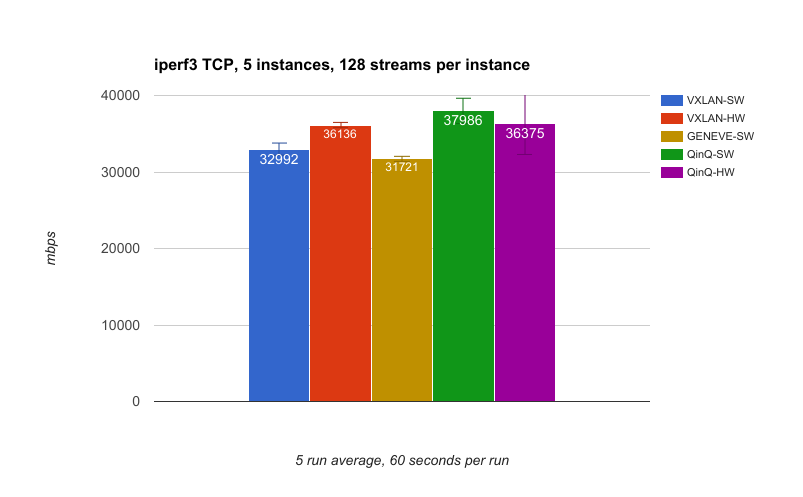
This third test uses 5 instances of iperf3 with each instance having 128 streams. In general, the throughput here is better than with netperf because we're using a lot more sockets and therefore have a lot more buffering.
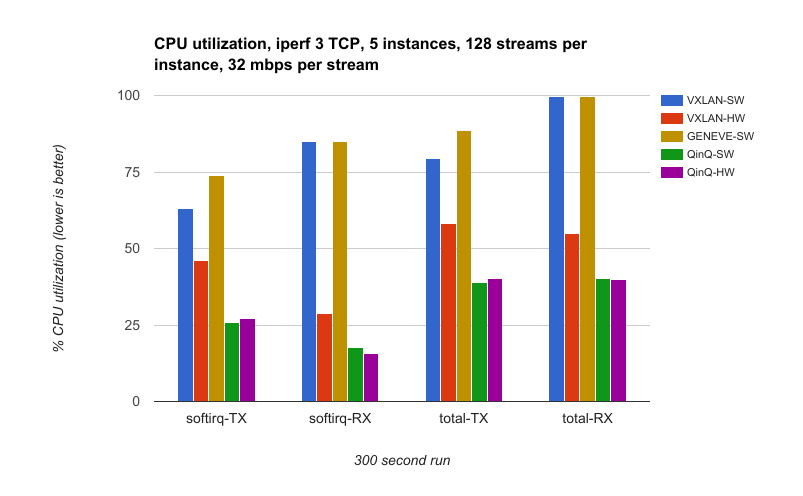
Our final test measures CPU utilization. This is almost identical to the previous iperf3 test, but to make the comparison fair we target a specific data rate. In this case, it's 32 Mbps * 128 streams * 5 instances, which equals 20 Gbps. The CPU utilization is collected on both nodes using mpstat from the sysstat package. All but 5 CPU cores (one per tunnel) are disabled for this test to give more digestible utilization percentages.
Test Analysis
Now, let's pick out some notable things from the graphs above.
- QinQ has great performance.
Given what we learned in the overview post, this should not be all that surprising. QinQ's overhead is minimal which means fewer cycles have to be spent on the encapsulation. Another thing to note is that the IP-based tunnels have to go through the routing code of the kernel after they are encapsulated. QinQ frames can be put directly on the egress interface's output queue. - QinQ-SW CPU utilization is less than half of other software only tunnels.
In the CPU utilization test, we see that utilization for QinQ-SW is less than half of VXLAN-SW and GENEVE-SW. This savings translates into the host having more cycles to spend on other tasks. - VXLAN offload is a huge help.
This is very clear in the graphs. Hardware offload really helps VXLAN in both throughput and CPU utilization. - Not much difference between QinQ-SW and QinQ-HW.
The kernel is efficient at inserting and parsing VLAN tags. A quick analysis with perf shows inserting the VLAN into the packet data only accounts for 0.02% of the transmit overhead. This indicates that hardware S-VLAN insert and parse may help, but only by a small amount.
Conclusion
We found that OVS QinQ performs very well in both throughput and CPU utilization. As such, it may be a solid choice for your deployment. This is especially true if hardware offload is not available as is the case for virtual machines and older hardware. It means you can move from one cloud provider or NIC to another and expect similar performance. You're not dependent on hardware features provided by a subset of vendors.
To get started with OVS QinQ, you can check out the previous post for a quick overview.
Download this Kubernetes cheat sheet for automating deployment, scaling and operations of application containers across clusters of hosts, providing container-centric infrastructure.
Last updated: September 18, 2018
