Redhat Developers  Logo
  • AI

    Get started with AI

    • Red Hat AI
      Accelerate the development and deployment of enterprise AI solutions.
    • AI learning hub
      Explore learning materials and tools, organized by task.
    • AI interactive demos
      Click through scenarios with Red Hat AI, including training LLMs and more.
    • AI/ML learning paths
      Expand your OpenShift AI knowledge using these learning resources.
    • AI quickstarts
      Focused AI use cases designed for fast deployment on Red Hat AI platforms.
    • No-cost AI training
      Foundational Red Hat AI training.

    Featured resources

    • OpenShift AI learning
    • Open source AI for developers
    • AI product application development
    • Open source-powered AI/ML for hybrid cloud
    • AI and Node.js cheat sheet

    Red Hat AI Factory with NVIDIA

    • Red Hat AI Factory with NVIDIA is a co-engineered, enterprise-grade AI solution for building, deploying, and managing AI at scale across hybrid cloud environments.
    • Explore the solution
  • Learn

    Self-guided

    • Documentation
      Find answers, get step-by-step guidance, and learn how to use Red Hat products.
    • Learning paths
      Explore curated walkthroughs for common development tasks.
    • See all learning

    Hands-on

    • Developer Sandbox
      Spin up Red Hat's products and technologies without setup or configuration.
    • Interactive labs
      Learn by doing in these hands-on, browser-based experiences.
    • Interactive demos
      Click through product features in these guided tours.

    Browse by topic

    • AI/ML
    • Automation
    • Java
    • Kubernetes
    • Linux
    • See all topics

    Training & certifications

    • Courses and exams
    • Certifications
    • Skills assessments
    • Red Hat Academy
    • Learning subscription
    • Explore training
  • Build

    Get started

    • Red Hat build of Podman Desktop
      A downloadable, local development hub to experiment with our products and builds.
    • Developer Sandbox
      Spin up Red Hat's products and technologies without setup or configuration.

    Download products

    • Access product downloads to start building and testing right away.
    • Red Hat Enterprise Linux
    • Red Hat AI
    • Red Hat OpenShift
    • Red Hat Ansible Automation Platform
    • See all products

    Featured

    • Red Hat build of OpenJDK
    • Red Hat JBoss Enterprise Application Platform
    • Red Hat OpenShift Dev Spaces
    • Red Hat Developer Toolset

    References

    • E-books
    • Documentation
    • Cheat sheets
    • Architecture center
  • Community

    Get involved

    • Events
    • Live AI events
    • Red Hat Summit
    • Red Hat Accelerators
    • Community discussions

    Follow along

    • Articles & blogs
    • Developer newsletter
    • Videos
    • Github

    Get help

    • Customer service
    • Customer support
    • Regional contacts
    • Find a partner

    Join the Red Hat Developer program

    • Download Red Hat products and project builds, access support documentation, learning content, and more.
    • Explore the benefits

Open vSwitch: Overview of 802.1ad (QinQ) Support

June 6, 2017
Eric Garver

    Open vSwitch (OVS) recently gained support for 802.1ad (QinQ). It can be used as a lightweight alternative to tunnel technologies such as; VXLAN, GENEVE, GRE. A key advantage of QinQ is that it can make use of hardware offload features common in network interface cards (NICs). Only newer NICs support hardware offload for VXLAN and GENEVE. QinQ also incurs less frame processing and has a smaller encapsulation overhead.

    QinQ is an IEEE standard formally known an 802.1ad. It has been widely supported by enterprise switches and routers for some time. QinQ frames look very much like a normal VLAN tagged Ethernet frame. The only difference is the presence of a second VLAN tag. This means QinQ only adds 4 extra bytes to a frame.

    The above diagram shows a VLAN tagged packet before and after inserting a QinQ tag.">

    Enabling QinQ support in OVS is a simple configuration change. You must set the vlan-limit option to a value of 0 (unlimited) or 2. By default vlan-limit has a value of 1, which means only one VLAN tag will be inspected. This preserves backward compatibility with older OVS releases.

    $ ovs-vsctl set Open_vSwitch . other_config:vlan-limit=2
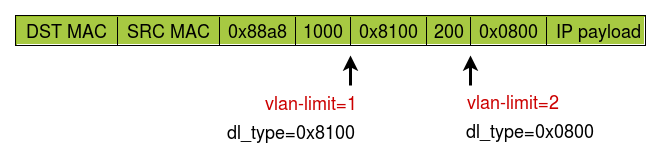
    The effects of vlan-limit on dl_type matching
    The above diagram shows the significance of vlan-limit for flow matching.
    The above diagram shows the significance of vlan-limit for flow matching.">

    Depending on the setting of vlan-limit the match value for dl_type may be different. Of course, if the frame is only single tagged then dl_type is the same regardless of the vlan-limit setting.

    If you change vlan-limit on a live system that has already been passing traffic you may need to run the revalidator so established flows are reconsidered. That can be done with the following command.

    $ ovs-appctl revalidator/purge

    Basic push and pop support of QinQ tags work very much like existing VLAN tags. The only difference is you specify a different EtherType for the push_vlan action. This example pushes a second tag with VLAN ID of 1000 for northbound traffic and pops the tag for southbound traffic.

    $ ovs-ofctl in_port=1 action=push_vlan:0x88a8,mod_vlan_vid=1000,output:2
    $ ovs-ofctl in_port=2 action=pop_vlan,output:1

    A more convenient way to use QinQ is the new dot1q-tunnel VLAN mode. It will handle the tunneling without having to explicitly define push and pop actions. This example will push a QinQ tag with VLAN ID 1000 on ingress, but only if the frame is tagged with VLAN ID 100 or 200 - other frames will be dropped. On egress, it will strip the QinQ tag.

    $ ovs-vsctl set port ovs-p0 vlan_mode=dot1q-tunnel tag=1000 cvlans=100,200

    You can also leave off the cvlans option to tunnel all frames, including untagged frames.

    There is at least one caveat to QinQ; it's not a true tunnel. The MAC addresses in the frame are those of the end stations (often virtual machines). This means that the intermediate and core network switches will have to learn all the MAC addresses in the network resulting in larger MAC tables. For many networks, this is a non-issue, but it may be a concern for cloud setups or older switches.

    Another thing to consider is QinQ is a layer 2 technology. As such, it can only be used in layer 2 networks. It will not traverse a router. However, it's possible to use QinQ in your layer 2 network while using another tunnel technology (VXLAN, GENEVE, etc) at the gateway to joining the separate networks.

    OVS QinQ support is available today! It landed in the OVS master branch on Mar 1, 2017 (commit fed8962aff57). As such, it will be in the next OVS release, presumably 2.8. Kernel data path support is available since kernel 4.9.

    Thanks to Lance Richardson, Hannes Sowa, and Flavio Leitner for their feedback on this post.


    Whether you are new to Linux or have experience, downloading this cheat sheet can assist you when encountering tasks you haven’t done lately.

    Last updated: June 1, 2017

    Recent Posts

    • Confidential virtual machine storage attack scenarios

    • Introducing virtualization platform autopilot

    • Integrate zero trust workload identity manager with Red Hat OpenShift GitOps

    • Best Practice Configuration and Tuning for Linux and Windows VMs

    • Red Hat UBI 8 builders have been promoted to the Paketo Buildpacks organization

    Red Hat Developers logo LinkedIn YouTube Twitter Facebook

    Platforms

    • Red Hat AI
    • Red Hat Enterprise Linux
    • Red Hat OpenShift
    • Red Hat Ansible Automation Platform
    • See all products

    Build

    • Developer Sandbox
    • Developer tools
    • Interactive tutorials
    • API catalog

    Quicklinks

    • Learning resources
    • E-books
    • Cheat sheets
    • Blog
    • Events
    • Newsletter

    Communicate

    • About us
    • Contact sales
    • Find a partner
    • Report a website issue
    • Site status dashboard
    • Report a security problem

    RED HAT DEVELOPER

    Build here. Go anywhere.

    We serve the builders. The problem solvers who create careers with code.

    Join us if you’re a developer, software engineer, web designer, front-end designer, UX designer, computer scientist, architect, tester, product manager, project manager or team lead.

    Sign me up

    Red Hat legal and privacy links

    • About Red Hat
    • Jobs
    • Events
    • Locations
    • Contact Red Hat
    • Red Hat Blog
    • Inclusion at Red Hat
    • Cool Stuff Store
    • Red Hat Summit
    © 2026 Red Hat

    Red Hat legal and privacy links

    • Privacy statement
    • Terms of use
    • All policies and guidelines
    • Digital accessibility