Modern LLM inference is rapidly shifting from a pure compute challenge to a distributed network bottleneck. To maintain high throughput and handle the massive context windows demanded by agentic workloads, production engines like vLLM and distributed LLM inference frameworks like llm-d are moving toward disaggregated, highly parallelized architectures.
In these setups, network performance sits directly on the critical path. With prefill/decode (P/D) disaggregation, prefill workers process the prompt and must stream gigabytes of KV-cache state across the network to decode workers before token generation can begin.
Similarly, serving cutting-edge open-weight models like DeepSeek, GLM, or Nemotron (>500B parameters) while meeting strict throughput and latency targets relies on multi-node expert parallelism. Using specialized libraries like DeepEP, a single forward pass through the LLM model requires multiple all-to-all dispatch and combine cycles across MoE layers — scattering token hidden states to remote expert GPUs and gathering their outputs back. These operations must happen multiple times for every single token generated.
GPUDirect RDMA makes these architectures viable by streaming data directly between GPUs across multiple servers via high-speed network adapters, bypassing host CPU overhead and unnecessary memory copies. However, simply attaching an RDMA-capable network interface to a GPU container is not enough to guarantee performance.
Limits of traditional Kubernetes device allocation
Modern multi-GPU servers are dense, complex systems. A single node packs multiple GPUs and high-speed network adapters (NICs) distributed across PCIe switches, PCIe root complexes, and CPU NUMA sockets. A GPU might share a local PCIe switch with a specific NIC, allowing data to stream between them at full wire speed (for example, GPU0 and NIC0 in figure 1). But if the traffic is forced across PCIe root complexes or routed through CPU sockets to reach a distant NIC, available RDMA bandwidth plummets and latency spikes (for example, GPU2 and NIC1 in figure 1).
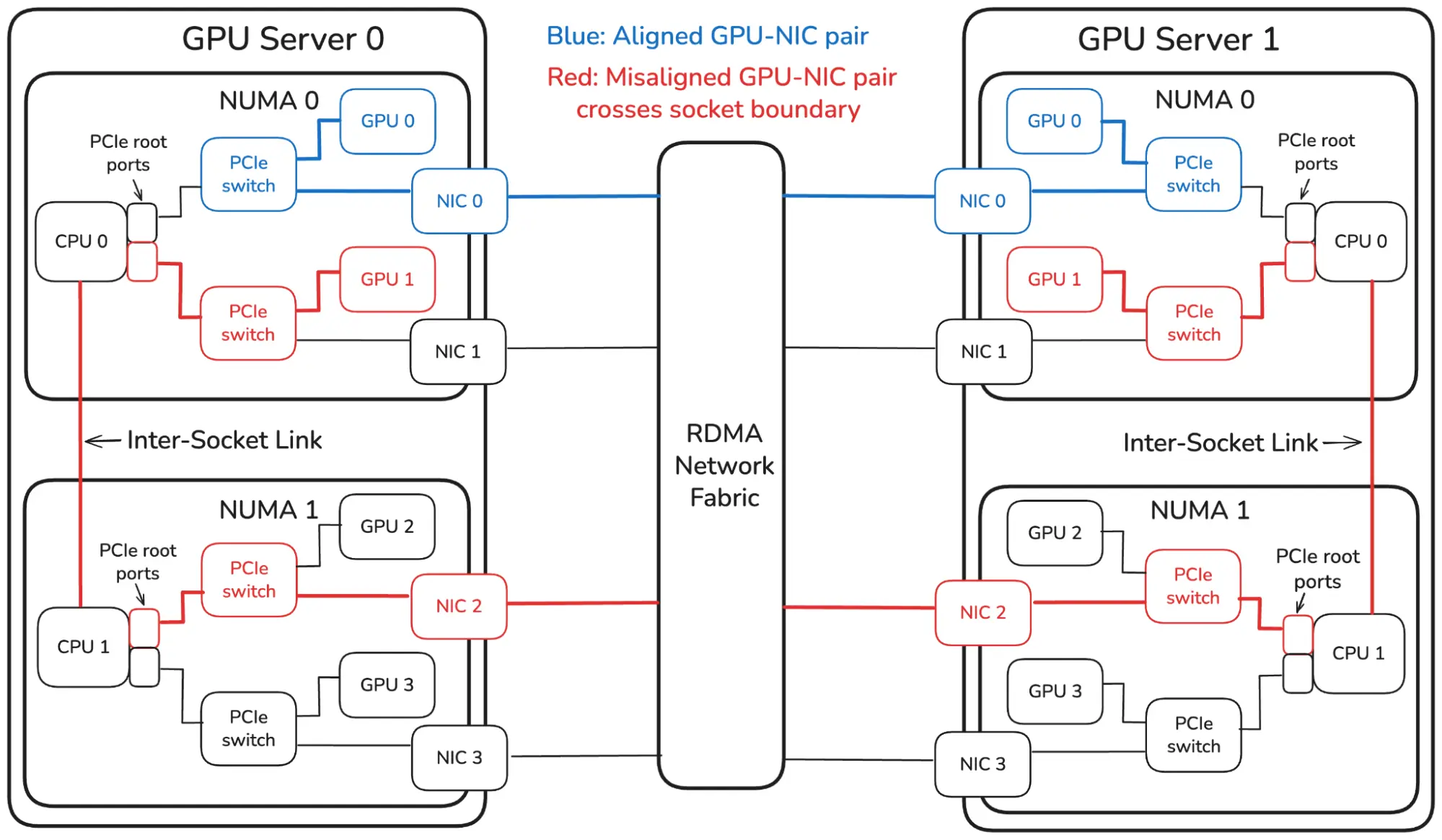
For years, Kubernetes device plugins served as the primary mechanism for binding accelerators and network devices to workloads. While features like Topology Manager eventually introduced NUMA-aware scheduling, this legacy model lacked granular PCIe topology awareness. A pod could easily land a GPU and an SR-IOV virtual function (VF) from a NIC on the same NUMA socket, but sitting behind completely separate PCIe switches. For example, in figure 1 a pod could land GPU0 and an SR-IOV VF from NIC1.
This limitation stems from 3 core architectural constraints of traditional device plugins:
- Opaque integer accounting: The traditional framework treats devices as simple scalar quantities (
nvidia.com/gpu: 1,vendor.com/sriov_vf: 1). The control plane tracks total resource counts, but has no visibility into the underlying PCIe topology or inter-device relationships. - Isolated plugin operations: Legacy device plugins operate in total silos. The GPU plugin selects an available GPU, while the network plugin independently selects a virtual function (VF). Because plugins cannot coordinate during allocation, they cannot negotiate a shared PCIe switch.
- Uncoordinated placement: Workloads requesting multiple resource types receive arbitrary assignments. A pod cannot request a specific virtual function, filter by physical function or link type, or require that a VF sit under the same PCIe root as an assigned GPU.
As a result, clusters relying solely on traditional device plugins routinely hand pods a resource allocation that is valid on paper (gpu: 1, vf: 1), but can be a worst-case GPU-NIC pairing in reality. The pod boots without errors, but GPUDirect RDMA traffic is secretly forced through sub-optimal hardware paths, choking throughput and undermining the performance of disaggregated, multi-node inference.
Introducing dra-driver-sriov with NVIDIA GPU DRA driver
Dynamic resource allocation (DRA) changes the model. Instead of opaque integer pools, drivers publish individual devices into ResourceSlices, each carrying structured attributes. Workloads request devices through ResourceClaims (often with ResourceClaimTemplates), selecting them with DeviceClasses and CEL expressions. The scheduler can also apply constraints, notably matchAttribute, so every device (SR-IOV, GPU, and so on) allocated for a claim must share the same attribute value. That single mechanism is what makes cross-driver PCIe topology alignment possible: A claim can ask for a GPU from the NVIDIA GPU DRA Driver and an SR-IOV VF from dra-driver-sriov, and require that both advertise the same resource.kubernetes.io/pcieRoot.
For a disaggregated llm-d deployment, workloads rely on topologically aligned GPUs and network interfaces for optimal performance. Even without multiple pods sharing a physical adapter, using SR-IOV virtual functions instead of full physical function (PF) passthrough is beneficial for host-level observability and platform security. Moving a PF into a container removes it from the host network namespace, breaking host-level telemetry services, like NVIDIA DOCA Telemetry Service, that query the adapter from the host. Assigning a dedicated VF to a pod keeps the PF on the host to preserve telemetry, hardware isolation, and raw administrative control, while giving the pod full GPUDirect RDMA performance using the VF.
Assume the cluster has DRA enabled, SR-IOV network operator installed, the NVIDIA GPU DRA driver advertising GPUs under gpu.nvidia.com, and dra-driver-sriov deployed. The important custom resources, in order:
- SriovNetworkNodePolicy: SR-IOV network operator CR that creates VFs on selected PFs.
- DeviceAttributes Stamps extra attributes (such as Multus
k8s.cni.cncf.io/resourceName) onto selected devices. - SriovResourcePolicy: Selects which VFs to advertise (node selectors, PF/vendor filters) and which DeviceAttributes to merge. Matched VFs appear in ResourceSlices with attributes including PCI address, PF identity, RDMA capability, and the standard
resource.kubernetes.io/pcieRoot/pciBusID. Without a matching policy, ResourceSlices stay empty. The NVIDIA GPU DRA driver advertises all NVIDIA GPUs on the node by default. - DeviceClass: CEL entry points;
dra-driver-sriovprovidessriovnetwork.k8snetworkplumbingwg.io, and the NVIDIA GPU DRA driver provides the GPU classgpu.nvidia.com. - ResourceClaimTemplate or ResourceClaim: The workload's VF + GPU request plus the PCIe-root constraint.
- Pod: References the ResourceClaimTemplate and consumes the allocated devices.
Both DRA drivers publish resource.kubernetes.io/pcieRoot on their ResourceSlice devices. Simplified excerpts:
# SR-IOV VF ResourceSlice (dra-driver-sriov)
devices:
- name: vf-0000-14-00-1
  attributes:
    resource.kubernetes.io/pcieRoot:
      string: "pci0000:14"
    resource.kubernetes.io/pciBusID:
      string: "0000:14:00.1"
---
# GPU ResourceSlice (NVIDIA GPU DRA Driver)
devices:
- name: gpu-0
  attributes:
    resource.kubernetes.io/pcieRoot:
      string: "pci0000:14"
    resource.kubernetes.io/pciBusID:
      string: "0000:15:00.0"
Note
Other structured attributes and metadata have been omitted.
A claim that co-locates one VF with one NVIDIA GPU looks like this:
apiVersion: resource.k8s.io/v1
kind: ResourceClaimTemplate
metadata:
  name: gpu-nic-aligned
spec:
  spec:
    devices:
      requests:
      - name: vf
        exactly:
          deviceClassName: sriovnetwork.k8snetworkplumbingwg.io
      - name: gpu
        exactly:
          deviceClassName: gpu.nvidia.com
          count: 1
      constraints:
      - requests: [gpu, vf]
         matchAttribute: "resource.kubernetes.io/pcieRoot"
Note
Details such as SR-IOV resource pool selection, and VF configurations were omitted.
The scheduler only commits an allocation when the chosen VF and GPU share the same pcieRoot value (for example pci0000:14). If no node has an overlapping pair, the claim stays pending rather than silently falling back to a mismatched VF on the wrong PCIe complex, so you never get a runnable pod with a poor-performing topology. Once allocated, the NVIDIA driver prepares the GPU as usual, and dra-driver-sriov attaches the matching VF.
That locality matters for GPUDirect and similar RDMA paths: DMA between GPU and NIC stays within 1 PCIe root complex (and the underlying PCIe switch) instead of traversing the CPU or crossing between PCIe roots. Device-plugin integer pools could not express that requirement; whereas DRA's matchAttribute makes it a first-class scheduling constraint across drivers.
A sample configuration using the above custom resources is available on GitHub.
Performance results
To demonstrate the performance impact of GPU-NIC alignment for RDMA workloads, we ran 2 experiments: First RDMA microbenchmarks and then a disaggregated prefill/decode LLM deployment, in both cases comparing aligned and unaligned GPU-NIC pairs. Our measurements use a previous-generation A100 platform where each PCIe switch connects 2 GPUs and 2 NICs. On this platform, GPUs and NICs that advertise the same PCIe root are also connected through the same PCIe switch, providing the most direct PCIe path between the devices. We therefore define aligned placement as a GPU and NIC connected through the same PCIe switch.
RDMA bandwidth microbenchmark results
We used ib_write_bw with CUDA device memory over a 200 Gbit/s InfiniBand link. We tested 3 GPU/NIC placements on both endpoints:
- Aligned: GPU and VF beneath the same PCIe root and, on this platform, the same PCIe switch.
- Same-NUMA misaligned: GPU and VF beneath different PCIe roots, but on the same NUMA node.
- Cross-NUMA misaligned: GPU and VF on different NUMA nodes.
Each result is the mean of 10 independent runs using 8 MiB messages and 5,000 iterations.
Aligned
- Bandwidth: 194.6 Gbit/s
- Loss vs. aligned: —
Same NUMA, different PCIe roots
- Bandwidth: 127.1 Gbit/s
- Loss vs. aligned: 34.7%
Different NUMA nodes
- Bandwidth: 110.0 Gbit/s
- Loss vs. aligned: 43.4%
Aligned placement reached approximately 97% of line rate. It delivered 1.53x the bandwidth of same-NUMA misalignment and 1.77x that of cross-NUMA misalignment. This demonstrates the severe performance impact which can occur if pods are assigned GPUs and NICs which are not topologically aligned.
The complete microbenchmark results on GitHub include raw output, topology validation, manifests, and ResourceClaims.
LLM KV-cache transfer performance
To test a real-world production workload, we deployed a disaggregated prefill/decode setup for Qwen/Qwen3.8-27B using distributed inference with llm-d on Red Hat OpenShift AI 3.5. The setup used 1 prefill pod (single A100 GPU) and 1 decode pod (single A100 GPU) on separate nodes connected by an InfiniBand network fabric.
The workload used concurrency 10, with 16,000 input tokens, 64 output tokens, and 3 repetitions of 128 requests. Both endpoints were aligned in 1 configuration and cross-NUMA in the other.
Aligned
- Transfers: 384
- Payload per transfer: 1,175.81 MB
- Mean latency: 56.78 ms
- Effective throughput: 20,709.6 MB/s
Cross-NUMA
- Transfers: 384
- Payload per transfer: 1,175.81 MB
- Mean latency: 122.32 ms
- Effective throughput: 9,612.6 MB/s
Aligned placement delivered 2.15x the KV-transfer throughput and reduced mean transfer latency by 53.6%. The improvement was consistent across all 3 repetitions. Both experiments demonstrate that GPU/NIC placement can significantly impact RDMA and distributed inference performance.
The complete KV-transfer results on GitHub include vLLM logs, GuideLLM output, Prometheus snapshots, DRA allocations, and topology reports. Note that the exact numbers are specific to this combination of model, GPU (A100), NIC (ConnectX-6) and server topology.
Conclusion
For distributed LLM inference workloads deployed on Kubernetes, alignment between the GPUs and RDMA NICs assigned to a pod is critical for performance. Our benchmarks show that eliminating cross-bus bottlenecks cuts KV-cache transfer latency in half and doubles throughput in vLLM. Dynamic resource allocation (DRA) solves legacy device plugin limits by letting workloads request devices based on hardware attributes like PCIe topology. We are actively working to bring these DRA capabilities and driver ecosystems into Red Hat OpenShift to deliver maximum hardware efficiency for enterprise AI workloads deployed on Red Hat OpenShift AI out of the box. Keep your eyes out for a follow-up blog where we explore the performance impact of GPU-NIC alignment for distributed multi-node expert-parallel model deployments.
Dynamic resource allocation (DRA) brings topology-aware GPU and RDMA NIC alignment directly to Red Hat OpenShift pods. Explore how Red Hat OpenShift AI optimizes hardware resource scheduling across complex multi-node clusters.

