Language models are incredible at synthesizing information, but tool calling is what transforms them into systems that actually get things done. It bridges the gap between generating text and executing tasks. By giving the model bounded hands, tool calling allows it to safely interact with real environments—translating an engineer's offhand triage question into a precise operational query.
If you already run Apache Camel, you don't need an elaborate agent framework like LangChain or CrewAI just to let an LLM query an API or trigger a workflow. The tools are the Camel routes you already know how to write. Give your existing routes a name and description, then expose them through the ai-tool component. The camel-openai loop automatically presents each registered route as a callable function, runs it when requested, and returns the output to the model without custom wrapper code.
A vague question like "Why have payments been flaky this afternoon?" turns directly into a parameterized call against your metrics route—no extra orchestration glue required. You combine the flexibility of an AI assistant with a predictable, bounded loop built on familiar Camel enterprise patterns.
This is tool calling, not an agent
The Camel OpenAI component (camel-openai) gives you a synchronous, bounded loop. One request in, a handful of tool calls, one answer out. No durable execution, no checkpointing, no planning beyond the retry loop, no memory across sessions, no sub-agents. If your problem needs those, you want a real agent runtime.
Most problems labeled "agent" are not that. They are "read this request, map it to one safe operation, run it, report back." For that job the missing features are the reason you can test the thing. An autonomous loop that plans its own course is exciting right up until it does something you didn't predict against a production database. A bounded loop can't.
A few knobs decide everything the model is allowed to do, and none of them are prompt tricks it can argue past:
Knob | Where it lives | What it limits |
|---|---|---|
tags | openai:chat-completion | Which tools the model can ever see |
maxToolIterations | openai:chat-completion | How many tool-call passes before the loop stops |
argSchema | The ai-tool route | The shape and allowed values of each argument |
returnDirect | The terminal ai-tool route | Whether the model is even in the loop for the final answer |
This architecture remains entirely vendor-neutral. While the integration uses camel-openai, you are by no means tied to a single provider. It works with any OpenAI-compatible API, including Red Hat AI Inference (vLLM), Red Hat OpenShift AI (KServe), Amazon Bedrock, Google Cloud Vertex AI, Mistral, Cloudflare AI Gateway, Groq, OpenRouter, NVIDIA NIM Microservices, NVIDIA NeMo Guardrails, and local engines like llama.cpp, Ollama, LM Studio, and LocalAI.
What a tool is here
A tool is a plain Camel route registered with the ai-tool component. No Model Context Protocol (MCP) server, no subprocess, no HTTP. The assistant route sets a system prompt and hands control to the bounded loop; the openai:chat-completion endpoint discovers every tool that carries a matching tag.
# The assistant: a system prompt, then the bounded tool-call loop.
- route:
    from:
      uri: direct:operate-services
      steps:
        - setHeader:
            name: CamelOpenAISystemMessage
            constant: "You are an SRE assistant. Answer using only the provided tools."
        - to:
            uri: openai:chat-completion
            parameters:
              tags: devops           # only tools tagged "devops" are visible to the model
              maxToolIterations: 5    # hard ceiling on tool-call passes

# One tool the model can call. Arguments arrive as message headers,
# validated against argSchema before this route runs.
- route:
    from:
      uri: ai-tool:query_metric
      parameters:
        tags: devops
        description: "Query a single metric for one service over a time window."
        argSchema: "classpath:query-metric.args.schema.json"
      steps:
        - setBody:
            simple: '{"service":"payments-api","metric":"error_rate","window":"1h","value":"7.2%","trend":"rising"}'
The argSchema parameter points at the tool's contract, a JSON Schema that constrains the arguments before your route ever runs:
{
  "type": "object",
  "properties": {
    "service": { "type": "string", "enum": ["checkout-api", "payments-api", "inventory-db"] },
    "metric":  { "type": "string", "enum": ["error_rate", "latency_p99", "cpu", "request_rate"] },
    "window":  { "type": "string", "description": "Lookback window, e.g. 15m, 1h, 24h." }
  },
  "required": ["service", "metric", "window"],
  "additionalProperties": false
}
The model picks from your services and metrics. It cannot invent a 5th metric or query a service you never defined. This schema and the tag list, not the wording of your prompt, are your defense when the model reaches for the wrong tool.
4 reasons to call a tool
The operate-services sample project (Figure 1) acts as a site reliability engineering (SRE) assistant. Its 4 tools illustrate the distinct operational reasons a model calls an external system:
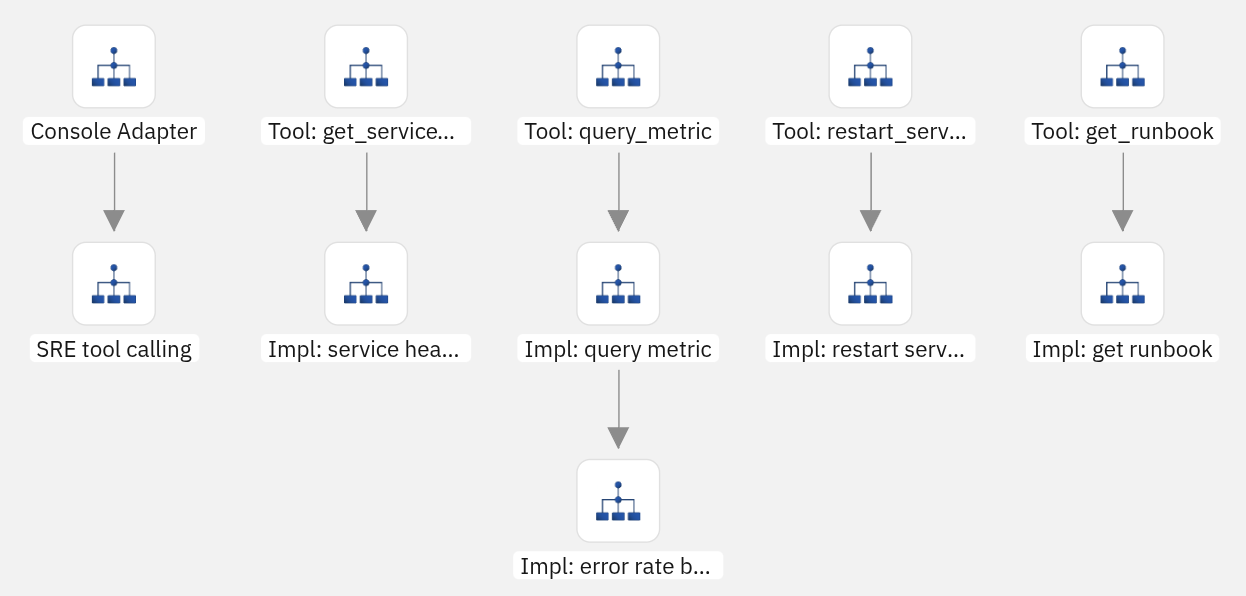
- An aggregate read with no arguments.
get_service_healthreturns the status of every service in one call, like a status API. "Are all services healthy?" is a single call rather than one poll per service, and the efficiency lives in the shape of the tool. - A structured query. The
query_metrictool demonstrates the true value of tool calling. The model turns a fuzzy request into service, metric, and window parameters, something a metrics back end can actually answer. - A mutation.
restart_servicechanges state, carries adestructiveHint, and its result flows back so the model confirms the outcome in plain language. - A terminal answer.
get_runbookis markedreturnDirect=true. The runbook text is the answer, so the loop short-circuits and returns it verbatim, skipping a final model round-trip. That is the right home forreturnDirect. Putting it onget_service_healthwould be a bug, because that result needs the model to summarize it.
Publish the same routes as an MCP server
Everything so far ran in one process. The support-desk example takes the same kind of tools and serves them to a separate assistant over MCP, and the striking part is how little it takes to get there.
You do not write an MCP server. camel-mcp-server is 1 line of configuration: tag the ai-tool routes you want to expose, and each one is published as an MCP tool over streamable HTTP, with its description and argSchema advertised to clients for you. No JSON-RPC handling, no transport code, no session management, no hand-maintained tool manifest.
# commerce-tools/application.properties — this is the entire server
camel.server.mcp.tags=commerce
That is the real win over hand-rolling an MCP server. When you build one from scratch, the protocol is the easy 10%. The other 90% is the integration behind each tool, and here every tool is a full Camel route. A tool can query a database, call Salesforce or SAP, publish to Kafka, transform the payload, and inherit retries, error handling, and the rest of Camel's connectors and enterprise integration patterns without extra code. The returnDirect, readOnlyHint, and destructiveHint annotations travel with the tool over MCP and are honored on the client. And because it speaks standard MCP, any MCP client can call these tools, while the same camel-openai loop can point at any third-party MCP server. An ai-tool route is the same route whether it is discovered in-process by tag or published over MCP. Only where it runs changes.
You also get a governance boundary with an allow-list on each side. The server decides what is publishable at all, using the previously configured tags. The client (Figure 2) decides what this particular consumer may see:
# self-service-assistant: connect to the tool server, then run the loop.
- route:
    from:
      uri: direct:assistant
      steps:
        - to:
            uri: openai:chat-completion
            parameters:
              mcpServer.commerce.transportType: streamableHttp
              mcpServer.commerce.url: http://localhost:8080/mcp
              mcpServer.commerce.toolNames: check_inventory,lookup_order,get_return_policy
              maxToolIterations: 5
The server also publishes an initiate_refund tool that a human-operated console could use. The assistant's toolNames leaves it out, so this model cannot call for a refund no matter how a shopper phrases the request. The tool is live on the network and still invisible to this consumer by policy.
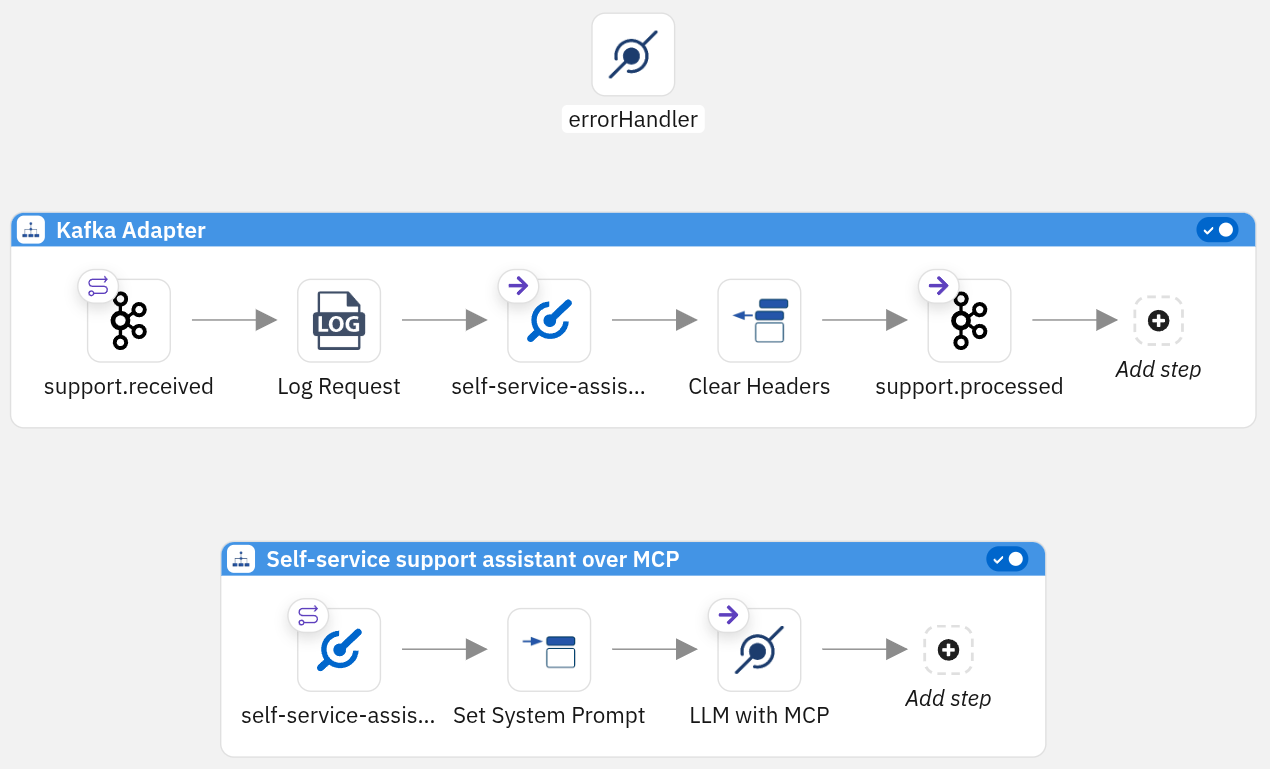
Stay in-process when the tools and the loop ship together. Reach for the gateway when a different team owns the tools, several assistants share one set, or you want a single place to decide what is publishable with per-consumer allow-lists on top.
Where this stops being the right tool
The loop is stateless and the iteration ceiling is a hard stop. Anything that needs memory across turns lives in your data layer, not the model, and a genuinely multi-step task can hit the ceiling and stop halfway. If you want the model to plan across many steps, keep working memory, or coordinate other models, you have outgrown this pattern. Move to an agent framework built for it. That is not a failure—it is knowing which tool you are holding.
Takeaway
Restraint is what makes this design work: the model only interprets requests and sets up parameters, while your Camel routes stay in complete control of the actual execution. You get the conversational flexibility of an AI front-end without surrendering your production safeguards. The model does the interpreting, but your routes hold the reins.
Want to test these boundaries on your own machine? Clone the Camel OpenAI Patterns repository, connect operate-services to your local Ollama or Red Hat AI Inference instance, and see firsthand how effectively argSchema keeps a model on rails.

