When migrating from legacy virtualization platforms to Red Hat OpenShift, networking architecture is often one of the biggest hurdles. Most legacy virtualization platform environments rely on flat VLAN-based tenant networks rather than overlay networks. Asking customers to re-architect their network topology to adopt Red Hat OpenShift Virtualization creates unnecessary friction.
To bridge this gap, Red Hat OpenShift supports localnet user-defined networks (CUDN). Localnet CUDNs enables you to migrate directly from VLAN tenant networks to Localnet CUDNs, so your organization can preserve its existing infrastructure layout while modernizing their platform.
We put localnet CUDNs through rigorous scale and performance testing. The core question: Can localnet CUDNs scale to thousands of networks while maintaining low resource overhead and high data-path performance?
The short answer is yes. We successfully tested up to 3,500 Localnet CUDNs hosting over 3,500 active virtual machines, observing excellent network performance and steady-state control plane stability. This blog post shares our results as well a receipt so you can recreate our testing environment.
Key takeaways from our testing
- High scale stability: OVN-Kubernetes (OVNK) demonstrated strong stability at scale, successfully managing 3,500 Localnet CUDNs.
- Reduced control plane overhead: Because Localnet CUDNs offload overlay management, encapsulation (Geneve tunnels), and complex routing to the physical network, OVN-Kubernetes has significantly less work to do.
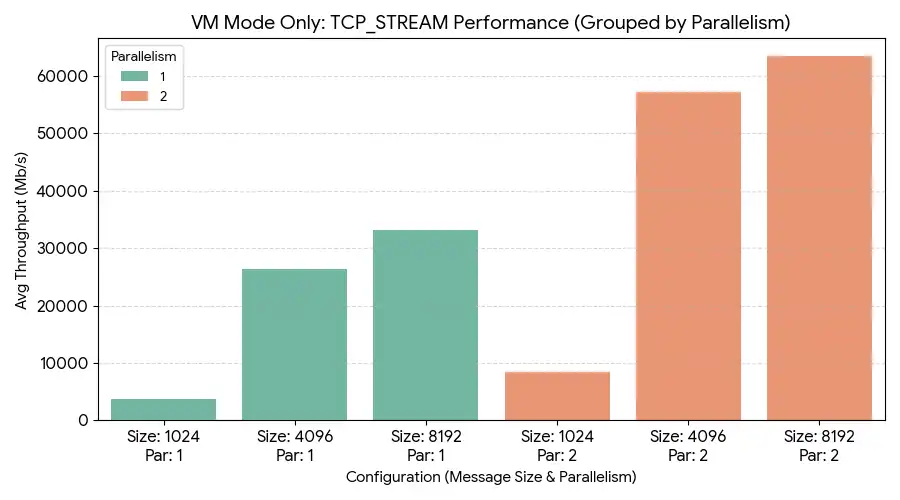
- Near-line-speed data-path: Without Geneve tunneling overhead between nodes, data-path throughput is excellent, enabling near maximum link utilization over 100GbE interfaces.
- Predictable resource footprint:
- Worker nodes: During resource creation (spinning up thousands of CUDNs and VMs), OVNK CPU usage peaked around 5 to 5.5 cores per worker node, with RAM hovering around 10 GiB RSS. At idle, CPU drops to an acceptable baseline and memory usage drops slightly.
- Control plane: During the creation phase where we used a queries per second (QPS) and burst of 20, ovnkube-control-plane consumed ~10 CPU cores, and ovnkube-controller used ~2.5 GiB RSS. After creation completed, utilization dropped back to low baseline levels.
System under test (SUT)
These tests were executed in the performance and scale lab using enterprise-grade hardware running Red Hat OpenShift 4.20.16:
Control plane
- Count: 3
- Hardware model: Dell PowerEdge R760
- CPU cores: 128 (Intel Xeon Gold 6548Y+)
- Memory: 512 GiB
- Network Interfaces: 25GbE / 100GbE
Worker nodes
- Count: 20
- Hardware model: Dell PowerEdge R760
- CPU cores: 128 (Intel Xeon Gold 6548Y+)
- Memory: 512 GiB
- Network Interfaces: 25GbE / 100GbE
Bastion
- Count: 1
- Hardware model: Dell PowerEdge R760
- CPU cores: 128 (Intel Xeon Gold 6548Y+)
- Memory: 512 GiB
- Network Interfaces: 25GbE / 100GbE
Other details
- Platform: OpenShift 4.20.16
- OS interface: Mellanox ConnectX-6 / 100GbE Direct Attach Copper
Post-install and network setup
Before running density and performance tests, Node Network Maintenance (NMState) was configured to map physical worker interfaces to an Open vSwitch (OVS) bridge.
1. NMState Operator Deployment
Create a namespace and apply the OperatorGroup:
# Create namespace
oc create namespace openshift-nmstate

# Apply OperatorGroup
cat <<EOF | oc apply -f -
apiVersion: operators.coreos.com/v1
kind: OperatorGroup
metadata:
  name: openshift-nmstate-group
  namespace: openshift-nmstate
spec:
  targetNamespaces:
  - openshift-nmstate
EOF

# Subscribe to the Operator
cat <<EOF | oc apply -f -
apiVersion: operators.coreos.com/v1alpha1
kind: Subscription
metadata:
  name: kubernetes-nmstate-operator
  namespace: openshift-nmstate
spec:
  channel: stable
  installPlanApproval: Automatic
  name: kubernetes-nmstate-operator
  source: redhat-operators
  sourceNamespace: openshift-marketplace
EOF
2. Node network configuration policy (NNCP)
This policy binds physical interface ens6f0np0 to OVS bridge br-ens6 and creates the OVN bridge mapping for physnet-ens6.
apiVersion: nmstate.io/v1
kind: NodeNetworkConfigurationPolicy
metadata:
  name: ens6f0np0-ovs-underlay
spec:
  nodeSelector:
    node-role.kubernetes.io/worker: ""
  desiredState:
    interfaces:
      - name: br-ens6
        description: "OVS Bridge dedicated to ens6f0np0 for CUDN Localnets"
        type: ovs-bridge
        state: up
        bridge:
          allow-extra-patch-ports: true
          port:
            - name: ens6f0np0
    ovn:
      bridge-mappings:
        - localnet: physnet-ens6
          bridge: br-ens6
          state: present
Testing methodology
The assessment was split into 2 phases: Control plane testing and data-path testing.
Control plane testing
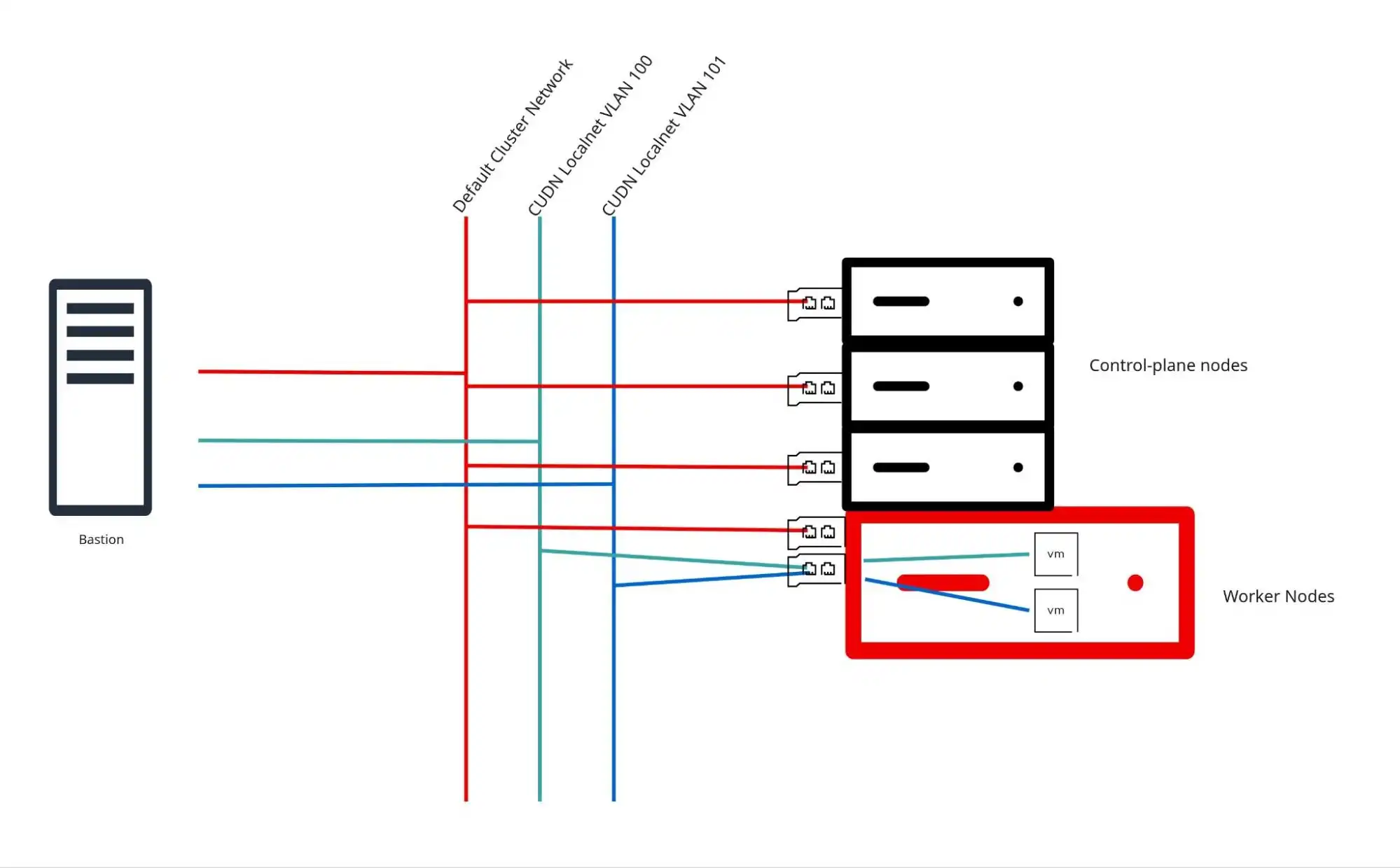
To generate thousands of CUDNs and VMs, we utilized kube-burner-ocp configured for localnet density tests (virt-cudn-density). See figure 1 for a visualization.
- Interface creation: A custom script on the bastion node provisioned VLAN sub-interfaces (access ports) corresponding to the targeted CUDNs.
./bin/amd64/kube-burner-ocp virt-cudn-density \ # Workload name
  --localnet \                                  # Enabling the localnet test
  --enable-ipam \                               # (Optional) enable IPAM
  --physical-network physnet-ens6 \             # Bridge created in the SUT Post-Install section.
  --iterations <ITERATIONS> \                   # Number of CUDN Localnet's and namespaces to create
  --gc=false \                                  # Leave everything in place (no cleanup)
  --vms-per-udn 2 \                             # Number of VMs to deploy in each CUDN
  --vlan-start 100 \                            # Starting VLAN ID, if we start at 100 CUDN-0 is vlan 100.
  --profile-type=both \                         # (Optional) Metric collection
--pprof=true # (Optional) PProf collection- Validation: To verify network path integrity without relying on
virtctl, an automated SSH connectivity loop probed every launched VM guest directly across the CUDN localnet interface. We needgcto be false to check on SSH connectivity after all the resources are created.
2. Data-path testing
Using a CUDN-localnet branch of k8s-netperf, East-West data-plane tests were executed across worker nodes using dedicated 100GbE interfaces (mlx5_core). See figure 2 for a visualization.
./bin/amd64/k8s-netperf \
  --cudn-localnet cudn-localnet-999 \ # Using an existing CUDN we built from the control-plane testing
  --cudn-localnet-namespace netperf \ # Namespace we will run the test from "netperf"
  --vm=true \                         # We tested in VMs
  --clean=false                       # (Optional) Leave the resources around for further testing if needed.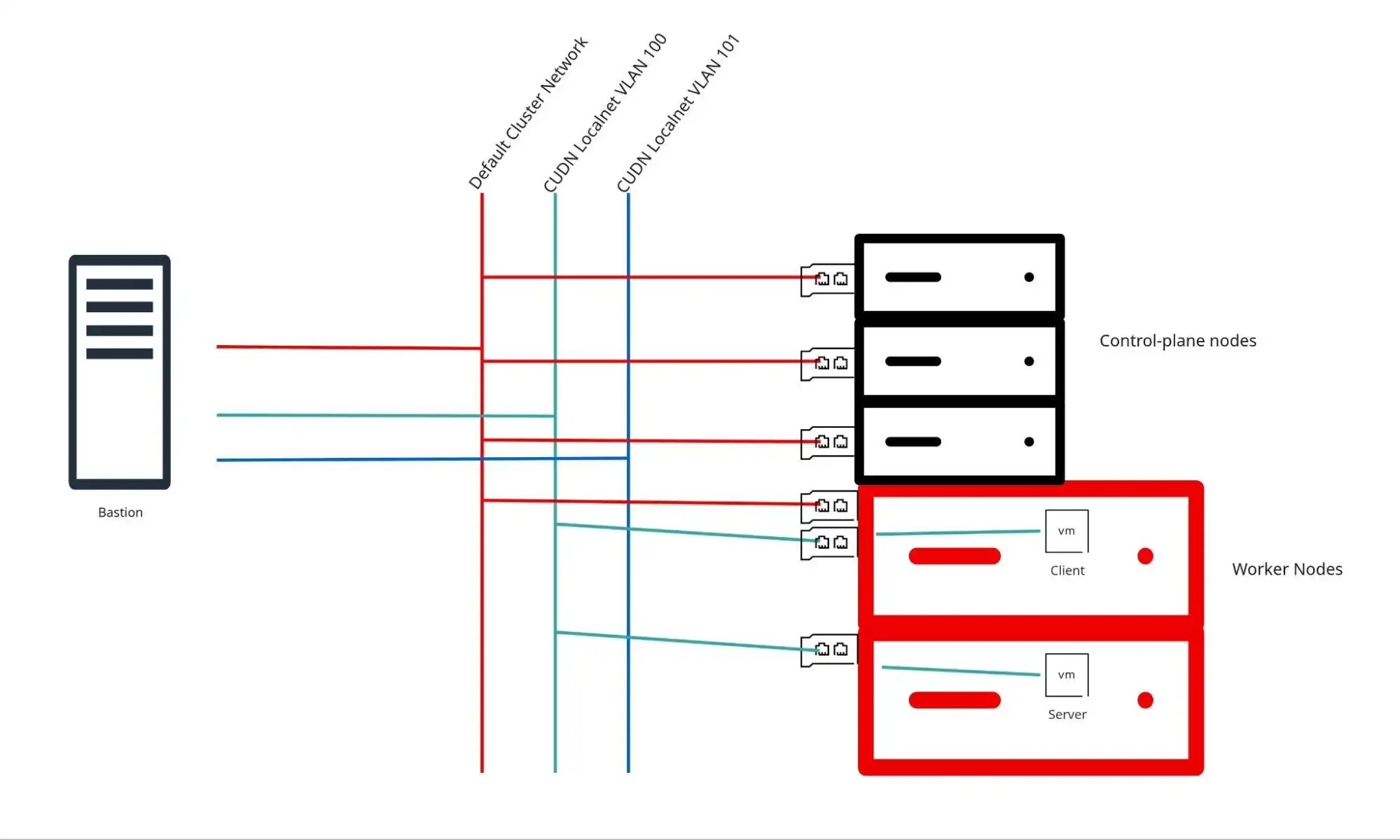
Control-plane test results
Across all scaling increments—from 100 CUDNs up to 3,500 CUDNs—the network layer demonstrated a 100% success rate once guest OS initialization completed. We only deployed 3,500 VMs because we had limited hardware to test on.
+----------------+------------+------------------+-----------------------+
| Localnet CUDNs | Total VMs  | SSH Success Rate | Result UUID           |
+----------------+------------+------------------+-----------------------+
| 100            | 500        | 100%             | 25bf402c-7632-4cfc... |
| 500            | 2,500      | 100%             | 82449b27-f00c-4764... |
| 1,000          | 3,000      | 100%             | 2cfd3423-578e-4884... |
| 1,500          | 3,000      | 100%*            | dc18b131-151b-4c9d... |
| 2,000          | 4,000      | 100%*            | 2dd87b47-6159-4cf5... |
| 3,500          | 3,500      | 100%*            | 5e1385b7-d117-48c3... |
+----------------+------------+------------------+-----------------------+
A note on guest boot behavior: During rapid scale-up runs (1,500+ CUDNs), a fractional percentage (<0.1%) of virtual machines experienced a hung guest OS boot state (getting stuck at systemd-vconsole-setup or dracut-pre-mount prior to reaching sshd). This was verified as an OS/boot timing anomaly unrelated to network plumbing. Issuing a VM reboot resolved the hang and restored 100% connectivity. The issue is unrelated to CUDN localnets.
3,500 CUDNs with 3,500 VMs
The results from the control-plane metric collection only show the creation phase. The creation phase is where we expect to see heavy CPU utilization, since we are creating all the CUDN localnets and virtual machines attached to both the default network and the CUDN. After all the CUDNs and VMs are created the utilization of the OVN and OVS components returns back to an acceptable baseline. Localnet CUDNs remove the typical footprint of CUDNs, since the majority of the network features are managed by the infrastructure.
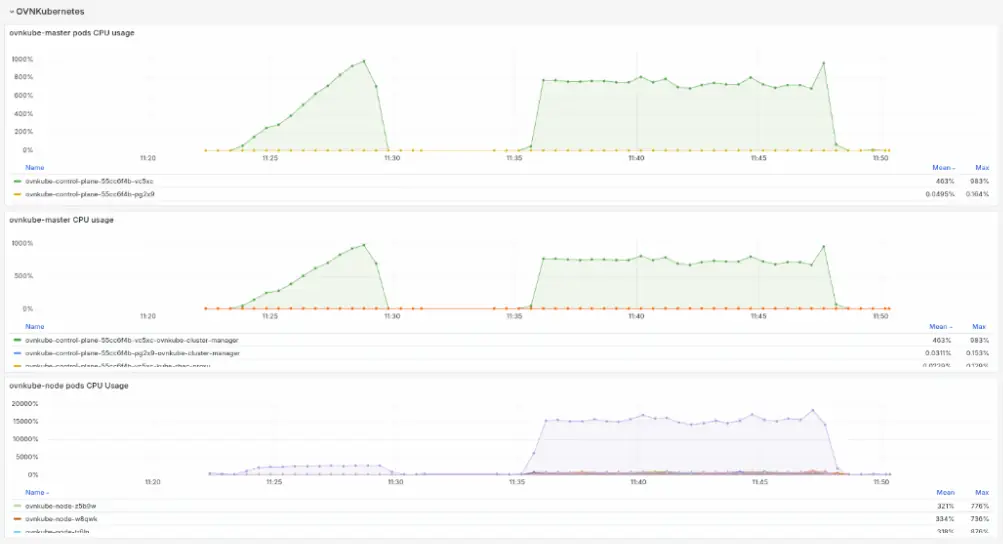
The CPU utilization is high during the creation phase as shown in figure 3. OVNKubernetes uses all available resources to quickly process the requests, however after all the requests are processed, we see CPU utilization drop to normal and acceptable levels (figure 4).
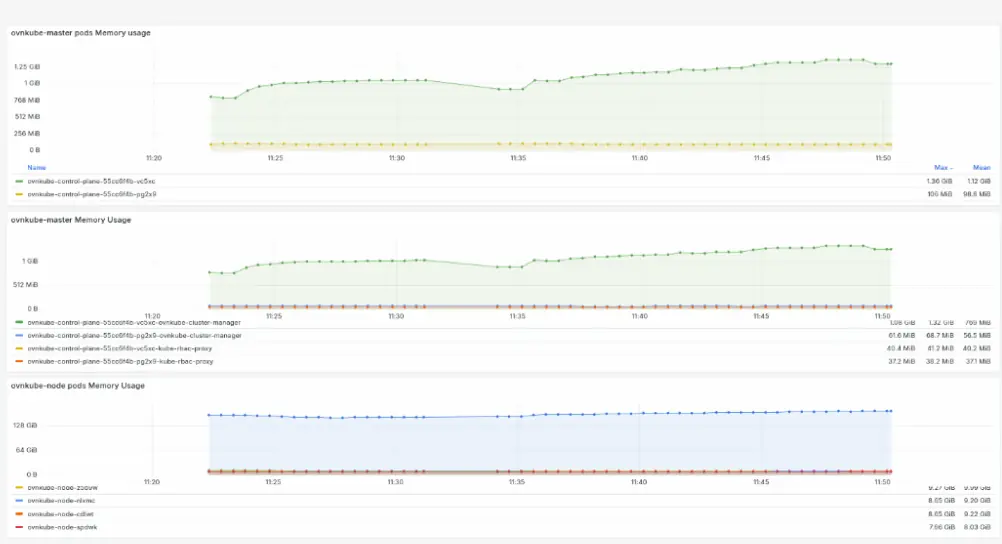
OVNKubernetes growth is minimal (figure 5) throughout the creation phase of the workload.


SSH connectivity at 3,500 localnet CUDNs
The results are clear:
===== Round 3 -- Thu Jul 10 09:21:19 PM UTC 2026 =====
Testing 3500 VMs...

--- Round 3 Summary ---
Total: 3500 | OK: 3500 (100%) | FAIL: 0 | Time: 53s

Cumulative: 0 unique VMs failed | 0 with repeated failures
The data-path test results are summarized in figure 6:
Recommendations
- Ideal for VMware migrations: Localnet CUDNs provide a seamless pathway for migrating existing VLAN-reliant workloads to Red Hat OpenShift Virtualization without forcing physical network re-architecture.
- Superior throughput: Removing overlay tunnel encapsulation (Geneve) drastically cuts CPU overhead on traffic processing, allowing workloads to tap into full 100GbE link speeds.
- Monitor rapid VM spawns: When orchestrating large-scale VM deployments in tight timeframes, ensure guest images are optimized for fast initialization to avoid occasional OS boot hangs during hypervisor resource contention.
- Capacity planning: Allocate ~5.5 CPU cores per worker node and ~10 CPU cores on control plane nodes to handle peak churn during mass deployment phases.
For detailed metric breakdowns, performance dashboards, or follow-up queries regarding this scale test, feel free to reach out to Joe Talerico.

