Red Hat OpenShift 4.22, based on Kubernetes 1.35 and CRI-O 1.35, is now generally available. This blog post highlights the notable new features, updates, and fixes in this release for developers.
Developer experience
Discover the latest tools and platform enhancements designed to improve your development workflows.
Red Hat OpenShift Dev Spaces
Red Hat OpenShift Dev Spaces versions 3.26, 3.27, and 3.28 are now available.
These versions include four major enhancements:
- The VS Code Remote-SSH feature is now generally available. It includes a new extension that automates local-to-remote connection steps. This flow allows you to use proprietary Microsoft Marketplace extensions directly.
- Administrators can now enforce container memory and CPU caps via the CheCluster custom resource. Any out-of-bounds workspace requests will automatically default to the maximum allowed limits.
- This release adds OpenID Connect (OIDC) support for Microsoft Azure DevOps, replacing the deprecated OAuth2 flow.
- A new multicluster developer gateway lets you scale by spreading environments across clusters, and persistent home directories are now enabled by default.
Find the full details in the release notes.
Red Hat Desktop
Manage your local development runtimes and container environments directly from your workstation.
Red Hat build of Podman Desktop
Red Hat build of Podman Desktop, a supported and hardened enterprise version of Podman Desktop, is available at no cost. Red Hat sells technical support separately as part of Red Hat Desktop.
The most recent release includes the Project Hummingbird extension, which provides users with a catalog of hardened, zero-CVE images. It also pairs well with the Grype extension, which provides image scanning and an easy way to compare security findings across images.
This version includes several accessibility improvements, including high contrast themes and accents, as well as component modernization with proper Accessible Rich Internet Applications (ARIA) focus and reduced motion support.
It is now easier to synchronize host certificates to the Podman VM through a new tooltip.
Find the full details in the release notes.
Kaiden
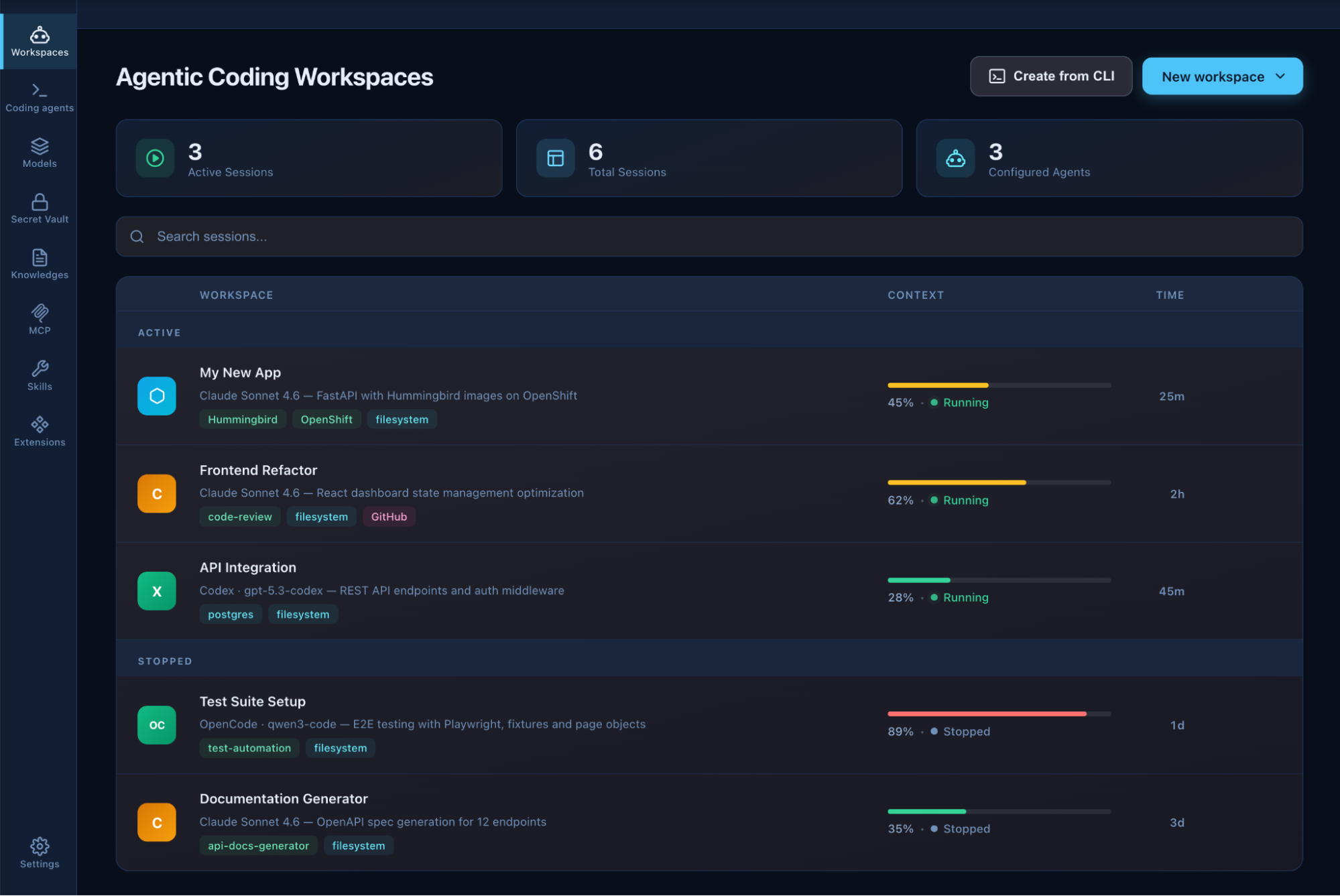
Kaiden is another application from the Podman Desktop team that wraps your preferred coding agents in isolated, governed sandboxes. As an engine, it uses OpenShell, which provides the basics of sandboxing agents.
Kaiden provides an easy way to manage agents, connect them to the Model Context Protocol (MCP), skills, knowledge bases, and your available model providers. Kaiden also enables you to switch between one coding agent to another, and use open source models, as shown in Figure 1.
Red Hat Advanced Developer Suite
Accelerate your secure software supply chain with advanced development, automated analysis, and artifact signing tools.
Red Hat Developer Hub
New updates to Red Hat Developer Hub simplify the developer experience and accelerate onboarding while deepening integration with the broader Red Hat AI portfolio.
Improvements to Red Hat Developer Hub 1.9 include:
- A Red Hat Lightspeed AI chatbot pop-up and dock that improve the user experience.
- Support for multiple identity providers on the login screen.
- The scorecard now supports aggregated data views.
- New logging functionality for orchestrator workflows.
- Expanded language support to include Italian and Japanese.
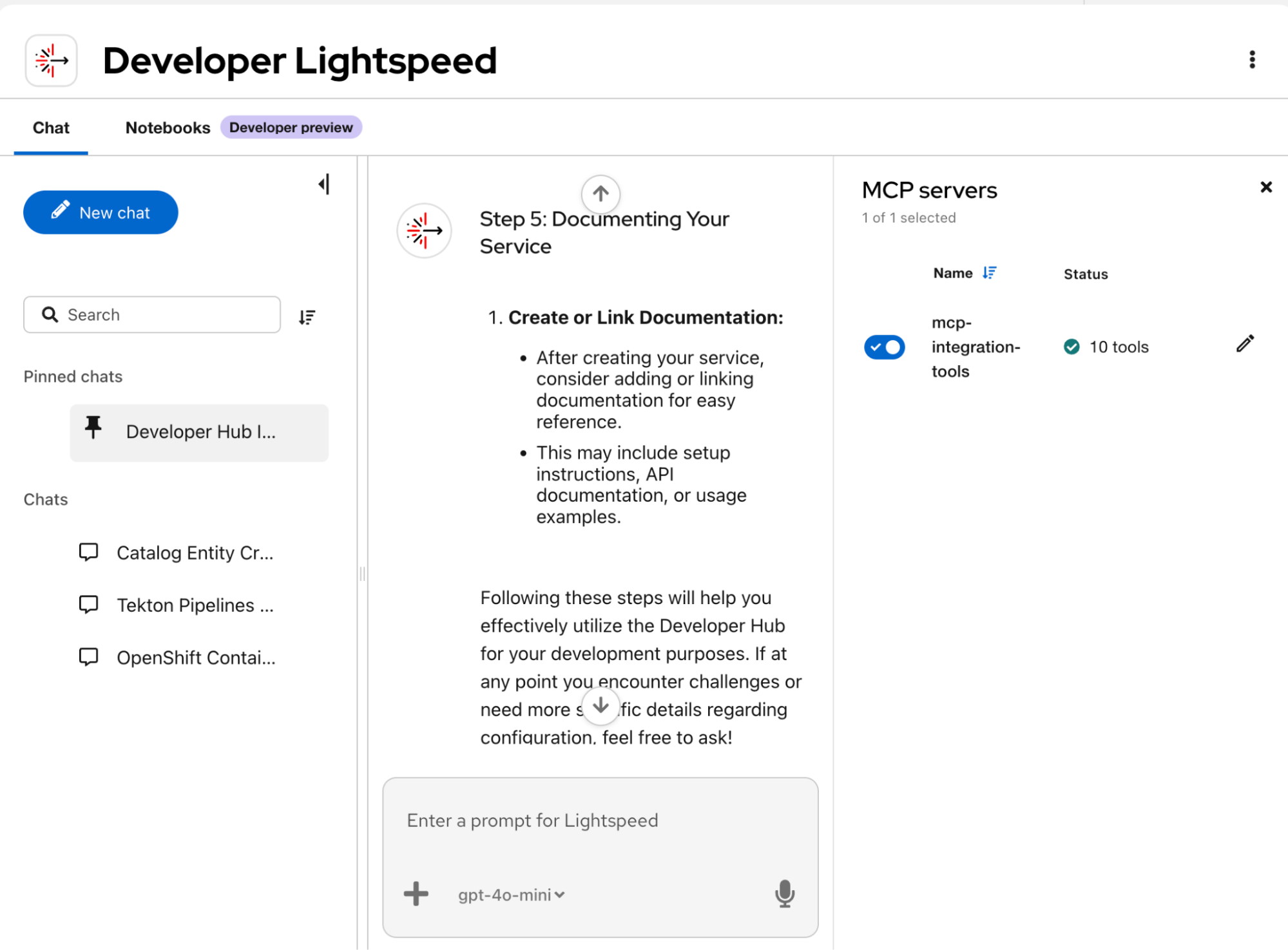
Red Hat Developer Hub 1.10, which was released in June 2026, includes:
- General availability of Red Hat OpenShift Lightspeed for developers.
- This release introduces the MCP service selector in chat and token storage, and enables MCP server scaffolder operations.
- The homepage is now persona-aware to improve user onboarding.
- Expanded translations include Spanish and German.
Get more details in the release notes.
Red Hat Trusted Artifact Signer
Red Hat Trusted Artifact Signer 1.4 is a maturity release—several capabilities that were in technology preview are now generally available, and other improvements prepare the platform for enterprise deployment.
Three features are now generally available:
- High availability. You can now run Trusted Artifact Signer in an high-availability configuration on a single Red Hat OpenShift cluster with replicated components, load balancing, and failover.
- The Sigstore Policy Controller is now generally available. This is an admission controller that enforces which container images can run on your cluster, based on Trusted Artifact Signer signatures and attestations.
- PostgreSQL support. The Trillian-based transparency log now fully supports PostgreSQL.
Trusted Artifact Signer runs on Cosign 3.0.4, which brings a modernized cache layout and the new signingConfig approach, simplifying initialization. The operator now automates The Update Framework (TUF) repository migration when upgrading from Trusted Artifact Signer 1.3 to 1.4, so no manual intervention is needed. Command-line interface (CLI) binaries are now available directly on the Red Hat Developer portal, so you no longer need a full Trusted Artifact Signer deployment to get the tools.
Key Management Service (KMS) support for managing Rekor signing keys, AI/ML model signing via the model validation operator, and the Trusted Artifact Signer console—a web UI for browsing TUF roots, certificates, and signing events—are all available in Technology Preview.
Read more in the release notes.
Red Hat Trusted Profile Analyzer
Red Hat Trusted Profile Analyzer 2.2 includes several generally available core updates:
- Automated labeling for both artificial intelligence and cryptographic bills of materials (AIBOM and CBOM).
- The ability to generate missing software bills of materials (SBOMs) directly from Red Hat Quay using Syft.
- A dedicated screen that allows you to search, filter, and track unique software licenses across all SBOMs.
- A new recommendations API endpoint that automatically retrieves trusted package versions and vulnerability remediations.
- The ability to delete SBOM documents directly from the interface with a highly optimized API.
- Improved upload navigation that moves buttons from the main sidebar to their respective SBOMs and advisories pages.
- A performance boost that loads large volumes of SBOM vulnerabilities in seconds rather than minutes.
Get the full details in the release notes.
Exploit intelligence
A new feature of Red Hat Trusted Profile Analyzer, exploit intelligence, is now available in Technology Preview. It is an AI-powered exploitability analysis engine that provides contextual, code-aware assessments that determine whether a CVE is exploitable within a given codebase. Built on NVIDIA's Morpheus Agent and NAT frameworks, this feature reduces manual triage with a "plan-and-execute" agentic workflow.
It also produces Common Security Advisory Framework (CSAF) Vulnerability Exploit Exchange (VEX) documents to suppress false positives in downstream platforms and remediation, allowing your developers to focus on actual, exploitable risks.
AI capabilities
Red Hat OpenShift 4.22 includes several optimizations for high-density AI and ML workloads.
JobSet
The JobSet controller is now generally available, and lets you orchestrate multiple Red Hat OpenShift jobs as a cohesive, higher-level construct.
Speeding up container image pulls
Accelerate container startup times with lazy image pulling in Red Hat OpenShift 4.22 through a plug-in-based architecture for CRI-O. This allows containers to start before the entire image is downloaded, which minimizes delays for AI/ML workload images.
DRA support for partitionable devices
In Red Hat OpenShift, dynamic resource allocation (DRA) manages specialized hardware like GPUs. Traditional DRA supports only whole-device allocation, which can lead to underutilized high-performance hardware. Now in technology preview, you can allocate sliceable, partitionable devices instead of whole devices only.
Additional artifact store
The additional artifact store, now available in technology preview, lets you select where OpenShift container image volume images can be pulled from, which creates additional artifact storage locations in CRI-O. This feature also enables SSD-backed storage for large ML models.
Platform services
Build, deploy, and scale your applications with a unified application platform designed to simplify core cluster operations.
OpenShift Service Mesh
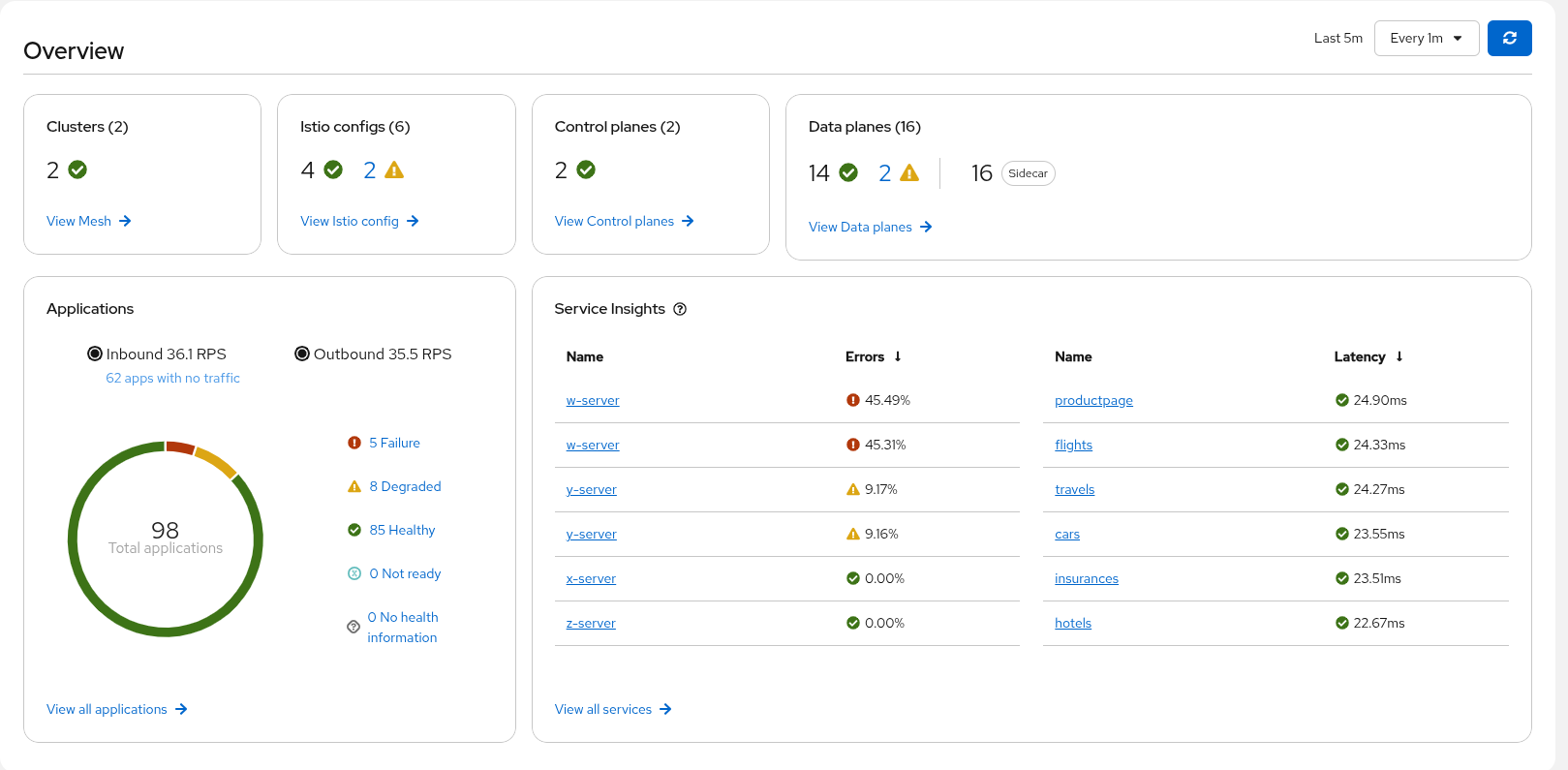
Red Hat OpenShift Service Mesh 3.4, based on Istio 1.30, includes updated FIPS support to the 140-3 standard for both sidecar and ambient modes. Read the documentation on how to run ambient mode and sidecar mode workloads within the same mesh—and a supported procedure for how to migrate workloads from sidecar to ambient mode.
This release includes several Kiali tools that use AI to simplify service mesh management and troubleshoot challenges. Integration with zero trust workload identity manager is now available in technology preview. This provides deeper workload attestation and allows teams to share trust at scale for workloads across different clusters, datacenters, and regions.
Builds and pipelines
Red Hat OpenShift Pipelines 1.22 now includes a technology preview that federates pipeline runs (PRs) across a cluster fleet. It also lets you control host user namespace sharing for TaskRuns and PipelineRuns. This release improves pipeline readability, monitoring, security, performance, Prometheus support, vendor-specific features, and startup times.
Builds for Red Hat OpenShift 1.8 now include fine-grained resource definitions and let you specify the container runtimes for build pods.
Red Hat OpenShift GitOps
Red Hat OpenShift GitOps 1.21 brings substantial upgrades to core components, moving to Argo CD 3.4, Argo Rollouts 1.9, and Argo CD Agent 0.9. The Argo CD image updater is now generally available. Beyond monitoring registries, it automatically generates pull and merge requests. This ensures that image updates follow your existing governance workflows, and requires human approval before delivering to live environments.
The Argo CD CLI is also now generally available, and provides a stable, officially supported tool for automation and management. The Red Hat OpenShift console plug-in, included in technology preview, adds a topology view to help teams visualize the status of their ApplicationSet resources, alongside pages to manage Argo Rollouts and image updaters directly in the UI.
The hybrid architecture, available in technology preview, allows users to gradually migrate from the classic push architecture to the agent's pull architecture right inside their existing Argo CD instances. It also simplifies operations by eliminating the need for an additional agent to manage the control plane cluster—which an application controller running alongside the main control plane instance can now handle.
Serverless
Red Hat OpenShift Serverless 1.38 updates core components to align with Knative’s 1.17 upstream release. This release updates default configurations for serving, simplifying installation and deployment across your environments. Knative Eventing now supports generic event sources and sinks using Apache Camel Kamelets, alongside multiple minor resource optimization fixes.
OpenShift Serverless functions for MCP servers are also available in developer preview, letting you use serverless functions as an MCP server via the OpenShift Serverless CLI. Additionally, a technology preview introducing OpenShift Serverless integration with OpenShift Service Mesh 3 will arrive soon.
Migration toolkit for applications
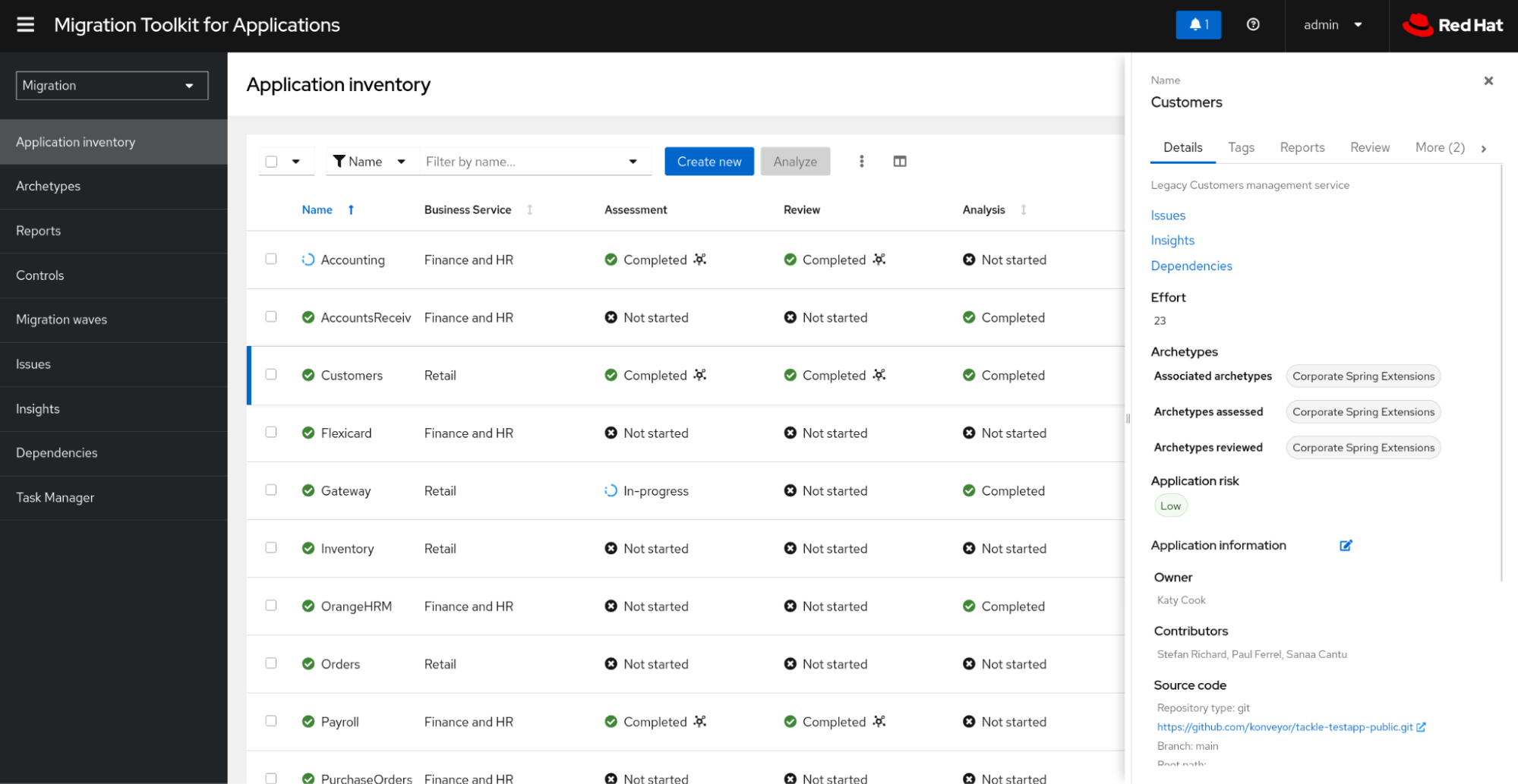
Red Hat's migration toolkit for applications 8.2, released in July 2026, introduces cross-cluster migration for stateless applications, removes Keycloak as a dependency, and upgrades the interface to PatternFly 6.
Console
Red Hat OpenShift 4.22 introduces changes for web console dynamic plug-ins, requiring a migration to new dependencies.
Upgrade your plug-ins to the new core library versions outlined in Table 1.
| Core library | Legacy version | New version |
|---|---|---|
| react | 17.x | 18.x |
| redux | 4.x | 5.x |
| redux-thunk | 2.x | 3.x |
| react-redux | 7.x | 9.x.1 |
| react-router | — | 7.x |
| PatternFly | 5.x (support dropped) | 6.x |
Table 1: Core library dependency migrations for web console dynamic plug-ins.
Read Red Hat OpenShift 4.22: What dynamic plug-in developers need to know for more information. To help with this transition, refer to the release-4.22 branch of the Console plug-in template for a working example. Be sure to review this information before starting your migration to 4.22.
Find more in the web console release notes.
Red Hat OpenShift Virtualization
Red Hat OpenShift Virtualization includes several updates for developers to ease virtual machine (VM) administration, update cluster infrastructure, and expand networking capabilities.
Simplified VM management
Virtual machine administration is easier with Red Hat OpenShift 4.22, with dashboards that show multicluster and single-cluster health, and let you perform multicluster VM operations.
Cross-cluster VM live migration is now generally available.
This release updates the UI to display Red Hat OpenShift Lightspeed details and support third-party UI integrations.
Infrastructure updates
Developers can now insert and eject CD-ROMs within a running VM, alongside updated support for Windows clusters. OpenShift Virtualization now supports Google Cloud Bare Metal as a target platform. You can also attach multi-instance GPU (MIG) vGPUs from NVIDIA to your virtual workloads.
Networking updates
OpenShift Virtualization now supports importing VMs connected to an overlay network and configuring single stack IPv6 installations.
Get more details in the OpenShift Virtualization release notes.
Next steps for your OpenShift 4.22 migration
Red Hat OpenShift 4.22 provides a unified foundation for modernizing your applications, whether you are migrating web console dynamic plug-ins or administering virtual workloads. These core library updates and infrastructure options help development teams track cluster health, implement hardware accelerators, and build a more responsive, security-focused environment. Review the updated release documentation to prepare your environment and start your migration.
Get started:
- Start your OpenShift journey in the no-cost Developer Sandbox.
- Discover more ways to get started by downloading Red Hat OpenShift.
- Find resources for getting started with OpenShift.
- Explore OpenShift interactive demos
- Level up your skills with OpenShift learning paths like Foundations of OpenShift.
- Read Navigate AI and scale with Red Hat OpenShift 4.22 to learn more.

