If you've ever tried to rebuild an entire Python dependency tree from source, you know it's not a simple process. Packages depend on other packages, which have build-time dependencies, which also have their own dependencies, and so on. It's easy to get the order wrong, which eventually causes the build to fail. Fromager solves this problem with two key artifacts: build-order.json and graph.json. Together, these artifacts turn complex Python dependency trees into a reproducible, auditable build pipeline.
But there are already projects and tools that build Python wheels, so the obvious question is why we need Fromager. In this blog post, we delve into the motivations behind Fromager and explain its unique role in the ecosystem.
The trust problem
When you run pip install numpy, a pre-built binary lands on your machine, and it works. That's the happy path and for most development workflows, it's fine. But there are environments where the happy path is not enough.
A pre-built Python wheel is a binary artifact compiled by someone else's CI system, from source code you may not have reviewed, with build tools you didn't choose. If you work in an environment where you need to audit every binary you deploy (for example, financial services, government, defense, regulated AI), then this is a non-starter. And after a string of supply chain attacks on Python packages (typosquatting, compromised maintainer accounts, malicious build hooks), this isn't just a theoretical concern any more.
To maintain a trustworthy environment, you must be able to prove that every binary in your environment was built from auditable source code. Along with auditability, you also need absolute reproducibility: the ability to build the exact same set of wheels again tomorrow. This is what Fromager does. It rebuilds entire Python dependency trees from source and produces two artifacts that make the process transparent: build-order.json and graph.json.
But security is only one piece. Organizations also end up building from source for other reasons:
- Custom hardware: If you need to link against a specific accelerator SDK i.e. a particular CUDA version, ROCm or you're targeting an architecture nobody publishes wheels for, you have to build from source with the right flags.
- Regulatory compliance: Some frameworks require provenance: a documented chain from source code to deployed binary. A wheel downloaded from PyPI has no such chain.
- Reproducibility across platforms: When you manage multiple variants (x86_64, aarch64, CPU-only, CUDA), you need the same packages built consistently across all of them. Grabbing whatever wheels happen to exist on PyPI doesn't give you that.
These requirements show up especially in the AI/ML ecosystem, where dependency trees are large, native code is everywhere, and hardware diversity is becoming the norm.
Why pip install --no-binary :all: doesn't work
The pip module can build from source. Pass --no-binary :all: and it compiles every package instead of downloading wheels. But pip doesn't solve the bootstrapping problem.
For example, to build numpy from source, pip needs setuptools. To build setuptools from source, pip needs setuptools. This is a circular dependency! To break this cycle, pip downloads pre-built wheels for build tools from PyPI. It must do this because its architecture assumes that build tools are already available as binaries.
If your requirement is that every binary must be built from source, then pip cannot satisfy it. The build tools themselves are a gap. This bootstrapping challenge is well-known in the Python packaging community and has been discussed since 2020 and remains an open problem.
Also there's no way to customize build flags per package. You can set global environment variables but you can't, for instance, specify to build numpy with CUDA support and scipy with OpenBLAS. There's no patching mechanism if upstream source doesn't compile on your platform. There's no cross-compilation support. And there's no way to manage multiple platform variants (CPU, CUDA, ROCm) from a single build pipeline.
Common alternatives have similar issues. The uv tool has the same limitations as pip, and conda doesn't build from source at all. Bazel can auto-generate targets for PyPI dependencies, but primarily consumes pre-built wheels. The ability to build from source sdists with native extensions is still an open feature request. It's designed for monorepos where you control your own code, not for bootstrapping an upstream ecosystem of packages entirely from source.
Why not build everything from source?
Nix and Gentoo do build everything from source, including build tools. They solve the bootstrapping problem. But they solve it by requiring a manually written build specification for every package (a Nix derivation or a Gentoo ebuild).
Spack, widely used in HPC and scientific computing, takes the same approach: Every package needs a handwritten package.py recipe that specifies how to fetch, configure, and build it.
For a Python dependency tree containing hundreds of packages that change frequently, writing and maintaining a build recipe for literally every package just doesn't scale.
What Fromager does
Here's the thing: Python already has a standardized way for packages to declare build requirements: PEP 517 and pyproject.toml. Every well-maintained Python package already says what it needs to build. The information is there. It just needs a tool that can use it, all the way down.
To demonstrate how Fromager's bootstrap process works, let's look at stevedore, a library for managing dynamic plugins maintained by the OpenStack community.
fromager bootstrap stevedoreThis single command kicks off a multi-step orchestration: 1. Resolves stevedore to a specific version 2. Discovers that stevedore needs setuptools and pbr to build 3. Discovers that stevedore needs pbr at install time 4. Discovers that pbr itself needs setuptools to build 5. Builds setuptools first (it has no dependencies) 6. Builds pbr next (its dependency setuptools is now available) 7. Builds stevedore last (both setuptools and pbr are available)
In the end, Fromager generates two files in the working directory: build-order.json and graph.json.
The recipe: build-order.json
The artifact build-order.json is a simple ordered list, a recipe that defines the order in which the packages must be built:
[
  {
    "req": "setuptools>=40.8.0",
    "constraint": "",
    "dist": "setuptools",
    "version": "75.8.2",
    "prebuilt": false,
    "source_url": "https://pypi.org/...",
    "source_url_type": "sdist"
  },
  {
    "req": "pbr>=1.0",
    "constraint": "",
    "dist": "pbr",
    "version": "6.1.1",
    "prebuilt": false,
    "source_url": "https://pypi.org/...",
    "source_url_type": "sdist"
  },
  {
    "req": "stevedore",
    "constraint": "",
    "dist": "stevedore",
    "version": "5.4.1",
    "prebuilt": false,
    "source_url": "https://pypi.org/...",
    "source_url_type": "sdist"
  }
]
The sequence within this file is critical. The first is setuptools because both pbr and stevedore need it to build. Next is pbr because stevedore depends on it. Each entry records exactly where the source came from (source_url), what type it was, and whether it was built from source or used as-is (prebuilt). This build-order.json file can be added into version control, and it is your auditable record of what went into the build.
The complete map: graph.json
While build-order.json tells you what to build and when, graph.json tells you why. It captures every relationship between every package:
  {
  "": {
    "download_url": "",
    "pre_built": false,
    "version": "0",
    "canonicalized_name": "",
    "edges": [
      {
        "key": "stevedore==5.4.1",
        "req_type": "toplevel",
        "req": "stevedore"
      }
    ]
  },
  "stevedore==5.4.1": {
    "download_url": "https://pypi.org/...",
    "pre_built": false,
    "version": "5.4.1",
    "canonicalized_name": "stevedore",
    "edges": [
      {
        "key": "pbr==6.1.1",
        "req_type": "install",
        "req": "pbr!=2.1.0,>=2.0.0"
      },
      {
        "key": "setuptools==75.8.2",
        "req_type": "build-system",
        "req": "setuptools>=40.8.0"
      }
    ]
  },
  "pbr==6.1.1": {
    "download_url": "https://pypi.org/...",
    "pre_built": false,
    "version": "6.1.1",
    "canonicalized_name": "pbr",
    "edges": [
      {
        "key": "setuptools==75.8.2",
        "req_type": "build-system",
        "req": "setuptools>=40.8.0"
      }
    ]
  },
  "setuptools==75.8.2": {
    "download_url": "https://pypi.org/...",
    "pre_built": false,
    "version": "75.8.2",
    "canonicalized_name": "setuptools",
    "edges": []
  }
}
The graph reveals several distinct edge types, such as top-level, install, and build-system. These categories are significant because they define the specific nature of each dependency relationship. The stevedore module needs pbr at install time because it is run-time dependency, but it needs setuptools only at build time. The setuptools module itself has no dependencies. It's a leaf node, the foundation everything else rests upon. The root node in the form of an empty string represents your original request. From there, you can trace every path through the tree to understand exactly how each package ended up in your build. Figure 1 shows a visual representation of graph.json.
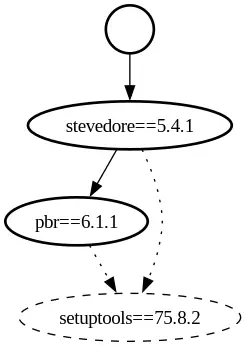
Fromager takes a list of top-level packages you want and discovers, resolves, and builds the entire dependency tree from source, including all build tools, all the way down to the bottom.
Key features of Fromager
Fromager works entirely within the Python ecosystem. It reads pyproject.toml, calls PEP 517 hooks, consumes packages from PyPI, and produces standard wheels.
Along with that, it provides several advantages.
Fromager distinguishes build dependencies from install dependencies
The dependency graph has two fundamentally different classifications of dependencies:
- Build dependencies: Packages needed to compile the software (
setuptools, Cython, wheel). These must be fully built and installed before the package that needs them can be compiled. - Install dependencies: Packages needed to use the software at runtime (
numpy,requests). These are discovered after the build phase completes, by reading metadata from the resulting wheel or sdist.
Build dependencies must be processed depth-first and compiled immediately. Install dependencies can be deferred. Fromager tracks this because different categories of build requirements must be installed in a specific sequence (you need the build system before you can call PEP 517 hooks to discover what else is needed).
Fromager discovers dependencies automatically
Fromager doesn't require manually written build specifications. For each package, it:
- Reads
pyproject.tomlto find build system requirements - Installs those into an isolated build environment
- Calls PEP 517's
get_requires_for_build_wheel()hook to discover additional build requirements - Recursively applies the same process to every dependency it discovers
The build order emerges from traversal. It's an iterative depth-first loop over an explicit stack, not from a human writing it down.
Fromager customizable without forking
This is one of the biggest strengths of Fromager. When you are building hundreds of packages, you inevitably come across situations where the Python project doesn't follow the standard repository structure or other Python standards, which would normally cause issues during the build. For example a package may need a specific environment variable, a patch to its build system, or a pinned version that differs from what PyPI advertises.
Fromager handles this with a layered override system. Common adjustments, environment variables, patches, version pins go in a YAML settings file that's specific to the package and doesn't require any coding.
While standard Python packaging currently lacks awareness of accelerators, Fromager was specifically designed to fill this void.
A --variant flag lets you build for different targets (CPU, CUDA, ROCm) using the same pipeline with different settings per variant. For packages that don't follow Python packaging standards at all, you can write a plugin to handle the edge case.
The system evolves over time. As common patterns emerge across packages, they get promoted into Fromager itself, so what started as a plugin becomes a YAML setting.
Fromager separates discovery from building
This is where the supply chain security story comes together. Fromager can split the build process into two stages separated by a data-only boundary:
Stage 1 (the discovery phase) resolves versions, queries package indexes, and runs PEP 517 hooks. Because those hooks are arbitrary Python code defined by each package's build backend, this stage executes untrusted upstream code and requires network access. It produces:
graph.json: Every package, version, and typed dependency edgebuild-order.json: A topologically sorted build sequence- Requirements: Cached requirement files for each package
- Source: Downloaded source archives
Stage 2 (the build phase) compiles packages using only Stage 1 artifacts. It uses cached requirement files instead of re-running discovery hooks, and builds from pre-downloaded sources. On Linux, when network isolation is enabled, build commands run inside network namespaces (unshare --net) with no outbound connectivity. This deterministic approach allows builds to function in air-gapped environments without PyPI access. It ensures that the same packages are built from identical sources in the exact same order every time, with the build-order.json file serving as the formal contract between discovery and execution.
Between the two stages, you can inspect everything, diff graph.json to see what changed, review it in a pull request, or transfer the artifacts to an air-gapped system and build with no network access at all. No compilation happens until you're satisfied with the plan.
fromager build-sequence build-order.jsonFromager scales
For large dependency trees, serial building is slow. Fromager can schedule concurrent builds using topology-aware parallelism i.e. packages that don't depend on each other for building can be compiled simultaneously. Resource-intensive packages like PyTorch can be marked for exclusive builds so they don't run in parallel with other compilations.
When onboarding new packages, you don't know how many will fail to build from source. Fromager's test mode continues after failures by substituting a pre-built binary for any package that fails, so downstream packages can still be built. At the end, it produces a JSON report of every failure classified by type , giving you a clear map of what still needs fixing.
Try Fromager
Most Python packaging tools treat dependency resolution as a solved problem and defer it to pip but pip resolves and installs in one pass, using pre-built wheels from PyPI. Standard tools like pip fall short when you require full builds from source for security audits, isolated network environments, or specialized platform targets.
When you can see every dependency, trace every relationship, and replay every build, you move from "it works on my machine" to the ability to prove what exactly is in your environment. For teams that need that level of assurance, Fromager turns Python's complex packaging into something transparent and reproducible.
Fromager is an open source project, and is actively developed.
- GitHub: python-wheel-build/fromager
- Documentation: fromager.readthedocs.io

