Redhat Developers  Logo
  • Products

    Platforms

    • Red Hat Enterprise Linux
      Red Hat Enterprise Linux Icon
    • Red Hat AI
      Red Hat AI
    • Red Hat OpenShift
      Openshift icon
    • Red Hat Ansible Automation Platform
      Ansible icon
    • See all Red Hat products

    Featured

    • Red Hat build of OpenJDK
    • Red Hat Developer Hub
    • Red Hat JBoss Enterprise Application Platform
    • Red Hat OpenShift Dev Spaces
    • Red Hat OpenShift Local
    • Red Hat Developer Sandbox

      Try Red Hat products and technologies without setup or configuration fees for 30 days with this shared Red Hat OpenShift and Kubernetes cluster.
    • Try at no cost
  • Technologies

    Featured

    • AI/ML
      AI/ML Icon
    • Linux
      Linux Icon
    • Kubernetes
      Cloud icon
    • Automation
      Automation Icon showing arrows moving in a circle around a gear
    • See all technologies
    • Programming languages & frameworks

      • Java
      • Python
      • JavaScript
    • System design & architecture

      • Red Hat architecture and design patterns
      • Microservices
      • Event-Driven Architecture
      • Databases
    • Developer experience

      • Productivity
      • Tools
      • GitOps
    • Automated data processing

      • AI/ML
      • Data science
      • Apache Kafka on Kubernetes
    • Platform engineering

      • DevOps
      • DevSecOps
      • Red Hat Ansible Automation Platform for applications and services
    • Secure development & architectures

      • Security
      • Secure coding
  • Learn

    Featured

    • Kubernetes & cloud native
      Openshift icon
    • Linux
      Rhel icon
    • Automation
      Ansible cloud icon
    • AI/ML
      AI/ML Icon
    • See all learning resources

    E-books

    • GitOps cookbook
    • Podman in action
    • Kubernetes operators
    • The path to GitOps
    • See all e-books

    Cheat sheets

    • Linux commands
    • Bash commands
    • Git
    • systemd commands
    • See all cheat sheets

    Documentation

    • Product documentation
    • API catalog
    • Legacy documentation
  • Developer Sandbox

    Developer Sandbox

    • Access Red Hat’s products and technologies without setup or configuration, and start developing quicker than ever before with our new, no-cost sandbox environments.
    • Explore the Developer Sandbox

    Featured Developer Sandbox activities

    • Get started with your Developer Sandbox
    • OpenShift virtualization and application modernization using the Developer Sandbox
    • Explore all Developer Sandbox activities

    Ready to start developing apps?

    • Try at no cost
  • Blog
  • Events
  • Videos

Running Karpathy's autoresearch on Red Hat OpenShift AI: 198 experiments, zero intervention

Autonomous ML research loop with Red Hat OpenShift AI

April 7, 2026
Roy Belio
Related topics:
Artificial intelligence
Related products:
Red Hat AIRed Hat OpenShift AI

    The autoresearch project by Andrej Karpathy, former AI director at Tesla and OpenAI co-founder, gives an AI agent a GPT training script and lets it experiment autonomously. It modifies code, trains for 5 minutes, and keeps improvements while reverting failures and then repeating. We wanted to see if Red Hat OpenShift AI could run an autonomous ML research loop end-to-end, and what a 24-hour unsupervised agent would actually find. So we took that idea, packaged it into a container built on Red Hat AI base images, deployed it to an OpenShift cluster with H100 GPUs, and walked away.
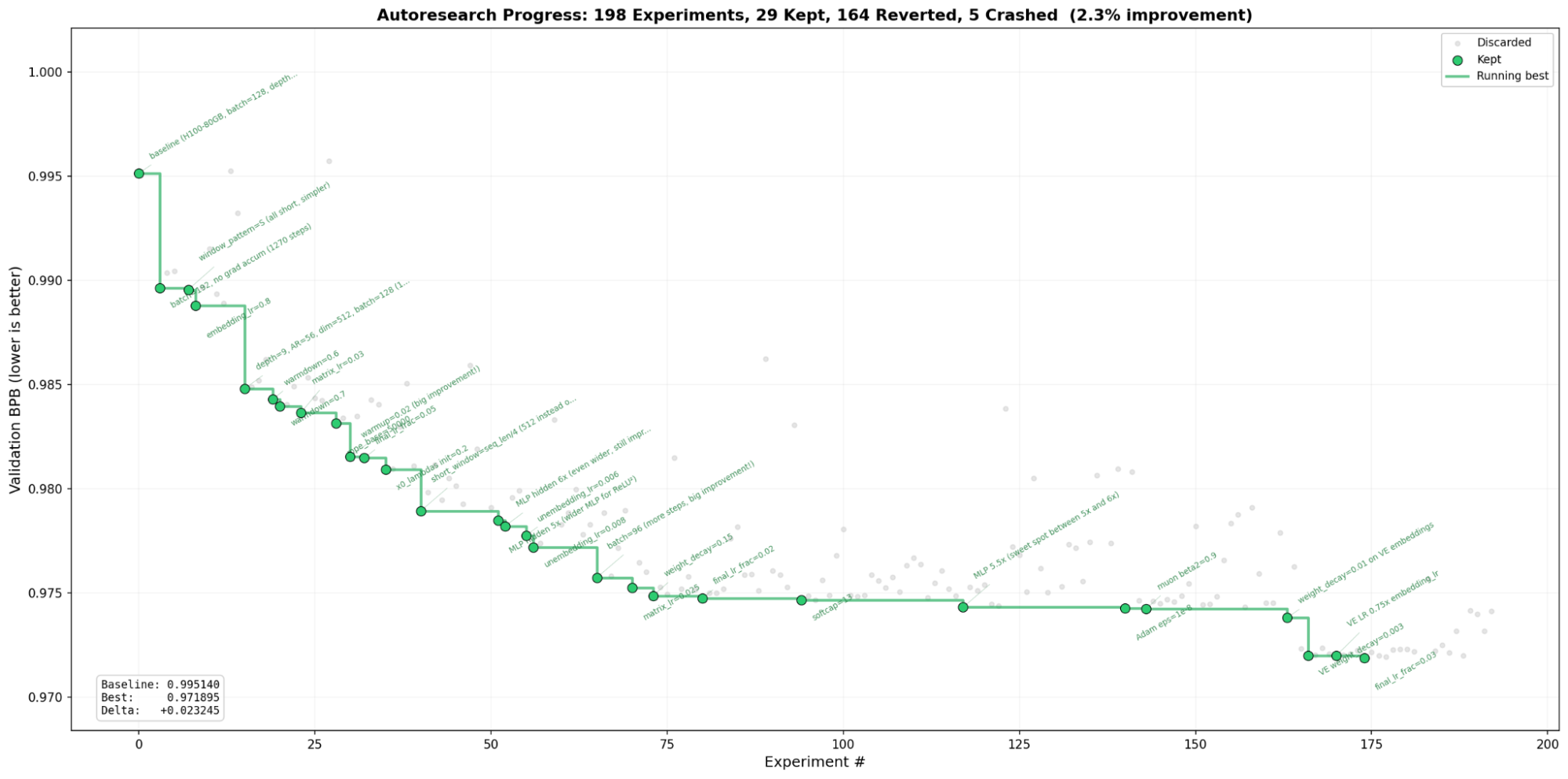
    198 experiments. 29 kept. 2.3% improvement in validation loss. Zero human intervention.
    Figure 1: 198 experiments. 29 kept. 2.3% improvement in validation loss. Zero human intervention.

    From bare metal to oc apply

    Karpathy's repo assumes a bare-metal setup: 1 GPU, Python, and the command to run the script: uv run train.py. That works on a personal workstation, but not when your GPUs sit behind a Kubernetes API.

    We built a multi-stage Containerfile on a Red Hat OpenShift AI workbench image for PyTorch CUDA (odh-workbench-jupyter-pytorch-cuda-py312-rhel9). The image ships PyTorch and CUDA pre-configured on universal base image (UBI) 9, so the Containerfile adds what autoresearch needs: uv, git, and the Claude Code CLI.

    FROM registry.redhat.io/rhoai/odh-workbench-jupyter-pytorch-cuda-py312-rhel9:v2.25.3
    RUN curl -LsSf https://astral.sh/uv/install.sh | sh
    RUN curl -fsSL https://claude.ai/install.sh | bash

    The entrypoint supports 3 modes -- prepare for data download, manual for a single validation run, and agent for the autonomous loop. A set of Kubernetes manifests handles the rest (namespace, PVCs for data and workspace), a ConfigMap for the research strategy, and the agent pod.

    Requesting a GPU is 1 line in the pod spec:

    resources:
      requests:
        nvidia.com/gpu: 1

    The GPU operator on OpenShift handles drivers, device plug-ins, and monitoring. No manual CUDA installation, and no driver version juggling is needed.

    H100 vs. A100: same cluster, different nodeSelector

    We tested on both GPU architectures. Switching between them from within OpenShift AI is pretty simple, requiring only one field change:

    MetricH100 80GBA100 80GB
    Baseline val_bpb0.99511.1044
    MFU39.4%15.7%
    Steps per 5 min943384
    Tokens/sec~1,630,000~430,000

    The H100 Hopper architecture runs native Flash Attention 3 kernels, giving 2.5x the throughput compared to the A100 Ampere for this workload. It's the same container image, and the same manifests. It's the nodeSelector is the difference:

    nodeSelector:
      nvidia.com/gpu.product: NVIDIA-H100-80GB-HBM3

    What the agent discovered in 24 hours

    The agent ran Claude Code Opus for more than 20 hours in a single session without restarting. It systematically explored architecture changes, optimizer tuning, and hyperparameter sweeps:

    • Step count dominates fixed-time training: Reducing batch size from 128 to 96 and eliminating gradient accumulation gave more training steps per 5-minute window, consistently beating larger-model approaches.
    • Wider multi-layer perceptrons (MLP) beat deeper networks: MLP at 5.5x hidden dimension with depth 9 outperformed depth 10+ at 4x MLP width.
    • Value embedding regularization was the late-run breakthrough: Adding weight decay (0.003) and learn rate (LR) scaling (0.75x) to value embeddings pushed validation loss (val_bpb) from 0.974 to 0.972 in the final hours.
    • Some ideas fail spectacularly: Weight tying produced 3.2 BPB (catastrophic regression). Label smoothing hit 1.3 BPB.

    There's a catch

    The version of Red Hat OpenShift AI used for these tests (v3.4.0-ea.1) includes a base image with CUDA 12.8 compatibility libraries. On nodes running later drivers (580.x / CUDA 13.0), these load instead of the host driver and cause cudaErrorSystemDriverMismatch. The fix is 1 line in the entrypoint:

    export LD_LIBRARY_PATH="/usr/lib64${LD_LIBRARY_PATH:+:$LD_LIBRARY_PATH}"

    This fix applies to any Red Hat OpenShift AI image running on nodes with CUDA 13.0 or later drivers.

    Try it yourself

    The full deployment (Containerfile, Kubernetes manifests, entrypoint, results, and the progress visualization) is published at github.com/aicatalyst-team/autoresearch. The README walks through setup in 8 steps: create namespace and storage, configure credentials, build or pull the image, prepare data, and launch the agent.

    If you have an OpenShift cluster with GPU nodes, you can go from git clone to a running autonomous research agent in less than an hour.

    If you don't have OpenShift AI yet, start with a 60 day trial.

    Related Posts

    • Vibes, specs, skills, and agents: The four pillars of AI coding

    • Integrate Claude Code with Red Hat AI Inference Server on OpenShift

    • Dynamic resource allocation goes GA in Red Hat OpenShift 4.21: Smarter GPU scheduling for AI workloads

    • Run Model-as-a-Service for multiple LLMs on OpenShift

    Recent Posts

    • Running Karpathy's autoresearch on Red Hat OpenShift AI: 198 experiments, zero intervention

    • Distributed tracing for agentic workflows with OpenTelemetry

    • Set up a CI framework using Red Hat Ansible Automation Platform, Podman, and Horreum

    • Kafka Monthly Digest: March 2026

    • Introduction to Linux interfaces for virtual networking

    What’s up next?

    Learning Path intro-to-OS-LP-feature-image

    Introduction to OpenShift AI

    Learn how to use Red Hat OpenShift AI to quickly develop, train, and deploy...
    Red Hat Developers logo LinkedIn YouTube Twitter Facebook

    Platforms

    • Red Hat AI
    • Red Hat Enterprise Linux
    • Red Hat OpenShift
    • Red Hat Ansible Automation Platform
    • See all products

    Build

    • Developer Sandbox
    • Developer tools
    • Interactive tutorials
    • API catalog

    Quicklinks

    • Learning resources
    • E-books
    • Cheat sheets
    • Blog
    • Events
    • Newsletter

    Communicate

    • About us
    • Contact sales
    • Find a partner
    • Report a website issue
    • Site status dashboard
    • Report a security problem

    RED HAT DEVELOPER

    Build here. Go anywhere.

    We serve the builders. The problem solvers who create careers with code.

    Join us if you’re a developer, software engineer, web designer, front-end designer, UX designer, computer scientist, architect, tester, product manager, project manager or team lead.

    Sign me up

    Red Hat legal and privacy links

    • About Red Hat
    • Jobs
    • Events
    • Locations
    • Contact Red Hat
    • Red Hat Blog
    • Inclusion at Red Hat
    • Cool Stuff Store
    • Red Hat Summit
    © 2026 Red Hat

    Red Hat legal and privacy links

    • Privacy statement
    • Terms of use
    • All policies and guidelines
    • Digital accessibility

    Report a website issue