Managing the lifecycle of an enterprise Linux fleet has traditionally been a game of spreadsheets, calendar alerts, and manual cross-referencing. You have to track which systems are nearing end of life (EOL), which ones qualify for extended update support (EUS), and how recent major releases like Red Hat Enterprise Linux (RHEL) 10 will impact your specific package stack. The Model Context Protocol (MCP) server for Red Hat Lightspeed changes this dynamic. By connecting your AI assistant—whether it’s Claude, VS Code, or a custom agent—directly to Red Hat Lightspeed planning data, you can move from reactive maintenance to proactive strategy. In this article, we’ll walk through how to use the MCP server for Red Hat Lightspeed to transform raw lifecycle data into actionable migration plans and executive-ready reports.
Beyond the UI: Plan with AI
The Red Hat Lightspeed planning user interface (UI) is excellent for visualizing data. However, the AI layer allows for synthesis across sources. While the UI shows you a list, the AI can cross-reference that list against deprecation logs, generate a migration schedule, and even draft the email you need to send to your stakeholders.
Phase 1: Audit your current fleet
The first step in any lifecycle strategy is knowing where you stand. Instead of filtering through host inventories, you can simply ask for the pain points.
Try this prompt:
"Which one of my systems is running RHEL versions near end-of-life, and what are their exact retirement dates?"
The MCP server queries the planning API and returns a prioritized list. From here, you can dig deeper into the specific dates for various support tiers.
Try this prompt:
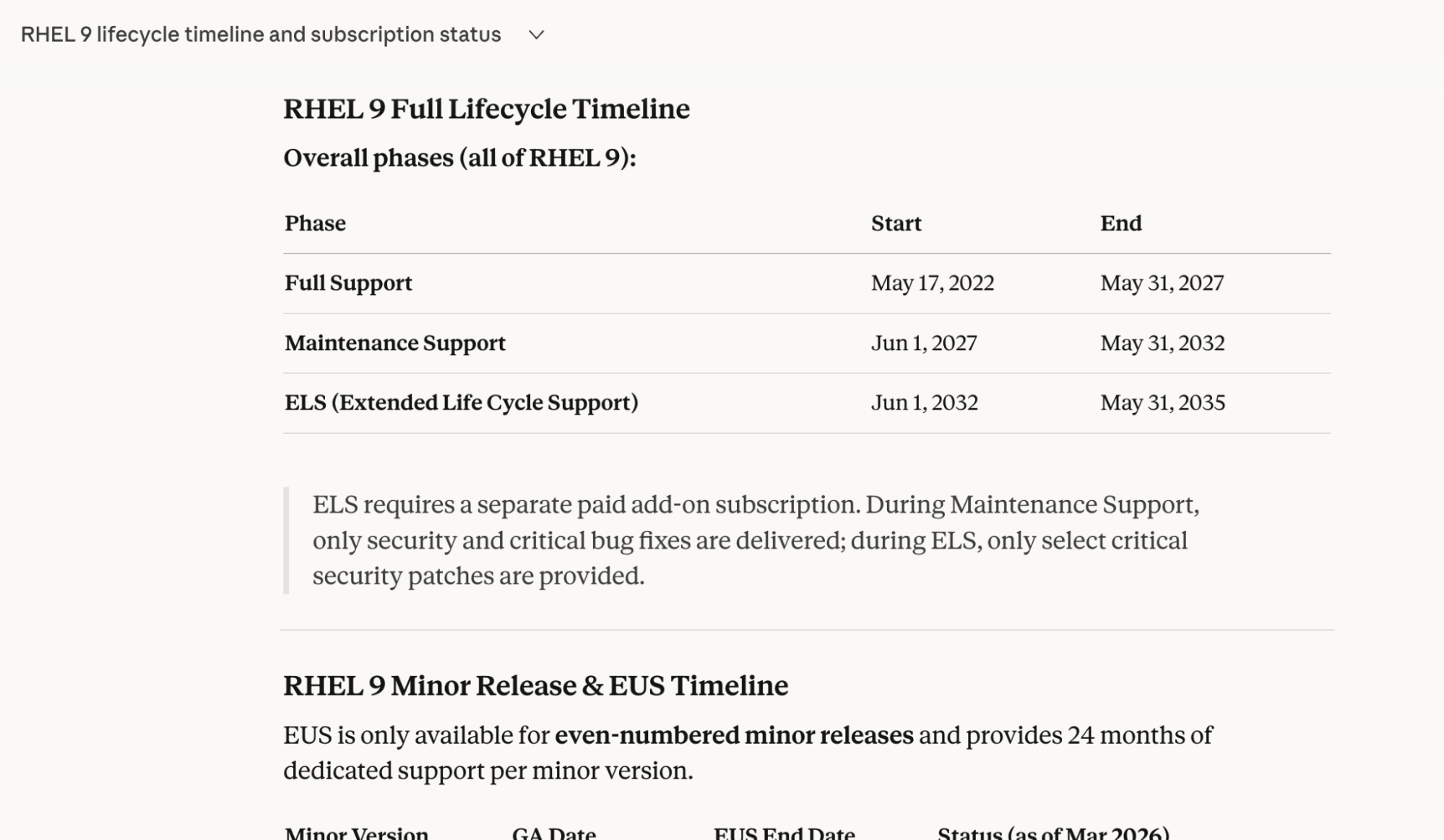
"Show me the full lifecycle timeline for RHEL 9, including EUS and ELS dates, and identify which one of my systems is currently subscribed to these versions."
Figure 1 shows the response from Claude, powered by the MCP server for Red Hat Lightspeed, illustrating the full RHEL 9 lifecycle timeline and identifying subscribed systems.
Phase 2: Mapping the road to RHEL 10
Planning your RHEL lifecycle should focus not only on EOL dates but also on anticipating the next major releases. As you prepare for the upgrade to RHEL 10, what are the implications for your specific environment?
Try this prompt:
"What's the coming roadmap for RHEL, and specifically, what upcoming deprecations in RHEL 10 will affect the packages currently installed on my systems?"
Because the MCP has access to your real-time inventory and the official Red Hat roadmap, it can identify specific risks—like a library being deprecated in RHEL 10 that your core application relies on in RHEL 8 or 9.
Phase 3: Generating artifacts for leadership
The true power of the AI layer is artifact generation. A sysadmin's job often involves proving the need for resources or maintenance windows to management.
Try this prompt:
"Build me an executive summary of our fleet risk posture. Include which versions retire in the next 6 months, how many systems are affected, and the recommended upgrade path for each group."
This moves you from being a data gatherer to a strategic planner. You can even take it a step further to automate the paperwork:
Try this prompt:
"Cross-reference our upcoming deprecations with lifecycle data and draft a migration plan for our web-tier systems. Then, generate a report I can share with my manager on app streams we need to migrate before Q3."
A roadmap that talks back
The MCP server for Red Hat Lightspeed for planning is currently in developer preview. It represents a shift from searching for information to declaring intent. Whether you are managing ten servers or ten thousand, the ability to converse with your infrastructure's future ensures that no EOL date ever catches you by surprise.
Ready to start planning? Check out the following resources:
- Explore the MCP: Visit the Red Hat Lightspeed MCP GitHub repository to get started.
- Set up your environment: Check out our guide on how to set up the Model Context Protocol.
- Share your feedback: Your feedback is essential to refining these capabilities. Please share your experiences, feature requests, or bug reports via the Red Hat Issue Router (select the MCP component) or on our GitHub repository.

