Redhat Developers  Logo
  • AI

    Get started with AI

    • Red Hat AI
      Accelerate the development and deployment of enterprise AI solutions.
    • AI learning hub
      Explore learning materials and tools, organized by task.
    • AI interactive demos
      Click through scenarios with Red Hat AI, including training LLMs and more.
    • AI/ML learning paths
      Expand your OpenShift AI knowledge using these learning resources.
    • AI quickstarts
      Focused AI use cases designed for fast deployment on Red Hat AI platforms.
    • No-cost AI training
      Foundational Red Hat AI training.

    Featured resources

    • OpenShift AI learning
    • Open source AI for developers
    • AI product application development
    • Open source-powered AI/ML for hybrid cloud
    • AI and Node.js cheat sheet

    Red Hat AI Factory with NVIDIA

    • Red Hat AI Factory with NVIDIA is a co-engineered, enterprise-grade AI solution for building, deploying, and managing AI at scale across hybrid cloud environments.
    • Explore the solution
  • Learn

    Self-guided

    • Documentation
      Find answers, get step-by-step guidance, and learn how to use Red Hat products.
    • Learning paths
      Explore curated walkthroughs for common development tasks.
    • Guided learning
      Receive custom learning paths powered by our AI assistant.
    • See all learning

    Hands-on

    • Developer Sandbox
      Spin up Red Hat's products and technologies without setup or configuration.
    • Interactive labs
      Learn by doing in these hands-on, browser-based experiences.
    • Interactive demos
      Click through product features in these guided tours.

    Browse by topic

    • AI/ML
    • Automation
    • Java
    • Kubernetes
    • Linux
    • See all topics

    Training & certifications

    • Courses and exams
    • Certifications
    • Skills assessments
    • Red Hat Academy
    • Learning subscription
    • Explore training
  • Build

    Get started

    • Red Hat build of Podman Desktop
      A downloadable, local development hub to experiment with our products and builds.
    • Developer Sandbox
      Spin up Red Hat's products and technologies without setup or configuration.

    Download products

    • Access product downloads to start building and testing right away.
    • Red Hat Enterprise Linux
    • Red Hat AI
    • Red Hat OpenShift
    • Red Hat Ansible Automation Platform
    • See all products

    Featured

    • Red Hat build of OpenJDK
    • Red Hat JBoss Enterprise Application Platform
    • Red Hat OpenShift Dev Spaces
    • Red Hat Developer Toolset

    References

    • E-books
    • Documentation
    • Cheat sheets
    • Architecture center
  • Community

    Get involved

    • Events
    • Live AI events
    • Red Hat Summit
    • Red Hat Accelerators
    • Community discussions

    Follow along

    • Articles & blogs
    • Developer newsletter
    • Videos
    • Github

    Get help

    • Customer service
    • Customer support
    • Regional contacts
    • Find a partner

    Join the Red Hat Developer program

    • Download Red Hat products and project builds, access support documentation, learning content, and more.
    • Explore the benefits

Jlink integration with OpenShift tech preview release

Enabling slim Java application containers

April 17, 2025
Jonathan Dowland
Related topics:
ContainersDeveloper toolsJavaQuarkus
Related products:
Red Hat build of OpenJDKRed Hat OpenShiftRHEL UBI

    We are pleased to announce the first technology preview release of the jlink integration with Red Hat OpenShift for the Red Hat Universal Base Image (UBI) and Red Hat build of OpenJDK containers. We first publicly previewed this technology in a presentation at FOSDEM 2024. We will provide a quick overview of it in this article. For a deeper dive, please refer to the FOSDEM slides and recording.

    Background

    We ship two flavors of Universal Base Image and Red Hat build of OpenJDK containers: builder and runtime. The builders support OpenShift source-to-image (S2I). Using S2I, customers can set up automated pipelines to rebuild and deploy their application when their source is updated, or other relevant triggers.

    S2I is conceptually simple, and that simplicity has advantages. But one drawback is the resulting application container is layered on top of the builder image. For Java applications, that means they include the full Java Development Kit, including compiler, and Apache Maven tooling. Customers may wish for smaller containers, or a reduced attack-surface.

    In our 2021 article, we described how to configure OpenShift to perform a two-stage build, cherry-picking the application and layering it on top of the OpenJDK runtime images. The images produced by this method are smaller than plain S2I, but we felt we could make them even smaller. The OpenJDK runtime is about half the total image size, so it was our focus to find savings.

    Java modules and jlink

    In 2017, Project Jigsaw reorganized upstream OpenJDK into discrete modules. OpenJDK releases from version 9 onwards are modularized and include tooling for managing the following OpenJDK modules: 

    • jdeps are used to analyze an application to determine which modules it requires. 
    • jlink are used to produce a new OpenJDK runtime, containing only a specified sub-set of the full set of OpenJDK modules.

    Our runtime images are designed to be suitable for a wide range of users, and so included the majority of OpenJDK’s modules. What if we could remove OpenJDK modules that were not needed for a specific application?

    OpenShift and jlink

    By extending S2I, we can analyze the Java application to determine which OpenJDK modules it requires, and produce a minimized OpenJDK runtime, tailored to that application. Building upon the two-stage build, we extract both the application and the bespoke runtime and layer them on top of a runtime image. Figure 1 shows the OpenShift jlink three-stage build pipeline.
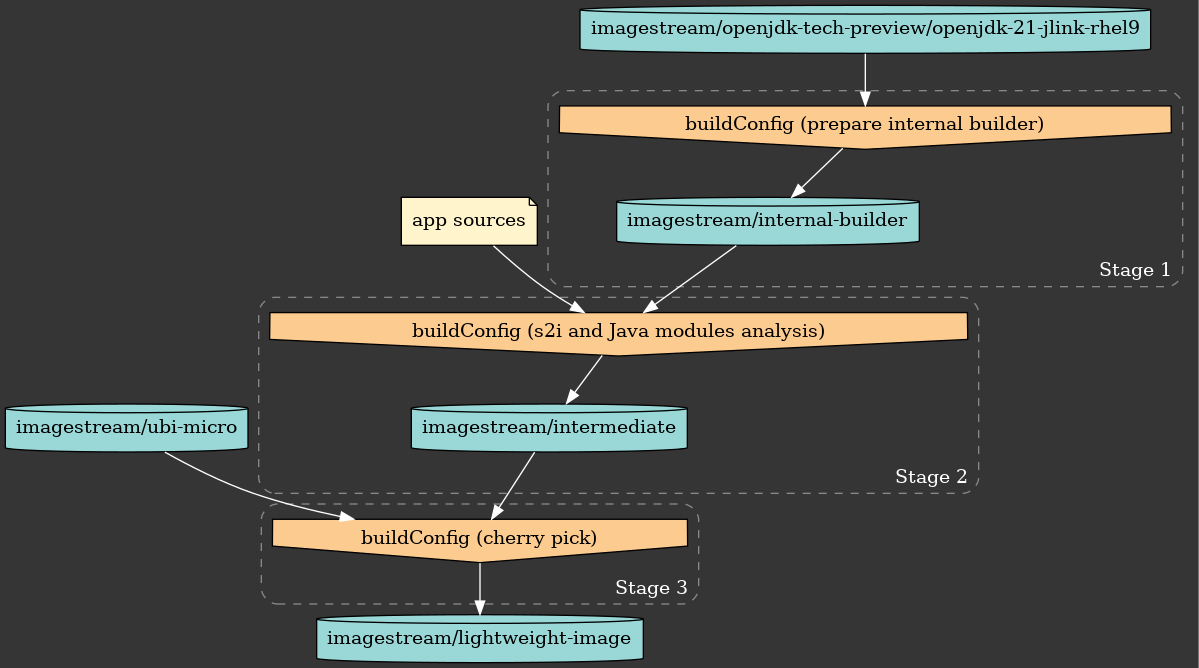
    Jlink BuilldConfig flow diagram
    License under CC BY-SA 4.0.
    Figure 1. OpenShift jlink three-stage build pipeline.

    As an additional bonus of this method, we can layer on top of the UBI micro image. This is a fraction of the size of the regular UBI runtime images, weighing in the order of 20-30MiB, or less than 10% the size of the UBI and OpenJDK runtime images.

    Combined, these space savings mean we can build ultra-lean application containers. In our experiments, the container size of a Quarkus-based application is reduced by 57% compared to the lean-containers technique. Figure 2 shows a breakdown of the OpenShift jlinked image sizes.
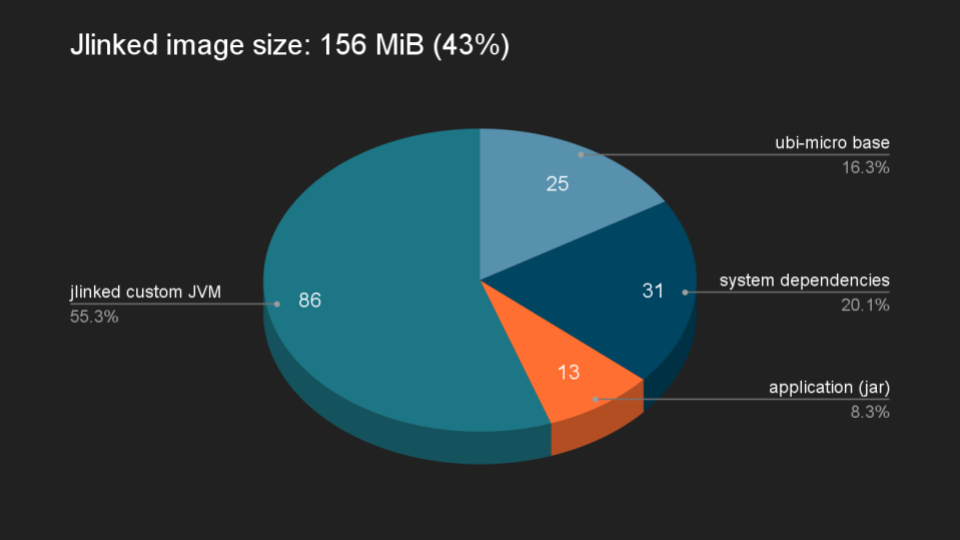
    Jlink container size breakdown pie chart
    Figure 2. A pie chart of the OpenShift jlinked-image size breakdown.

    How to get the tech preview image

    Initially, we’re releasing this feature as a separate tech preview container image using the Red Hat build of OpenJDK 21. This is to give us an opportunity to gather feedback from the community about this feature. We’d love to know what you think of this feature. Let us know what results you get with your real-world containers. Your feedback will help shape the future of this feature!

    We’ve packaged the required OpenShift configuration into this OpenShift template. Use the template in conjunction with the tech preview image, which is available from the Red Hat Ecosystem Catalog. You can also pull it from the Red Hat Container Registry with this command: registry.access.redhat.com/openjdk-tech-preview/openjdk-21-jlink-rhel9:latest.

    You can find the full step-by-step instructions in this README. The example application in our template is a Quarkus quickstart, configured to use the "Uber JAR" package type. We welcome your feedback.

    Related Posts

    • Build lean Java containers with the new Red Hat Universal Base Images OpenJDK runtime images

    • How to use Java container awareness in OpenShift 4

    • Build smaller container images using S2I

    Recent Posts

    • Every layer counts: Defense in depth for AI agents with Red Hat AI

    • Fun in the RUN instruction: Why container builds with distroless images can surprise you

    • Trusted software factory: Building trust in the agentic AI era

    • Build a zero trust AI pipeline with OpenShift and RHEL CVMs

    • Red Hat Hardened Images: Top 5 benefits for software developers

    What’s up next?

    Download free preview chapters from Applied AI for Enterprise Java Development (O’Reilly), a practical guide for Java developers who want to build AI applications.

    Get the e-book
    Red Hat Developers logo LinkedIn YouTube Twitter Facebook

    Platforms

    • Red Hat AI
    • Red Hat Enterprise Linux
    • Red Hat OpenShift
    • Red Hat Ansible Automation Platform
    • See all products

    Build

    • Developer Sandbox
    • Developer tools
    • Interactive tutorials
    • API catalog

    Quicklinks

    • Learning resources
    • E-books
    • Cheat sheets
    • Blog
    • Events
    • Newsletter

    Communicate

    • About us
    • Contact sales
    • Find a partner
    • Report a website issue
    • Site status dashboard
    • Report a security problem

    RED HAT DEVELOPER

    Build here. Go anywhere.

    We serve the builders. The problem solvers who create careers with code.

    Join us if you’re a developer, software engineer, web designer, front-end designer, UX designer, computer scientist, architect, tester, product manager, project manager or team lead.

    Sign me up

    Red Hat legal and privacy links

    • About Red Hat
    • Jobs
    • Events
    • Locations
    • Contact Red Hat
    • Red Hat Blog
    • Inclusion at Red Hat
    • Cool Stuff Store
    • Red Hat Summit
    © 2026 Red Hat

    Red Hat legal and privacy links

    • Privacy statement
    • Terms of use
    • All policies and guidelines
    • Digital accessibility

    Chat Support

    Please log in with your Red Hat account to access chat support.