AI
  • Get started with AI

    • Red Hat AI

      Accelerate the development and deployment of enterprise AI solutions.

    • AI learning hub

      Explore learning materials and tools, organized by task.

    • AI interactive demos

      Click through scenarios with Red Hat AI, including training LLMs and more.

    • AI/ML learning paths

      Expand your Red Hat OpenShift AI knowledge using these learning resources.

    • AI quickstarts

      Focused AI use cases designed for fast deployment on Red Hat AI platforms.

    • No-cost AI training

      Foundational Red Hat AI training.

  • Featured resources

    • Red Hat OpenShift AI
    • Open source AI for developers
    • AI product application development
    • Open source-powered AI/ML for hybrid cloud
    • AI and Node.js cheat sheet

Red Hat AI Factory with NVIDIA

Red Hat AI Factory with NVIDIA is a co-engineered, enterprise-grade AI solution for building, deploying, and managing AI at scale across hybrid cloud environments.

Learn
  • Self-guided

    • Documentation

      Find answers, get step-by-step guidance, and learn how to use Red Hat products.

    • Learning paths

      Explore curated walkthroughs for common development tasks.

    • Guided learning

      Receive custom learning paths powered by our AI assistant.

    • See all learning
  • Hands-on

    • Developer Sandbox

      Spin up Red Hat's products and technologies without setup or configuration.

    • Interactive labs

      Learn by doing in these hands-on, browser-based experiences.

    • Interactive demos

      Click through product features in these guided tours.

  • Browse by topic

    • AI/ML
    • Automation
    • Java
    • Kubernetes
    • Linux
    • See all topics
  • Training & certifications

    • Courses and exams
    • Certifications
    • Skills assessments
    • Red Hat Academy
    • Learning subscription
    • Explore training
Build
  • Get started

    • Red Hat build of Podman Desktop

      A downloadable, local development hub to experiment with our products and builds.

    • Developer Sandbox

      Spin up Red Hat's products and technologies without setup or configuration.

  • Download products

    • Red Hat Enterprise Linux
    • Red Hat AI
    • Red Hat OpenShift
    • Red Hat Ansible Automation Platform
    • See all products
  • Featured

    • Red Hat build of OpenJDK
    • Red Hat JBoss Enterprise Application Platform
    • Red Hat OpenShift Dev Spaces
    • Red Hat Developer Toolset
  • References

    • E-books
    • Documentation
    • Cheat sheets
    • Architecture center
Community
  • Get involved

    • Events
    • Live AI events
    • Red Hat Summit
    • Red Hat Accelerators
    • Community discussions
  • Follow along

    • Articles & blogs
    • Developer newsletter
    • Videos
    • Github
  • Get help

    • Customer service
    • Customer support
    • Regional contacts
    • Find a partner

Join the Red Hat Developer program

Download Red Hat products and project builds, access support documentation, learning content, and more.

ConsoleDocsSupport Search
New For you

Recommended

We'll recommend resources you may like as you browse. Try these suggestions for now.

  • Product downloads
  • Cheat sheets
  • Red Hat Developer learning portal
  • Developer blog
  • E-books
  • Developer Sandbox
Log in

Get more with a Red Hat Developer account

  • Product downloads
  • Console access
  • Event registration
  • Training & trials
Explore more account benefitsLog in or register

A subscription may be required for some services.

Contact us

Red Hat Single Sign-On: Give it a try for no cost!

<p>&nbsp;</p> <quillbot-extension-portal></quillbot-extension-portal>

February 7, 2019
Nicolas Massé
Related topics:
KubernetesSecurity
Related products:
Red Hat OpenShift

    In a software world where each day is more hostile than the previous one, security matters and developers are coping with more and more non-functional requirements about security. The most common ones are the "OWASP Top 10": the ten security risks that every developer should know. There are many more security risks you should care about, but those ten risks are the ones having the most impact on the security of your software. Among them are authentication and access control.

    The good news is that authentication and access control are now commodities in the open source world, thanks to Red Hat Single Sign-On Red Hat Single Sign-On is an access management tool that takes care of the details of most authentication protocols such as SAML, OAuth, and OpenID Connect; user consent with UMA; and even access control. It is easy to use, is very well-documented, and has a very active community: Keycloak.

    This article describes how to download and install Red Hat Single Sign-On for no cost.

    Why not give it a try?

    Red Hat Single Sign-On is part of the Red Hat Middleware Core Services Collections (formerly called Red Hat JBoss Core Services Collection), and this means it is shipped and supported with OpenShift and most products of the Red Hat middleware portfolio. If you are already using those products in your company, chances are you can already use and deploy Red Hat Single Sign-On.

    Alternatively, as a developer, you can also try Red Hat Single Sign-On through a developer subscription at no cost. If you already have a developer account, go to developers.redhat.com, click "Log in" in the upper right corner, and log in.

    Register for a developer subscription

    If you don't already have a developer subscription, go to developers.redhat.com/register and create your account.

    Create a token to access the Red Hat registry

    You will need to create a token to be able to fetch Red Hat Single Sign-On from the Red Hat registry. Go to access.redhat.com/terms-based-registry, log in with your developer account (if you have not already done so), and click "New Service Account."

    Give the token a name (for the rest of this article, we will use "sso") and a meaningful description.

    Click "Create" and the generated token is displayed. Save the username and the token in a safe place for future reference.
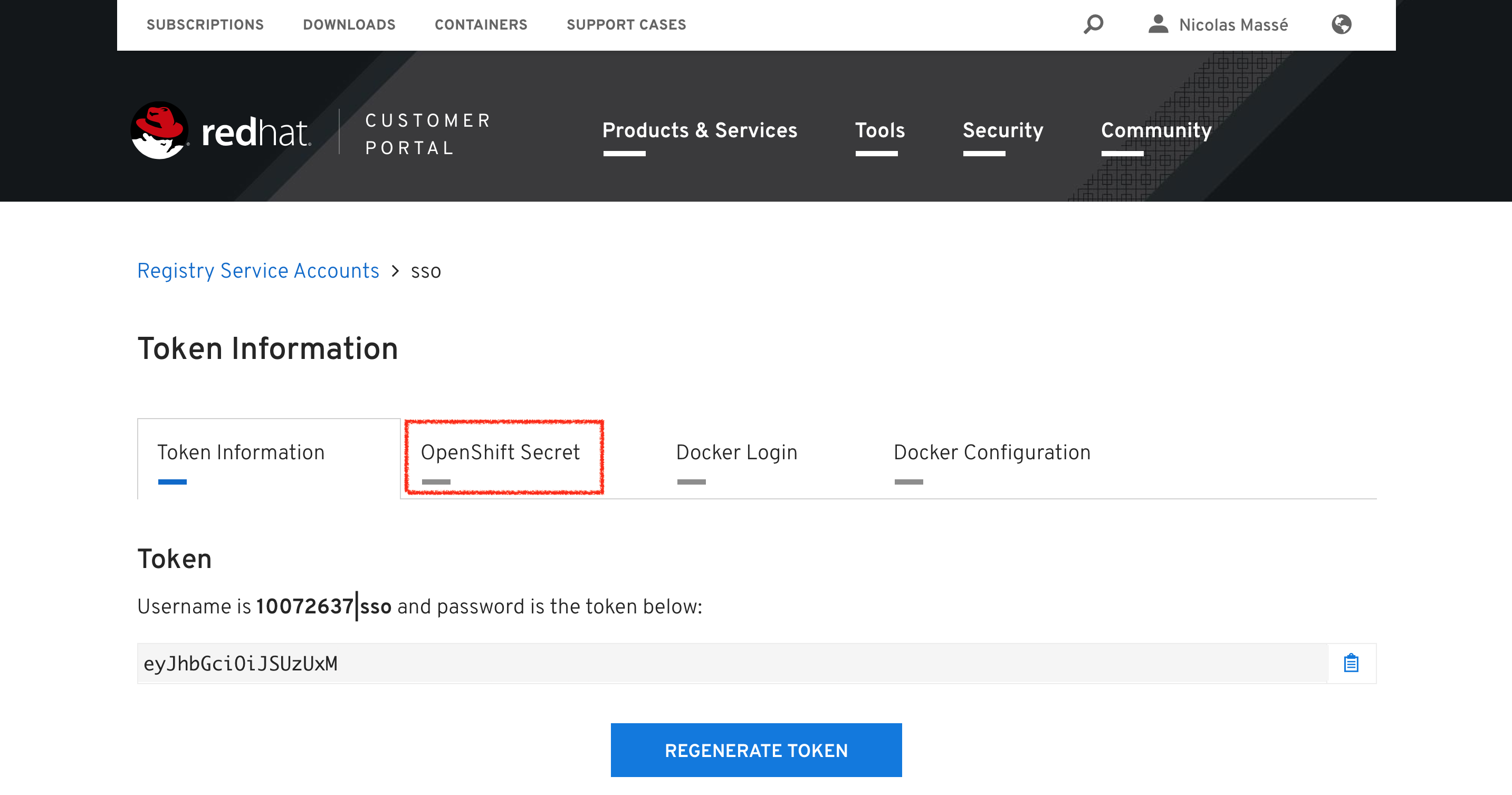
     Generating a token

    Click the "OpenShift Secret" tab and then "sso-secret.yaml" to download your token in a format OpenShift will understand. Save it somewhere convenient for later use.
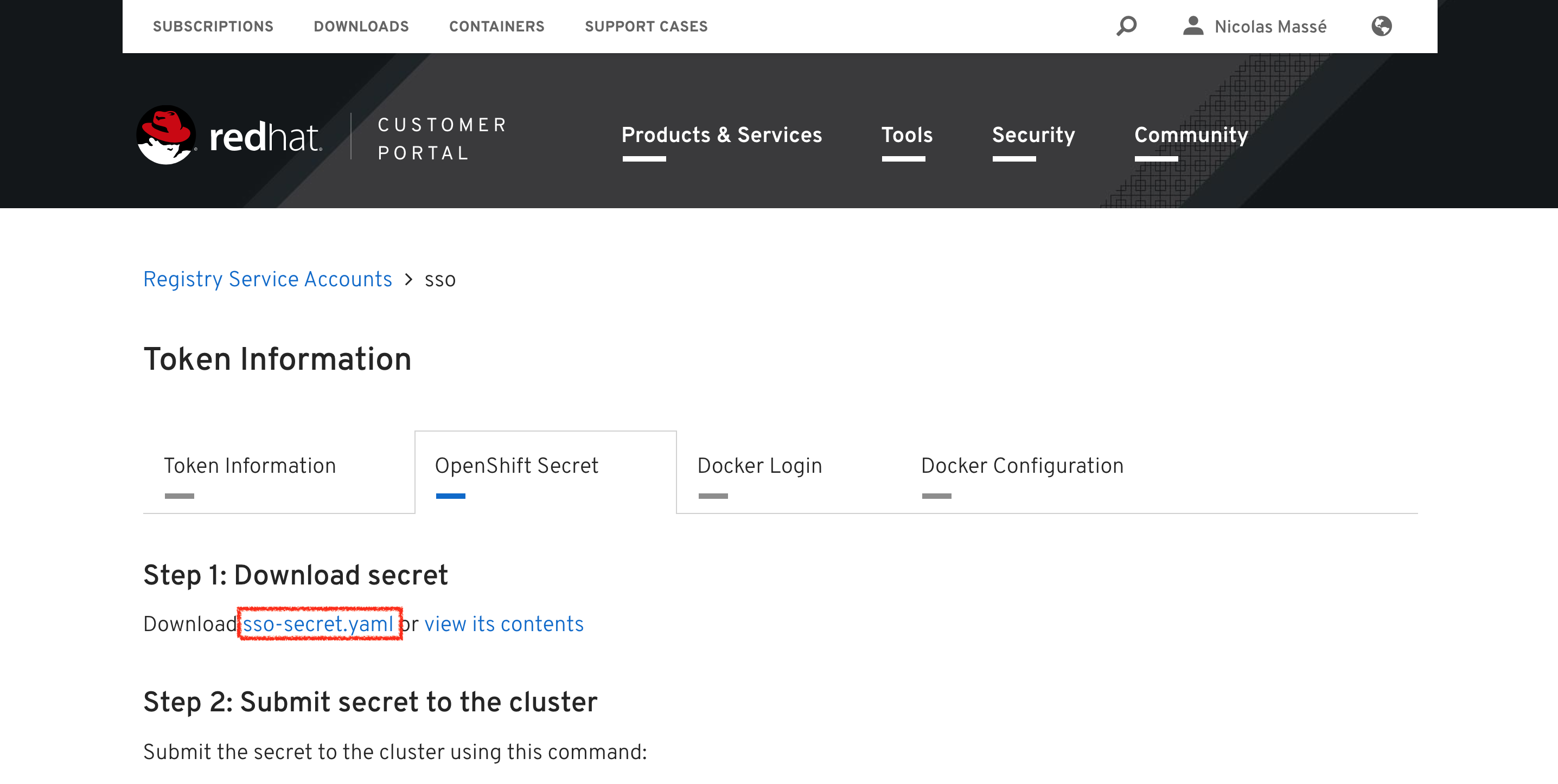
    Download your token

    Install Red Hat Single Sign-On

    To install Red Hat Single Sign-On, you will need an OpenShift instance. If your company has one, use it. If not, I would recommend using Red Hat Container Development Kit (CDK)/minishift. Minishift is an OpenShift installation targeted at developers that runs on your laptop. If you need to install CDK/minishift, see these instructions.

    Spin up a minishift instance:

    $ minishift start

    Create a new project for your Red Hat Single Sign-On deployment:

    $ oc new-project sso

    Inject the token you downloaded previously in your OpenShift project, as a secret:

    $ oc create -f ~/Downloads/*_sso-secret.yaml

    Find the name of your secret:

    $ oc get secret
    NAME                       TYPE                                  DATA      AGE
    10072637-sso-pull-secret   kubernetes.io/dockerconfigjson        1         3m

    If you named your token "sso" as suggested above, your secret should end with "-sso-pull-secret." In this example, my secret is named "10072637-sso-pull-secret."

    Link your token with the default service account so that any pod in this project can use it (do not forget to change "10072637-sso-pull-secret" to your token name):

    $ oc secrets link default 10072637-sso-pull-secret --for=pull

    And import the Red Hat Single Sign-On 7.3 image into your project:

    $ oc import-image redhat-sso73-openshift:1.0 --confirm --scheduled --from=registry.redhat.io/redhat-sso-7/sso73-openshift:1.0

    You can now deploy Red Hat Single Sign-On 7.3 as explained in the documentation.

    Are you eager to see Red Hat Single Sign-On live but you do not want to read the documentation? Here is a summary:

    $ oc create -f https://raw.githubusercontent.com/jboss-container-images/redhat-sso-7-openshift-image/sso73-dev/templates/sso73-x509-https.json
    $ oc policy add-role-to-user view system:serviceaccount:$(oc project -q):default
    $ oc new-app --template=sso73-x509-https -p SSO_ADMIN_USERNAME=admin -p SSO_ADMIN_PASSWORD=password -p IMAGE_STREAM_NAMESPACE=$(oc project -q)

    Wait a couple of minutes for minishift to pull the image and start the pod. You can supervise the deployment with the following command (press Ctrl-C to exit):

    $ oc get pods -w

    Once deployed, display the console URL using this command:

    $ oc get route sso -o jsonpath='http://{.spec.host}/auth/admin/'

    Open this URL in your web browser and log in with the username and password you provided during installation (admin/password, in this example).

    Congratulations; you just installed Red Hat Single Sign-On!

    Further reading

    To get the most value out of Red Hat Single Sign-On, see the Server Administration Guide and the Securing Applications and Services Guide.

    You might also wish to read Using a public certificate with Red Hat Single Sign-On/Keycloak.

    Happy testing!

    Last updated: August 1, 2023

    Recent Posts

    • A day in the life of an NVIDIA H100 on Red Hat OpenShift 5

    • Migrate BuildConfigs to builds for Red Hat OpenShift with one plug-in install

    • Run Red Hat Enterprise Linux CoreOS on NVIDIA BlueField DPUs

    • Agent harness engineering: Separating model capabilities from enforcement

    • What's new for developers in Red Hat Enterprise Linux 10.3 and 9.9

    Red Hat Developers logo

    Platforms

    • Red Hat AI
    • Red Hat Enterprise Linux
    • Red Hat OpenShift
    • Red Hat Ansible Automation Platform
    • See all products

    Build

    • Developer Sandbox
    • Developer tools
    • Interactive tutorials
    • API catalog

    Quicklinks

    • Learning resources
    • E-books
    • Cheat sheets
    • Blog
    • Events
    • Newsletter

    Communicate

    • About us
    • Contact sales
    • Find a partner
    • Report a website issue
    • Site status dashboard
    • Report a security problem

    Red Hat Developer

    Build here. Go anywhere.

    We serve the builders. The problem solvers who create careers with code.

    Join us if you’re a developer, software engineer, web designer, front-end designer, UX designer, computer scientist, architect, tester, product manager, project manager or team lead.

    Sign me up

    Red Hat legal and privacy links

    • About Red Hat
    • Jobs
    • Events
    • Locations
    • Contact Red Hat
    • Red Hat Blog
    • Inclusion at Red Hat
    • Cool Stuff Store
    • Red Hat Summit
    © 2026 Red Hat

    Red Hat legal and privacy links

    • Privacy statement
    • Terms of use
    • All policies and guidelines
    • Digital accessibility
    Ask AI