This blog is part of a series looking deeper at Envoy Proxy and Istio.io and how it enables a more elegant way to connect and manage microservices. Follow me @christianposta to stay up with these blog post releases. I think the flow for what I cover over the next series will be something like:
- What is Envoy Proxy, how does it work?
- How to implement some of the basic patterns with Envoy Proxy?
- How Istio Mesh fits into this picture?
- How Istio Mesh works, and how it enables higher-order functionality across clusters with Envoy?
- How Istio Mesh auth works?
Here’s the idea for the next couple of parts (will update the links as they’re published):
Part I - Circuit Breaking with Envoy Proxy
This first blog post introduces you to Envoy Proxy’s implementation of circuit breaking functionality. These demos are intentionally simple so that I can illustrate the patterns and usage individually. Please download the source code for this demo and follow along!
This demo is composed of a client and a service. The client is a Java http application that simulates making http calls to the “upstream” service (note, we’re using Envoys terminology here, and throughout this repo). The client is packaged in a Docker image named docker.io/ceposta/http-envoy-client:latest. Alongside the http-client Java application is an instance of Envoy Proxy. In this deployment model, Envoy is deployed as a sidecar alongside the service (the http client in this case). When the http-client makes outbound calls (to the “upstream” service), all the calls go through the Envoy Proxy sidecar.
The “upstream” service for these examples is httpbin.org. Httpbin.org allows us to easily simulate HTTP service behavior. It’s awesome, so check it out if you’ve not seen it.
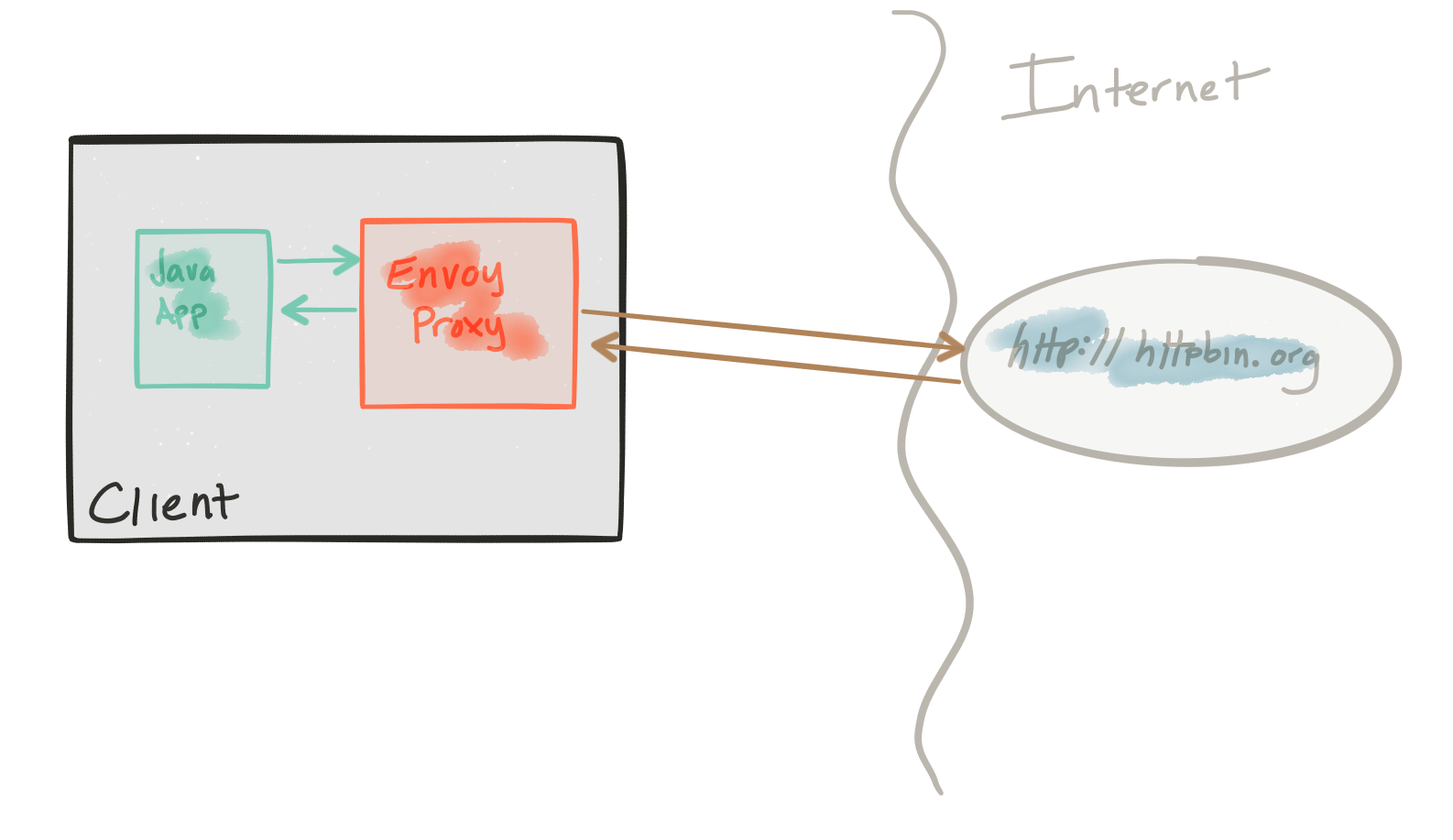
The circuit-breaker demo has its own envoy.json configuration file. I definitely recommend looking at the reference documentation for each section of the configuration file to help understand the full configuration. The good folks at datawire.io also put together a nice intro to Envoy and its configuration, which you should check out too.
Running the circuit-breaker demo
To run the circuit-breaker demo, familiarize yourself with the demo framework and then run:
./docker-run.sh -d circuit-breaker
The Envoy configuration for circuit breakers looks like this (see the full configuration here):
"circuit_breakers": {
  "default": {
    "max_connections": 1,
    "max_pending_requests": 1,
    "max_retries": 3
  }
}
This configuration allows us to:
- Limit the number of HTTP/1 connections that we will make to the upstream clusters, short-circuiting them if we go over.
- Limit the number of requests to be queued/waiting for connections to become available, short-circuiting them if we go over.
- Limit the number of total concurrent retries at any given time (assuming a retry policy is in place) effectively putting in place a retry quota.
Let’s look at each configuration. We’ll ignore the max retry settings now for two reasons:
- Our settings as they are don’t really make much sense; we cannot have 3 concurrent retries since we have only 1 HTTP connection allowed with 1 queued request.
- We don’t actually have any retry policies in place for this demo; we can see retries in action in the
retriesdemo.
In any event, the retries setting here allows us to avoid large retry storms – which in most cases can serve to compound problems when dealing with connectivity to all instances in a cluster. It’s an important setting that we’ll come back to with the retries demo.
max_connections
Let’s see what envoy does when too many threads in an application try to make too many concurrent connections to the upstream cluster.
Recall our circuit breaking settings for our upstream httbin cluster looks like this (see the full configuration here):
"circuit_breakers": {
  "default": {
    "max_connections": 1,
    "max_pending_requests": 1,
    "max_retries": 3
  }
}
If we look at the ./circuit-breaker/http-client.env settings file, we’ll see that initially, we’ll start by running a single thread, which creates a single connection, and makes five calls, and shuts down:
NUM_THREADS=1
DELAY_BETWEEN_CALLS=0
NUM_CALLS_PER_CLIENT=5
URL_UNDER_TEST=http://localhost:15001/get
MIX_RESPONSE_TIMES=false
Let’s verify this. Run the demo:
./docker-run.sh -d circuit-breaker
This sets up the application with its client libraries and sets up Envoy Proxy. We will send traffic directly to Envoy Proxy to handle circuit breaking for us. Let’s call our service:
docker exec -it client bash -c 'java -jar http-client.jar'
We should see output like this:
using num threads: 1
Starting pool-1-thread-1 with numCalls=5 delayBetweenCalls=0 url=http://localhost:15001/get mixedRespTimes=false
pool-1-thread-1: successes=[5], failures=[0], duration=[545ms]
We can see all five of our calls succeeded!
Let’s look at some of the metrics collected by Envoy Proxy:
./get-envoy-stats.sh
WOW! That’s a lot of metrics Envoy tracks for us! Let’s grep through that:
./get-envoy-stats.sh | grep cluster.httpbin_service
This will show the metrics for our configured upstream cluster named httpbin_service. Take a quick look through some of these statistics and look up their meaning in the Envoy documentation. The important ones to note are called out here:
cluster.httpbin_service.upstream_cx_http1_total: 1
cluster.httpbin_service.upstream_rq_total: 5
cluster.httpbin_service.upstream_rq_200: 5
cluster.httpbin_service.upstream_rq_2xx: 5
cluster.httpbin_service.upstream_rq_pending_overflow: 0
cluster.httpbin_service.upstream_rq_retry: 0
This tells us we had 1 http/1 connection, with 5 requests (total) and 5 of them ended in HTTP 2xx (and even 200). Great! But what happens if we try to use two concurrent connections?
First, let’s reset the statistics:
./reset-envoy-stats.sh
OK
Let’s invoke these calls with 2 threads:
docker exec -it client bash -c 'NUM_THREADS=2; java -jar http-client.jar'
We should see some output like this:
using num threads: 2
Starting pool-1-thread-1 with numCalls=5 delayBetweenCalls=0 url=http://localhost:15001/get mixedRespTimes=false
Starting pool-1-thread-2 with numCalls=5 delayBetweenCalls=0 url=http://localhost:15001/get mixedRespTimes=false
pool-1-thread-1: successes=[0], failures=[5], duration=[123ms]
pool-1-thread-2: successes=[5], failures=[0], duration=[513ms]
Whoa...one of our threads had 5 successes, but one of them didn’t! One thread had all 5 of its requests failed! Let’s take a look at the Envoy stats again:
./get-envoy-stats.sh | grep cluster.httpbin_service
Now our stats from above look like this:
cluster.httpbin_service.upstream_cx_http1_total: 1
cluster.httpbin_service.upstream_rq_total: 5
cluster.httpbin_service.upstream_rq_200: 5
cluster.httpbin_service.upstream_rq_2xx: 5
cluster.httpbin_service.upstream_rq_503: 5
cluster.httpbin_service.upstream_rq_5xx: 5
cluster.httpbin_service.upstream_rq_pending_overflow: 5
cluster.httpbin_service.upstream_rq_retry: 0
From this output, we can see that only one of our connections succeeded! We ended up with 5 requests that resulted in HTTP 200 and 5 requests that ended up with HTTP 503. We also see that upstream_rq_pending_overflow has been incremented to 5. That is our indication that the circuit breaker did its job here. It short-circuited any calls that didn’t match our configuration settings.
Note, we’ve set our max_connections setting to an artificially low number, 1in this case, to illustrate Envoy’s circuit breaking functionality. This is not a realistic setting but hopefully, serves to illustrate the point.
max_pending_requests
Let’s run some similar tests to exercise the max_pending_requests setting.
Recall our circuit breaking settings for our upstream httbin cluster looks like this (see the full configuration here):
"circuit_breakers": {
  "default": {
    "max_connections": 1,
    "max_pending_requests": 1,
    "max_retries": 3
  }
}
What we want to do is simulate multiple simultaneous requests happening on a single HTTP connection (since we’re only allowed max_connections of 1). We expect the requests to queue up, but Envoy should reject the queued up messages since we have a max_pending_requests set to 1. We want to set upper limits on our queue depths and not allow retry storms, rogue downstream requests, DoS, and bugs in our system to cascade.
Continuing from the previous section, let’s reset the Envoy stats:
./reset-envoy-stats.sh
OK
Let’s invoke the client with 1 thread (ie, 1 HTTP connection) but send our requests in parallel (in batches of 5 by default). We will also want to randomize the delays we get on sends so that things can queue up:
docker exec -it client bash -c 'NUM_THREADS=1 && PARALLEL_SENDS=true && MIX_RESPONSE_TIMES=true; java -jar http-client.jar'
We should see output similar to this:
using num threads: 1
Starting pool-1-thread-1 with numCalls=5 parallelSends=true delayBetweenCalls=0 url=http://localhost:15001/get mixedRespTimes=true
pool-2-thread-3: using delay of : 3
pool-2-thread-2: using delay of : 0
pool-2-thread-1: using delay of : 2
pool-2-thread-4: using delay of : 4
pool-2-thread-5: using delay of : 0
finished batch 0
pool-1-thread-1: successes=[1], failures=[4], duration=[4242ms]
Damn! four of our requests failed…let’s check the Envoy stats:
./get-envoy-stats.sh | grep cluster.httpbin_service | grep pending
Sure enough, we see that 4 of our requests were short-circuited:
cluster.httpbin_service.upstream_rq_pending_active: 0
cluster.httpbin_service.upstream_rq_pending_failure_eject: 0
cluster.httpbin_service.upstream_rq_pending_overflow: 4
cluster.httpbin_service.upstream_rq_pending_total: 1
What about when services go down completely?
We’ve seen what circuit breaking facilities Envoy has for short circuiting and bulkheading threads to clusters, but what if nodes in a cluster go down (or appear to go down) completely?
Envoy has settings for “outlier detection” which can detect when hosts in a cluster are not reliable and can eject them from the cluster rotation completely (for a period). One interesting phenomenon to understand is that by default, Envoy will eject hosts from the load balancing algorithms up to a certain point. Envoy’s load balancer algorithms will detect a panic threshold if too many (ie, > 50%) of the hosts have been deemed unhealthy and will just go back to load balancing against all of them. This panic threshold is configurable and to get circuit-breaking functionality that sheds load (for a period) to all hosts during a severe outage, you can configure the outlier detection settings. In our sample circuit breaker) envoy.json config you can see the following:
    "outlier_detection" : {
      "consecutive_5xx": 5,
      "max_ejection_percent": 100,
      "interval_ms": 3
    }
Let’s test this case and see what happens. First, reset the stats:
./reset-envoy-stats.sh
OK
Next, let’s call our client with a URL that will give us back HTTP 500 results. We’ll make 10 calls because our outlier detection will check for 5 consecutive 5xx responses, so we’ll want to do more that 5 calls.
docker exec -it client bash -c 'URL_UNDER_TEST=http://localhost:15001/status/500 && NUM_CALLS_PER_CLIENT=10; java -jar http-client.jar'
We should see a response like this where all the calls failed (as we expect: at least 5 of them would have gotten back HTTP 500):
using num threads: 1
Starting pool-1-thread-1 with numCalls=10 parallelSends=false delayBetweenCalls=0 url=http://localhost:15001/status/500 mixedRespTimes=false
pool-1-thread-1: successes=[0], failures=[10], duration=[929ms]
Let’s now check the Envoy stats to see what happened exactly:
./get-envoy-stats.sh | grep cluster.httpbin_service | grep outlier
cluster.httpbin_service.outlier_detection.ejections_active: 0
cluster.httpbin_service.outlier_detection.ejections_consecutive_5xx: 1
cluster.httpbin_service.outlier_detection.ejections_overflow: 0
cluster.httpbin_service.outlier_detection.ejections_success_rate: 0
cluster.httpbin_service.outlier_detection.ejections_total: 1
We can see we tripped the consecutive 5xx detection! We’ve also removed that host from our load-balancing group.
Series
Please stay tuned! Part II and III on timeouts/retries/tracing should be landing next week!
For a framework for building enterprise Java microservices visit WildFly Swarm and download the cheat sheet.
Last updated: February 11, 2024
