Redhat Developers  Logo
  • AI

    Get started with AI

    • Red Hat AI
      Accelerate the development and deployment of enterprise AI solutions.
    • AI learning hub
      Explore learning materials and tools, organized by task.
    • AI interactive demos
      Click through scenarios with Red Hat AI, including training LLMs and more.
    • AI/ML learning paths
      Expand your OpenShift AI knowledge using these learning resources.
    • AI quickstarts
      Focused AI use cases designed for fast deployment on Red Hat AI platforms.
    • No-cost AI training
      Foundational Red Hat AI training.

    Featured resources

    • OpenShift AI learning
    • Open source AI for developers
    • AI product application development
    • Open source-powered AI/ML for hybrid cloud
    • AI and Node.js cheat sheet

    Red Hat AI Factory with NVIDIA

    • Red Hat AI Factory with NVIDIA is a co-engineered, enterprise-grade AI solution for building, deploying, and managing AI at scale across hybrid cloud environments.
    • Explore the solution
  • Learn

    Self-guided

    • Documentation
      Find answers, get step-by-step guidance, and learn how to use Red Hat products.
    • Learning paths
      Explore curated walkthroughs for common development tasks.
    • Guided learning
      Receive custom learning paths powered by our AI assistant.
    • See all learning

    Hands-on

    • Developer Sandbox
      Spin up Red Hat's products and technologies without setup or configuration.
    • Interactive labs
      Learn by doing in these hands-on, browser-based experiences.
    • Interactive demos
      Click through product features in these guided tours.

    Browse by topic

    • AI/ML
    • Automation
    • Java
    • Kubernetes
    • Linux
    • See all topics

    Training & certifications

    • Courses and exams
    • Certifications
    • Skills assessments
    • Red Hat Academy
    • Learning subscription
    • Explore training
  • Build

    Get started

    • Red Hat build of Podman Desktop
      A downloadable, local development hub to experiment with our products and builds.
    • Developer Sandbox
      Spin up Red Hat's products and technologies without setup or configuration.

    Download products

    • Access product downloads to start building and testing right away.
    • Red Hat Enterprise Linux
    • Red Hat AI
    • Red Hat OpenShift
    • Red Hat Ansible Automation Platform
    • See all products

    Featured

    • Red Hat build of OpenJDK
    • Red Hat JBoss Enterprise Application Platform
    • Red Hat OpenShift Dev Spaces
    • Red Hat Developer Toolset

    References

    • E-books
    • Documentation
    • Cheat sheets
    • Architecture center
  • Community

    Get involved

    • Events
    • Live AI events
    • Red Hat Summit
    • Red Hat Accelerators
    • Community discussions

    Follow along

    • Articles & blogs
    • Developer newsletter
    • Videos
    • Github

    Get help

    • Customer service
    • Customer support
    • Regional contacts
    • Find a partner

    Join the Red Hat Developer program

    • Download Red Hat products and project builds, access support documentation, learning content, and more.
    • Explore the benefits

RHDH Local — Test & Develop Locally With Red Hat Developer Hub Using Containers

March 31, 2025
Ben Wilcock
Related topics:
Developer productivityDeveloper toolsDevOpsDevSecOps
Related products:
Red Hat Developer Hub

    For developers and platform engineers using Backstage, the ability to test configurations, plugins, and templates in an isolated environment is invaluable. That’s where RHDH Local comes in—a lightweight, self-contained way to run Red Hat Developer Hub (RHDH) on your local machine using containers and without a full Kubernetes setup.

    Whether you need to validate the configuration of software catalogs, write and test TechDocs, or build RHDH dynamic plugins, RHDH Local simplifies the process, allowing you to iterate quickly and troubleshoot locally before deploying changes to a production system.

    Let’s dive into what makes RHDH Local a valuable development tool for platform engineers and how they can get started.


    Why Use RHDH Local?

    1. Test Without Kubernetes
      Running a full Backstage-based developer portal typically requires Kubernetes, but not everyone wants to spin up a cluster just to experiment. RHDH Local removes that barrier—just install Docker or Podman, and you’re good to go.
       
    2. Experiment with Configurations & Plugins
      Need to tweak a homepage layout, test a new dynamic plugin, or configure GitHub integrations? RHDH Local provides a safe playground to validate these changes before rolling them out to a larger team.
       
    3. Simple, Fast, and Disposable
      Because it runs in a containerized environment, you can spin up RHDH Local in seconds and tear it down just as easily when you're done—without cluttering your system.
       
    4. Debugging in a Controlled Setup
      For developers working on custom Backstage plugins, RHDH Local offers a structured way to attach a debugger and troubleshoot issues without interfering with a production environment.
       
    5. Iterate Quickly On Your Dev Portal Content
      When writing and testing TechDocs, Templates, or Catalog items, RHDH Local offers a fast and simple solution that lets you work quickly and retain full control over your setup and your database.
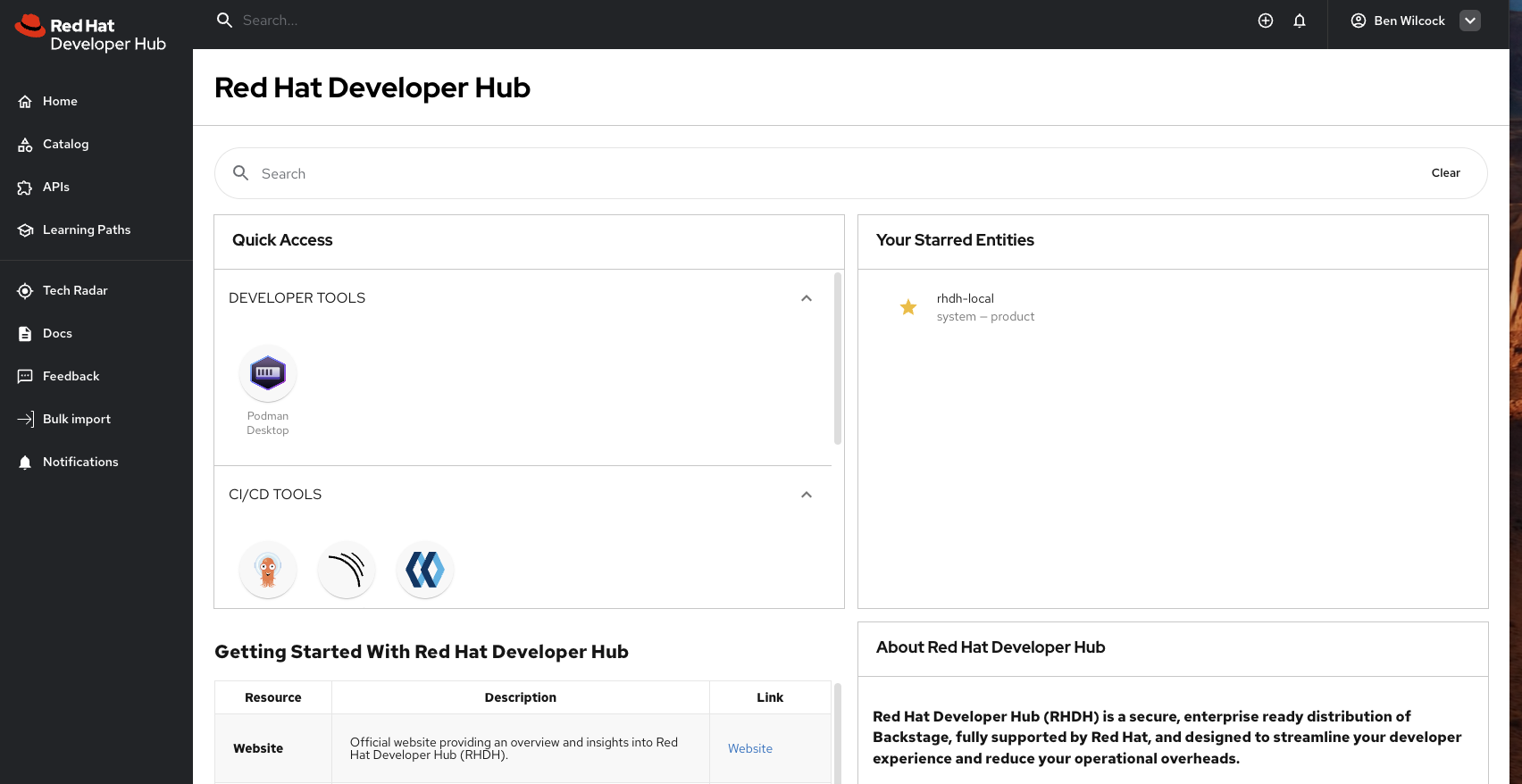
    RHDH Local running in a browser and displaying a lightly modified home page view.
    RHDH Local running in a browser and displaying a lightly modified home page view.

    What You Need to Get Started

    • x86_64 (amd64) PC (ARM support is coming soon)
    • Podman or Docker installed
    • Internet connection (to access the code and container images)
    • git (for cloning the RHDH Local code repository)

    Setting Up RHDH Local

    Clone the repository

    git clone https://github.com/redhat-developer/rhdh-local.git
    cd rhdh-local

    Prepare your environment

    cp env.sample .env


    Most default settings in the copied .env file should work without requiring you to modify them.

    The RHDH_IMAGE used by default in the .env file requires an AMD64 based CPU to function. However, the community nightly image (quay.io/rhdh-community/rhdh:next) supports ARM64 and can be used as an alternative on Apple M* based systems.

    Start RHDH Local Using Podman

    podman compose up -d

    Start RHDH Local Using Docker

    docker compose up -d

    That's it! If you use the defaults you can now access RHDH Local from your browser at http://localhost:7007 and start your testing.


    Modifying Your Configuration

    Updating app-config.local.yaml

    To apply any configuration changes you make, restart the RHDH container:

    podman compose stop rhdh && podman-compose start rhdh

    Or for Docker:

    docker compose restart rhdh

    Testing Local Dynamic Plugins

    To load a new dynamic plugin from a local directory:

    1. Place the dynamic plugin in the local-plugins/ directory.
      To create a dynamic plugin out of the regular Backstage plugin, run npx @janus-idp/cli package export-dynamic-plugin inside the plugin’s source code. The dynamic plugin package will be generated in the dist-dynamic directory.
       
    2. Update configs/dynamic-plugins.yaml
      Enable the plugin and add any additional configuration that you need.

    Then you must run:

    podman compose run install-dynamic-plugins
    podman compose stop rhdh && podman-compose start rhdh

    Or for Docker:

    docker compose run install-dynamic-plugins
    docker compose restart rhdh

    Final Thoughts

    RHDH Local is a powerful tool for developers and platform engineers looking to test and refine their Backstage-based developer portals in a fast, lightweight, and disposable environment. While it’s not a replacement for a full RHDH deployment, it’s an invaluable resource for local development and testing.

    RHDH-Local is a Developer Preview. 🚀 Try it today and let us know what you think. Contributions and feedback are always welcome!

    👉 GitHub Repository

    Last updated: October 22, 2025
    Disclaimer: Please note the content in this blog post has not been thoroughly reviewed by the Red Hat Developer editorial team. Any opinions expressed in this post are the author's own and do not necessarily reflect the policies or positions of Red Hat.

    Recent Posts

    • Red Hat Hardened Images: Top 5 benefits for software developers

    • How EvalHub manages two-layer Kubernetes control planes

    • Tekton joins the CNCF as an incubating project

    • Federated identity across the hybrid cloud using zero trust workload identity manager

    • Confidential virtual machine storage attack scenarios

    Red Hat Developers logo LinkedIn YouTube Twitter Facebook

    Platforms

    • Red Hat AI
    • Red Hat Enterprise Linux
    • Red Hat OpenShift
    • Red Hat Ansible Automation Platform
    • See all products

    Build

    • Developer Sandbox
    • Developer tools
    • Interactive tutorials
    • API catalog

    Quicklinks

    • Learning resources
    • E-books
    • Cheat sheets
    • Blog
    • Events
    • Newsletter

    Communicate

    • About us
    • Contact sales
    • Find a partner
    • Report a website issue
    • Site status dashboard
    • Report a security problem

    RED HAT DEVELOPER

    Build here. Go anywhere.

    We serve the builders. The problem solvers who create careers with code.

    Join us if you’re a developer, software engineer, web designer, front-end designer, UX designer, computer scientist, architect, tester, product manager, project manager or team lead.

    Sign me up

    Red Hat legal and privacy links

    • About Red Hat
    • Jobs
    • Events
    • Locations
    • Contact Red Hat
    • Red Hat Blog
    • Inclusion at Red Hat
    • Cool Stuff Store
    • Red Hat Summit
    © 2026 Red Hat

    Red Hat legal and privacy links

    • Privacy statement
    • Terms of use
    • All policies and guidelines
    • Digital accessibility

    Chat Support

    Please log in with your Red Hat account to access chat support.