Open Data Hub (ODH) is a blueprint for building an AI-as-a-service platform on Red Hat's Kubernetes-based OpenShift 4.x. Version 0.6 of Open Data Hub comes with significant changes to the overall architecture as well as component updates and additions. In this article, we explore these changes.
From Ansible Operator to Kustomize
If you follow the Open Data Hub project closely, you might be aware that we have been working on a major design change for a few weeks now. Since we started working closer with the Kubeflow community to get Kubeflow running on OpenShift, we decided to leverage Kubeflow as the Open Data Hub upstream and adopt its deployment tools—namely KFdef manifests and Kustomize—for deployment manifest customization.
We still believe Ansible Operator provides a great framework for building Operators, but at the same time, we believe we need to be close to our upstream (Kubeflow), which is why it makes perfect sense to align with the project on the deployment and lifecycle management front. For this purpose, we analyzed all of our components and started to rework them from Ansible roles into a Kustomize-compatible structure.
You can find the new manifests in the odh-manifest repository. It closely follows the structure of the Kubeflow manifests repository to make sure that the projects are compatible.
Updated components
As part of this rewrite, some of the components were updated as well. We decided to depend on OpenShift 4x in the future starting with version 0.6.0. This decision allowed us to fully take advantage of the Operator Lifecycle Manager (OLM) and avoid duplicating the maintenance burdens other teams already undergo by providing their projects in the OLM Catalog.
From a technical perspective, this means that we do not hold deployment manifests for all of the components we deploy and manage, but rather we deploy the Operators through the OLM via a subscription and only instruct the Operator by specific custom resource. The components deployed via OLM are Strimzi, Prometheus, and Grafana.
Let's take a look at the other components.
Spark
Another component that received an update is the Radanalytics.io Spark Operator. We now use SparkCluster custom resources instead of ConfigMaps and we updated our Spark dependencies to Spark 2.4.5.
Argo
We originally wanted to use Argo directly through the Kubeflow project, but Kubeflow ships Argo 2.3, which is too old for Open Data Hub users. Since we had to convert the component to Kustomize anyway we decided to also update it to the latest stable version, so ODH now provides Argo 2.7.
JupyterHub
JupyterHub changes are coming in the form of updates to the library JupyterHub Singleuser Profiles, which we use for customizing Jupyter server deployments and for our integrations between JupyterHub and other services like Spark. These changes are mainly related to refactoring some of the configuration structures to be more Kubernetes-native and improving our integration with the Spark Operator.
Superset
The list of updated components above does not include Superset, but you do not need to worry—Superset is still part of Open Data Hub. The deployment simply did not change and was converted into Kustomize.
AI Library
The last not mentioned component is the AI Library. You can see it in the repository, but we did not officially include it in the 0.6 release since we were not able to get Seldon in, which is a dependency of this library. We will make sure that both AI Library and Seldon are part of the next release.
Airflow added to Open Data Hub
We have been hearing requests for Airflow in Open Data Hub for a long time. Since we already have a workflow management system (Argo) available in ODH we wanted to make sure that we are not simply duplicating the components. It turns out that many Open Data Hub users are also Airflow users and having Airflow deployed by ODH would add a lot of value for them.
Our team investigated options for adding Airflow among Open Data Hub's components and decided to go with the Airflow Operator. We also provide an example Airflow cluster definition deploying Airflow with Celery that users can easily enable and try out.
Installing Open Data Hub 0.6
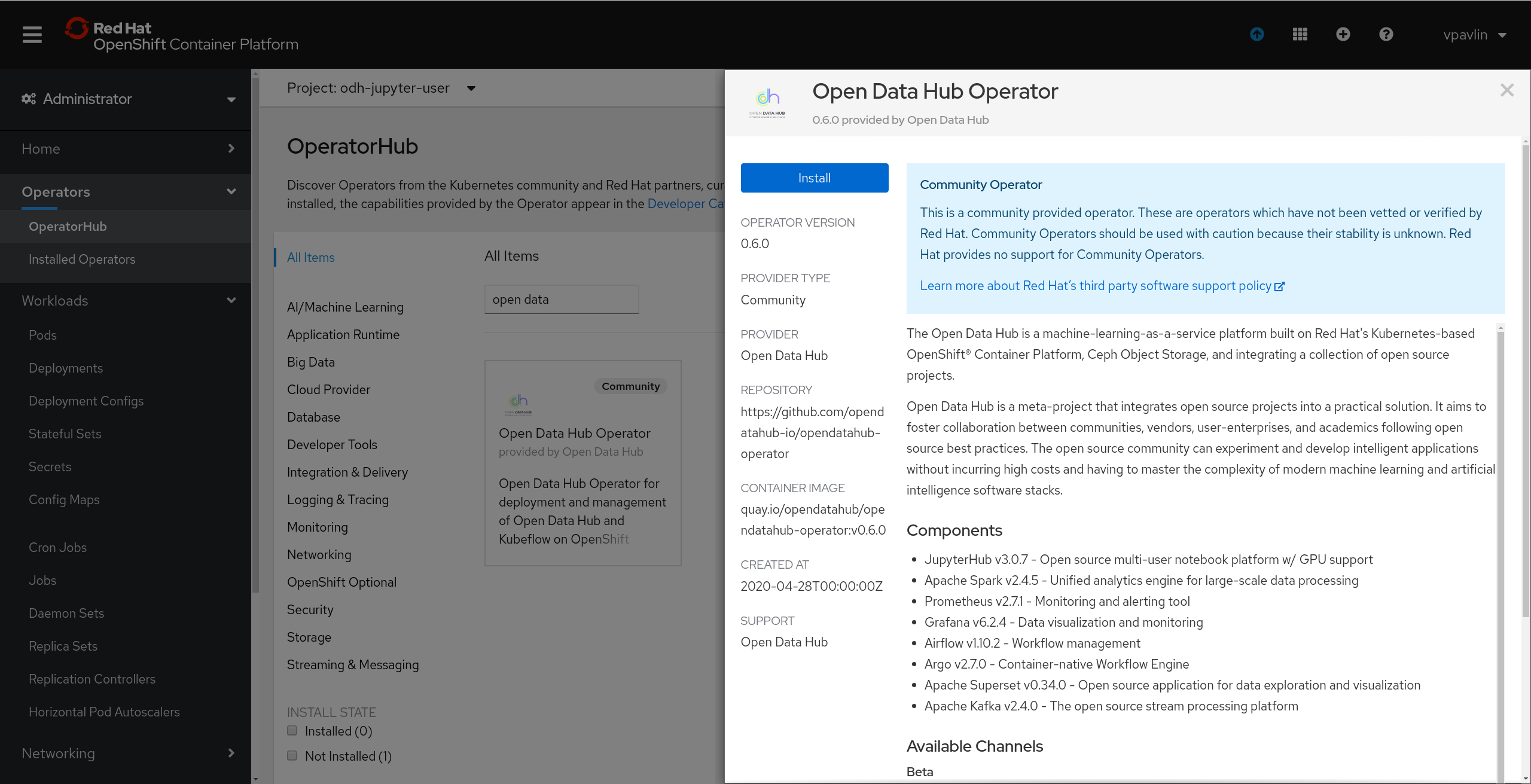
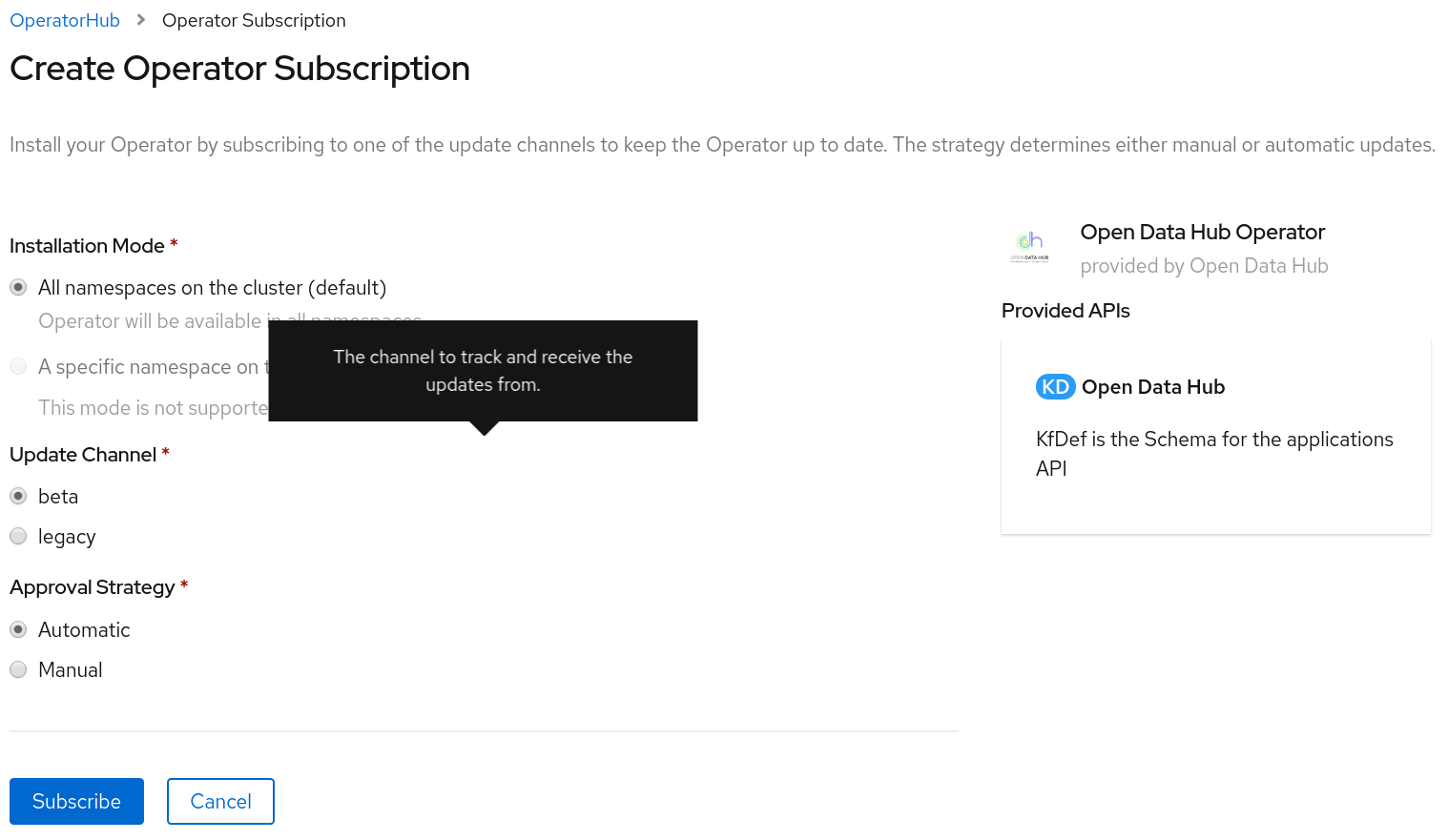
As with all of the previous versions of Open Data Hub, we care deeply about the user experience during installation. That’s why we restructured the Operator Catalog entry (Figure 1) to provide two channels—beta and legacy (Figure 2).
The beta channel
The beta channel provides new versions of Open Data Hub starting with ODH 0.6.0. The custom resource, now based on KFDef, has changed significantly along with the implementation, so don’t be surprised by the new example.
The legacy channel
The legacy channel still provides an ODH 0.5.x option. At the moment of publishing, it is 0.5.1, but we will do our best to keep bug fixes flowing into version 0.5 as we know that some users need to stay on that version for the time since 0.6 only works on OCP 4. We will not add new features or components to ODH 0.5, though.
Kubeflow on OpenShift
One important feature to mention is that since we use the same tooling as Kubeflow, you can use Open Data Hub Operator 0.6 to deploy Kubeflow on OpenShift. The operator only supports KFDef v1, which is newer than what Kubeflow 0.7 contains, so we prepared an updated custom resource for you in our Kubeflow manifests repository.
It is not possible to deploy and use Kubeflow and Open Data Hub together at the moment but this feature will be available in upcoming releases.
Community
This part does not change a bit—we love to get your feedback. We completely understand that ODH 0.6 comes with significant changes, and it is ever more important for us to know if you hit any issues or have any suggestions.
Since we adopted Kubeflow as our upstream and that community lives on GitHub, we are moving there too. We started our planning for future sprints using GitHub Projects and we will iteratively move most of the sources and documentation to GitHub as well, so please bear with us in case the project feels a bit chaotic regarding links and pointers—we are working on it.
In any case, do not hesitate to join our community meetings, mailing list, or simply contact us via GitHub issues.
Last updated: June 20, 2023
