Redhat Developers  Logo
  • AI

    Get started with AI

    • Red Hat AI
      Accelerate the development and deployment of enterprise AI solutions.
    • AI learning hub
      Explore learning materials and tools, organized by task.
    • AI interactive demos
      Click through scenarios with Red Hat AI, including training LLMs and more.
    • AI/ML learning paths
      Expand your OpenShift AI knowledge using these learning resources.
    • AI quickstarts
      Focused AI use cases designed for fast deployment on Red Hat AI platforms.
    • No-cost AI training
      Foundational Red Hat AI training.

    Featured resources

    • OpenShift AI learning
    • Open source AI for developers
    • AI product application development
    • Open source-powered AI/ML for hybrid cloud
    • AI and Node.js cheat sheet

    Red Hat AI Factory with NVIDIA

    • Red Hat AI Factory with NVIDIA is a co-engineered, enterprise-grade AI solution for building, deploying, and managing AI at scale across hybrid cloud environments.
    • Explore the solution
  • Learn

    Self-guided

    • Documentation
      Find answers, get step-by-step guidance, and learn how to use Red Hat products.
    • Learning paths
      Explore curated walkthroughs for common development tasks.
    • Guided learning
      Receive custom learning paths powered by our AI assistant.
    • See all learning

    Hands-on

    • Developer Sandbox
      Spin up Red Hat's products and technologies without setup or configuration.
    • Interactive labs
      Learn by doing in these hands-on, browser-based experiences.
    • Interactive demos
      Click through product features in these guided tours.

    Browse by topic

    • AI/ML
    • Automation
    • Java
    • Kubernetes
    • Linux
    • See all topics

    Training & certifications

    • Courses and exams
    • Certifications
    • Skills assessments
    • Red Hat Academy
    • Learning subscription
    • Explore training
  • Build

    Get started

    • Red Hat build of Podman Desktop
      A downloadable, local development hub to experiment with our products and builds.
    • Developer Sandbox
      Spin up Red Hat's products and technologies without setup or configuration.

    Download products

    • Access product downloads to start building and testing right away.
    • Red Hat Enterprise Linux
    • Red Hat AI
    • Red Hat OpenShift
    • Red Hat Ansible Automation Platform
    • See all products

    Featured

    • Red Hat build of OpenJDK
    • Red Hat JBoss Enterprise Application Platform
    • Red Hat OpenShift Dev Spaces
    • Red Hat Developer Toolset

    References

    • E-books
    • Documentation
    • Cheat sheets
    • Architecture center
  • Community

    Get involved

    • Events
    • Live AI events
    • Red Hat Summit
    • Red Hat Accelerators
    • Community discussions

    Follow along

    • Articles & blogs
    • Developer newsletter
    • Videos
    • Github

    Get help

    • Customer service
    • Customer support
    • Regional contacts
    • Find a partner

    Join the Red Hat Developer program

    • Download Red Hat products and project builds, access support documentation, learning content, and more.
    • Explore the benefits

OpenShift 4.4: Finding components in the Topology view

April 30, 2020
Veethika Mishra
Related topics:
ContainersDevOpsKubernetes

    Since its introduction, the Topology view in the Red Hat OpenShift web console's Developer perspective has come a long way in creatively empowering developers. It helps them break away from the limitations of text prompts, and opens a whole new world of visual-interaction-led operations. But the Topology view is not even halfway through the process in its pursuit of bringing an excellent development experience to the table.

    Let's take a look at the new find feature.

    Find feature

    The new find feature in Red Hat OpenShift Container Platform 4.4 increases the discoverability of a component inside of a developer’s application. You can use this feature to surface the relevant component or groups by their name. This feature serves as the primary effort toward improving the Topology view to allow making fixes and enhancements more efficiently, per the feedback from OpenShift users. This feature also counts toward equipping the Topology graph view to deal with a larger canvas with a higher number of resources.

    Using find

    When looking for a component or group by name, users can type the character string in the text input field of the find component. If a match is found, it is surfaced on the graph view with a highlight and a higher opacity compared to the non-matches. The non-matches are still shown with subdued opacity on the graph to retain the context in which the component exists, without allowing it to overshadow the matches, as shown in Figure 1.
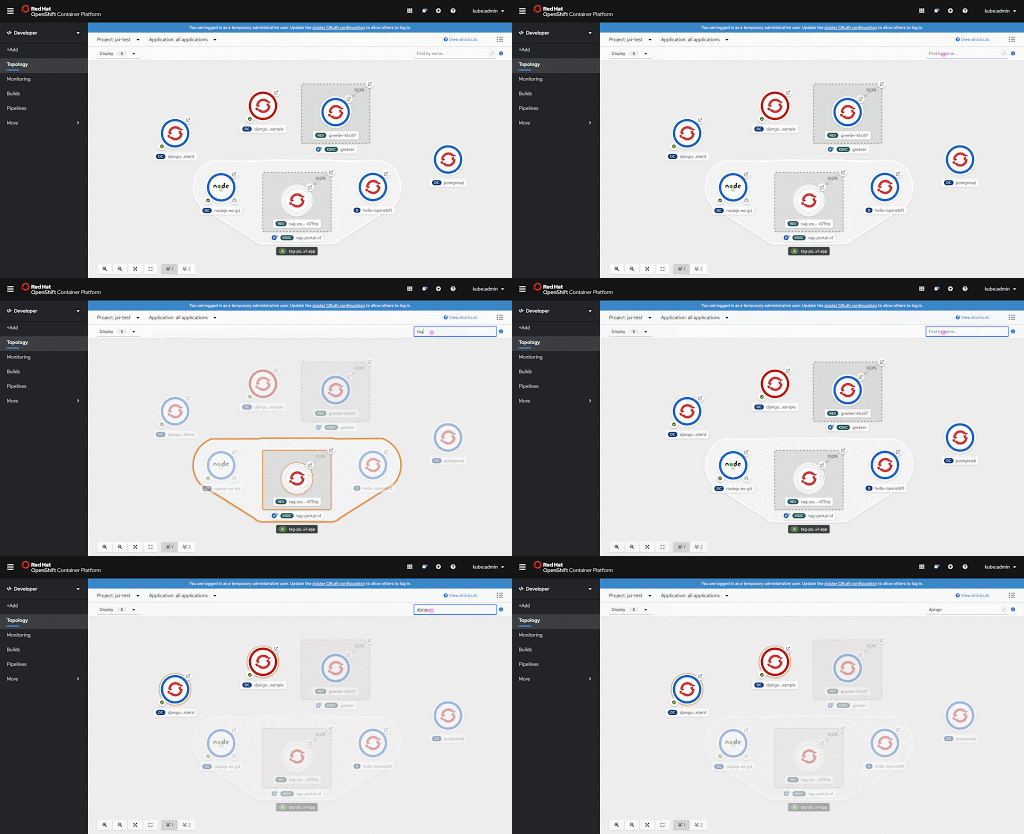
    OpenShift Topology view finding components
    Figure 1: Finding components in the Topology view.">

    Viewing matches beyond the visible area

    It is possible for matches to be outside of the visible area. We added a trigger to notify them of this possibility, along with a shortcut action button to fit the entire project in the view, as shown in Figure 2.
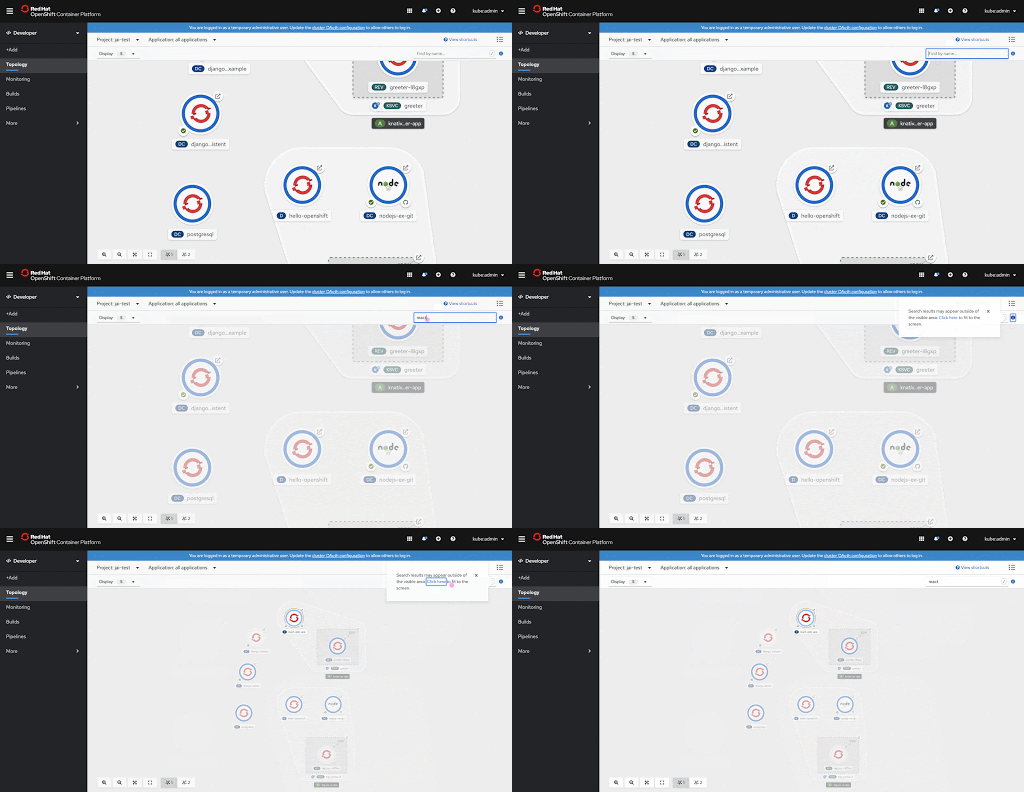
    OpenShift showing find matches outside of the visible area
    Figure 2: Viewing find matches outside of the visible area.">

    The find feature gets us a step closer to handling scalability. In future releases, we have grand plans for the Topology view.

    Ready to get started?

    Try OpenShift today.

    Provide your feedback

    Keep an eye out for additional options to help improve scalability in the future! Let us help you, share your thoughts here and we’ll use that as input during our next round of Topology designs. Also, join our OpenShift Developer Experience Google Group to participate in discussions and learn about our Office Hours session, where you can collaborate with us and provide feedback.

    Learn more

    If you’re interested in learning more about application development with OpenShift, learn more from Application development on OpenShift.

    Last updated: June 29, 2020

    Recent Posts

    • MCP servers vs. skills: Choosing the right context for your AI

    • How to route external and local LLMs with Models-as-a-Service

    • Protect data offloaded to GPU-accelerated environments with OpenShift sandboxed containers

    • Case study: Measuring energy efficiency on the x64 platform

    • How to prevent AI inference stack silent failures

    Red Hat Developers logo LinkedIn YouTube Twitter Facebook

    Platforms

    • Red Hat AI
    • Red Hat Enterprise Linux
    • Red Hat OpenShift
    • Red Hat Ansible Automation Platform
    • See all products

    Build

    • Developer Sandbox
    • Developer tools
    • Interactive tutorials
    • API catalog

    Quicklinks

    • Learning resources
    • E-books
    • Cheat sheets
    • Blog
    • Events
    • Newsletter

    Communicate

    • About us
    • Contact sales
    • Find a partner
    • Report a website issue
    • Site status dashboard
    • Report a security problem

    RED HAT DEVELOPER

    Build here. Go anywhere.

    We serve the builders. The problem solvers who create careers with code.

    Join us if you’re a developer, software engineer, web designer, front-end designer, UX designer, computer scientist, architect, tester, product manager, project manager or team lead.

    Sign me up

    Red Hat legal and privacy links

    • About Red Hat
    • Jobs
    • Events
    • Locations
    • Contact Red Hat
    • Red Hat Blog
    • Inclusion at Red Hat
    • Cool Stuff Store
    • Red Hat Summit
    © 2026 Red Hat

    Red Hat legal and privacy links

    • Privacy statement
    • Terms of use
    • All policies and guidelines
    • Digital accessibility

    Chat Support

    Please log in with your Red Hat account to access chat support.