Recently I wrote about decoupling infrastructure code from microservices. I found that Apache Camel and Debezium provided the middleware I needed for that project, with minimal coding on my end. After my successful experiment, I wondered if it would be possible to orchestrate two or more similarly decoupled microservices into a new service–and could I do it without writing any code at all? I decided to find out.
This article is a quick dive into orchestrating microservices without writing any code. We will use Syndesis (an open source integration platform) as our orchestration platform. Note that the examples assume that you are familiar with Debezium and Kafka.
About Syndesis
Syndesis is an open source integration platform that can connect to any service you use. It targets citizen integrators, who are usually business-domain experts who want to quickly combine existing data sources into new microservices without writing any code. These users have valuable business expertise, and a microservices architecture provides the ideal platform for transforming their knowledge into business services. What's needed is an integration platform to connect their business expertise to the technology back end.
Note that Syndesis is the open source project for Red Hat Fuse Online. Fuse Online runs on Red Hat OpenShift Online, Red Hat OpenShift Dedicated, and Red Hat OpenShift Container Platform.
Microservices orchestration with Syndesis
Our goal is to integrate two or more microservices to create a new notification service for a game-store platform. Using Syndesis as our integrated platform-as-a-service (iPaaS) lets us orchestrate existing microservices without writing any code. We assume a microservices architecture where Debezium and Kafka have already been implemented to decouple infrastructure code from the microservices, following an approach similar to the one demonstrated in my previous article.
Our game store has an established set of microservices running different parts of the business. For this project, we're interested in the GamePrice and UserPreference services. GamePrice provides the price of each game in the store. UserPreference is an AI engine that matches users with games they will like. Each microservice exposes an API that we can view in its OpenAPI documentation.
The game store occasionally uses the GamePrice service for product promotions and giveaways. Now we want to integrate GamePrice with UserPreference to create a new microservice for email alerts. The service will alert subscribers when a selected game is offered for free. Our integration platform, Syndesis, integrated with a Debezium connector, makes it easy to capture changes in the GamePrice domain. It will also automatically generate the integration logic connecting our existing microservices, and it will send a personalized email alert to interested users' (UserPreference domain). Kafka will be the messaging infrastructure where Debezium produces change data events. We won't need to write any code to get our new notification system up and running.
Step 1: Configure microservices endpoints
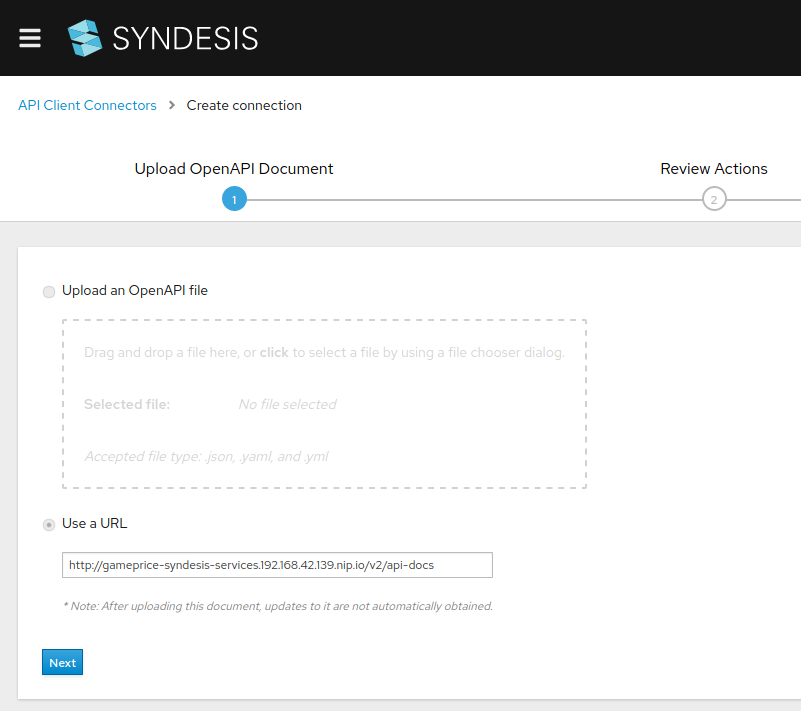
To start, we need to configure Syndesis to use the GamePrice and UserPreference APIs. We do that by providing their OpenAPI endpoints, as shown in Figure 1. (Note that this feature is provided by Apicurio.)
Step 2: Capture data changes in the database
Next, we need to capture changes to price data in the database. We can create event streams to capture such changes. We'll use a Syndesis Debezium connector pointing to a Kafka broker, which we assume has been previously configured. Kafka is the infrastructure used by Debezium to produce change data events. By selecting the broker we will tell Syndesis which events we need to consume. Figure 2 shows this configuration.

Step 3: Configure the email service
Finally, we configure the email service. For this example, I chose to use an SMTP service (as shown in Figure 3), but you could use virtually any notification type or service.

Building the integration pipeline
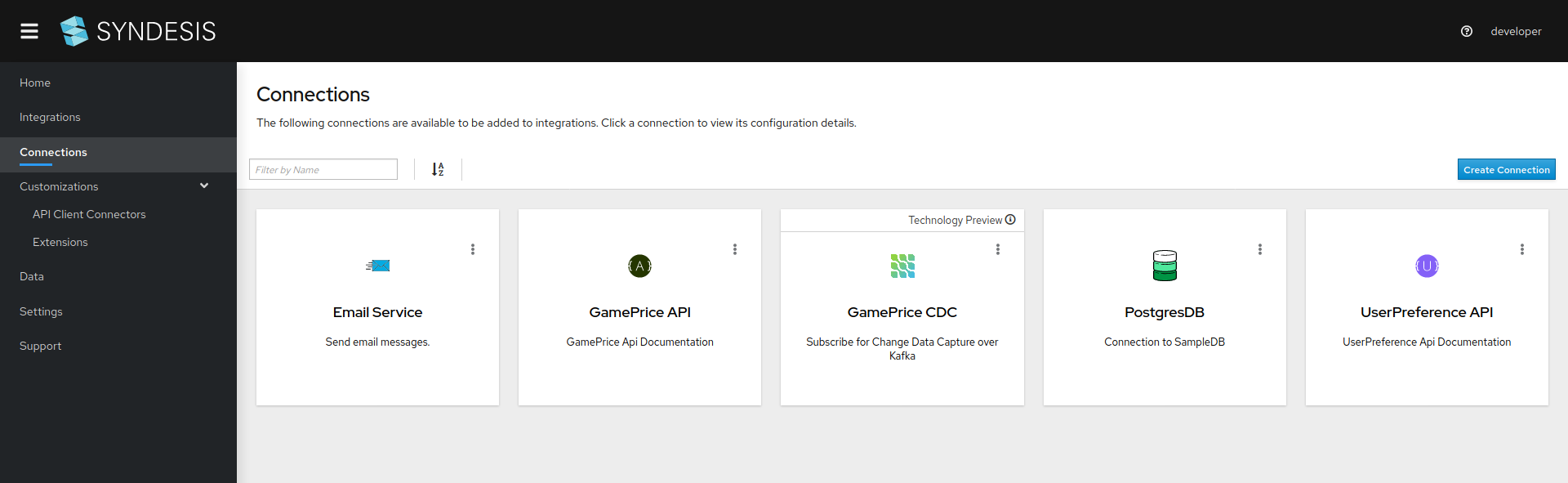
We've configured all the microservices we need for our orchestrated email alerts. Our next step will be to ingrate the GamePrice, UserPreference, GamePrice CDC, and Email services into a new pipeline. These services are shown in Figure 4.
Our completed integration pipeline will look like the diagram in Figure 5.

Let's get started!
Step 1: Create the integration pipeline
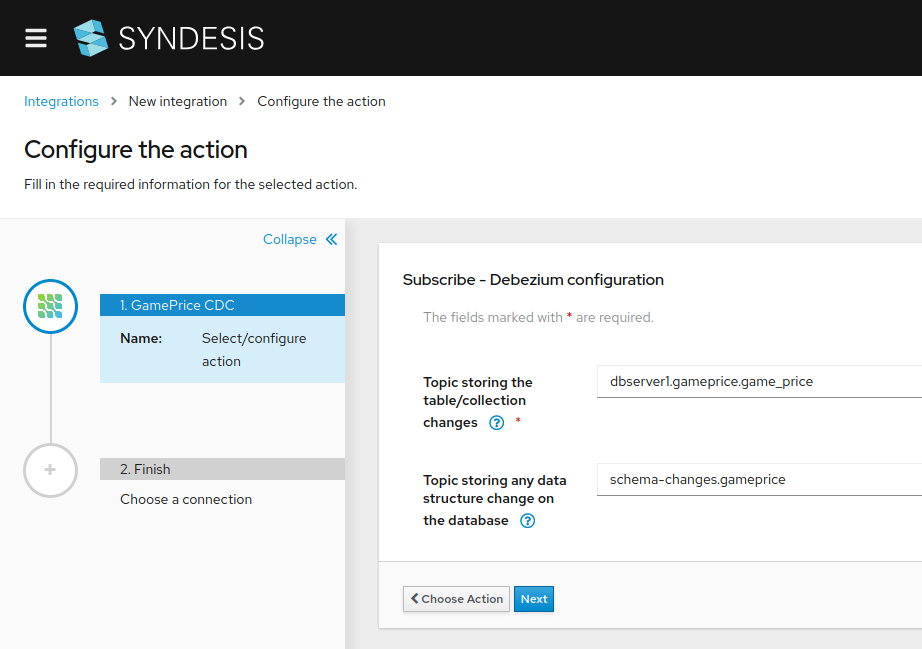
We'll start by selecting the Debezium connector as a source. We select the Kafka topic we need to listen to and a special Kafka topic as shown in Figure 6. Syndesis will use the events produced in the first topic in order to pick the GamePricedrop. It will use the second topic to analyze the event data structure and allow the integrator to map that data to each step in the integration.
Step 2: Add steps and connections
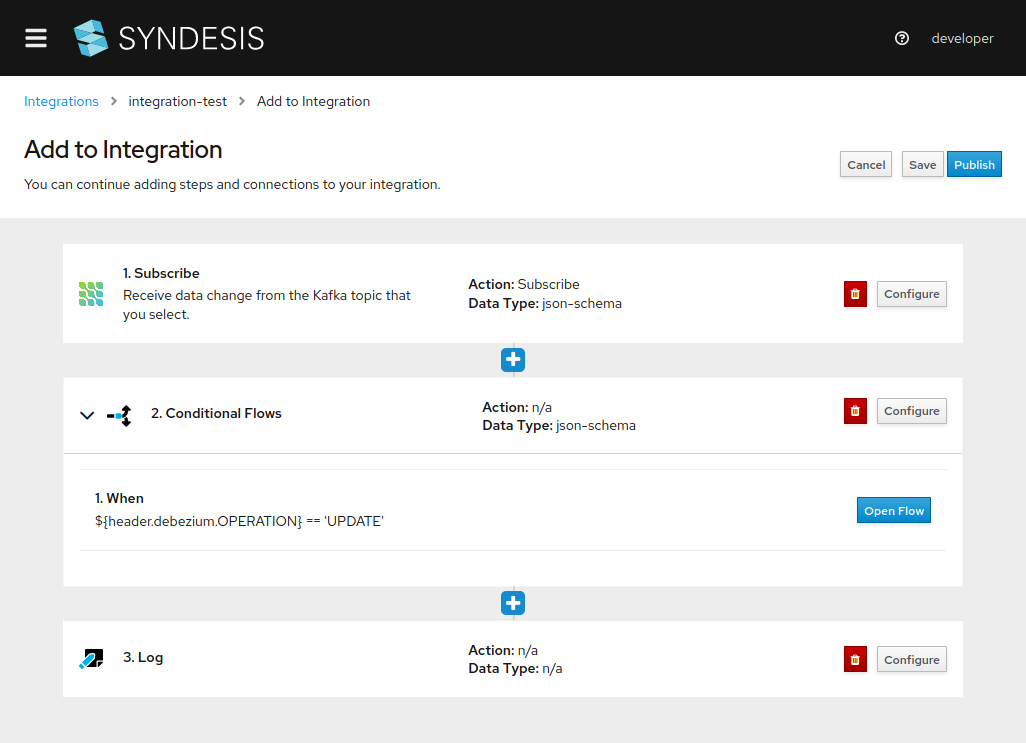
Next, we begin filling in our pipeline as shown in Figure 7. As a destination, we use a conditional flow that filters for price updates. Notice that you can add other conditions based on the complexity of your integration. We'll also add a logging action to trace the results of each execution.
Step 3: Retrieve user preferences
Next, we call the UserPreference API to retrieve the list of users potentially interested in a particular offer as shown in Figure 8. We'll use this list to send emails informing them of promotions and giveaways.
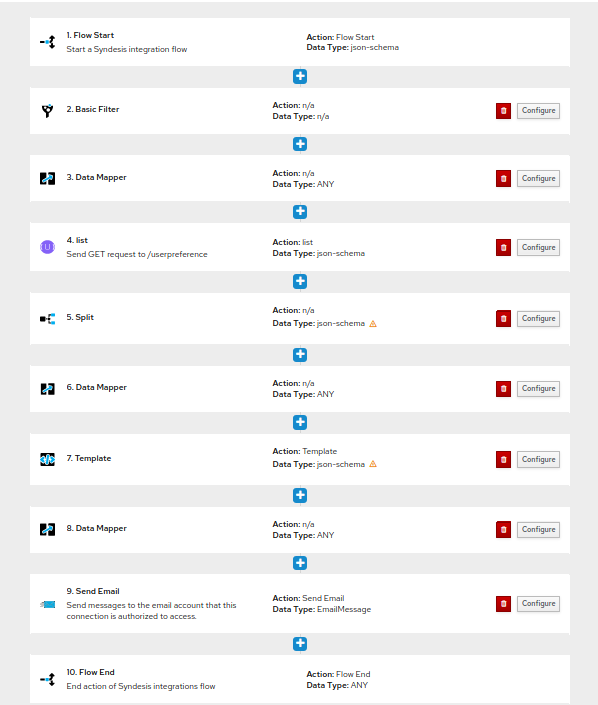
Before we continue to the final steps, let's look at the overall flow of the pipeline, as shown in Figure 9.
In the first step (1 in figure 9), a change in price starts the flow. The next step is the basic filter (2 in figure 9), which we've configured to notify us of events where a price has dropped to zero (price=0). Next, we go to the UserPreference API (4 in figure 9), where we select the endpoint and retrieve a list of users likely to be interested in the specified event. Notice that in the UserPreference API, we also had to do some data mapping (3 in figure 9), which we did visually thanks to a feature provided by AtlasMap.
Step 4: Split the data
Next, we continue to (5 in figure 9), where we split the list of users obtained in (4 in figure 9). We need to split data in order to treat each user separately as we want to personalize email message.
Step 5: Customize the message
Now, we are almost ready to send our selected users a promotional invitation. But before we do, let's use the template feature (7 in figure 9) to personalize our message, as shown in Figure 10.
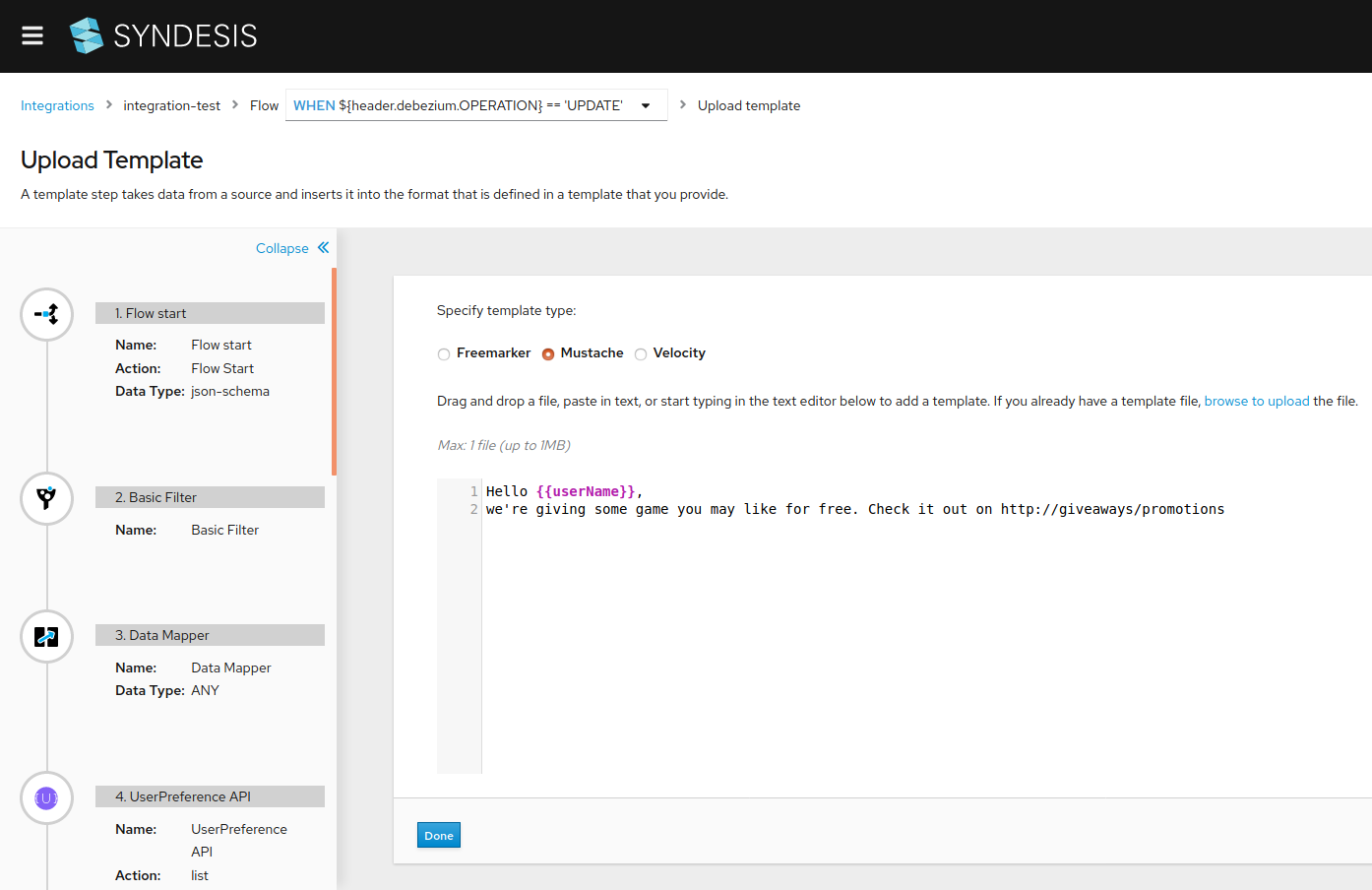
After we've uploaded our custom template, we return to the Data Mapper (8 in figure 9) to define a new mapping that will generate a personalized message for each user. (This configuration is similar to what we did in (3 in figure 9).)
Step 6: Send the email
Finally, we are ready to send the email, which combines our personalized message with the email addresses we pulled from the UserPreference service. Figure 11 shows the result of a live execution.

The code and steps to run this example are available in my GitHub repository.
Conclusion
You've seen in this article how to use Syndesis to integrate two existing microservices into a new, personalized service for added business value–and you've seen that it's possible to do it without writing a single line of code. Using Syndesis, a business expert without programming experience could discover microservices in a services dashboard, compose a pipeline based on one or more of those existing services, correlate data from the services, and build the integration.
All that's left to do is to start dreaming up integrations that will bring added value to your business.
Last updated: June 23, 2023