Redhat Developers  Logo
  • AI

    Get started with AI

    • Red Hat AI
      Accelerate the development and deployment of enterprise AI solutions.
    • AI learning hub
      Explore learning materials and tools, organized by task.
    • AI interactive demos
      Click through scenarios with Red Hat AI, including training LLMs and more.
    • AI/ML learning paths
      Expand your OpenShift AI knowledge using these learning resources.
    • AI quickstarts
      Focused AI use cases designed for fast deployment on Red Hat AI platforms.
    • No-cost AI training
      Foundational Red Hat AI training.

    Featured resources

    • OpenShift AI learning
    • Open source AI for developers
    • AI product application development
    • Open source-powered AI/ML for hybrid cloud
    • AI and Node.js cheat sheet

    Red Hat AI Factory with NVIDIA

    • Red Hat AI Factory with NVIDIA is a co-engineered, enterprise-grade AI solution for building, deploying, and managing AI at scale across hybrid cloud environments.
    • Explore the solution
  • Learn

    Self-guided

    • Documentation
      Find answers, get step-by-step guidance, and learn how to use Red Hat products.
    • Learning paths
      Explore curated walkthroughs for common development tasks.
    • Guided learning
      Receive custom learning paths powered by our AI assistant.
    • See all learning

    Hands-on

    • Developer Sandbox
      Spin up Red Hat's products and technologies without setup or configuration.
    • Interactive labs
      Learn by doing in these hands-on, browser-based experiences.
    • Interactive demos
      Click through product features in these guided tours.

    Browse by topic

    • AI/ML
    • Automation
    • Java
    • Kubernetes
    • Linux
    • See all topics

    Training & certifications

    • Courses and exams
    • Certifications
    • Skills assessments
    • Red Hat Academy
    • Learning subscription
    • Explore training
  • Build

    Get started

    • Red Hat build of Podman Desktop
      A downloadable, local development hub to experiment with our products and builds.
    • Developer Sandbox
      Spin up Red Hat's products and technologies without setup or configuration.

    Download products

    • Access product downloads to start building and testing right away.
    • Red Hat Enterprise Linux
    • Red Hat AI
    • Red Hat OpenShift
    • Red Hat Ansible Automation Platform
    • See all products

    Featured

    • Red Hat build of OpenJDK
    • Red Hat JBoss Enterprise Application Platform
    • Red Hat OpenShift Dev Spaces
    • Red Hat Developer Toolset

    References

    • E-books
    • Documentation
    • Cheat sheets
    • Architecture center
  • Community

    Get involved

    • Events
    • Live AI events
    • Red Hat Summit
    • Red Hat Accelerators
    • Community discussions

    Follow along

    • Articles & blogs
    • Developer newsletter
    • Videos
    • Github

    Get help

    • Customer service
    • Customer support
    • Regional contacts
    • Find a partner

    Join the Red Hat Developer program

    • Download Red Hat products and project builds, access support documentation, learning content, and more.
    • Explore the benefits

Using Quay.io to find vulnerabilities in your container images

<p>&nbsp;</p> <quillbot-extension-portal></quillbot-extension-portal>

June 26, 2019
Doug Tidwell
Related topics:
ContainersSecurity
Related products:
Red Hat OpenShift Container Platform

    You've created a container image that has all the packages that you and your team need to do something useful, or maybe you've built a public image that anybody can use. But, what if that image contains packages with known security vulnerabilities? Regardless of the severity of those vulnerabilities, you'll want to learn more and take steps to mitigate them as soon as possible.

    Fortunately, your team uses Quay.io* as your registry. When you push an image to Quay.io, it automatically runs a security scan against that image.

    Here are the results of the latest scan for an image I built a few months ago for an article about creating custom stacks for Eclipse Che:
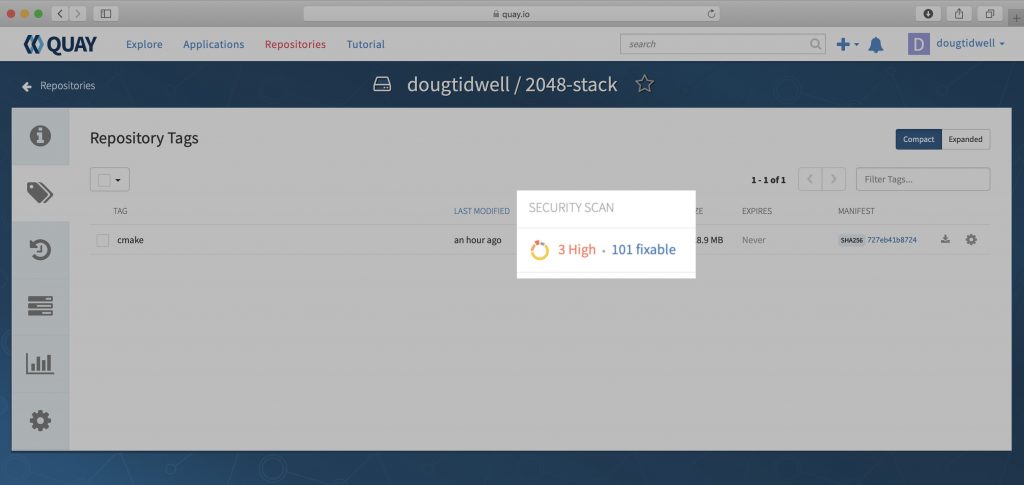
    Initial scan with vulnerabilities

    As you can see, I found to my dismay that there are three security vulnerabilities ranked High. They weren't there when I built the image; they've been discovered since I pushed the image to the registry. Hopefully, they're included in the 101 vulnerabilities labeled Fixable. Clicking on 101 fixable gives a list of all the vulnerabilities and their fixes—if any—as shown in the following screenshot.
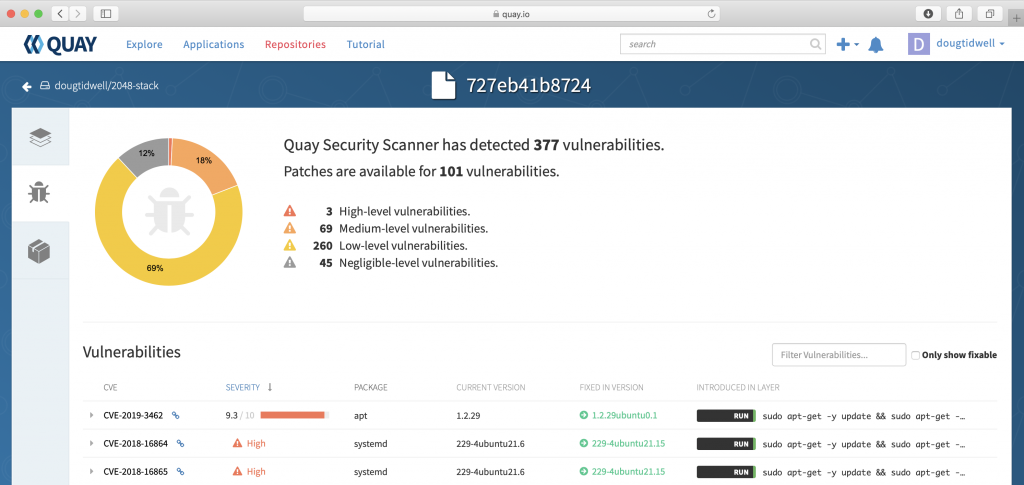
    Vulnerability list

    Fortunately, all three of the high vulnerabilities have fixes. In this image, the leftmost column lists the CVE number for each vulnerability. (CVE stands for Common Vulnerabilities and Exposures, a reference method for publicly known issues.) Clicking the link icon next to the CVE number takes you to the actual vulnerability report. Together, these resources will give you all the available information about the issues identified by the security scan.

    Again, the three high vulnerabilities all have fixes, as shown in the Fixed in version column. If we rebuild the image and push it back to Quay.io, it will automatically be rescanned. If we're lucky, all of the fixes will be applied, and our new image will be safe for the world once more.

    We can improve our luck by making sure any updates and upgrades are applied to the new image. My Dockerfile starts like this:

    # Base the image on the standard C++ stack
    FROM eclipse/cpp_gcc
    
    # Basic system hygiene
    RUN sudo apt-get -y update && \
        sudo apt-get -y upgrade && \

    The update and upgrade commands for your distribution manager (apt-get, yum, dnf, etc.) ensure that all of the packages in the base image are updated and upgraded before the image build continues.

    Pro tip: Using the Linux AND operator (&&) lets you execute multiple commands with a single RUN statement. That prevents your image building tool (podman or docker) from creating a separate layer for each command.

    After I rebuilt the image and pushed it back to Quay.io, the security scan looks much better:
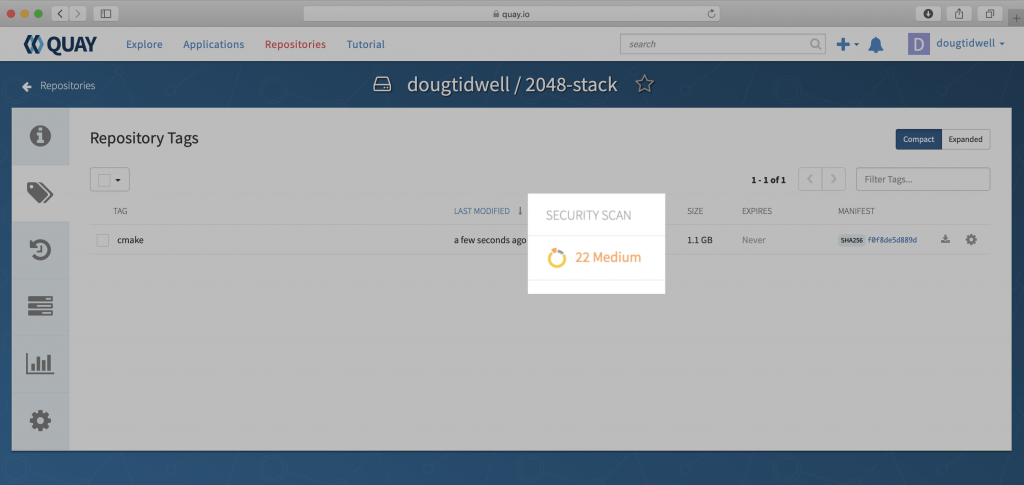
    We don't have any high vulnerabilities now. Opening the report and clicking the Only show fixable checkbox shows that the package repositories we're using do not have any fixes yet for the problems Quay.io found:
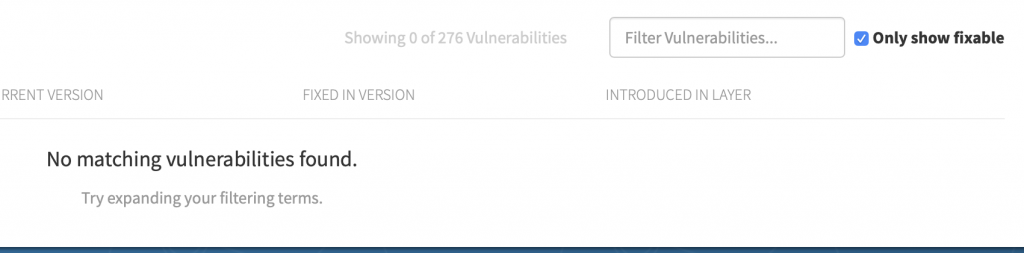
    No matching vulnerabilities found

    Now it's time for a judgment call. Unchecking "Only show fixable" displays the entire list. You can then look at the CVE report for each item and decide whether it's crucial to fix any of your remaining vulnerabilities. If so, you may be able to find a fix outside the package repositories you're using. (There is usually a lag of a few days between the time a fix is released and the time it shows up in the repos.) If a fix exists elsewhere, you'll have to do something like updating your Dockerfile to use curl to get the fix and then using your platform's install tool to add it to your image.

    Quay.io scans your image periodically, so it's a good idea to check your image on a regular basis. When you do, you'll see an up-to-date list of any vulnerabilities in your image along with the information you need to evaluate them. Red Hat Quay is also available as a separate product so you can create private registries that deliver the same features.

    With Quay.io's security scans, you can make sure your image is as safe and secure as possible.


    * Although the English-speaking world outside of the United States pronounces this word "key," the product is officially pronounced "kway." (Google Translate pronounces it "key" as well.) I'm just the messenger here.

    Last updated: February 11, 2024

    Recent Posts

    • SQL Server HA on RHEL: Meet Pacemaker HA Agent v2 (tech preview)

    • Deploy with confidence: Continuous integration and continuous delivery for agentic AI

    • Every layer counts: Defense in depth for AI agents with Red Hat AI

    • Fun in the RUN instruction: Why container builds with distroless images can surprise you

    • Trusted software factory: Building trust in the agentic AI era

    Red Hat Developers logo LinkedIn YouTube Twitter Facebook

    Platforms

    • Red Hat AI
    • Red Hat Enterprise Linux
    • Red Hat OpenShift
    • Red Hat Ansible Automation Platform
    • See all products

    Build

    • Developer Sandbox
    • Developer tools
    • Interactive tutorials
    • API catalog

    Quicklinks

    • Learning resources
    • E-books
    • Cheat sheets
    • Blog
    • Events
    • Newsletter

    Communicate

    • About us
    • Contact sales
    • Find a partner
    • Report a website issue
    • Site status dashboard
    • Report a security problem

    RED HAT DEVELOPER

    Build here. Go anywhere.

    We serve the builders. The problem solvers who create careers with code.

    Join us if you’re a developer, software engineer, web designer, front-end designer, UX designer, computer scientist, architect, tester, product manager, project manager or team lead.

    Sign me up

    Red Hat legal and privacy links

    • About Red Hat
    • Jobs
    • Events
    • Locations
    • Contact Red Hat
    • Red Hat Blog
    • Inclusion at Red Hat
    • Cool Stuff Store
    • Red Hat Summit
    © 2026 Red Hat

    Red Hat legal and privacy links

    • Privacy statement
    • Terms of use
    • All policies and guidelines
    • Digital accessibility

    Chat Support

    Please log in with your Red Hat account to access chat support.