Redhat Developers  Logo
  • AI

    Get started with AI

    • Red Hat AI
      Accelerate the development and deployment of enterprise AI solutions.
    • AI learning hub
      Explore learning materials and tools, organized by task.
    • AI interactive demos
      Click through scenarios with Red Hat AI, including training LLMs and more.
    • AI/ML learning paths
      Expand your OpenShift AI knowledge using these learning resources.
    • AI quickstarts
      Focused AI use cases designed for fast deployment on Red Hat AI platforms.
    • No-cost AI training
      Foundational Red Hat AI training.

    Featured resources

    • OpenShift AI learning
    • Open source AI for developers
    • AI product application development
    • Open source-powered AI/ML for hybrid cloud
    • AI and Node.js cheat sheet

    Red Hat AI Factory with NVIDIA

    • Red Hat AI Factory with NVIDIA is a co-engineered, enterprise-grade AI solution for building, deploying, and managing AI at scale across hybrid cloud environments.
    • Explore the solution
  • Learn

    Self-guided

    • Documentation
      Find answers, get step-by-step guidance, and learn how to use Red Hat products.
    • Learning paths
      Explore curated walkthroughs for common development tasks.
    • Guided learning
      Receive custom learning paths powered by our AI assistant.
    • See all learning

    Hands-on

    • Developer Sandbox
      Spin up Red Hat's products and technologies without setup or configuration.
    • Interactive labs
      Learn by doing in these hands-on, browser-based experiences.
    • Interactive demos
      Click through product features in these guided tours.

    Browse by topic

    • AI/ML
    • Automation
    • Java
    • Kubernetes
    • Linux
    • See all topics

    Training & certifications

    • Courses and exams
    • Certifications
    • Skills assessments
    • Red Hat Academy
    • Learning subscription
    • Explore training
  • Build

    Get started

    • Red Hat build of Podman Desktop
      A downloadable, local development hub to experiment with our products and builds.
    • Developer Sandbox
      Spin up Red Hat's products and technologies without setup or configuration.

    Download products

    • Access product downloads to start building and testing right away.
    • Red Hat Enterprise Linux
    • Red Hat AI
    • Red Hat OpenShift
    • Red Hat Ansible Automation Platform
    • See all products

    Featured

    • Red Hat build of OpenJDK
    • Red Hat JBoss Enterprise Application Platform
    • Red Hat OpenShift Dev Spaces
    • Red Hat Developer Toolset

    References

    • E-books
    • Documentation
    • Cheat sheets
    • Architecture center
  • Community

    Get involved

    • Events
    • Live AI events
    • Red Hat Summit
    • Red Hat Accelerators
    • Community discussions

    Follow along

    • Articles & blogs
    • Developer newsletter
    • Videos
    • Github

    Get help

    • Customer service
    • Customer support
    • Regional contacts
    • Find a partner

    Join the Red Hat Developer program

    • Download Red Hat products and project builds, access support documentation, learning content, and more.
    • Explore the benefits

Why Infrastructure Parity Matters for Developers Too

August 9, 2017
Scott McCarty (fatherlinux)
Related topics:
ContainersDevOps
Related products:
Developer Toolset

    Background

    I’ve been working with the CTO of an online video game company to develop a container architecture for his business. The goal is to simplify the deployment of new applications as well as make it easier to go back and change the code on older applications. The desired state is environmental parity across the infrastructure -- this will simplify the assignment of work on different applications to different developers. From developer laptops to production servers, the code will just work!

    While video game production has unique technical and business requirements, infrastructure parity from developer laptops to production servers is a common desire that touches every industry that relies on application delivery.

    An Interesting Problem

    While discussing possible architectures something interesting came up - When doing video game programming, it is common to embed a scripting language into your main programming language. Lua happens to be a popular language for scripting video games. This company compiles their own Ruby interpreter because they need to embed Lua to script game play logic.

    Following the LuaJIT installation instructions, they started on a development server that was set up like production. Ruby compiled without a problem and they began development. As they moved further into the development lifecycle, it became clear that it would be easier and more convenient to move most of the development work to the developer laptops.

    So, they began the process of installing all of the developer tools on Mac OSX. Once complete, they began the process of compiling Ruby with LuaJIT. Everything compiled fine, but every time they ran the binary it would exit with a segmentation fault (segfault). The development team worked for four solid hours debugging. Eventually, they realized that they had missed a small piece of documentation.

    From the LuaJIT installation guide

    If you're building a 64-bit application on OSX which links directly or indirectly against LuaJIT, you need to link your main executable with these flags:

    -pagezero_size 10000 -image_base 100000000

    Also, it's recommended to rebase all (self-compiled) shared libraries, which are loaded at runtime on OSX/x64 (e.g. C extension modules for Lua). See: man rebase

    Lesson Learned
    Developers need to be thinking about the operating system user space. In fact, to avoid problems with moving to production, or setting up developer environments for new developers, I recommend two important things to developers. First, they run a virtual machine configured identical to production, even if it's just a container host - this can still prevent performance and security regressions. Second, and more importantly from a frustration perspective, develop with the exact same container images as are used in production. This consistency will speed things up and avoid 4-hour Yak shaving detours.
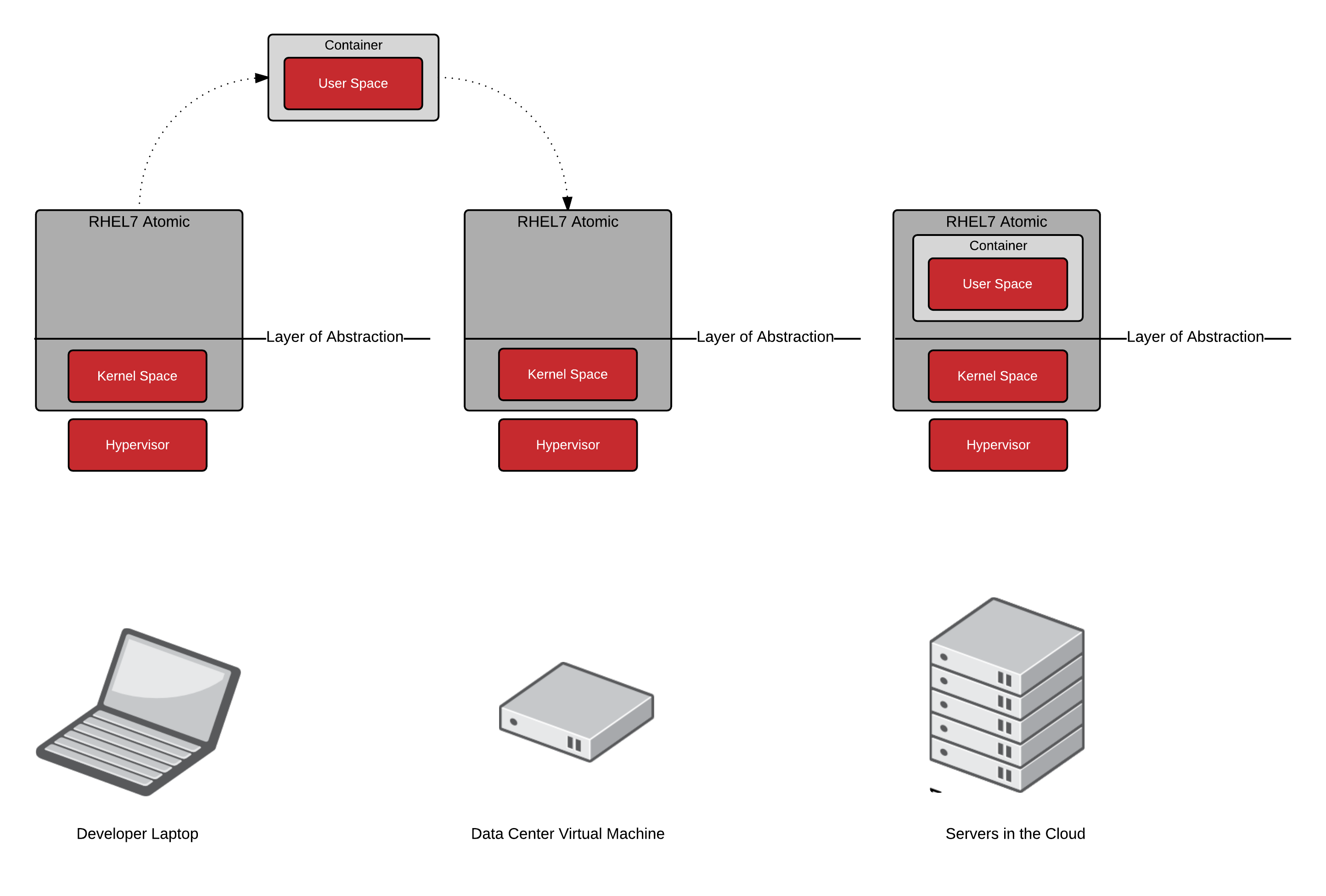
    You might think you don't have this problem because you use Node.js, Java, Python, or vanilla Ruby right? Wrong - interpreted languages do not provide 100% isolation from the operating system. Though most non-video game developers are not compiling their own Ruby interpreter, almost every language has C based modules that do need to be compiled? Compiled modules are popular in Perl, Ruby, PHP, Python, and even Java has JNI. Even doing something as simple as "shelling out" with the system() function to execute a local shell script, can cause headaches when the user space is updated for security, performance, or support reasons.

    To avoid these problems, you should run a constant container image (user space) and host (kernel) from development all the way to production. It just simplifies things over time and removes the chances of compatibility problems. At the end of the day, the CTO I worked with told me, “By using Containers, I can avoid this [compile problem] and create a documented and reproducible Linux environment. Containers let me develop an image on OS X and then deploy to Linux servers in production.” Infrastructure parity from developer laptops to production servers allows development teams to leverage the power of container images. These container images make it easy to avoid bugs created by user space differences between platforms. Let’s shave less Yaks and write more code!


    Whether you are new to Containers or have experience, downloading this cheat sheet can assist you when encountering tasks you haven’t done lately.

    Last updated: February 6, 2024

    Recent Posts

    • Trusted software factory: Building trust in the agentic AI era

    • Build a zero trust AI pipeline with OpenShift and RHEL CVMs

    • Red Hat Hardened Images: Top 5 benefits for software developers

    • How EvalHub manages two-layer Kubernetes control planes

    • Tekton joins the CNCF as an incubating project

    Red Hat Developers logo LinkedIn YouTube Twitter Facebook

    Platforms

    • Red Hat AI
    • Red Hat Enterprise Linux
    • Red Hat OpenShift
    • Red Hat Ansible Automation Platform
    • See all products

    Build

    • Developer Sandbox
    • Developer tools
    • Interactive tutorials
    • API catalog

    Quicklinks

    • Learning resources
    • E-books
    • Cheat sheets
    • Blog
    • Events
    • Newsletter

    Communicate

    • About us
    • Contact sales
    • Find a partner
    • Report a website issue
    • Site status dashboard
    • Report a security problem

    RED HAT DEVELOPER

    Build here. Go anywhere.

    We serve the builders. The problem solvers who create careers with code.

    Join us if you’re a developer, software engineer, web designer, front-end designer, UX designer, computer scientist, architect, tester, product manager, project manager or team lead.

    Sign me up

    Red Hat legal and privacy links

    • About Red Hat
    • Jobs
    • Events
    • Locations
    • Contact Red Hat
    • Red Hat Blog
    • Inclusion at Red Hat
    • Cool Stuff Store
    • Red Hat Summit
    © 2026 Red Hat

    Red Hat legal and privacy links

    • Privacy statement
    • Terms of use
    • All policies and guidelines
    • Digital accessibility

    Chat Support

    Please log in with your Red Hat account to access chat support.