This is the first part of a 2 part article, part 2 (End To End Encryption With OpenShift Part 2: Re-encryption) will be authored by Matyas Danter, Sr Consultant with Red Hat, it will be published soon.
This article aims to demonstrate use cases for Openshift routes to achieve end-to-end encryption. This is a desirable and sometimes mandated configuration for many verticals, which deal with strict regulations.
For example, financial sectors often are extremely careful about their application security standards and always follow a very high level of compliance.
Many critical applications in a financial organization adhere to two-way SSL. This is a scheme where both the server and client need to establish their identity in order to exchange encrypted data via a secure connection.
This POC is based on the Red Hat Enterprise Linux 7.2 and Openshift Container Platform 3.2 (OCP). The samples are using Nginx and Apache to demonstrate configuration.
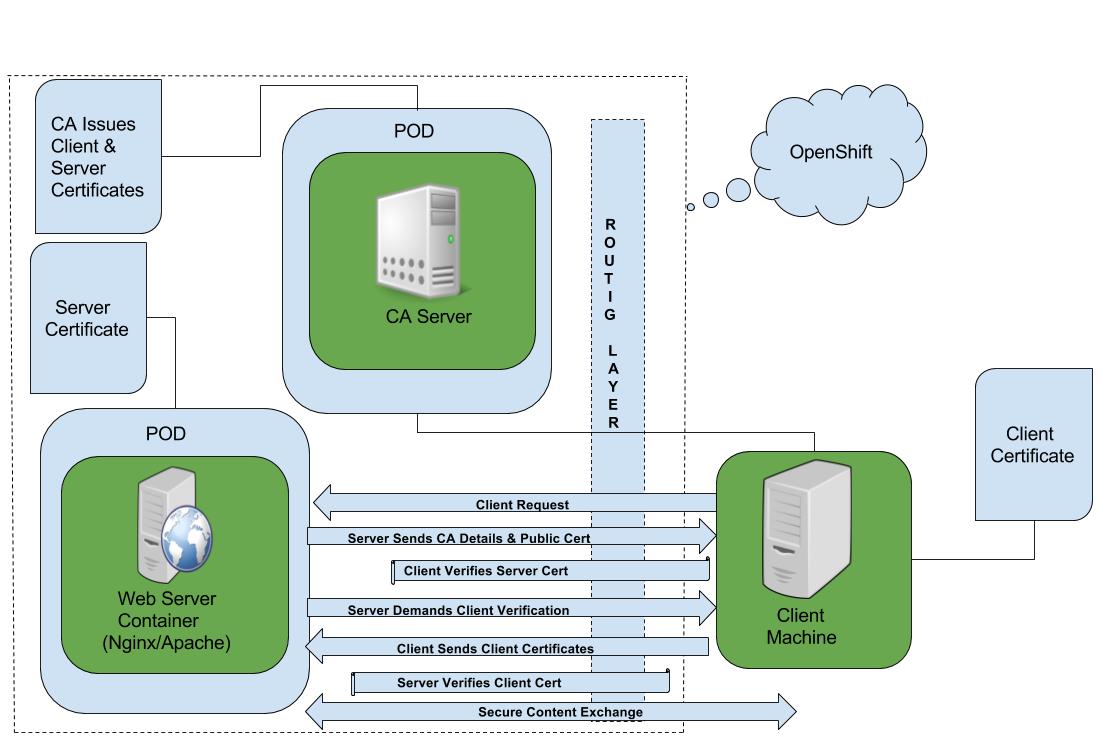
Pic (1) Two-Way SSL in Openshift Container Platform
OCP out of the box provides containerized stateless HAProxy as a default router for the whole container ecosystem and one of the key capabilities that come with OCP is this configurable routing layer.
There are three configurable ways to do TLS termination with secure routes in OCP; namely edge, re-encryption, and passthrough. For this POC we leverage “passthrough” route and handle TLS termination at the pod level.
To achieve this:
- Create a Root CA and generate a server certificate, private key, client certificate, and client key.
- In the real world, the certificate issuance process will vary from one organization to another; for our POC we used OpenSSL to generate and sign certificates.
- Build a docker image from RHEL 7's latest base operating system to install and configure Nginx and Apache for two-way SSL.
- Tag and push the docker image to the registry that Openshift is using.
Dockerfile for Nginx
| # Pull the rhel image from the local repository
FROM rhel7:latest USER root MAINTAINER Ron Sengupta # Fix per https://bugzilla.redhat.com/show_bug.cgi?id=1192200 RUN yum -y install deltarpm yum-utils --disablerepo=*-eus-* --disablerepo=*-htb-* \ --disablerepo=*-ha-* --disablerepo=*-rt-* --disablerepo=*-lb-* --disablerepo=*-rs-* --disablerepo=*-sap-* RUN yum-config-manager --disable *-eus-* *-htb-* *-ha-* *-rt-* *-lb-* *-rs-* *-sap-* > /dev/null COPY nginx.repo /etc/yum.repos.d/nginx.repo RUN chmod 777 /etc/yum.repos.d/nginx.repo RUN yum update -y; yum install nginx -y;yum clean all RUN mkdir -p /etc/nginx/certs RUN mkdir -p /var/www/html COPY default.conf /etc/nginx/conf.d/default.conf COPY clisec.rhel-cdk.10.1.2.2.xip.io.crt /etc/nginx/certs/server.crt COPY clisec.rhel-cdk.10.1.2.2.xip.io.key /etc/nginx/certs/server.key COPY ca.crt /etc/nginx/certs/ca.crt RUN echo "The Nginx Web Server is Running" > /var/www/html/index.html EXPOSE 443 # Define default command. CMD ["nginx", "-g", "daemon off;"] |
This dockerfile has a very simple flow, it is pulling the base image and installing and configuring Nginx. As part of the container build it also copies the server SSL certificate, private key, CA public certificate and the Nginx SSL config file “default.conf “ to /etc/nginx/conf.d/ and finally passes the CMD to the container.
You can review the working copy of the code here.
- Review Dockerfile for Nginx
- Review Dockerfile for Apache
- Here is the link for the Nginx Repo
Sample SSL configuration for Nginx
| # content of /etc/nginx/conf.d/default.conf
server { listen 443 default_server ssl; root /var/www/html; index index.html index.htm index.php; ssl on; ssl_certificate /etc/nginx/certs/server.crt; ssl_certificate_key /etc/nginx/certs/server.key; ssl_client_certificate /etc/nginx/certs/ca.crt; ssl_verify_client on; ssl_session_timeout 5m; ssl_protocols SSLv3 TLSv1; ssl_ciphers ALL:!ADH:!EXPORT56:RC4+RSA:+HIGH:+MEDIUM:+LOW:+SSLv3:+EXP; ssl_prefer_server_ciphers on; } |
- Downloadable link for Nginx SSL configuration.
- Downloadable link for the Apache SSL configuration.
After the docker image is successfully pushed to registry check the image stream for that project.
- $ oc get is
You should see a new image stream object.
| NAME DOCKER REPO TAGS UPDATED
greentea-nginx 172.30.163.234:5000/rhelnginx/greentea-nginx latest About an hour ago |
- Launch the new app from the image stream and check the status.
- $ oc new-app greentea-nginx
- $ oc status
- $ oc get pods
You can check the status from web console as well.
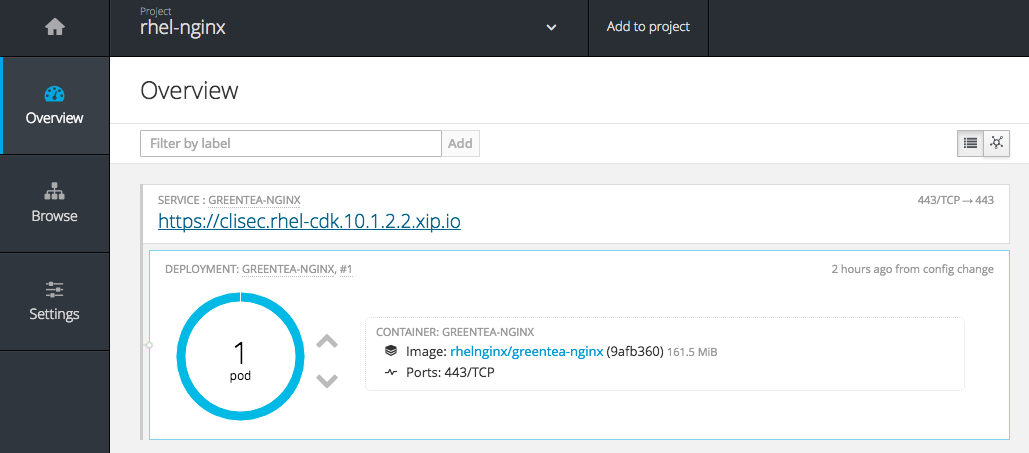
| Alternatively, you can create it using following deployment config and subsequently exposing the service. Here is the Github link for the relevant code - dc.yaml. |
| --- apiVersion: v1 kind: DeploymentConfig metadata: labels: app: twowayssl name: twowayssl namespace: rhelnginx spec: replicas: 2 selector: app: twowayssl strategy: type: Rolling template: metadata: labels: app: twowayssl spec: containers: - image: 172.30.163.234:5000/rhelnginx/greentea-nginx name: twowayssl ports: - containerPort: 443 protocol: TCP triggers: - type: ConfigChange |
Change the IP address, Port, and Image name as per your docker registry setup.
The TLS passthrough route config looks simple. Using the Github code link, route.yaml you'll need to modify the hostname as per your environment.
| --- apiVersion: v1 kind: Route metadata: labels: app: twowayssl name: twowayssl namespace: rhelnginx spec: host: clisec.rhel-cdk.10.1.2.2.xip.io port: targetPort: 443-tcp tls: termination: passthrough to: kind: Service name: twowayssl |
You could use the OC CLI to create these objects,
$ oc create -f dc.yaml
$ oc create -f route.yaml
Now the container infrastructure is ready so you can test the two-way SSL.
- Nginx Web Server present SSL server certificate to client and demand client certificate for authorization but the client did not present it.
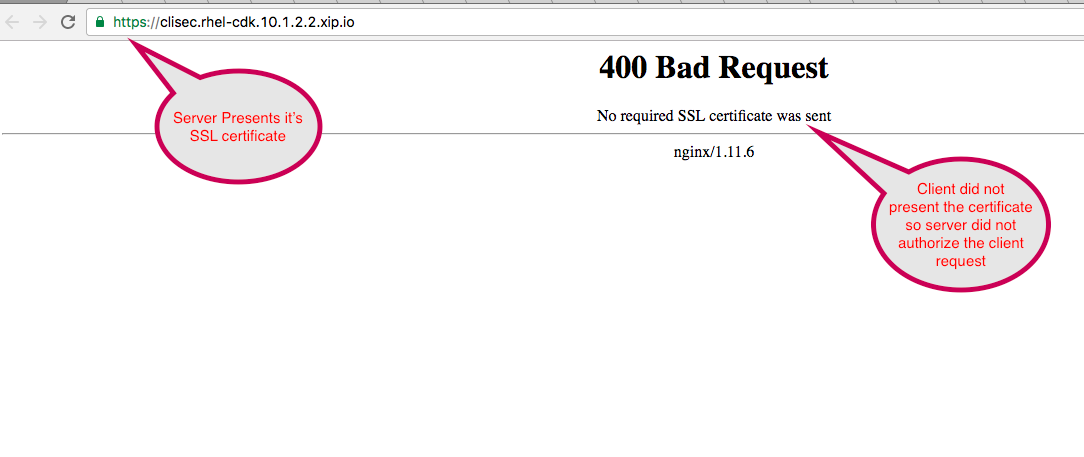 |
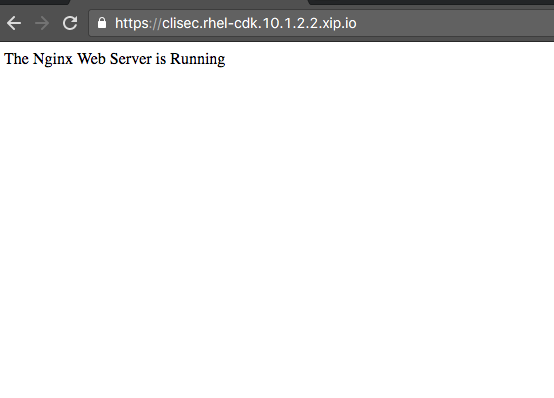
- Client presents the appropriate certificate and therefore secure communication takes place.
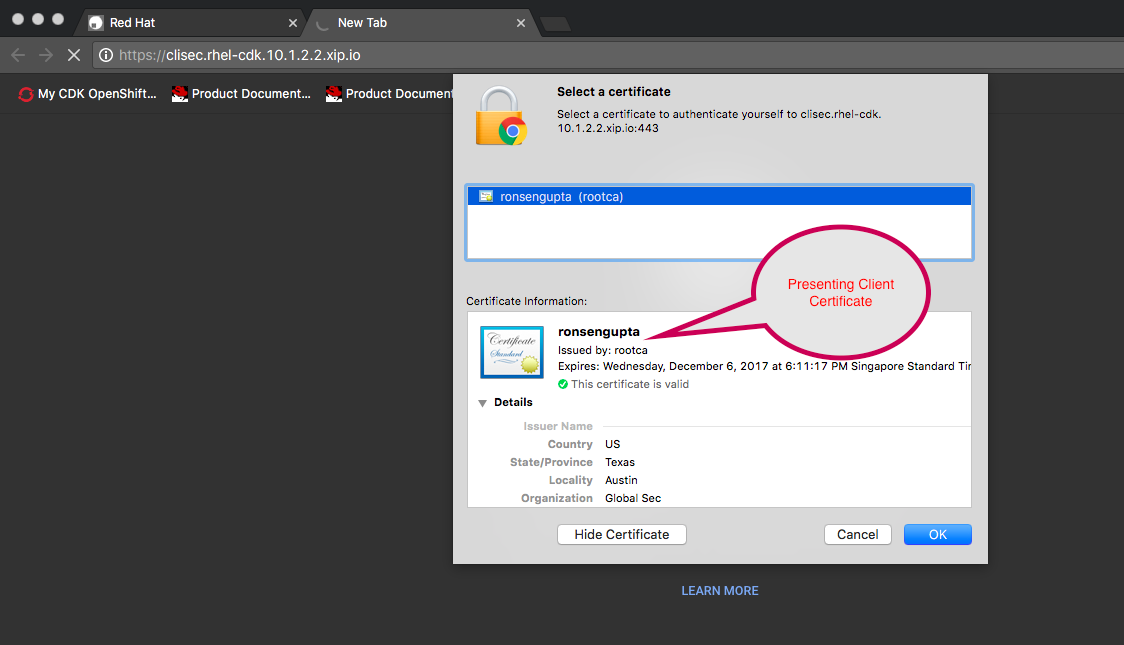
 |
Click here to learn more about Red Hat Openshift Container Platform.
Last updated: March 16, 2018
