Model Context Protocol (MCP) lets an agent use tools across your enterprise platform. In a telco, that can include your network inventory, service assurance, ticketing, and customer systems. A shared MCP gateway makes those tools available through one endpoint. That endpoint still needs a policy boundary. A caller that has authenticated to the gateway should not automatically be able to read every system or invoke every operation. Reading an inventory record and changing a customer service may use the same MCP protocol, but they should not require the same permission.
This article discusses gateway isolation, network access, tool permissions and request limits.
Choose the gateway boundary
Start by deciding whether teams should share a single gateway or have separate gateway instances. An isolated instance gets its own routes, configuration, and MCP server connections. In Red Hat OpenShift, this can all be configured with custom resources.
An MCPGatewayExtension extends a gateway with MCP capabilities, attached to a listener section:
apiVersion: mcp.kuadrant.io/v1
kind: MCPGatewayExtension
metadata:
  name: team-a-gateway
  namespace: team-a
spec:
  targetRef:
    kind: Gateway
    name: team-a-gateway
    sectionName: mcp
---
apiVersion: mcp.kuadrant.io/v1
kind: MCPGatewayExtension
metadata:
  name: team-b-gateway
  namespace: team-b
spec:
  targetRef:
    kind: Gateway
    name: team-b-gateway
    sectionName: mcp
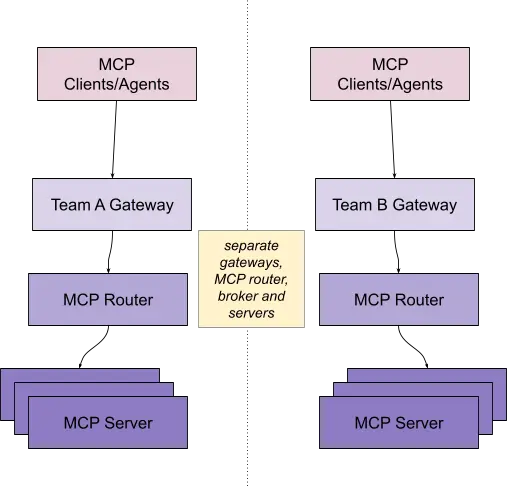
Each team can have its own gateway and its own MCPGatewayExtension, as illustrated in Figure 1. This provides separate deployment isolation.
A single gateway instance can be used with team isolation per listener. In this case, you target the same shared gateway with each MCPGatewayExtension resource:
apiVersion: mcp.kuadrant.io/v1
kind: MCPGatewayExtension
metadata:
  name: team-a-gateway
  namespace: team-a
spec:
  targetRef:
    kind: Gateway
    name: shared-gateway
    sectionName: mcp-a
---
apiVersion: mcp.kuadrant.io/v1
kind: MCPGatewayExtension
metadata:
  name: team-b-gateway
  namespace: team-b
spec:
  targetRef:
    kind: Gateway
    name: shared-gateway
    sectionName: mcp-b
Each team can have its own MCPGatewayExtension and registered MCP servers behind the shared gateway, as illustrated in Figure 2.
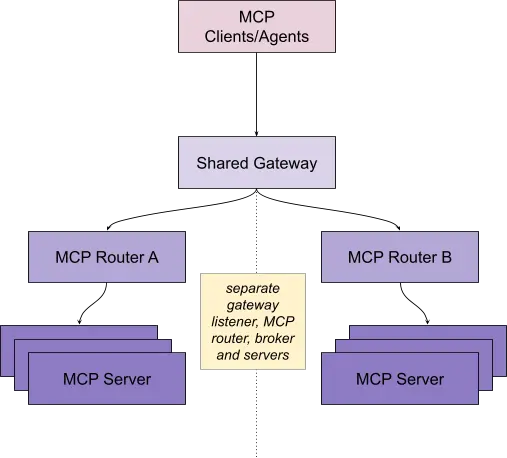
In both cases, you register your MCP servers against the corresponding MCPGatewayExtension, allowing for isolated groups of servers behind each gateway or gateway listener.
Apply NetworkPolicy
A NetworkPolicy controls which workloads can communicate. It does not know the MCP user or tool name. By default, a NetworkPolicy restricts traffic to the MCP router, broker internals, and metrics endpoint. The policy looks something like this:
apiVersion: networking.k8s.io/v1
kind: NetworkPolicy
metadata:
  name: mcp-gateway
  namespace: team-a
  labels:
    app.kubernetes.io/name: mcp-gateway
    app.kubernetes.io/managed-by: mcp-gateway-controller
spec:
  podSelector:
    matchLabels:
      app.kubernetes.io/name: mcp-gateway
      app.kubernetes.io/managed-by: mcp-gateway-controller
  policyTypes:
    - Ingress
    - Egress
  ingress:
    - from:
        - namespaceSelector:
            matchLabels:
              kubernetes.io/metadata.name: gateway-system
      ports:
        - protocol: TCP
          port: 8080
        - protocol: TCP
          port: 50051
    - ports:
        - protocol: TCP
          port: 9090
  egress:
    - {}
All external traffic from the gateway and MCP router/broker namespace out to MCP servers is allowed by default. However, you can lock it down by adding a separate NetworkPolicy. For example, to lock down traffic to just your network inventory MCP server on HTTPS, you might add something like this:
apiVersion: networking.k8s.io/v1
kind: NetworkPolicy
metadata:
  name: allow-mcp-gateway-to-inventory
  namespace: inventory
spec:
  podSelector:
    matchLabels:
      app.kubernetes.io/name: inventory-mcp
  policyTypes:
    - Ingress
  ingress:
    - from:
        - namespaceSelector:
            matchLabels:
              kubernetes.io/metadata.name: team-a
          podSelector:
            matchLabels:
              app.kubernetes.io/name: mcp-gateway
              app.kubernetes.io/managed-by: mcp-gateway-controller
      ports:
        - protocol: TCP
          port: 443
The namespaceSelector selects the MCP gateway extension namespace (for example, team-a). The podSelector then narrows the source to the controller-managed broker-router pods. Replace the namespace, pod labels, and port with the values used by your MCP server. NetworkPolicy objects are additive, so this server policy is separate from the controller-managed broker-router policy.
Configure AuthPolicy authentication
Use an Red Hat Connectivity Link (RHCL) AuthPolicy to validate the caller's OpenID Connect (OIDC) or JWT credential at the MCP listener. Keep the well-known resource metadata available so an MCP client can discover the authorization server. For example:
apiVersion: kuadrant.io/v1
kind: AuthPolicy
metadata:
  name: mcp-auth-policy
  namespace: gateway-system
spec:
  targetRef:
    group: gateway.networking.k8s.io
    kind: Gateway
    name: mcp-gateway
    sectionName: mcp
  defaults:
    when:
      - predicate: "!request.path.contains('/.well-known')"
    rules:
      authentication:
        mcp-user:
          jwt:
            issuerUrl: https://idp.example.com/realms/telco
The AuthPolicy validates the caller's token against the configured issuer. Requests with invalid or missing credentials will not be able to access the MCP gateway or call any tools. If a request has a valid user, they can access all tools available behind the MCP gateway by default.
Configure AuthPolicy authorization
To lock down what tools an agent or client can use, add authorization to the policy after authentication works. The router parses the JSON-RPC body and sets x-mcp-servername and x-mcp-toolname before AuthPolicy evaluates the request. The client cannot set those values to choose a more permissive policy path. In an AuthPolicy, the authorization block checks the requested tool against the roles for the requested server:
apiVersion: kuadrant.io/v1
kind: AuthPolicy
metadata:
  name: mcp-tool-auth-policy
  namespace: gateway-system
spec:
  targetRef:
    group: gateway.networking.k8s.io
    kind: Gateway
    name: mcp-gateway
    sectionName: mcps
  rules:
    authentication:
      mcp-user:
        jwt:
          issuerUrl: https://idp.example.com/realms/telco
    authorization:
      tool-access:
        when:
          - predicate: "request.headers.exists(h, h == 'x-mcp-toolname')"
        patternMatching:
          patterns:
            - predicate: |
                ('tool:' + request.headers['x-mcp-toolname']) in (
                  has(auth.identity.resource_access) &&
                  auth.identity.resource_access.exists(p, p == request.headers['x-mcp-servername'])
                  ? auth.identity.resource_access[request.headers['x-mcp-servername']].roles
                  : []
                )
    response:
      unauthenticated:
        code: 401
      unauthorized:
        code: 403
This policy authenticates again because policy attachments on different listeners are independent. It then checks the requested tool against the roles for the requested server. An allowed call reaches the selected MCP server. A direct call to a tool without the matching role returns 403 before the backend performs the operation.
In the identity provider, claims can be issued for specific tools like this:
{
  "resource_access": {
    "mcp-system/inventory": {
      "roles": ["tool:read"]
    }
  }
}
The key is the namespaced MCPServerRegistration (mcp-system/inventory). The role is the unprefixed tool permission (tool:read). If the registration uses the inventory_ prefix, the client sees inventory_read while the authorization check uses read.
Add RateLimitPolicy
Authentication and authorization decide whether a request is allowed. RateLimitPolicy limits how much traffic the gateway or a backend receives. The following example applies a gateway wide limit for all traffic:
apiVersion: kuadrant.io/v1
kind: RateLimitPolicy
metadata:
  name: mcp-gateway-limit
  namespace: gateway-system
spec:
  targetRef:
    group: gateway.networking.k8s.io
    kind: Gateway
    name: mcp-gateway
  limits:
    mcp-requests:
      rates:
        - limit: 1000
          window: 1m
This gateway-level spec.limits entry is a default. A route-level policy (using a targetRef.kind of HTTPRoute) can replace it for a specific backend.
What each policy controls
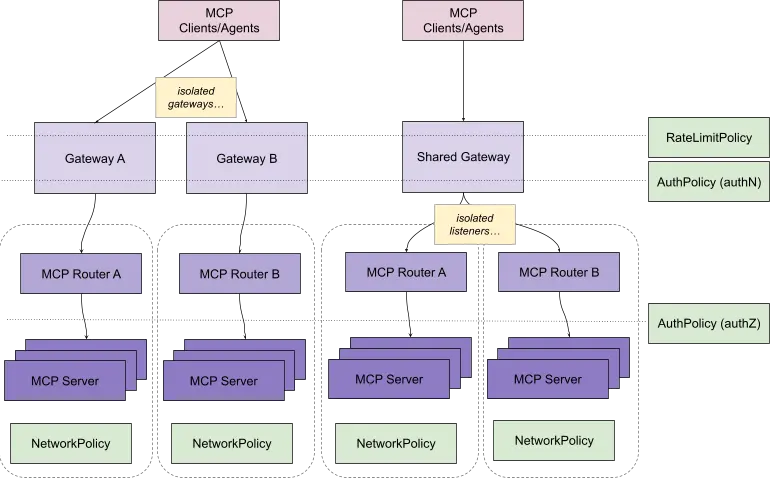
Gateway isolation defines which team or tenant owns the configuration and MCP server connections. NetworkPolicy determines which workloads can communicate, while AuthPolicy checks the caller's identity and permissions to see and call specific servers and tools. RateLimitPolicy limits the volume of traffic passing through the gateway (figure 3).
The controls map primarily to the following OWASP risks for LLM and agentic applications:
- LLM03:2026 excessive agency: Least-privilege tool exposure limits the actions available to an agent.
- LLM06:2026 unbounded consumption: RateLimitPolicy limits request volume and backend pressure.
- ASI02:2026 tool misuse and exploitation: Filtered tool catalogs and per-tool authorization reduce misuse of otherwise valid capabilities.
- ASI03:2026 identity and privilege abuse: AuthPolicy binds the user to permitted MCP servers and tools, then enforces that decision on each tool call.
These policies do not replace content checks or guardrails, credential isolation, or provenance checks.
Finding out more
See the latest MCP gateway documentation for how to install and configure your gateway for MCP traffic using policies.

