Redhat Developers  Logo
  • AI

    Get started with AI

    • Red Hat AI
      Accelerate the development and deployment of enterprise AI solutions.
    • AI learning hub
      Explore learning materials and tools, organized by task.
    • AI interactive demos
      Click through scenarios with Red Hat AI, including training LLMs and more.
    • AI/ML learning paths
      Expand your OpenShift AI knowledge using these learning resources.
    • AI quickstarts
      Focused AI use cases designed for fast deployment on Red Hat AI platforms.
    • No-cost AI training
      Foundational Red Hat AI training.

    Featured resources

    • OpenShift AI learning
    • Open source AI for developers
    • AI product application development
    • Open source-powered AI/ML for hybrid cloud
    • AI and Node.js cheat sheet

    Red Hat AI Factory with NVIDIA

    • Red Hat AI Factory with NVIDIA is a co-engineered, enterprise-grade AI solution for building, deploying, and managing AI at scale across hybrid cloud environments.
    • Explore the solution
  • Learn

    Self-guided

    • Documentation
      Find answers, get step-by-step guidance, and learn how to use Red Hat products.
    • Learning paths
      Explore curated walkthroughs for common development tasks.
    • Guided learning
      Receive custom learning paths powered by our AI assistant.
    • See all learning

    Hands-on

    • Developer Sandbox
      Spin up Red Hat's products and technologies without setup or configuration.
    • Interactive labs
      Learn by doing in these hands-on, browser-based experiences.
    • Interactive demos
      Click through product features in these guided tours.

    Browse by topic

    • AI/ML
    • Automation
    • Java
    • Kubernetes
    • Linux
    • See all topics

    Training & certifications

    • Courses and exams
    • Certifications
    • Skills assessments
    • Red Hat Academy
    • Learning subscription
    • Explore training
  • Build

    Get started

    • Red Hat build of Podman Desktop
      A downloadable, local development hub to experiment with our products and builds.
    • Developer Sandbox
      Spin up Red Hat's products and technologies without setup or configuration.

    Download products

    • Access product downloads to start building and testing right away.
    • Red Hat Enterprise Linux
    • Red Hat AI
    • Red Hat OpenShift
    • Red Hat Ansible Automation Platform
    • See all products

    Featured

    • Red Hat build of OpenJDK
    • Red Hat JBoss Enterprise Application Platform
    • Red Hat OpenShift Dev Spaces
    • Red Hat Developer Toolset

    References

    • E-books
    • Documentation
    • Cheat sheets
    • Architecture center
  • Community

    Get involved

    • Events
    • Live AI events
    • Red Hat Summit
    • Red Hat Accelerators
    • Community discussions

    Follow along

    • Articles & blogs
    • Developer newsletter
    • Videos
    • Github

    Get help

    • Customer service
    • Customer support
    • Regional contacts
    • Find a partner

    Join the Red Hat Developer program

    • Download Red Hat products and project builds, access support documentation, learning content, and more.
    • Explore the benefits

Efficiently manage host content with Red Hat Satellite's multi-CV

July 13, 2026
Matthew Yee
Related topics:
Automation and managementLinux
Related products:
Red Hat Enterprise Linux

    Managing host content efficiently is an essential responsibility for system administrators. Red Hat Satellite helps you curate content for hosts, but until now, giving hosts access to multiple content views (multi-CV) could become a heavy administrative burden.

    Let's look at how multi-CV works, why we built it, and how you can start using it today.

    Content curation in Satellite

    Red Hat Satellite content views help system administrators manage software distribution by providing point-in-time snapshots of software synchronized from the Red Hat content delivery network. You allocate content views to lifecycle environments (LCEs), which represent various stages of deploying applications to Red Hat Enterprise Linux (RHEL) systems.

    For example, the Web Application Alpha content view contains software from a specific date. You then assign test systems to the Testing lifecycle environment and this content view. This setup ensures that the software available to the host remains completely static during the testing period.

    Once you verify that the web application works as expected with this software, you can promote the content view to the Production lifecycle environment to provide the tested software to your production systems.

    Composite content views (CCVs)

    Often, a host needs access to content from multiple content views (CVs) simultaneously. Historically, system administrators used composite content views (CCVs) to solve this. CCVs act as a "bucket" that allows administrators to combine multiple CVs into a single, unified content set.

    However, CCVs introduce administrative overhead. Updating underlying CVs requires two separate publications. First, you must publish the updated underlying CV, and then you must publish the CCV itself. For administrators who need to publish dozens or even hundreds of times per day, this multi-step management process becomes time-consuming and difficult to maintain.

    The solution: Multi-CV

    System administrators have long asked: "Why can't we assign hosts to multiple content views directly?"

    With Red Hat Satellite 6.19, you finally can. Spelling out a clearer path for content architecture, multi-content views (multi-CV) offer an  efficient way to manage host content.

    How it works

    Instead of assigning a CV and LCE separately, you can now assign hosts and activation keys (AKs) to one or more content view environments.

    A content view environment combines an LCE and a CV. When you promote a CV to an LCE, Satellite automatically creates the corresponding content view environment.

    Figure 1 shows a RHEL system, sat-client3.
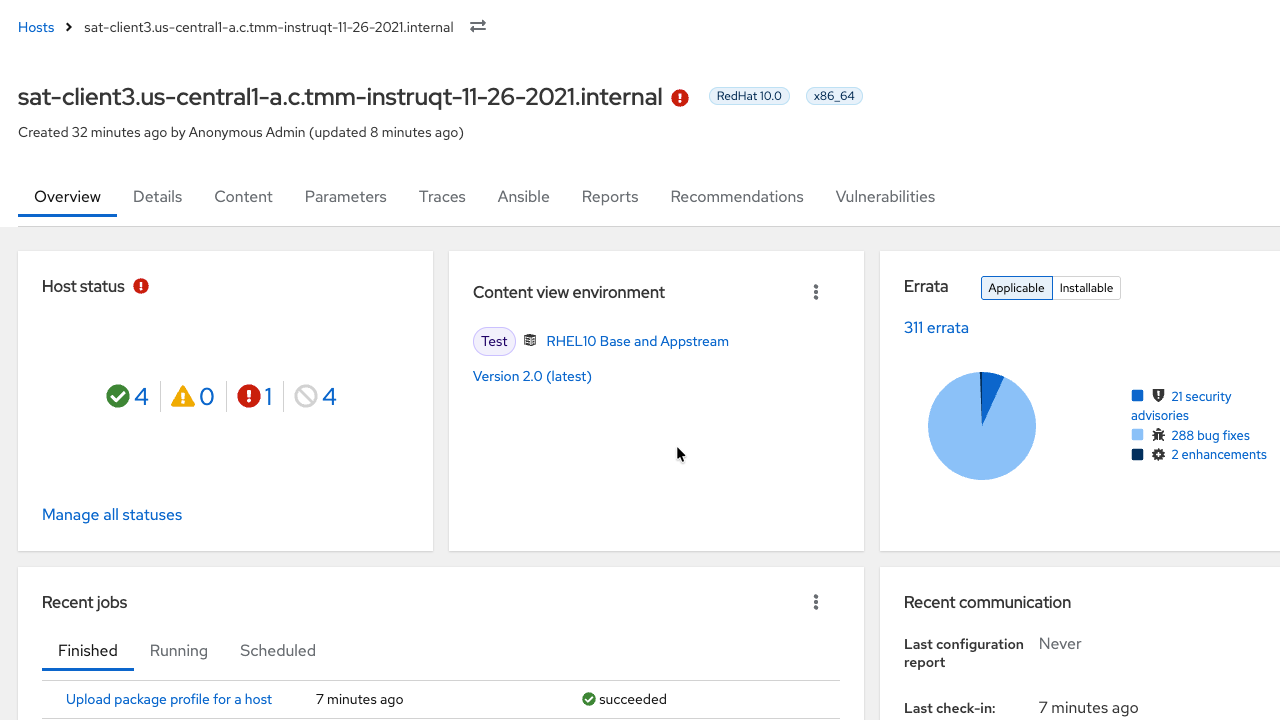
    The host overview dashboard for a system named sat-client3, highlighting the content view environment card where the RHEL 10 Base and AppStream content view is assigned to the Test environment.
    Figure 1: Host overview page in Red Hat Satellite showing the assigned content view environment card.

    In the Content view environment menu, you can see that the system sat-client3 is assigned to the RHEL10 Base and Appstream content view environment.

    Select the RHEL10 Base and Appstream content view environment (Figure 2).
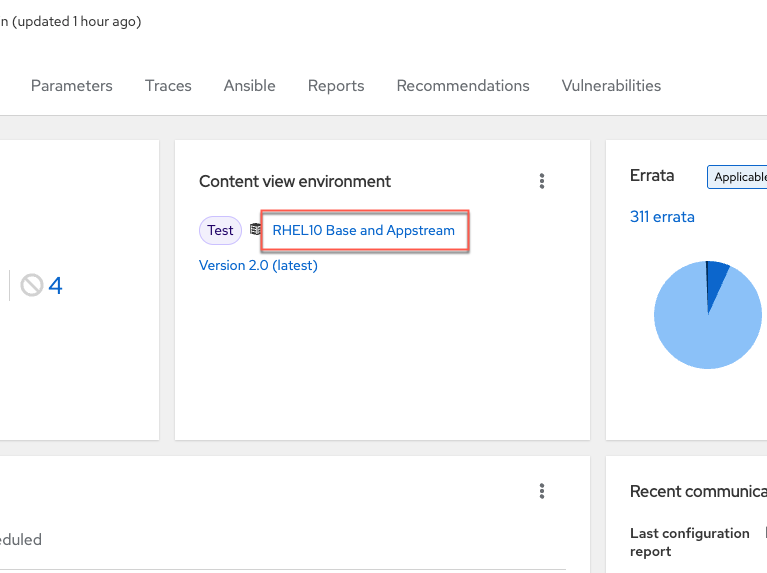
    A cropped screenshot of the content view environment card on the host dashboard, focusing on the clickable RHEL 10 Base and AppStream link inside a red box.
    Figure 2: Close-up view of the content view environment card with the interactive repository link highlighted.

    In the next menu, select the Repositories tab (Figure 3).
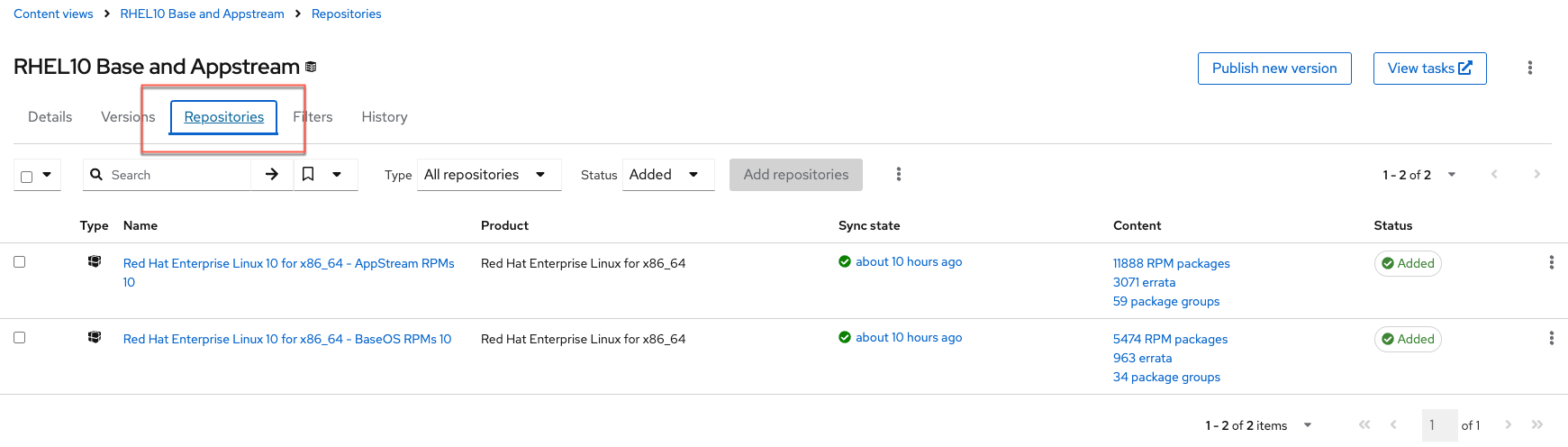
    The content view environment details screen, focusing on the repositories tab which lists the synchronized Red Hat Enterprise Linux 10 BaseOS and AppStream packages
    Figure 3: Repositories tab interface within the content view environment menu.

    The Repositories tab shows that this content view environment contains the Red Hat Enterprise Linux 10 BaseOS and AppStream repositories.

    Creating a content view environment in Red Hat Satellite

    Red Hat Satellite automatically creates a content view environment when you publish or promote a content view.

    To demonstrate this process, consider a content view that contains the Extra Packages for Enterprise Linux (EPEL) 10 repository but has not been published yet. You can publish this content view and promote it to the Test and Production lifecycle environments (Figure 4).
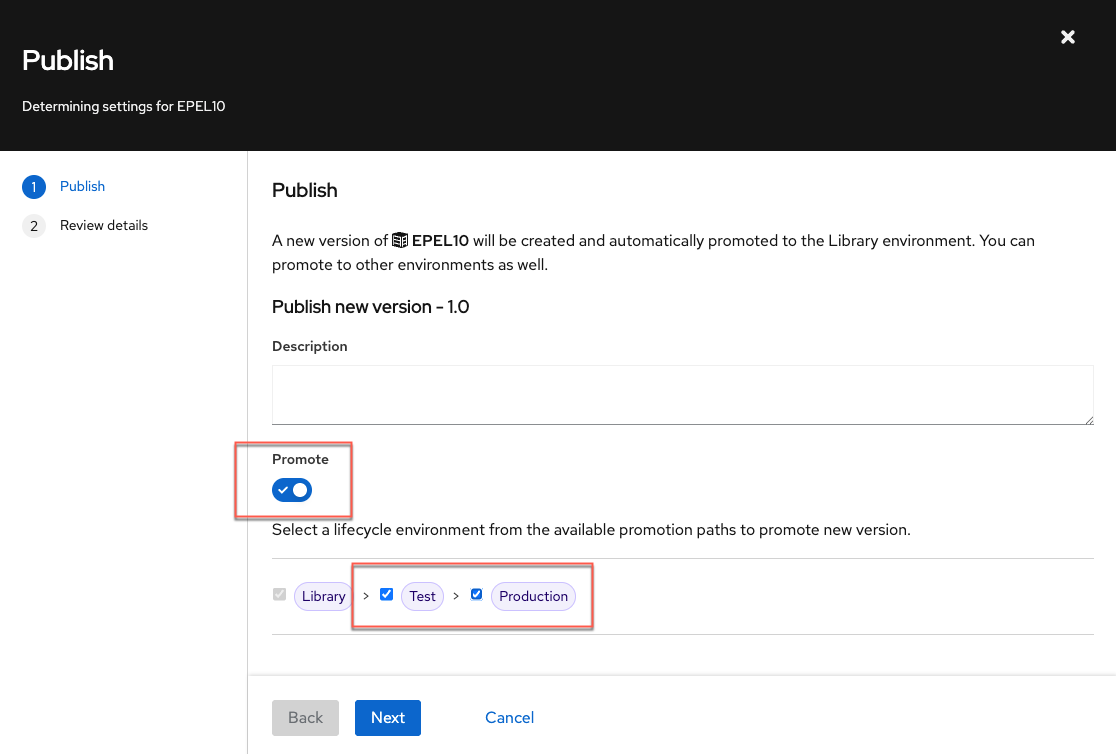
    The publish new version modal window for the EPEL 10 content view, showing the promote switch toggled on with checkboxes selected for the Test and Production lifecycle environments.
    Figure 4: Publishing wizard modal window with selected target lifecycle environments.

    Next, assign the new EPEL10 content view environment to your host by completing the following steps (illustrated in Figure 5):

    1. Go to Hosts →  All Hosts.
    2. Open the kebab menu and select Change content view environments.
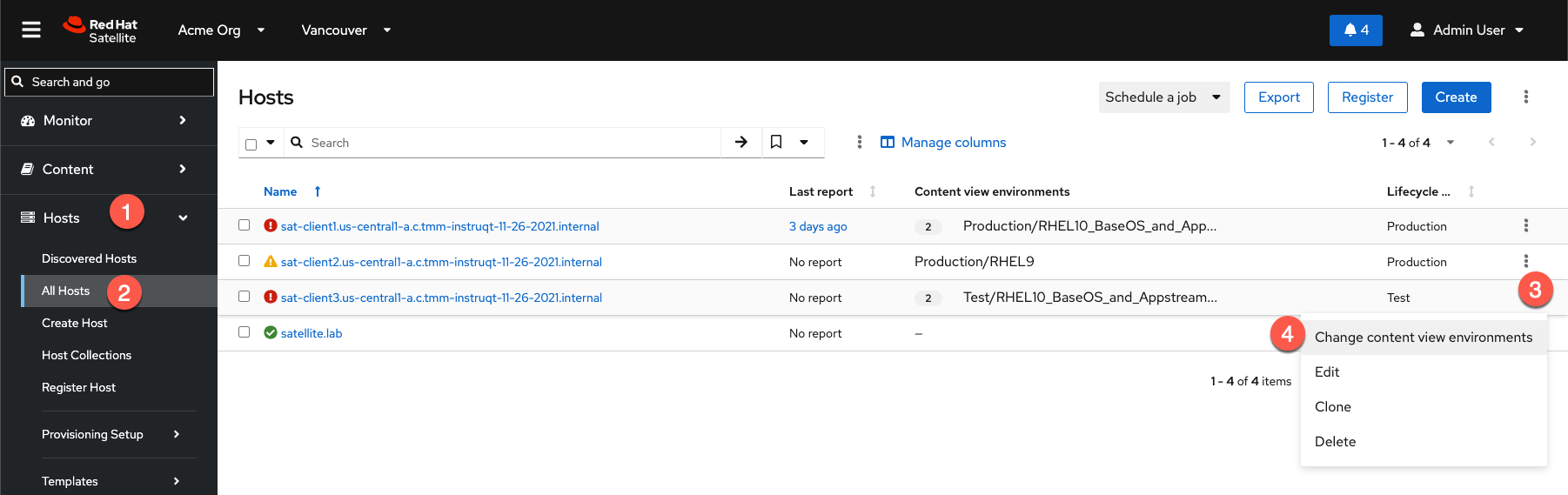
    The Red Hat Satellite hosts management interface with step-by-step numbered overlays demonstrating how to expand the host sidebar panel, navigate to all hosts, select a host kebab icon, and open the content view environment dialog.
    Figure 5: Hosts list page view with sequentially numbered step indicators to change content view environments.
    1. In the Assign content view environments panel, configure the following settings (Figure 6):
      1. Content view environment: Assign another content view environment
      2. Lifecycle environment: Test
      3. Content view: EPEL10
    2. Enable Update the host immediately via remote execution and save your changes. Save.
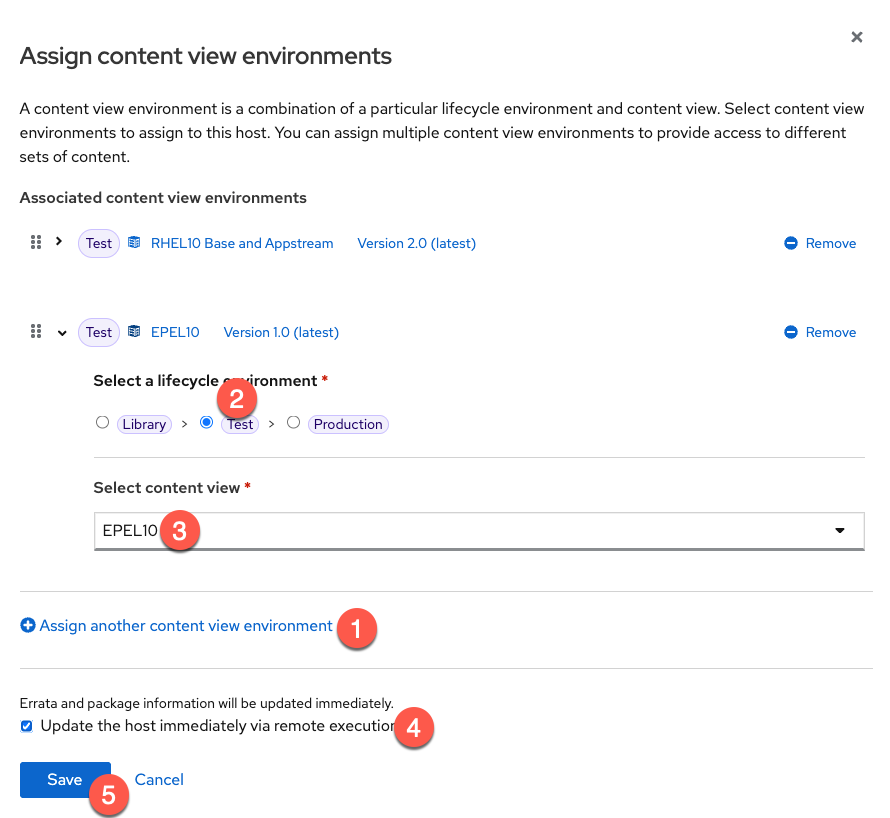
    The assign content view environments configuration panel with overlay markers detailing how to add an environment slot, choose the Test lifecycle stage, choose the EPEL 10 content view, select the execution checkbox, and save.
    Figure 6: Assign content view environments configuration panel with overlay action path markers.

    When you log back into the host, you can verify that it now has access to the EPEL10 repository (Figure 7).
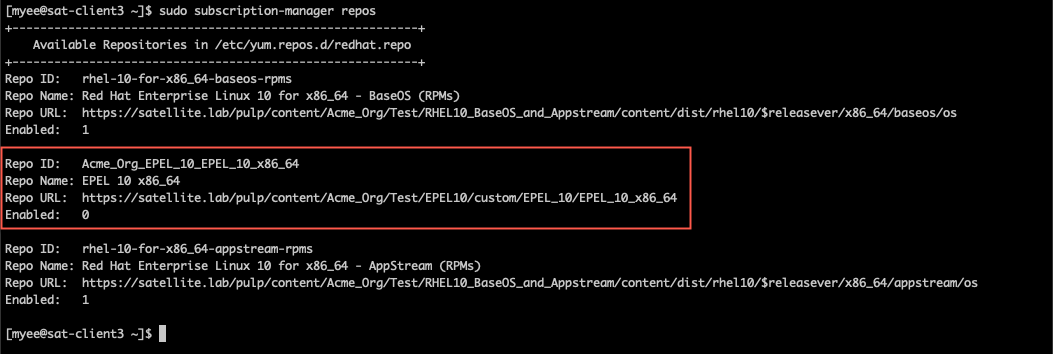
    A command-line terminal window outputting the subscription manager repos command, highlighting a red box that verifies the EPEL 10 repository is available on the system.
    Figure 7: Command-line terminal output verifying repository availability on the Red Hat Enterprise Linux system.

    Management efficiency

    Multi-CV in Red Hat Satellite marks a shift in content management efficiency. By letting you assign hosts directly to multiple content view environments, this feature eliminates the rigid, publication-heavy workflow required by composite content views. This direct approach reduces administrative overhead, simplifies software distribution, and gives your team more flexibility to manage deployments.

    Explore the documentation to see how multi-content views simplify host management in Red Hat Satellite. 

    Recent Posts

    • Efficiently manage host content with Red Hat Satellite's multi-CV

    • New features in Python 3.14

    • Why killing pods is not enough: Testing operator reconciliation with operator-chaos

    • Troubleshoot Red Hat OpenShift Virtualization localnet with the netobserv command

    • EvalHub: Capability and safety benchmarking for AI models

    What’s up next?

    RHEL Windows cheat sheet tile card

    Red Hat Enterprise Linux in Windows Subsystem for Linux cheat sheet

    Louis Imershein
    Red Hat Developers logo LinkedIn YouTube Twitter Facebook

    Platforms

    • Red Hat AI
    • Red Hat Enterprise Linux
    • Red Hat OpenShift
    • Red Hat Ansible Automation Platform
    • See all products

    Build

    • Developer Sandbox
    • Developer tools
    • Interactive tutorials
    • API catalog

    Quicklinks

    • Learning resources
    • E-books
    • Cheat sheets
    • Blog
    • Events
    • Newsletter

    Communicate

    • About us
    • Contact sales
    • Find a partner
    • Report a website issue
    • Site status dashboard
    • Report a security problem

    RED HAT DEVELOPER

    Build here. Go anywhere.

    We serve the builders. The problem solvers who create careers with code.

    Join us if you’re a developer, software engineer, web designer, front-end designer, UX designer, computer scientist, architect, tester, product manager, project manager or team lead.

    Sign me up

    Red Hat legal and privacy links

    • About Red Hat
    • Jobs
    • Events
    • Locations
    • Contact Red Hat
    • Red Hat Blog
    • Inclusion at Red Hat
    • Cool Stuff Store
    • Red Hat Summit
    © 2026 Red Hat

    Red Hat legal and privacy links

    • Privacy statement
    • Terms of use
    • All policies and guidelines
    • Digital accessibility

    Chat Support

    Please log in with your Red Hat account to access chat support.