Serving a large language model (LLM) is a well-worn path by now: tokens in, tokens out, and vLLM has spent years making that fast and efficient. Multimodal inputs already fit that path. For example, a vision-language model encodes an image into embeddings, merges them with the text, and relies on autoregressive text generation underneath.
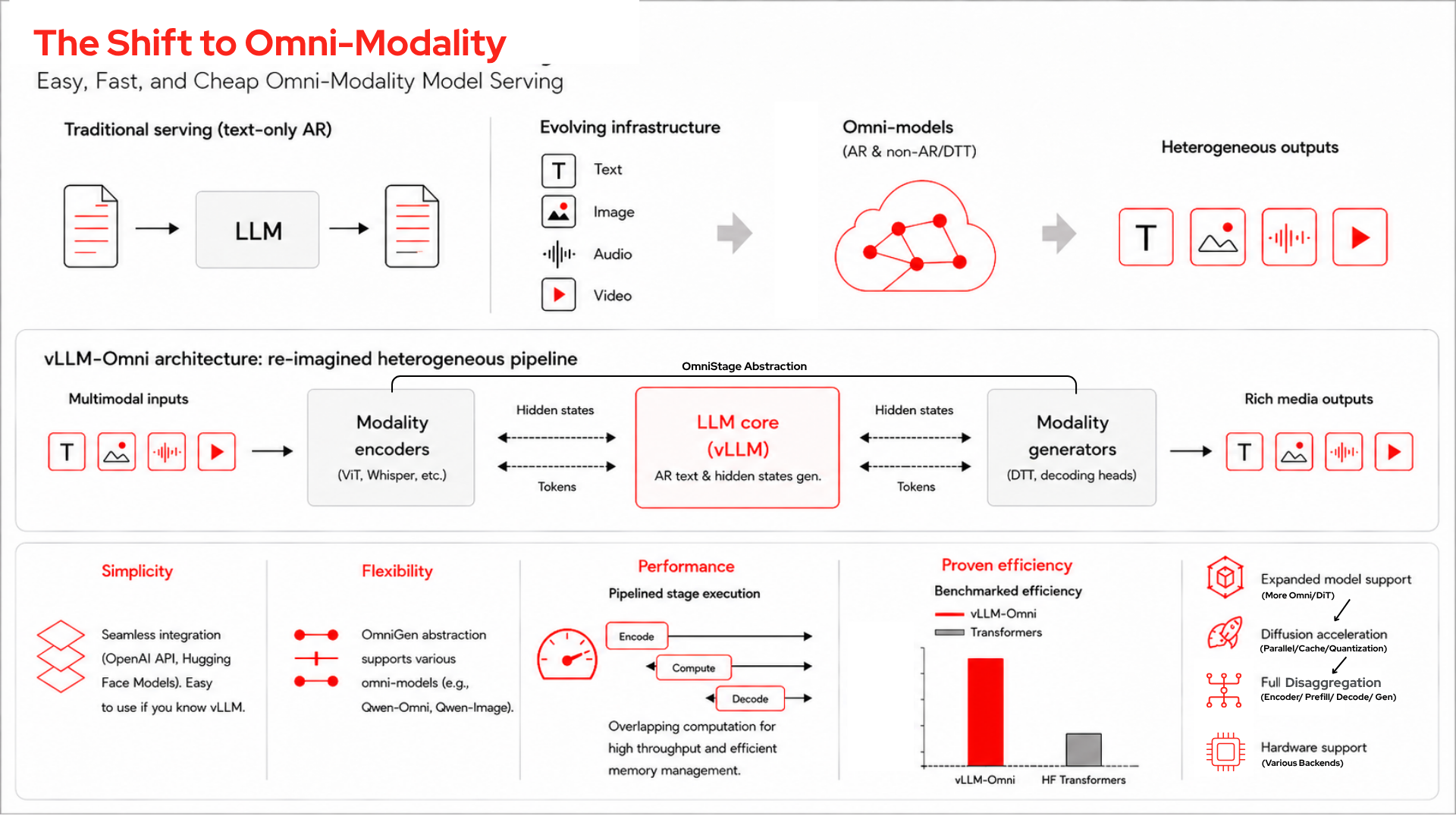
Multimodal outputs introduce a different structure. A model like Qwen3-Omni takes in text, images, audio, and video and can talk back. To do that, it isn't one model at all; it's a pipeline of stages: encoders, an autoregressive language model, and generation stages. Serving it well means serving that whole pipeline, which is a different problem than serving a single decoder, and it's the problem vLLM-Omni exists to solve.
I wanted to see what that actually looks like under load, so I built an insurance claim triage demo on a single hardware accelerator and instrumented it to show the engine working stage by stage. This post walks through the demo, separates what the model does from what the engine does, and then digs into how vLLM-Omni serves the pipeline. We can map out this high-level architecture using Figure 1, layering in the technical components as we go.
The demo
A claims analyst uploads a vehicle damage video and a customer voice statement. Each claim fires two concurrent requests: one for a text-only structured report for the adjuster (visible damage, statement summary, a consistency check, severity, and a recommended action), and one for a short spoken summary for the customer. Qwen3-Omni's speech is generated from its own text reasoning, so different content for the adjuster and the customer means sending two requests rather than one.
The hook is the consistency check. When the audio matches the video, the claim auto-approves. When the same video is paired with a voice statement describing a different incident, the report flags it and routes the claim to review.
That cross-modal reasoning is the Qwen3-Omni model, not vLLM-Omni. The Thinker's audio and vision encoders project into the same embedding space as the text tokens. Everything is concatenated into one sequence, and self-attention runs over all of it. Any token attends to any other token regardless of modality. That shared-sequence attention is why the model notices a spoken "front-end collision" and doesn't match visible rear-end damage. You'd get it from the model on plain Hugging Face Transformers.
vLLM-Omni doesn't change how the model reasons; it changes how efficiently you serve it. The rest of this post is about the serving, and that starts with the stages.
The stage graph
For Qwen3-Omni, the pipeline consists of three autoregressive stages plus encoders, which are mapped out sequentially in Figure 2:
- Thinker (~30 billion MoE): Reasoning and text, with integrated audio and SigLIP2 vision encoders. For a text-only response, it's the only stage that runs.
- Talker (~3 billion MoE): Generates audio codec codes from the Thinker's hidden states. This stage runs only for audio output.
- Code2Wav (causal ConvNet vocoder): Turns codec codes into a waveform.
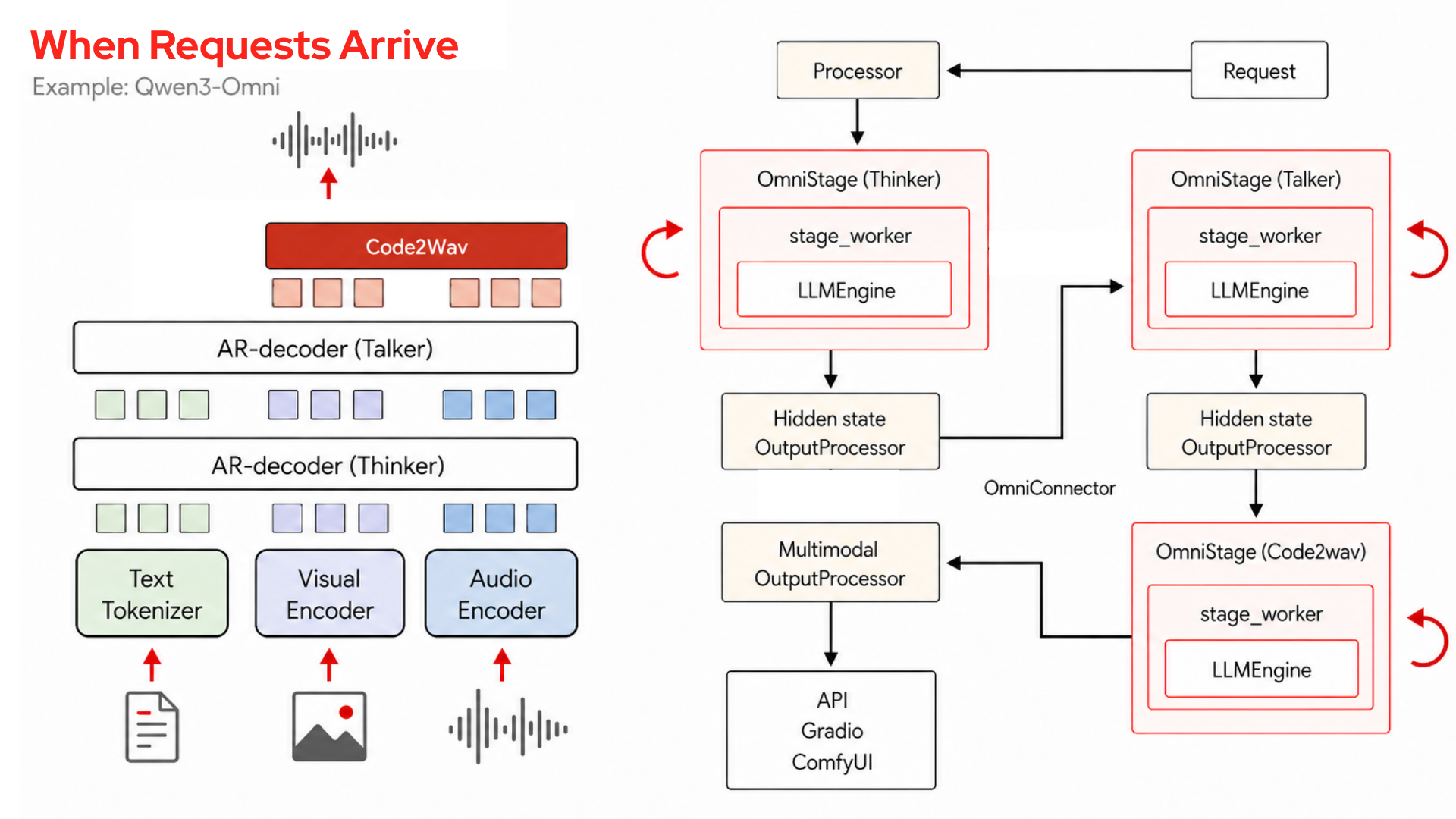
vLLM-Omni decomposes inference into a graph of these stages. The edges are functions that transform and route data between them, and a per-model YAML declares each stage's device, GPU memory fraction, and input source. Recent versions split this configuration into a --deploy-config schema that also captures the communication topology between stages for disaggregated deployments, with the original --stage-configs-path kept for compatibility. A few things follow from that.
One endpoint
vllm serve <model> --omni brings up the whole graph behind a single OpenAI-compatible API. Requests use the same schema vanilla vLLM uses for images, extended to video and audio plus a modalities parameter. The cross-stage orchestration is invisible to the caller.
It inherits vLLM
The autoregressive stages reuse PagedAttention, continuous batching, CUDA graphs, and the scheduler. After tokenization, multimodal placeholder tokens are replaced by encoder embeddings during prefill. The KV cache stores keys and values for all tokens regardless of modality, keeping the scheduler modality-agnostic.
Prefix caching carries over as well: vLLM-Omni reuses vLLM's KV cache prefix caching and adds a separate cache for the hidden-state tensors passed between stages. So, a repeated prefix skips recompute on the autoregressive stages, just as it would for a plain LLM. It's supported on autoregressive stages with a single KV cache group, and you toggle it per stage with --enable-prefix-caching in the stage config (see the vLLM-Omni prefix caching documentation).
Disaggregated resources
Each stage gets its own GPU memory fraction and can be placed and scaled independently. In this demo, the adjuster request is text-only. While its Talker and Code2Wav stages never run, they still initialize and hold memory. The container passes --stage-overrides, reserving 15% of the card for the Talker and 10% for Code2Wav. That per-stage budgeting is the foundation for scaling the bottleneck stage instead of duplicating the whole model.
Shared-memory transport
Stages talk through the OmniConnector, which splits a lightweight control plane from a heavy data plane. The default same-node connector moves payloads through /dev/shm and passes only a small handle through the control plane; RDMA and TCP connectors handle cross-node deployments. The connector only moves data between stages; a separate router handles load balancing, so when you run multiple replicas of a bottleneck stage it spreads requests across them while the other stages are untouched.
Pipeline execution
With async chunking, the stages overlap instead of running strictly in sequence, and audio streams out as the Talker generates each chunk, as illustrated in Figure 3.
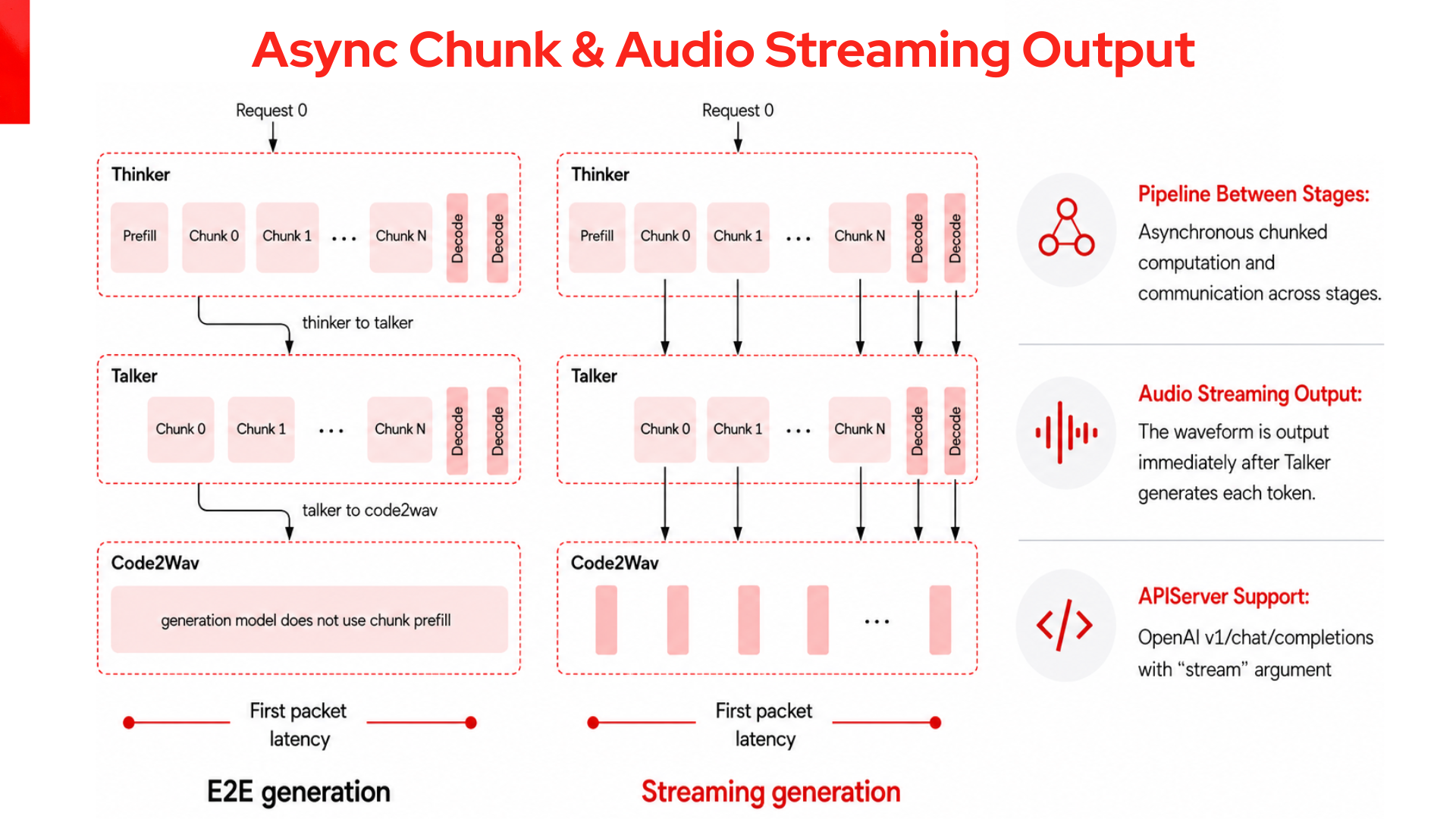
The demo's customer-callback request runs the full Thinker to Talker to Code2Wav path, and a live timeline tracks each stage from real timestamps in the streaming response: the Thinker from request-sent to last text token, the Talker from the first text token (async chunking lets it start before the Thinker finishes) to the first audio byte, Code2Wav from first audio byte to completion. You can watch the Talker start before the Thinker is done and the vocoder start before the Talker is done. This overlap is the key serving advantage for audio output.
Benchmarking performance against Hugging Face Transformers
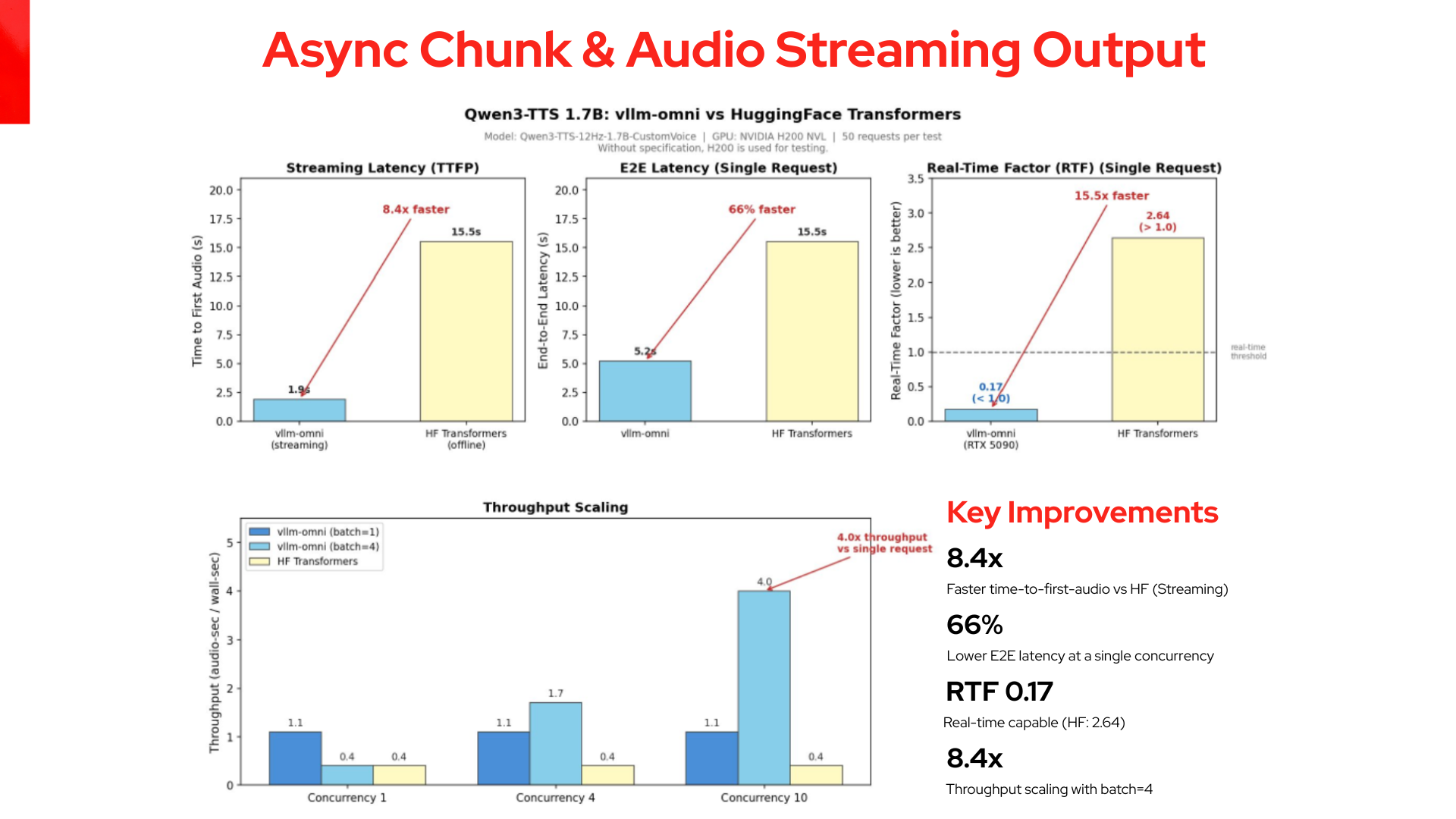
The right baseline for a serving engine is the same model served in a simpler way. The vLLM-Omni team's published Qwen3-TTS benchmarks do exactly that, the same Qwen3-TTS-1.7B model on both sides, which isolates what the dedicated omni engine adds rather than the model.
The comparison uses the exact same model weights and core reasoning, which shows the difference is entirely in serving. As shown in Figure 4, a real-time factor below 1.0 means the audio output is faster than playback, which contrasts with the performance of Hugging Face Transformers (at 2.64).
Not just this model
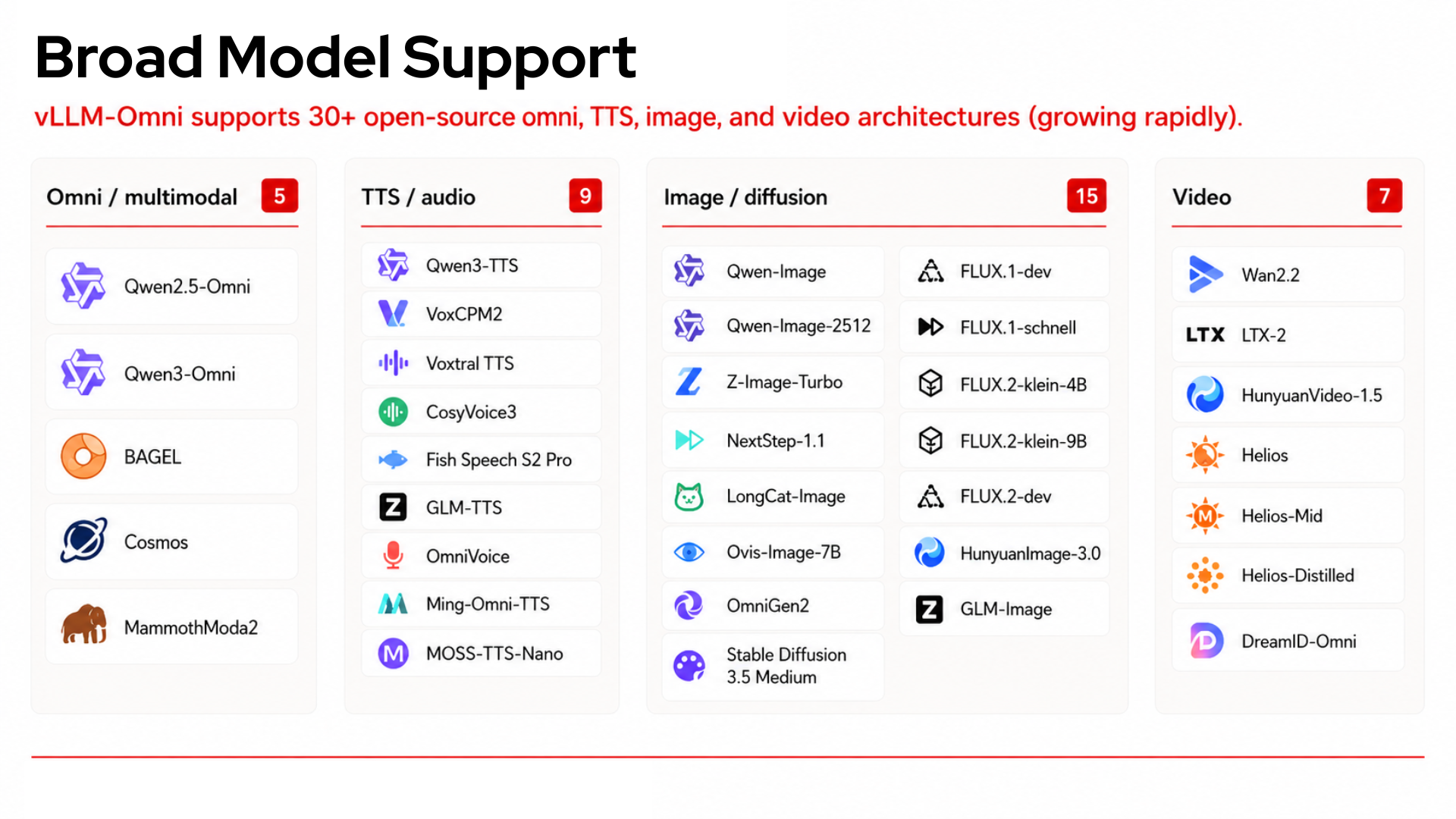
vLLM was built around autoregressive generation: one token at a time, causal mask, KV cache. Diffusion models break all three. A diffusion transformer (Qwen-Image, Flux, Wan, Stable Diffusion 3) refines a full output over fixed denoising steps with full attention and fixed sequence length. vLLM-Omni implements a native diffusion path alongside the autoregressive one, on the same stage and model-runner abstractions, so one engine serves both. Figure 5 highlights how an omni model can mix these components, using an autoregressive stage for understanding and a diffusion stage for generation.
The setup
I was running this on a single B200, which is 192 GB of HBM3e at 8 TB/s on the Blackwell architecture. Qwen3-Omni's weights are only about 60 GB at BF16, so the model fit with plenty of room and capacity was never the constraint. What mattered was bandwidth: decode is memory-bandwidth-bound, and since only about 3 billion of the 30 billion parameters are active per token, the rate you can move weights and KV cache through memory is what sets generation speed. The 8 TB/s is really why I reached for Blackwell, not the spare memory.
Review the following resources if you want to try it out yourself.

