TL;DR: Want to automatically update your documentation following code changes? See it in action with this interactive demo.
Every developer knows the feeling: You merge a pull request changing how a configuration option works, or refactors an API endpoint, and somewhere in a separate repository, the documentation still describes the old behavior. Weeks later, a user or fellow contributor follows those outdated instructions and hits a wall.
The problem isn't that developers don't care about documentation. It's that keeping docs in sync with code is a separate task, often in a separate repository, that's easy to forget when you're focused on shipping features and fixing bugs. For large open source projects with mountains of documentation pages, even knowing which files need updating after a code change can be a challenge.
Code-to-Docs is an open source GitHub Action that addresses this gap. It uses AI to analyze your code changes, identify which documentation files are affected, and generate updated content—all triggered by a simple comment on your pull request.
It can also verify that a pull request delivers what the product manager requested in the Jira ticket and documentation by fetching the ticket and linked specification documents, comparing them against the code changes, and posting a structured gap analysis on the pull request. See it in action with this spec versus code demo.
How Code-to-Docs works
Code-to-Docs integrates into your pull request workflow through three commands, typed as PR comments:
[review-docs]: AI examines your code diff, finds relevant documentation files, and posts a review comment with checkboxes listing each file it thinks needs an update, along with a short explanation of why.[update-docs]: Takes the files you approved in the review (or runs the full pipeline if you skipped the review step) and creates a pull request in your docs repository with the generated updates.[review-feature]PROJ-123: Fetches Jira tickets and their linked specification documents (Confluence pages, Google Docs), compares them against the pull request's code diff, and posts a spec-versus-code showing which requirements are covered, which are missing, and which code changes don't map to any requirement. It also runs the[review-docs]analysis.
Recommended workflow for Code-to-Docs
The two-step approach keeps humans in control while letting AI handle the discovery and drafting: AI suggests (as in Figure 1), and you decide. Nothing gets merged without human approval.
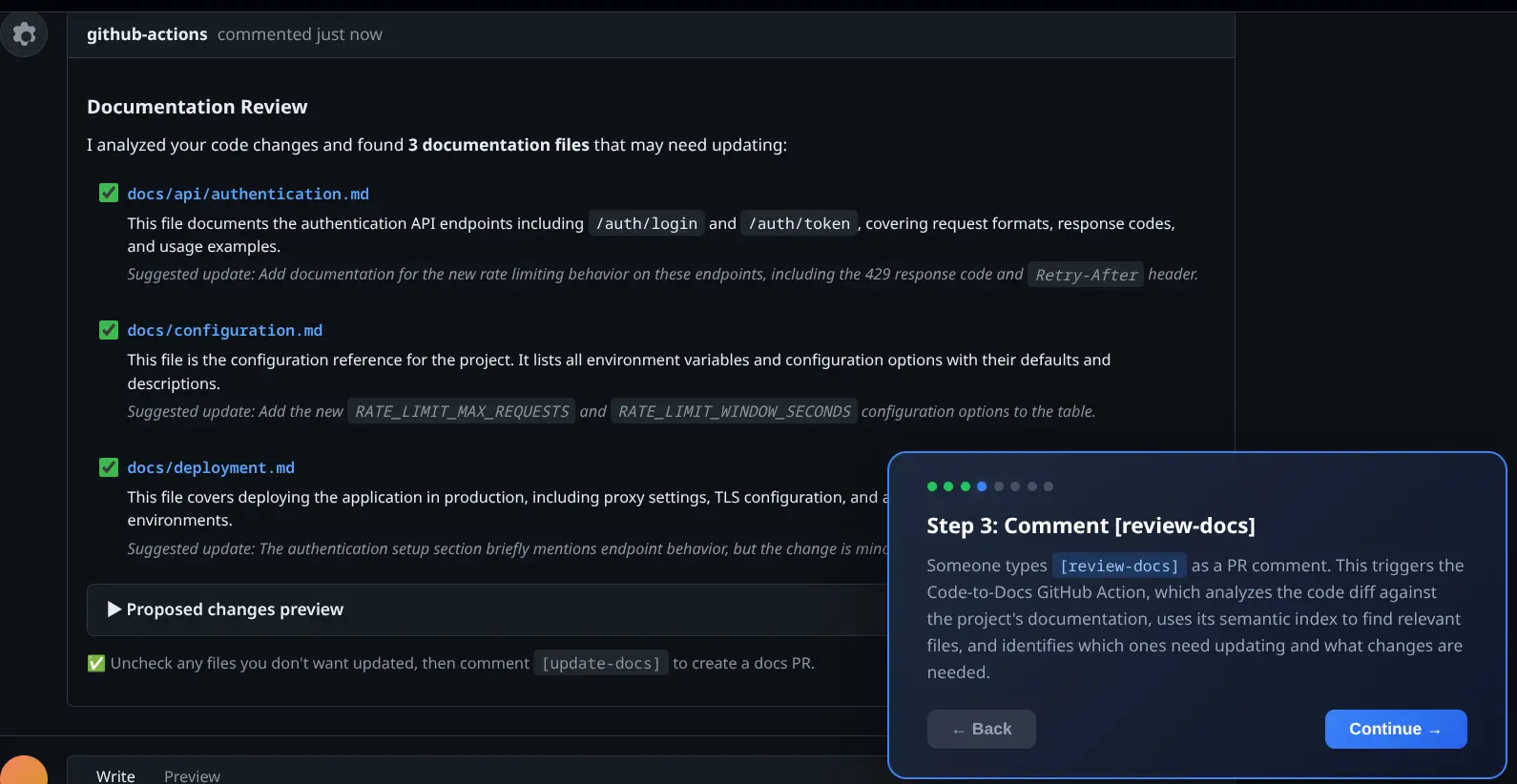
Here's an example scenario:
- A developer opens a pull request (PR) that changes a configuration option.
- A reviewer (or the developer) adds the
[review-docs]comment to the PR. - The GitHub Action analyzes the diff and responds with a list of probable changes: "These 3 doc files reference the config you changed. Here's what I'd update in each one…"
- The reviewer disables the one file that doesn't actually need changes.
- The reviewer adds the
[update-docs]comment to the PR, and a new docs PR appears in the documentation repository with the accepted updates ready for review (see Figure 2).
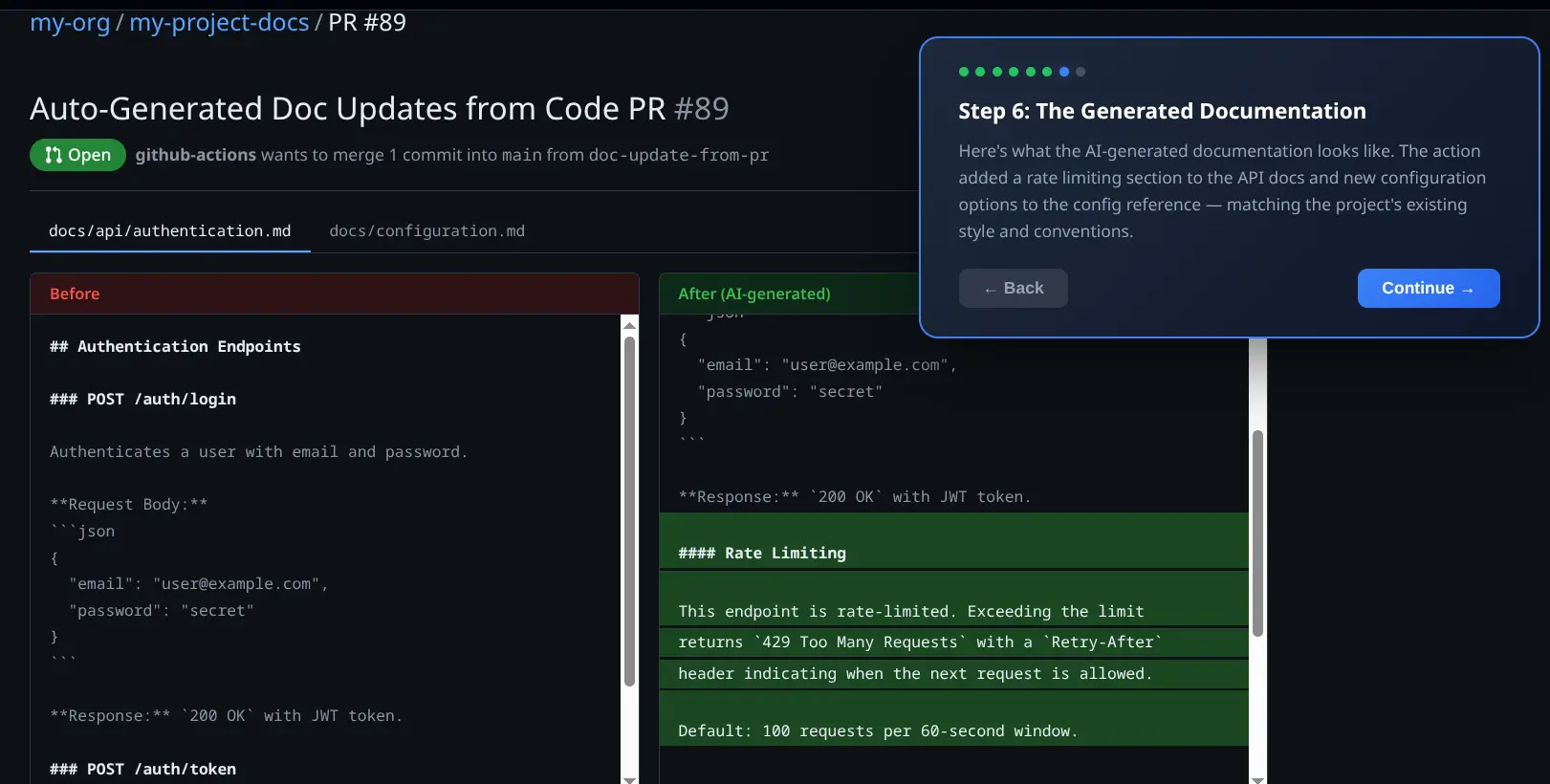
Here's another scenario, using [review-feature]:
- A developer opens a pull request to implement the PROJ-456 Jira ticket.
- A reviewer enters
[review-feature]PROJ-456 as a comment on the pull request. - GitHub Actions fetches the Jira ticket and its linked Google Docs specification, reads the pull request diff, and posts a spec-versus-code analysis (see Figure 3).
- The reviewer can see which requirements the pull request covers, partially implements, or misses.

Guiding the AI with instructions
Sometimes you want more control over what AI generates. With Code-to-Docs, you can add instructions directly in your [update-docs] comment: Global instructions on the first line, and instructions for specific files on the lines that follow (see Figure 4).

This is useful when you know exactly what part of a doc needs attention, or when you want to constrain the AI to small, focused edits rather than broad rewrites.
Setting up Code-to-Docs
Getting started takes two steps: Add a GitHub Actions workflow file, and configure a few repository secrets.
Step 1: Add the workflow file
Create .github/workflows/docs-assistant.yml in your repository, following these setup steps.
The workflow listens for issue_comment events, and triggers when a comment contains [review-docs], [update-docs], or [review-feature]. It checks out the PR's code, extracts the diff, and runs the Code-to-Docs action.
Step 2: Configure repository secrets
In your repository's Settings > Secrets and variables > Actions panel, add the required secrets, following these configuration details.
That's it. The next time someone comments [review-docs], [update-docs], or [review-feature] on a pull request, the GitHub Action kicks in.
How AI identifies and updates documentation files
Code-to-Docs uses any OpenAI-compatible LLM to analyze code changes and generate documentation updates. It works, with no customization necessary, with models deployed on Red Hat OpenShift AI with vLLM, Google Gemini, OpenAI, Ollama, and any other inference server that exposes the OpenAI API format. Here's a closer look at the key components that make this work.
Smart file discovery with semantic indexing
One of the biggest challenges is figuring out which documentation files are affected by a code change. In a project with hundreds of doc files, scanning every one with AI on each run would be slow and expensive. Code-to-Docs solves this with a two-stage semantic indexing system:
- Folder indexes: On the first run, the GitHub Action generates AI-powered summaries of each documentation folder, describing what topics each folder covers. These summaries are cached in a .doc-index directory and committed to your main branch.
- File summaries: For long documentation files, the GitHub Action generates and caches concise summaries so it doesn't need to send the full file content to the AI on every run.
When a new PR triggers the GitHub Action, it first checks the folder-level indexes to narrow down which areas of the documentation are relevant (a single API call instead of scanning hundreds of files). Then it examines only the files in those relevant folders. This cuts runtime from around 20 minutes to about 4 minutes on large documentation sets. Performance improves over time as more summaries are built up, and when a documentation file is updated, its cached summary is regenerated automatically.
The AI is prompted to be conservative in its file selection. It only picks files that directly document code being changed, preferring to return few results over noisy false positives. It works with AsciiDoc, Markdown, and reStructuredText, and supports both separate documentation repositories and docs that live alongside your code in the same repo.
Get started
Code contributors are often domain experts in the code they're changing, but they may not know the documentation structure well enough to find every affected file. Code-to-Docs lowers that barrier by handling doc discovery and drafting automatically. Maintainers get a clear signal when documentation needs attention, and the review-then-update workflow means nothing happens without human approval. The AI is a tool, not a gatekeeper.
Code-to-Docs is open source. Here are the resources to help you get started:
Last updated: April 23, 2026
