We didn't set out to build an "AI-ready" code base. Our mandate was to execute a large-scale, complex UI migration for the Red Hat Hybrid Cloud Console without disrupting production. To ensure we could do that safely, we had to lay down uncompromising architectural boundaries and strict governance to keep our human engineers aligned.
But as we enforced these rules—shifting from shared expertise to machine-readable constraints like custom linting and AGENTS.md—we discovered something fascinating. The same mechanical boundaries that keep human developers from making mistakes happen to create the perfect controlled environment for AI coding assistants.
By optimizing for human maintainability, we significantly increased our AI-assisted productivity. Here is how we engineered that environment.
The starting point
We were nearing the end of a major rewrite of the access management interface for Red Hat® Hybrid Cloud Console. This is where administrators manage roles, groups, permissions, and workspaces across their hybrid cloud environments. Two versions of the application—the original User Access (V1) and its replacement, Access Management (V2)—coexist in the same repository. They share some code base elements while remaining strictly isolated elsewhere.
The migration strategy (a strangler fig pattern replacing the system bottom-up) is a separate story. What matters here isn't the migration itself, but the problem it created: how do you keep a complex, multi-version code base governable when the architecture has rules that aren't obvious from the code alone?
The problem with implicit rules
Every code base has rules that live in people's heads:
- "V2 features that handle roles, groups, or workspaces must use the new permission system, but other V2 features can still use the old one."
- "Only the data layer files are allowed to import the API client packages directly."
- "Every table must use the shared table utility. No custom pagination."
- "Test files can't use arbitrary waits, hardcoded test data, or direct DOM manipulation."
These rules existed because the migration demanded them. Without them, the V1/V2 boundary would erode, the test suite would go flaky, and the shared abstractions would get bypassed. But they lived in Slack conversations and code review comments. They were invisible to any automated tool.
What we built (and why)
We formalized everything into three layers.
Layer 1: Defining machine-readable rules in AGENTS.md
We created a single file at the repository root, AGENTS.md, that encodes every architectural constraint in a format both humans and machines can parse. Not vague principles. Specific, actionable rules:
- Which directories can import from which other directories
- Which shared utilities are required for which components
- Which packages are restricted to which layers
- Which patterns are banned in test files and what to use instead
- Where documentation lives and what each doc covers
It's about 200 lines. Dense, structured and comprehensive. A new team member reads it on Day 1. An AI coding assistant reads it on every prompt.
Layer 2: Enforcing architectural boundaries with custom lint rules
We wrote four custom lint rules (a few hundred lines of code total) that encode the architectural rules that matter most: which directories can import from which, which shared utilities are required for which components, which packages are restricted to which layers.
The important detail: the rules aren't just "don't do X." They encode nuance. One rule knows that certain V2 feature directories must use the new permission system, while other V2 directories are allowed to use the older one. The exception is part of the rule, not a comment someone has to remember.
These rules exist primarily for humans, but they also catch mistakes made by AI.
Layer 3: Providing detailed documentation across 23 files
AGENTS.md says what the rules are. A dedicated documentation directory explains why and provides the patterns to follow:
- How to write behavioral tests (mandatory rules, banned patterns, interaction helpers)
- How to build API clients (typed wrappers, caching strategies, error handling)
- How to handle forms (type-safe submission, validation patterns)
- How to test end-to-end (persona infrastructure, page objects, assertion patterns)
- How the V1/V2 boundary works (which APIs are shared, which are version-specific, why)
Each doc is structured for lookup, not narrative reading. Sections have clear headings. Patterns include code examples. Anti-patterns are explicit.
What happened when AI started reading it
This wasn't our invention. Vercel's research on AGENTS.md compared two approaches to giving AI coding assistants project knowledge: passive context (a file the AI reads automatically on every prompt) versus on-demand lookup (the AI decides when to consult documentation).
Passive context won by a wide margin. A compressed docs index in AGENTS.md achieved a 100% pass rate on framework-specific tasks, while on-demand lookup maxed out at 79%. The key insight: when you remove the decision point (should I look this up?), the AI becomes dramatically more reliable because it never has to guess whether it needs help.
We applied this directly. AI coding assistants (Cursor, in our case) read AGENTS.md automatically. It's part of the context they ingest before generating code.
The effect was immediate and measurable.
| Before the governance layer | After the governance layer |
|---|---|
| Violated architectural boundaries (V1/V2 imports) | Follows boundary rules read from AGENTS.md |
| Hardcoded test data in test files | Uses seed constants from the mandatory rules doc |
| Used wrong permission checks | Uses the correct checks for each directory |
| Every change needed manual correction, sometimes multiple rounds | First-try correctness; lint rules catch the rest |
Not because the AI became smarter, but because the rules were now in its context window. The lint rules act as a safety net for the cases where the AI misses something. But the miss rate dropped dramatically once the rules were explicit and machine-readable.
Measuring the impact on development velocity
In January 2026 (the first full month with the governance layer in place) commit throughput jumped to 53 per month, from a baseline of about 12. One commit touched 840 files. Another removed 216 files of legacy state management. These were not reckless bulk changes. They were structurally verified by the test suite and architecturally constrained by the lint rules.
The AI wasn't doing the thinking. It was doing the typing, inside a constraint system designed to catch every structural violation before it reached a human reviewer.
In practice, this changed what "writing code" means. I stopped typing implementations and started writing specifications: what the component should do, which patterns it must follow, how it should interact with the data layer. AI wrote the code. I reviewed everything—reading the agent's reasoning process in real time, at depth proportional to the risk of the change.
A shared table component that wires our data layer to the UI in an opinionated, reliable way?
I designed every hook and every API surface. The AI implemented it to spec.
A mechanical TypeScript conversion? Lighter review, heavier reliance on the test suite to catch mistakes.
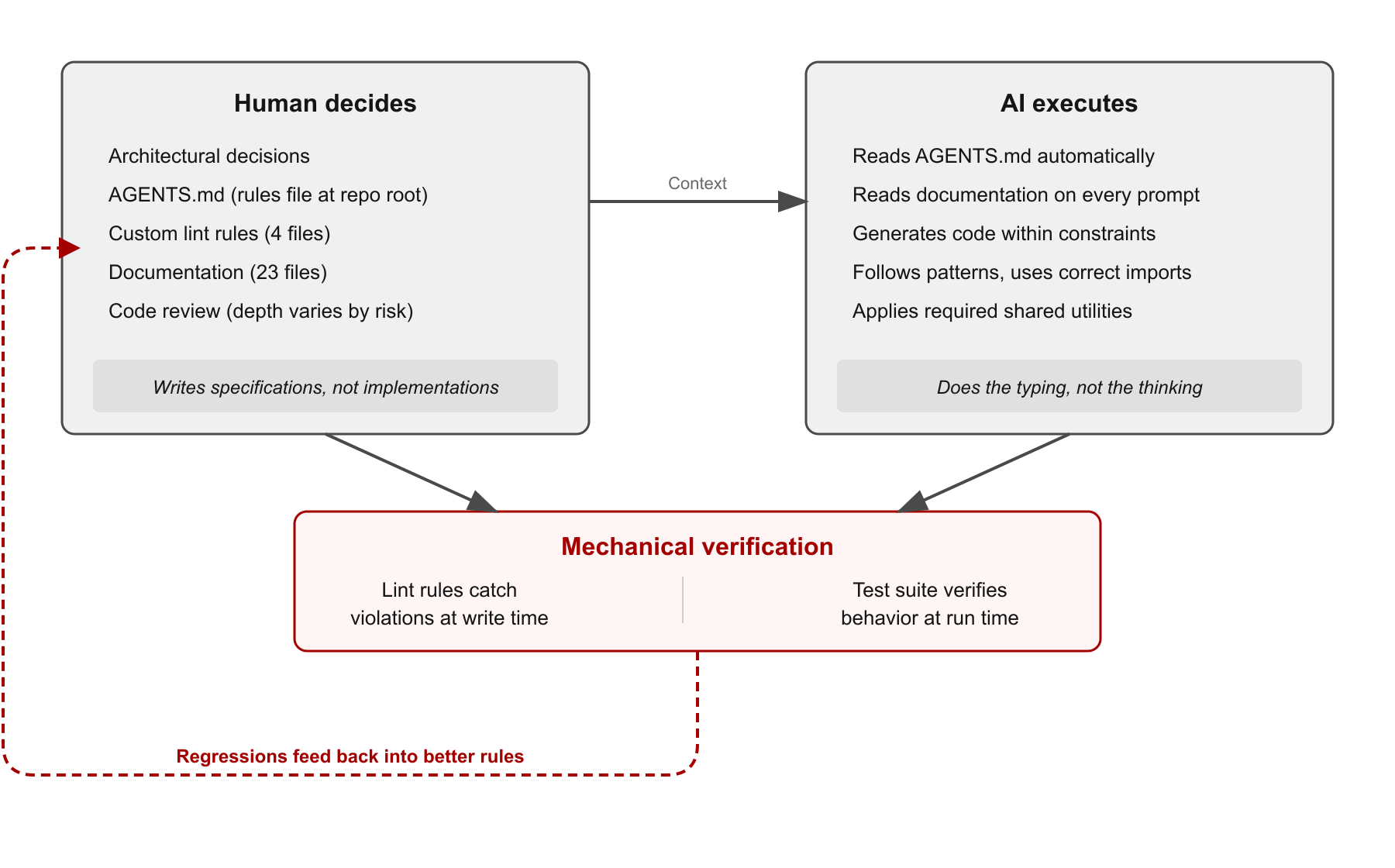
The practical effect: a small team produced output that would typically require a significantly larger one. The nine-month migration touched more than 5,000 files, created more than 1,000 new ones, removed 500 legacy files, and delivered 60,000 lines of test code. That's not a reflection of team size. It's a reflection of what happens when AI operates inside a well-governed code base: the governance eliminates the correction cycles that normally eat throughput and the test suite catches the mistakes that normally eat confidence.
Scaling governance for humans and machines
AIs are extremely capable, but if you let them loose on a loosely defined legacy code base, they will quickly hallucinate technical debt. They need a system of governance.
What we realized is that the governance required to keep AI safe is the exact same governance required to scale a human engineering team:
- Explicit rules over implicit knowledge. If a rule lives in someone's head, AI can't follow it. If it lives in a file at the repository root, AI reads it automatically.
- Mechanical enforcement over review-time enforcement. Lint rules catch violations at write time, whether the author is a human or an AI. Code review catches violations at review time, but only if the reviewer knows the rule and remembers to check.
- Structured documentation over narrative documentation. AI doesn't benefit from a three-paragraph explanation of why you chose a particular library. It benefits enormously from a list of "here's the pattern, here's the import, here are the banned alternatives."
- Boundary rules with encoded exceptions. Lint rules that encode nuance ("don't do X in these directories, because Y; do Z instead") give both humans and AI the context to self-correct. When a rule fires, its error message should explain what to do instead, not just what's wrong.
Applying architectural constraints to AI execution
We're not claiming AI replaces engineering judgment. The architectural decisions (the V1/V2 boundary model, the bottom-up migration sequence, the test-as-specification strategy) are human decisions. They require context, trade-off analysis, and experience.
But the execution of those decisions (writing components that follow the patterns, creating tests that use the right helpers, building API clients that respect the layer boundaries) is where AI operates well, if the constraints are explicit.
The investment wasn't large. AGENTS.md took one day to write. The lint rules are four files, a few hundred lines total. The 23 documentation files were written over the course of the migration to capture decisions as they were made. And yes, much of this was itself AI-assisted. The documentation, the lint rules, the test infrastructure were all written with AI help, guided by human architectural decisions. Then that governance layer made the AI better at writing everything else. It's a feedback loop: human judgment defines the constraints, AI helps formalize them, and then AI operates more reliably within them.
Best practices for starting your governance layer
If you are starting this process, here is what I recommend.
Write down your rules. Not in a wiki. In a file at the repository root that your tools (and your AI) will read automatically. If a rule isn't written down, it doesn't exist for anyone who wasn't in the room when it was decided.
Encode invariants as lint rules. Documentation tells people what to do. Lint rules make them do it. The gap between those two is where architectural drift lives.
Structure docs for lookup, not for reading. AI assistants and engineers have the same need: "what's the pattern for X?" If your docs require reading three pages of context to find the answer, they won't be used by either audience.
Make error messages prescriptive. When a lint rule fires, its message should say what to do instead, not just what's wrong. This helps humans and AI equally.
Let the test suite verify the output. The governance layer constrains what gets written. The test suite verifies that what gets written actually works. Together, they form a closed loop: rules in, code out, tests verify, regressions feed back into better rules.
Start with what matters most, then spread. We started with behavioral testing. The governance docs and lint rules grew from there. Our team is now adopting the same pattern across the other repositories we own. Not the full migration playbook, but the core approach: specify the system, enforce the architecture, make it machine-readable. Not every code base needs the same depth of treatment, but every code base benefits from explicit rules that both humans and AI can follow.
Try Red Hat Hybrid Cloud Console at console.redhat.com.
Learn more
- Red Hat Hybrid Cloud Console
- Inventory Groups are now Workspaces
- AGENTS.md outperforms skills in agent evals (Vercel)
- Read part 2: How we rewrote a production UI without stopping it
Note
This post was written with AI assistance, the same way it describes.

