In the 2.13 release of Red Hat Advanced Cluster Management for Kubernetes, we introduced managed cluster migration as a Dev Preview feature. With the release of Red Hat Advanced Cluster Management for Kubernetes 2.15 and Multicluster Global Hub 1.6.0, this feature is now Generally Available (GA), with improvements in the following scenarios:
- Installation: Install global hub agent in your existing Red Hat Advanced Cluster Management for Kubernetes hub cluster through the global hub
InstallAgentOnLocalflag. - Select managed cluster mechanism: A new mechanism to use the
Placementresource to auto-select your managed clusters. - Recovery mechanism: When pods restart, or the network temporarily reconnects, the migration process automatically resumes.
- Rollout mechanism: If migration of a managed cluster fails, the global hub automatically rolls back and recovers to ensure your managed clusters remain available.
In this article, I focus on a specific example for migrating managed clusters from one Red Hat Advanced Cluster Management for Kubernetes hub to another.
Preparing the migration environment
Install global hub operator in your existing ACM hub cluster and make sure InstallAgentOnLocal is true, we called this hub as source hub, refer multicluster global hub installation. Then, import another ACM hub into the above ACM hub following the label global-hub.open-cluster-management.io/deploy-mode: hosted, refer import the managed hub cluster. We called this hub as target hub.
Migrating managed cluster
- Create a placement to define which clusters get migrated. You must define the
Placementresource in the global hub agent namespace of the source hub cluster. Here's an example:
---
apiVersion: cluster.open-cluster-management.io/v1beta1
kind: Placement
metadata:
  name: production-clusters
  namespace: multicluster-global-hub
spec:
  clusterSets:
    - global
  numberOfClusters: 1
  predicates:
    - requiredClusterSelector:
        labelSelector:
          matchExpressions:
            - key: global-hub.open-cluster-management.io/deploy-mode
              operator: DoesNotExist
            - key: 'name'
              operator: 'NotIn'
              values:
- 'local-cluster'- Create a
managedclustermigrationcustom resource (CR) in the default global hub namespacemulticluster-global-hub. For example:
---
apiVersion: global-hub.open-cluster-management.io/v1alpha1
kind: ManagedClusterMigration
metadata:
  name: migration-placement-sample
spec:
  from: source-hub
  includedManagedClustersPlacementRef: production-clusters
  to: target-hub
Notice the values for spec:
- The
fromfield is the source hub cluster name. - The
tofield is the target hub cluster name. includedManagedClustersPlacementRefis a placement that has the nameproduction-clusters, defining which managed clusters get migrated.
For migrating your specific managed clusters by name, refer to the official documentation.
Viewing the status during migration
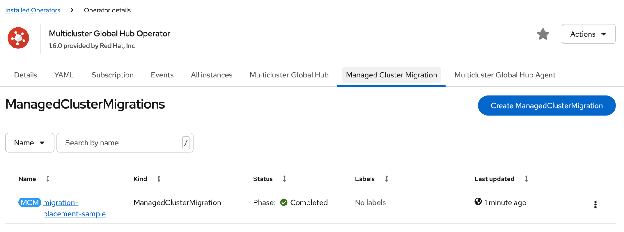
After creating this file, you can use the Red Hat Openshift console to view the migration process, as in Figure 1.
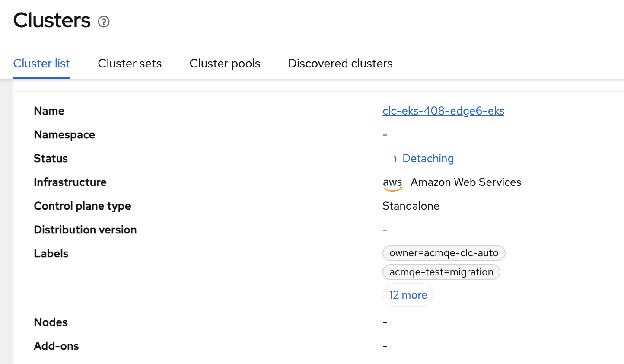
You can use the Red Hat Advanced Cluster Management for Kubernetes console to view the details of managed clusters on the source hub, as in Figure 2.
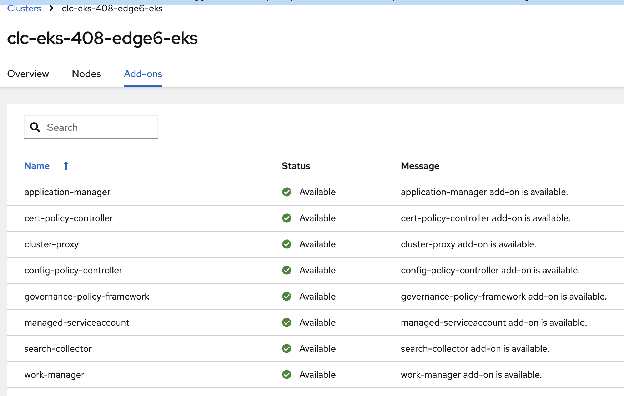
You can also use the Red Hat Advanced Cluster Management for Kubernetes console to view the details of the managed clusters in the target hub, as in Figure 3.
Conclusion
There are additional features of migration managed clusters in this release that are not covered in this article, but can be found in our official documentation.
The Multicluster Global Hub operator in Red Hat Advanced Cluster Management for Kubernetes 2.15 makes it easy for you to get started with migrating your managed clusters. We're still planning further improvements, so if you try it out and have suggestions, or find any issues, we welcome your feedback. Help us make this more useful for everyone!

